
报表生成poi----java操作java对象生成execl表单
1.Apache POI简介
Apache POI是Apache软件基金会的开放源码函式库,POI提供API给Java程式对Microsoft Office格式档案读和写的功能。 .NET的开发人员则可以利用NPOI (POI for .NET) 来存取 POI 的功能。
2.POI结构
HSSF - 提供读写Microsoft Excel XLS格式档案的功能。
XSSF - 提供读写Microsoft Excel OOXML XLSX格式档案的功能。
HWPF - 提供读写Microsoft Word DOC格式档案的功能。
HSLF - 提供读写Microsoft PowerPoint格式档案的功能。
HDGF - 提供读Microsoft Visio格式档案的功能。
HPBF - 提供读Microsoft Publisher格式档案的功能。
HSMF - 提供读Microsoft Outlook格式档案的功能。
3.生成execl的代码
 package com.bjsxt.sxf.test;

 import java.io.File;

 import java.io.FileNotFoundException;

 import java.io.FileOutputStream;

 import java.io.IOException;

 import java.io.OutputStream;

 import java.util.Date;

 import org.apache.poi.hssf.usermodel.HSSFSheet;

 import org.apache.poi.hssf.usermodel.HSSFWorkbook;

 import org.apache.poi.hssf.util.CellRangeAddress;

 import org.apache.poi.hssf.util.HSSFColor;

 import org.apache.poi.ss.usermodel.Cell;

 import org.apache.poi.ss.usermodel.CellStyle;

 import org.apache.poi.ss.usermodel.CreationHelper;

 import org.apache.poi.ss.usermodel.Font;

 import org.apache.poi.ss.usermodel.IndexedColors;

 import org.apache.poi.ss.usermodel.Row;

 import org.apache.poi.ss.usermodel.Workbook;

 /**

  * 操作java代码生成execl表格

 * @ClassName: JavaToExcel

 * @Description: TODO(这里用一句话描述这个类的作用)

 * @author 尚晓飞

 * @date 2014-10-9 上午10:21:54

 *

  */

 public class JavaToExcel {

     public static void main(String[] args) throws IOException {

         //创建Workbook对象(这一个对象代表着对应的一个Excel文件)

         //HSSFWorkbook表示以xls为后缀名的文件

         HSSFWorkbook wb=new HSSFWorkbook();

         //获得CreationHelper对象,这个应该是一个帮助类

         CreationHelper helper = wb.getCreationHelper();

         //创建Sheet并给名字(表示Excel的一个Sheet)

         HSSFSheet sheet1 = wb.createSheet("student01");

         //Row表示一行Cell表示一列

         Row row = null;

         Cell cell = null;

         for(int i=0;i<60;i++){

             //获得这个sheet的第i行  (行是从0开始的,0是第一行)

             row = sheet1.createRow(i);

             //设置行长度自动

             //row.setHeight((short)500);

             row.setHeightInPoints(20);

             //row.setZeroHeight(true);

             for(int j=0;j<25;j++){

                 //设置每个sheet每一列的宽度,自动,根据内容的最大长度确定。

                 sheet1.autoSizeColumn(j, true);

                 //创建一个基本的样式

                CellStyle cellStyle =  JavaToExcel.createStyleCell(wb);

                 //获得这一行的每j列

                 cell = row.createCell(j);

                 if(j==0){

                     //设置文字在单元格里面的位置

                     cellStyle = JavaToExcel.setCellStyleAlignment(cellStyle, CellStyle.ALIGN_LEFT, CellStyle.VERTICAL_BOTTOM);

                     //先创建字体样式,并把这个样式加到单元格的字体里面

                     cellStyle.setFont(createFonts(wb));

                     //把这个样式加到单元格里面

                     cell.setCellStyle(cellStyle);

                     //给单元格设值

                    if(i%2==0){

                        cell.setCellValue("尚晓飞是个大坏蛋dsafdsagfdsgserthgfdhytjfdsadfdsagrea");

                    }else{

                        cell.setCellValue("尚晓飞是个大坏蛋");

                    }

                 }else if(j==1){

                     //设置文字在单元格里面的位置

                     cellStyle = JavaToExcel.setCellStyleAlignment(cellStyle, CellStyle.ALIGN_CENTER, CellStyle.VERTICAL_CENTER);

                     //设置这个样式的格式(Format)

                     cellStyle = JavaToExcel.setCellFormat(helper,cellStyle, "#,##0.0000");

                     //先创建字体样式,并把这个样式加到单元格的字体里面

                     cellStyle.setFont(createFonts(wb));

                     //把这个样式加到单元格里面

                     cell.setCellStyle(cellStyle);

                     //给单元格设值

                     cell.setCellValue(new Date());

                 }else if(j==2){

                     cellStyle = JavaToExcel.setCellStyleAlignment(cellStyle, CellStyle.ALIGN_CENTER, CellStyle.VERTICAL_CENTER);

                     cellStyle.setFont(createFonts(wb));

                     cell.setCellStyle(cellStyle);

                     cell.setCellValue(helper.createRichTextString("RichString"+i+j));

                 }else if(j==3){

                     cellStyle = JavaToExcel.setCellStyleAlignment(cellStyle, CellStyle.ALIGN_CENTER, CellStyle.VERTICAL_CENTER);

                     cellStyle = JavaToExcel.setCellFormat(helper,cellStyle, "MM-yyyy-dd");

                     cell.setCellStyle(cellStyle);

                     cell.setCellValue(new Date());

                 }else if(j==24){

                     cellStyle = JavaToExcel.setCellStyleAlignment(cellStyle, CellStyle.ALIGN_CENTER, CellStyle.VERTICAL_CENTER);

                     cellStyle.setFont(createFonts(wb));

                     //设置公式

                     cell.setCellFormula("SUM(E"+(i+1)+":X"+(i+1)+")");

                 }else{

                     cellStyle = JavaToExcel.setCellStyleAlignment(cellStyle, CellStyle.ALIGN_CENTER, CellStyle.VERTICAL_CENTER);

                     cellStyle = JavaToExcel.setFillBackgroundColors(cellStyle,IndexedColors.ORANGE.getIndex(),IndexedColors.ORANGE.getIndex(),CellStyle.SOLID_FOREGROUND);

                     cell.setCellStyle(cellStyle);

                     cell.setCellValue("");

                 }

             }

         }

       //合并单元格

         //参数含义:new CellRangeAddress(a, b, c,d)

         //a和c:第几行  b和d是第几列   行和列的下标从0开始   0表示第一行或第一列

         /**

          * 重点注意事项:

           1.单元格CELL和ROW对象下标都是从0开始的。

           2.单元格合并时new CellRangeAddress(a, b, c,d)a的值的行号必须要比c的行号小,如果大于c就不能正常合并单元格

           3.合并单元格的时候要合并的单单元格必须先创建,这样方便后面再次获取这个单元格来填充数据,主要就是因为合并时不能由后向前进行合并引起的。

          */

         sheet1.addMergedRegion(new CellRangeAddress(0, 0, 0,24));

         Cell cell2=sheet1.getRow(0).getCell(0);

         cell2.setCellValue("将java中的对象转换成execl表格并保存的表内容");

         //输出

         OutputStream os;

         try {

             os = new FileOutputStream(new File("c://JavaToExcel.xls"));

               wb.write(os);

               os.close();

         } catch (FileNotFoundException e) {

             // TODO Auto-generated catch block

             e.printStackTrace();

         }

     }

     /**

      * 边框

      * @param wb

      * @return

      */

     public static CellStyle createStyleCell(Workbook wb){

         CellStyle cellStyle = wb.createCellStyle();

         //设置一个单元格边框样式

         cellStyle.setBorderBottom(CellStyle.BORDER_THIN);

         cellStyle.setBorderTop(CellStyle.BORDER_THIN);

         cellStyle.setBorderLeft(CellStyle.BORDER_THIN);

         cellStyle.setBorderRight(CellStyle.BORDER_THIN);

         /**

          *

              CellStyle.BORDER_DOUBLE      双边线

              CellStyle.BORDER_THIN        细边线

              CellStyle.BORDER_MEDIUM      中等边线

              CellStyle.BORDER_DASHED      虚线边线

              CellStyle.BORDER_HAIR        小圆点虚线边线

              CellStyle.BORDER_THICK       粗边线

          */

         //设置一个单元格边框颜色

         cellStyle.setRightBorderColor(IndexedColors.BLACK.getIndex());

         cellStyle.setLeftBorderColor(IndexedColors.BLACK.getIndex());

         cellStyle.setBottomBorderColor(IndexedColors.BLACK.getIndex());

         cellStyle.setTopBorderColor(IndexedColors.BLACK.getIndex());

         return cellStyle;

     }

     /**

      * 设置文字在单元格里面的位置

      * CellStyle.ALIGN_CENTER

      * CellStyle.VERTICAL_CENTER

      * @param cellStyle

      * @param halign

      * @param valign

      * @return

      */

     public static CellStyle setCellStyleAlignment(CellStyle cellStyle,short halign,short valign){

         //设置上下

         cellStyle.setAlignment(CellStyle.ALIGN_LEFT);

         //设置左右

         cellStyle.setVerticalAlignment(CellStyle.VERTICAL_BOTTOM);

         return cellStyle;

     }

     /**

      * 格式化单元格

      * 如#,##0.00,m/d/yy去HSSFDataFormat或XSSFDataFormat里面找

      * @param cellStyle

      * @param fmt

      * @return

      */

     public static CellStyle setCellFormat(CreationHelper helper,CellStyle cellStyle,String fmt){

         //还可以用其它方法创建format

         cellStyle.setDataFormat(helper.createDataFormat().getFormat(fmt));

         return cellStyle;

     }

     /**

      * 前景和背景填充的着色

      * @param cellStyle

      * @param bg IndexedColors.ORANGE.getIndex();

      * @param fg IndexedColors.ORANGE.getIndex();

      * @param fp CellStyle.SOLID_FOREGROUND

      * @return

      */

     public static CellStyle setFillBackgroundColors(CellStyle cellStyle,short bg,short fg,short fp){

         //cellStyle.setFillBackgroundColor(bg);

         cellStyle.setFillForegroundColor(fg);

         cellStyle.setFillPattern(fp);

         return cellStyle;

     }

     /**

      * 设置字体

      * @param wb

      * @return

      */

     public static Font createFonts(Workbook wb){

         //创建Font对象

         Font font = wb.createFont();

         //设置字体

         font.setFontName("黑体");

         //着色

         font.setColor(HSSFColor.BLUE.index);

         //斜体

         font.setItalic(true);

         //字体大小

         font.setFontHeight((short)300);

         return font;

     }

 }
示例:生成报表【此示例生成学生信息表(应用到阿帕奇的poi和struts2下载)】
一:struts.xml关于生成报表的下载配置
 <?xml version="1.0" encoding="UTF-8" ?>

 <!DOCTYPE struts PUBLIC

     "-//Apache Software Foundation//DTD Struts Configuration 2.3//EN"

     "http://struts.apache.org/dtds/struts-2.3.dtd">

 <struts>

     <!-- 如果请求地址=actionName!methodName ,则该配置需要进行设置,否则访问地址错误-->

     <constant name="struts.enable.DynamicMethodInvocation" value="true" />

     <!-- 开发模式 -->

     <constant name="struts.devMode" value="true" />

     <!-- 编码格式过滤 -->

     <constant name="struts.i18n.encoding" value="utf-8"></constant>

    <!-- 告诉struts.xml不要自己通过反射new,对象,去spring的ioc容器中找

             action中的class='spring中Ioc容器中对象的id'

             annotation注解生成对象默认情况下id值为是:类名首字符小写

             需要加jar包struts-spring-plugin..jar

          -->

     <constant name="struts.objectFactory" value="spring"></constant>

     <package name="default" namespace="/" extends="struts-default">

         <!-- actionName!methodName请求方式的配置 -->

         <action name="StudentAction" class="StudentAction">

             <result name="success">/page/success.jsp</result>

             <!-- 生成报表的下载返回 -->

             <result name="inputStu" type="stream">

                     <param name="contentType">application/vnd.ms-excel;charset=UTF-8</param>

                     <!-- 下载页文件名的显示,action中的属性 -->

                     <param name="contentDisposition">attachment;fileName="${fileName}"</param>

                     <!-- action中输入流属性的名字 -->

                     <param name="inputName">stuReport</param>

                     <!-- 读取字节数的大小1kb -->

                     <param name="bufferSize">1024</param>

             </result>

         </action>

         <action name="PowerAction" class="PowerAction">

             <result name="success">/page/success.jsp</result>

         </action>

     </package>

 </struts>
二:生成报表的action类,以及方法和下载时应该设置的属性。与struts.xml配置相对应
 package com.bjsxt.sxf.action;

 import java.io.File;

 import java.io.FileInputStream;

 import java.io.FileNotFoundException;

 import java.io.InputStream;

 import java.io.UnsupportedEncodingException;

 import org.apache.struts2.ServletActionContext;

 import com.bjsxt.sxf.po.Student;

 import com.bjsxt.sxf.service.ClassRoomService;

 import com.bjsxt.sxf.service.StudentService;

 public class StudentAction {

     private StudentService studentService;

     private ClassRoomService classRoomService;

     //struts2下载两个属性

     private String fileName; //生成的execl的文件名

     private InputStream stuReport;//将项目根目录下生成的execl文件读入的客户端内存中的输入流

     //此get方法是为了

     /**

      *     ISO8859-1是页面上数据传输的格式,

         new String(fileName.getBytes("utf-8"),"iso8859-1");

         utf-8是你java项目格式(根据实际项目变更),目的是为了将中文文件名正确显示在页面上

      */

     public String getFileName() {

         try {

             fileName=new String(this.fileName.getBytes("utf-8"),"ISO8859-1");

         } catch (UnsupportedEncodingException e) {

             // TODO Auto-generated catch block

             e.printStackTrace();

         }

         return fileName;

     }

     public void setFileName(String fileName) {

         this.fileName = fileName;

     }

     public InputStream getStuReport() {

         return stuReport;

     }

     public void setStuReport(InputStream stuReport) {

         this.stuReport = stuReport;

     }

     /**当前台请求触发该方法,则先生成execl表格,存放在项目根目录指定的文件下。然后利用struts2的下载将该execl下载到请求客户端的电脑上

      * 生成学生信息execl表格,并下载

     * @Title: reportStudent

     * @Description: TODO(这里用一句话描述这个方法的作用)

     * @return

     * @return String    返回类型

     * @author 尚晓飞

     * @date 2014-10-9 上午11:07:08

      */

     public String reportStudent(){

         try {

             fileName=studentService.stuList2Excel();

             String path=ServletActionContext.getServletContext().getRealPath("master")+File.separator+"report"+File.separator+fileName;

             stuReport=new FileInputStream(path);

         } catch (FileNotFoundException e) {

             // TODO Auto-generated catch block

             e.printStackTrace();

         }

         return "inputStu";

     }

     public String findById(){

         studentService.findById(1);

         return null;

     }

     public String findByIdClassRoom(){

         classRoomService.findById(1);

         return null;

     }

     public ClassRoomService getClassRoomService() {

         return classRoomService;

     }

     public void setClassRoomService(ClassRoomService classRoomService) {

         this.classRoomService = classRoomService;

     }

     public StudentService getStudentService() {

         return studentService;

     }

     public void setStudentService(StudentService studentService) {

         this.studentService = studentService;

     }

 }
三:生成execl表格的业务类,并将execl存入项目根目录指定文件下(省去dao层与数据库交互的方法)
 package com.bjsxt.sxf.service.impl;

 import java.io.File;

 import java.io.FileNotFoundException;

 import java.io.FileOutputStream;

 import java.io.IOException;

 import java.io.OutputStream;

 import java.text.DateFormat;

 import java.text.SimpleDateFormat;

 import java.util.Date;

 import java.util.List;

 import org.apache.poi.hssf.usermodel.HSSFCellStyle;

 import org.apache.poi.hssf.usermodel.HSSFSheet;

 import org.apache.poi.hssf.usermodel.HSSFWorkbook;

 import org.apache.poi.hssf.util.CellRangeAddress;

 import org.apache.poi.hssf.util.HSSFColor;

 import org.apache.poi.ss.usermodel.Cell;

 import org.apache.poi.ss.usermodel.CellStyle;

 import org.apache.poi.ss.usermodel.CreationHelper;

 import org.apache.poi.ss.usermodel.Font;

 import org.apache.poi.ss.usermodel.IndexedColors;

 import org.apache.poi.ss.usermodel.Row;

 import org.apache.struts2.ServletActionContext;

 import org.hibernate.dialect.IngresDialect;

 import com.bjsxt.sxf.dao.StudentDao;

 import com.bjsxt.sxf.po.ClassRoom;

 import com.bjsxt.sxf.po.Student;

 import com.bjsxt.sxf.service.StudentService;

 /**

  * 学生的业务类

 * @ClassName: StudentServiceImpl

 * @Description: TODO(这里用一句话描述这个类的作用)

 * @author 尚晓飞

 * @date 2014-10-9 下午5:24:04

 *

  */

 public class StudentServiceImpl implements StudentService{

     private StudentDao studentDao;

     /**

      * 添加一个学生

     * @Title: addStudent

     * @Description: TODO(这里用一句话描述这个方法的作用)

     * @author 尚晓飞

     * @date 2014-10-9 下午5:24:29

     * @param student

     * @see com.bjsxt.sxf.service.StudentService#addStudent(com.bjsxt.sxf.po.Student)

      */

     @Override

     public void addStudent(Student student) {

         // TODO Auto-generated method stub

         studentDao.add(student);

     }

     /**

      * 查询出指定id的学生

     * @Title: findById

     * @Description: TODO(这里用一句话描述这个方法的作用)

     * @author 尚晓飞

     * @date 2014-10-9 下午5:24:42

     * @param id

     * @return

     * @see com.bjsxt.sxf.service.StudentService#findById(java.lang.Integer)

      */

     @Override

     public Student findById(Integer id) {

         Student student=studentDao.find(id);

         ClassRoom cls=student.getClassRoom();

         System.out.println("StudentServiceImpl.findById()"+cls.getName());

         return student;

     }

     /**

      * 将学生信息生成excel表格,并写入项目根目录下

     * @Title: stuList2Excel

     * @Description: TODO(这里用一句话描述这个方法的作用)

     * @author 尚晓飞

     * @date 2014-10-9 上午11:28:57

     * @return

     * @see com.bjsxt.sxf.service.StudentService#stuList2Excel()

      */

     @Override

     public String stuList2Excel() {

         // TODO Auto-generated method stub

         //查询出所有学生的信息【要生成execl的java对象】

         List<Student> students=studentDao.queryAll();

         //标题行

         Date date=new Date();

         DateFormat format=new SimpleDateFormat("yyyy-MM-dd");

         String tilte=format.format(date)+"学生信息表";

         //列名行

         String[] valueT={"学生id","学生姓名","学生性别","所在班级名称"};

         //第一步:创建excel文件

         //HSSFWorkbook表示以xls为后缀名的文件

         HSSFWorkbook wb=new HSSFWorkbook();

         //获得CreationHelper对象,这个应该是一个帮助类

         CreationHelper helper = wb.getCreationHelper();

         //创建Sheet并给名字(表示Excel的一个Sheet)

         HSSFSheet sheet1 = wb.createSheet("学生信息表");

         HSSFCellStyle cellStyle = wb.createCellStyle();

         //设置单元格边框

         //设置一个单元格边框样式

         cellStyle.setBorderBottom(CellStyle.BORDER_THICK);

         cellStyle.setBorderTop(CellStyle.BORDER_THICK);

         cellStyle.setBorderLeft(CellStyle.BORDER_THICK);

         cellStyle.setBorderRight(CellStyle.BORDER_THICK);

         //设置一个单元格边框的颜色

         cellStyle.setRightBorderColor(IndexedColors.GREEN.getIndex());

         cellStyle.setLeftBorderColor(IndexedColors.GREEN.getIndex());

         cellStyle.setBottomBorderColor(IndexedColors.GREEN.getIndex());

         cellStyle.setTopBorderColor(IndexedColors.GREEN.getIndex());

         //设置单元格内容显示的位置

         //上下

         cellStyle.setAlignment(CellStyle.ALIGN_CENTER);

         //设置左右

         cellStyle.setVerticalAlignment(CellStyle.VERTICAL_BOTTOM);

         //设置字体

         Font font=wb.createFont();

         font.setFontName("黑体");

         font.setColor(HSSFColor.RED.index);

         font.setFontHeight((short)500);

         cellStyle.setFont(font);

         //第二步:创建标题行(先创建单元格,再合并单元格)

         Row titleRow=sheet1.createRow(0);

         for(int i=0;i<valueT.length;i++){

             Cell cell=titleRow.createCell(i);

             cell.setCellStyle(cellStyle);

         }

         //合并单元格

         sheet1.addMergedRegion(new CellRangeAddress(0, 0, 0,valueT.length-1));

         Cell cellTitle=titleRow.getCell(0);

         //标题行完成

         cellTitle.setCellValue(tilte);

         cellTitle.setCellStyle(cellStyle);

         //设置列的宽度为内容的最大长度【设置列的显示宽度,防止不遮盖内容】

         sheet1.autoSizeColumn(0, true);

         //第三步:创建列名行

         Row rowT=sheet1.createRow(1);

         for(int i=0;i<valueT.length;i++){

             sheet1.autoSizeColumn(i, true);

             Cell cellT=rowT.createCell(i);

             cellT.setCellValue(valueT[i]);

             cellT.setCellStyle(cellStyle);

         }

         //第四步创建内容行

         for(int a=0;a<students.size();a++){

             Row row=sheet1.createRow(a+2);

             Student student=students.get(a);

             //id

             sheet1.autoSizeColumn(0, true);

             Cell cellId=row.createCell(0);

             cellId.setCellValue(student.getId());

             cellId.setCellStyle(cellStyle);

             //姓名

             sheet1.autoSizeColumn(1, true);

             Cell cellName=row.createCell(1);

             cellName.setCellValue(student.getName());

             cellName.setCellStyle(cellStyle);

             //性别

             sheet1.autoSizeColumn(2, true);

             Cell cellSex=row.createCell(2);

             cellSex.setCellValue(student.getSex());

             cellSex.setCellStyle(cellStyle);

             //班级名称

             sheet1.autoSizeColumn(3, true);

             Cell cellClassName=row.createCell(3);

             cellClassName.setCellValue(student.getClassRoom().getName());

             cellClassName.setCellStyle(cellStyle);

         }

         //输出保存的文件名

         DateFormat format2=new SimpleDateFormat("yyyyMMddHHmmss");

         String fileName=format2.format(date)+"学生信息表.xls";

         //创建一个存放学生信息表的文件在项目根目录下

         File file=new File(ServletActionContext.getServletContext().getRealPath("master")+File.separator+"report");

         if(!file.exists()){

             file.mkdir();

         }

         //输出

         OutputStream os;

         try {

                //输出到项目根目录下

                os = new FileOutputStream(file+File.separator+fileName);

                wb.write(os);

                os.close();

         } catch (IOException e) {

                      // TODO Auto-generated catch block

                      e.printStackTrace();

         }

         return fileName;

     }

     public StudentDao getStudentDao() {

         return studentDao;

     }

     public void setStudentDao(StudentDao studentDao) {

         this.studentDao = studentDao;

     }

 }
四:效果图
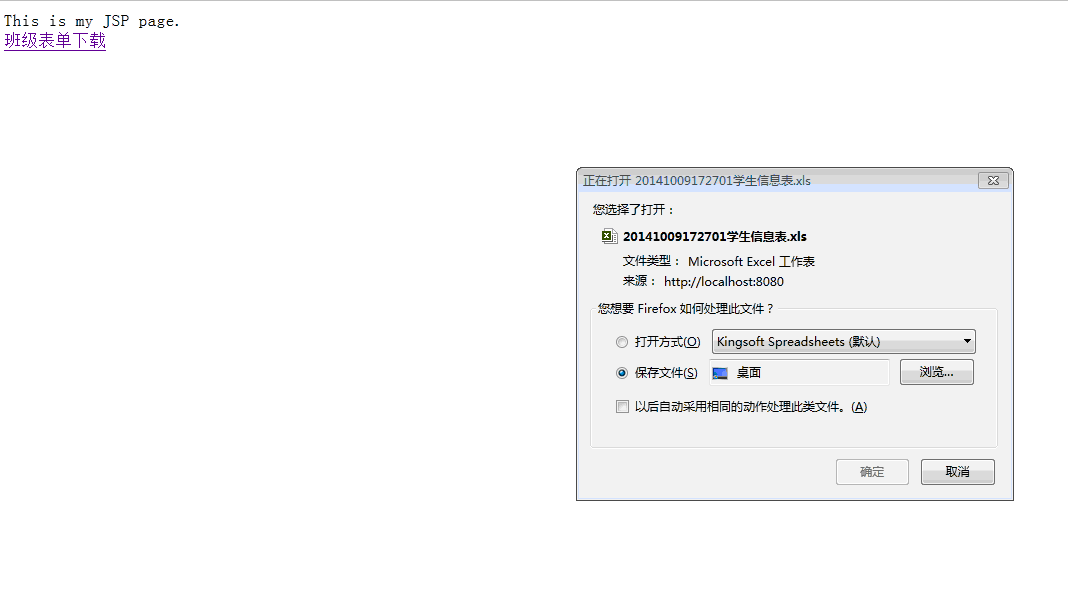
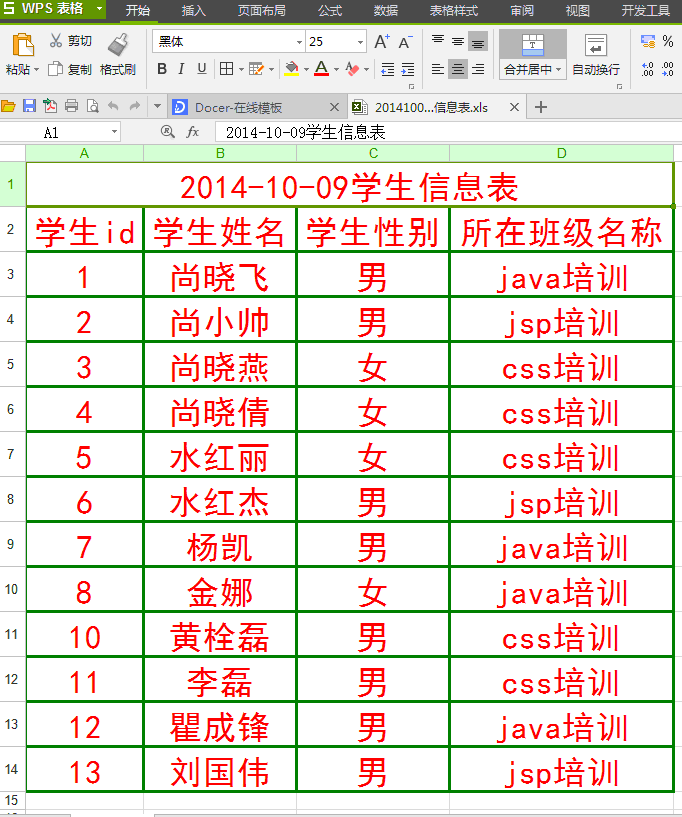
报表生成poi----java操作java对象生成execl表单的更多相关文章
- Java操作Sqoop对象
Windows下使用Eclipse工具操作Sqoop1.4.6对象 Sqoop是用来在关系型数据库与Hadoop之间进行数据的导入导出,Windows下使用Eclipse工具操作时,需要先搭建好Had ...
- [Java拾遗五]使用Session防止表单重复提交
申明:此文章属于转载, 转自博客: http://www.cnblogs.com/xdp-gacl/p/3859416.html在平时开发中,如果网速比较慢的情况下,用户提交表单后,发现服务器半天都没 ...
- java模拟表单上传文件,java通过模拟post方式提交表单实现图片上传功能实例
java模拟表单上传文件,java通过模拟post方式提交表单实现图片上传功能实例HttpClient 测试类,提供get post方法实例 package com.zdz.httpclient; i ...
- django中ModelForm save方法 以及快速生成空表单或包含数据的表单 包含错误信息
django中ModelForm学习系列一~save方法 Model代码 from django.db import models # Create your models here. class P ...
- MVC动态生成的表单:表单元素比较多 你就这样写
MVC动态生成的表单:表单元素比较多 你就这样写: public ActionResult ShoudaanActionResult(FormCollection from,T_UserM user) ...
- java:JavaScript2:(setTimeout定时器,history.go()前进/后退,navigator.userAgent判断浏览器,location.href,五种方法获取标签属性,setAttribute,innerHTML,三种方法获取form表单信息,JS表单验证,DOM对象,form表单操作)
1.open,setTimeout,setInterval,clearInterval,clearTimeout <!DOCTYPE> <html> <head> ...
- 【java学习】Servlet简单的表单程序(一)
此文用于java学习,在此小记. 在此小Demo中使用到了Servlet,所以有必要了解一下Servlet的相关知识.(Servlet的相关知识摘抄自http://blog.csdn.net/jiuq ...
- 「小程序JAVA实战」小程序的表单组件(25)
转自:https://idig8.com/2018/08/18/xiaochengxujavashizhanxiaochengxudebiaodanzujian25/ 来说下 ,小程序的基础组件.源码 ...
- java上传文件,提交表单必须要设置enctype="multipart/form-data"
表单中enctype="multipart/form-data"的意思,是设置表单的MIME编码.默认情况,这个编码格式是application/x-www-form-urlenc ...
随机推荐
- MyBatis—动态SQL
什么是动态SQL? 1.基于OGNL表达式 2.完成多条件查询的逻辑 3.动态SQL的主要元素 (if,trim,where,set,choose,foreach) where标签 可以根据if中是否 ...
- Python: 字符串中嵌入变量
问题:想创建一个内嵌变量的字符串,变量被它的值替换掉 解决方案: ①Python并没有对在字符串中简单替换变量值提供直接的支持,但是通过字符串的format()方法来解决这个问题 ②如果要被替换的变量 ...
- Example解析
本文总结自:https://github.com/abel533/Mapper/wiki/6.example,旨在提供一些基本概念上的解释 Example类用于条件查询,以代替冗长的"sel ...
- (转载)找圆算法((HoughCircles)总结与优化
Opencv内部提供了一个基于Hough变换理论的找圆算法,HoughCircle与一般的拟合圆算法比起来,各有优势:优势:HoughCircle对噪声点不怎么敏感,并且可以在同一个图中找出多个圆 ...
- 20145312 《网络对抗》PC平台逆向破解:注入shellcode和 Return-to-libc 攻击实验
20145312 <网络对抗>PC平台逆向破解:注入shellcode和 Return-to-libc 攻击实验 注入shellcode 实验步骤 1. 准备一段Shellcode 2. ...
- hdu 5687 Problem C trie树
Problem C Time Limit: 2000/1000 MS (Java/Others) Memory Limit: 131072/131072 K (Java/Others) Prob ...
- python 返回列表中的偶数
def is_even_num(l): enum = [] for n in l: == : enum.append(n) return enum print(is_even_num([, , , , ...
- display:box,按比列划分,水平均分,及垂直等高
一.按比例划分 <div class="test"> <p id="p1">Hello</p> <p id=" ...
- Java IO流-序列化流和反序列化流
2017-11-05 20:42:06 序列化流:把对象按照流的方式存入文本文件或者在网络中传输. 对象 -- 流数据(ObjectOutputStream) 反序列化流:把文本文件中的流对象数据或者 ...
- Rails 5 Test Prescriptions 第5章 Testing Models
Rails,model层包含业务逻辑和储存逻辑.其中储存逻辑被ActiveRecord处理. 在model中,不是每件事都必须是ActiveRecord对象.model layer可以包含各种服务,对 ...