
EBS增加客制应用CUX:Custom Application
1. 创建数据库文件和帐号
[root@ebs12vis oracle]# su - oracle
[oracle@ebs12vis ~]$ sqlplus / as sysdba
SQL*Plus: Release 11.1.0.7.0 - Production on Sun May 24 10:13:48 2015
Copyright (c) 1982, 2008, Oracle. All rights reserved.
Connected to:
Oracle Database 11g Enterprise Edition Release 11.1.0.7.0 - 64bit Production
With the Partitioning, OLAP, Data Mining and Real Application Testing options
SQL> create tablespace CUX_DATA datafile '/d01/oracle/VIS/db/apps_st/data/cux_data01.dbf' size 200M reuse autoextend on next 100M;
Tablespace created.
SQL> create tablespace CUX_INDEX datafile '/d01/oracle/VIS/db/apps_st/data/cux_index01.dbf' size 200M reuse autoextend on next 100M;
Tablespace created.
SQL> create temporary tablespace CUX_TEMP tempfile '/d01/oracle/VIS/db/apps_st/data/cux_temp01.dbf' size 200M;
Tablespace created.
SQL> create user cux identified by cux default tablespace CUX_DATA temporary tablespace CUX_TEMP;
User created.
SQL> grant resource to cux;
Grant succeeded.
SQL> grant connect to cux;
Grant succeeded.
SQL> grant create table to cux;
Grant succeeded.
SQL> grant create view to cux;
Grant succeeded.
SQL> grant create package to cux;
grant create package to cux
*
ERROR at line 1:
ORA-00990: missing or invalid privilege
SQL> grant create synonym to cux;
Grant succeeded.
SQL> grant create sequence to cux;
Grant succeeded.
2. 创建客制应用文件目录结构(参考INV_TOP)
[root@ebs12vis ~]# su - applmgr
[applmgr@ebs12vis ~]$ cd $APPL_TOP/inv
[applmgr@ebs12vis inv]$ find . -type d -exec mkdir -p $APPL_TOP/cux/{} \;
[applmgr@ebs12vis inv]$ cd ..
[applmgr@ebs12vis appl]$ cd cux
[applmgr@ebs12vis cux]$ du
8 ./12.0.0/help/US
8 ./12.0.0/help/ZHS
24 ./12.0.0/help
8 ./12.0.0/html
8 ./12.0.0/reports/US
8 ./12.0.0/reports/ZHS
24 ./12.0.0/reports
8 ./12.0.0/log
8 ./12.0.0/lib
8 ./12.0.0/out
8 ./12.0.0/patch/115/import/US
8 ./12.0.0/patch/115/import/ZHS
24 ./12.0.0/patch/115/import
8 ./12.0.0/patch/115/odf
8 ./12.0.0/patch/115/xdf
8 ./12.0.0/patch/115/irep/patch/115/import/US
16 ./12.0.0/patch/115/irep/patch/115/import
8 ./12.0.0/patch/115/irep/patch/115/odf
8 ./12.0.0/patch/115/irep/patch/115/sql
40 ./12.0.0/patch/115/irep/patch/115
48 ./12.0.0/patch/115/irep/patch
8 ./12.0.0/patch/115/irep/java/ebi/item/server
16 ./12.0.0/patch/115/irep/java/ebi/item
24 ./12.0.0/patch/115/irep/java/ebi
32 ./12.0.0/patch/115/irep/java
88 ./12.0.0/patch/115/irep
8 ./12.0.0/patch/115/xml/US
8 ./12.0.0/patch/115/xml/ZHS
24 ./12.0.0/patch/115/xml
8 ./12.0.0/patch/115/driver
8 ./12.0.0/patch/115/publisher/templates/US
8 ./12.0.0/patch/115/publisher/templates/ZHS
24 ./12.0.0/patch/115/publisher/templates
8 ./12.0.0/patch/115/publisher/defs
40 ./12.0.0/patch/115/publisher
8 ./12.0.0/patch/115/sql
216 ./12.0.0/patch/115
224 ./12.0.0/patch
8 ./12.0.0/java/make
8 ./12.0.0/java/jar
24 ./12.0.0/java
8 ./12.0.0/xml/orc115
16 ./12.0.0/xml
8 ./12.0.0/forms/US
8 ./12.0.0/forms/ZHS
24 ./12.0.0/forms
8 ./12.0.0/mds/lov/webui/ZHS
16 ./12.0.0/mds/lov/webui
8 ./12.0.0/mds/lov/consign/webui/ZHS
16 ./12.0.0/mds/lov/consign/webui
24 ./12.0.0/mds/lov/consign
48 ./12.0.0/mds/lov
8 ./12.0.0/mds/wshtxn/server/ZHS
16 ./12.0.0/mds/wshtxn/server
24 ./12.0.0/mds/wshtxn
8 ./12.0.0/mds/consign/webui/ZHS
16 ./12.0.0/mds/consign/webui
24 ./12.0.0/mds/consign
8 ./12.0.0/mds/rcv/server/ZHS
16 ./12.0.0/mds/rcv/server
24 ./12.0.0/mds/rcv
8 ./12.0.0/mds/attributesets/ZHS
16 ./12.0.0/mds/attributesets
8 ./12.0.0/mds/txnui/webui/ZHS
16 ./12.0.0/mds/txnui/webui
8 ./12.0.0/mds/txnui/lotDetails/webui/ZHS
16 ./12.0.0/mds/txnui/lotDetails/webui
24 ./12.0.0/mds/txnui/lotDetails
8 ./12.0.0/mds/txnui/serialDetails/webui/ZHS
16 ./12.0.0/mds/txnui/serialDetails/webui
24 ./12.0.0/mds/txnui/serialDetails
72 ./12.0.0/mds/txnui
216 ./12.0.0/mds
8 ./12.0.0/bin
8 ./12.0.0/mesg
8 ./12.0.0/admin/driver
8 ./12.0.0/admin/sql
24 ./12.0.0/admin
8 ./12.0.0/sql
640 ./12.0.0
648 .
3. 增加客制应用到自动配置文件
[root@ebs12vis ~]# su - applmgr
[applmgr@ebs12vis ~]$ cd $APPL_TOP
[applmgr@ebs12vis appl]$ find . -name "*.env"
./ad/12.0.0/admin/template/APPSORA_ux.env
./ad/12.0.0/admin/template/adiasnt.env
./ad/12.0.0/admin/template/ad80nt.env
./ad/12.0.0/admin/template/install/template/db/ad8idbux.env
./ad/12.0.0/admin/template/install/template/db/ad8idbnt.env
./ad/12.0.0/admin/template/APPLSYS_nt.env
./ad/12.0.0/admin/template/APPLSYS_ux.env
./ad/12.0.0/admin/template/adovars_nt.env
./ad/12.0.0/admin/template/adiasux.env
./ad/12.0.0/admin/template/APPSORA_nt.env
./ad/12.0.0/admin/template/adovars_ux.env
./ad/12.0.0/admin/template/ad80ux.env
./asg/12.0.0/admin/template/asgovars_nt.env
./asg/12.0.0/admin/template/asgovars_ux.env
./fnd/12.0.0/fndenv.env
./fnd/12.0.0/usrxit/devenv.env
./APPSVIS_ebs12vis.env
./VIS_ebs12vis.env
./admin/adovars.env
[applmgr@ebs12vis appl]$ vi VIS_ebs12vis.env
#!/bin/sh
#
# $Header: APPLSYS_ux.env 120.29.12010000.3 2009/01/11 17:35:23 mmanku ship $
#
# ###############################################################
#
# This file is automatically generated by AutoConfig. It will be read and
# overwritten. If you were instructed to edit this file, or if you are not
# able to use the settings created by AutoConfig, refer to Metalink Note
# 387859.1 for assistance.
#
# ###############################################################
#
############################
# Set the variables required
############################
AFJSMARG="-server -Xmx384m -XX:NewRatio=2 -XX:+UseSerialGC -Doracle.apps.fnd.common.Pool.leak.mode=stderr:off -verbose:
gc"
export AFJSMARG
AFJCPARG="-client"
export AFJCPARG
APPLRGF="/d01/applmgr/VIS/inst/apps/VIS_ebs12vis/logs/appl/rgf"
export APPLRGF
CNTL_BREAK="ON"
export CNTL_BREAK
ORACLE_TERM="vt220"
export ORACLE_TERM
/CONTEXT_FILE
# Define APPS_JDBC_URL
######################
APPS_JDBC_URL="jdbc:oracle:thin:@(DESCRIPTION=(ADDRESS_LIST=(LOAD_BALANCE=YES)(FAILOVER=YES)(ADDRESS=(PROTOCOL=tcp)(HOS
T=ebs12vis.oracle.com)(PORT=1521)))(CONNECT_DATA=(SERVICE_NAME=VIS)))"
export APPS_JDBC_URL
##########################################
# Define AD_APPS_JDBC_URL for AD Utilities
##########################################
TEMP_APPS_JDBC_URL="jdbc:oracle:thin:@(DESCRIPTION=(ADDRESS_LIST=(LOAD_BALANCE=YES)(FAILOVER=YES)(ADDRESS=(PROTOCOL=tcp
)(HOST=ebs12vis.oracle.com)(PORT=1521)))(CONNECT_DATA=(SERVICE_NAME=VIS)))"
AD_APPS_JDBC_URL=`echo $TEMP_APPS_JDBC_URL | cut -d "@" -f2`
export AD_APPS_JDBC_URL
####################################################################
# The CONTEXT_FILE variable stores the location of the context file.
####################################################################
CONTEXT_FILE="/d01/applmgr/VIS/inst/apps/VIS_ebs12vis/appl/admin/VIS_ebs12vis.xml"
export CONTEXT_FILE
####################################################################
# The CONTEXT_NAME variable stores the value for the current context
####################################################################
CONTEXT_NAME="VIS_ebs12vis"
export CONTEXT_NAME
########################################################
# The APPLFENV variable is the filename of this file.
# If you rename this file, you should change this value.
########################################################
[applmgr@ebs12vis ~]$ cd $INST_TOP/appl/admin
[applmgr@ebs12vis appl]$ vi VIS_ebs12vis.xml
<AU_TOP oa_var="s_autop" oa_type="PROD_TOP" oa_enabled="FALSE">/d01/applmgr/VIS/apps/apps_st/appl/au/12.0.0</AU_TOP>
<CUX_TOP oa_var="s_cuxtop" oa_type="PROD_TOP" oa_enabled="FALSE">/d01/applmgr/VIS/apps/apps_st/appl/cux/12.0.0</CUX_TOP>
<GWYUID oa_var="s_gwyuid">APPLSYSPUB/PUB</GWYUID>
Application Developer ==> Application ==> Register

System Administrator ==> Security ==> ORACLE ==> Register
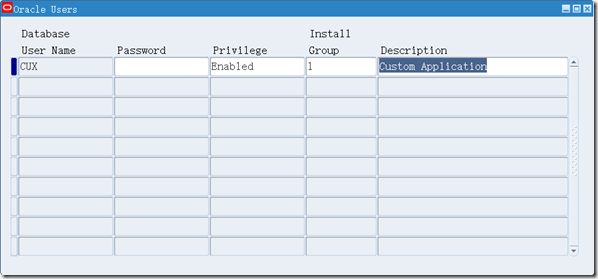
System Administrator ==> Security ==> ORACLE ==> DataGroup


Alter Manager ==> System ==> Installations

4. 客制应用CUX下应用APPS_DDL, APPS_ARRAY_DDL
SQL> @$AD_TOP/admin/sql/adaaddls.pls system_pword custom_schema custom_schema_pword
SQL> @$AD_TOP/admin/sql/adaaddlb.pls system_pword custom_schema custom_schema_pword
5. 重启EBS应用层服务
[applmgr@ebs12vis ~]$ cd $INST_HOME/admin/scripts
[applmgr@ebs12vis appl]$ sh adstpall.sh apps/apps
[applmgr@ebs12vis cux]$ sh adstrtal.sh apps/apps
EBS增加客制应用CUX:Custom Application的更多相关文章
- 转:FORM:客制化Form的菜单栏和右鍵菜單
Oracle EBS还允许客制化Form的菜单栏. 用户最多可以定义45个form-level的trigger,名称必须为SPECIALn, 其中SPECIAL1 to SPECIAL15属于Tool ...
- Form_通过Zoom客制化跳转页面功能(案例)
2012-09-08 Created By BaoXinjian
- SharePoint2013 Set a custom application page as site welcome page
本文主要介绍如何添加一个custom application page as site welcome page 1.首先创建一个sharepoint 2013 empty solution, add ...
- Dynamics AX 2012 R2 客制化RDP报表参数对话框
当我们在使用RDP报表时,AX会根据Data Contract,自动生成报表参数对话框上的字段控件.一般情况下,该对话框能够满足我们的需求,但是如果有较为复杂或特殊的需求,就要我们对该对话框进行客制化 ...
- BEvent_客制化BusinessEvent通过PLSQL Procedurer接受消息传递(案例)
2014-06-27 Created By BaoXinjian
- Android MTK6580 客制化关机充电动画
1.客制化关机充电图片 vendor/mediatek/proprietary/bootable/bootloader/lk/dev/logo/xxx 找到对应分辨率替换 2.调整显示图片位置.大小 ...
- T100——程序从标准签出客制后注意r.c和r.l
标准签出客制后,建议到对应4gl目录,客制目录 r.c afap280_01 r.l afap280_01 ALL 常用Shell操作命令: r.c:编译程序,需在4gl路径之下执行,产生的42m会自 ...
- (整理)FORM:Oracle EBS客制化Form的菜单栏用法说明
用户最多可以定义45个form-level的trigger,名称必须为SPECIALn, 其中SPECIAL1 to SPECIAL15属于Tools菜单项,放在“工具”主菜单下. SPECIAL16 ...
- Android RRO机制的运用-----google开机向导客制化
上周五的时候领导分了一个任务,客户让在google开机向导里面增加一页,首先就想到了android的Overlay,然后网上搜了下,发下有很多人写了这方面的技术.而且写的都还不错,所以本篇只当记录作用 ...
随机推荐
- LCD RGB 控制技术讲解 — 时钟篇(上)
时序图 下面是LCD RGB 控制的典型时序图 天啊,一下就上这玩意,怎么看??? 其实要解释上面的时序图,我们还需要了解一些LCD的显示过程.所以现在只是有个印象,稍后我们详细讲解. LCD显示流 ...
- [置顶]
Ubuntu16.04+opencv3.3.0的安装配置说明
系统环境: Linux Ubuntu 16.04 [GCC 5.4.0 20160609] on linux2 之前的教程中我们已经安装了做机器学习需要使用的框架TensorFlow,笔者本科阶段 ...
- Android图片高斯模糊的一些方法
高斯模糊 高斯模糊就是将指定像素变换为其与周边像素加权平均后的值,权重就是高斯分布函数计算出来的值. 一种实现 点击打开链接<-这里是一片关于高斯模糊算法的介绍,我们需要首先根据高斯分布函数计算 ...
- 常用的ubantu操作命令
Ubuntu软件操作的相关命令 sudo apt-get update 更新源 sudo apt-get install package 安装包 sudo apt-get remove package ...
- Nginx 是前端工程师的好帮手
Nginx [engine x] 是俄罗斯的 Igor Sysoev 编写的一个 强大的 HTTP 和反向代理服务器,而且也推出了 Windows 版本.Windows 版本使用 select 模型, ...
- java递归之“二叉树”
物有本末,事有始终,知所先后,则近道矣.-----题记. BotWong半路入行it做码农,也就半年时间,竟“不知天高地厚”地来到了深圳闯天下.一口气投了百个简历,一周后终于有公司邀约面试,除了基础的 ...
- jeesite快速开发平台(一)----简介
转自:https://blog.csdn.net/u011781521/article/details/54880170
- nodepad++快捷键
在用notepad++进行代码编辑的过程中,其实notepad++也可以进行单行.多行.区块注释和取消注释的....... 快捷键如下: 单行.多行注释 //方式 ...
- 7 MySQL--记录的增删改查
MySQL数据操作: DML ======================================================== 在MySQL管理软件中,可以通过SQL语句中的DML语言 ...
- JAVA_02
class Test2_Extents{ public static void main(String[] args){ System.out.println("Hello World&qu ...