
Websocket出现的错误
前端使用sockjs,后台使用spring的websocket框架
结果在一个网络较慢的地方,发现tomcat报错信息:
Oct 28, 2015 10:10:43 AM org.apache.catalina.core.StandardWrapperValve invoke

SEVERE: Servlet.service() for servlet [mvc-dispatcher] in context with path [/rscc] threw exception [Request processing failed; nested exception is org.springframework.web.socket.sockjs.SockJsException: Uncaught failure in SockJS request, uri=http://xxx/user/854/qckzogtf/xhr_streaming; nested exception is org.springframework.web.socket.sockjs.SockJsException: Uncaught failure for request http://xxx/user/854/qckzogtf/xhr_streaming; nested exception is java.lang.IllegalArgumentException: Async support must be enabled on a servlet and for all filters involved in async request processing. This is done in Java code using the Servlet API or by adding "<async-supported>true</async-supported>" to servlet and filter declarations in web.xml. Also you must use a Servlet 3.0+ container] with root cause

java.lang.IllegalArgumentException: Async support must be enabled on a servlet and for all filters involved in async request processing. This is done in Java code using the Servlet API or by adding "<async-supported>true</async-supported>" to servlet and filter declarations in web.xml. Also you must use a Servlet 3.0+ container

    at org.springframework.util.Assert.isTrue(Assert.java:65)

    at org.springframework.http.server.ServletServerHttpAsyncRequestControl.<init>(ServletServerHttpAsyncRequestControl.java:59)

    at org.springframework.http.server.ServletServerHttpRequest.getAsyncRequestControl(ServletServerHttpRequest.java:202)

    at org.springframework.web.socket.sockjs.transport.session.AbstractHttpSockJsSession.initRequest(AbstractHttpSockJsSession.java:238)

    at org.springframework.web.socket.sockjs.transport.session.AbstractHttpSockJsSession.handleInitialRequest(AbstractHttpSockJsSession.java:203)

    at org.springframework.web.socket.sockjs.transport.session.StreamingSockJsSession.handleInitialRequest(StreamingSockJsSession.java:54)

    at org.springframework.web.socket.sockjs.transport.handler.AbstractHttpSendingTransportHandler.handleRequestInternal(AbstractHttpSendingTransportHandler.java:66)

    at org.springframework.web.socket.sockjs.transport.handler.AbstractHttpSendingTransportHandler.handleRequest(AbstractHttpSendingTransportHandler.java:58)

    at org.springframework.web.socket.sockjs.transport.TransportHandlingSockJsService.handleTransportRequest(TransportHandlingSockJsService.java:254)

    at org.springframework.web.socket.sockjs.support.AbstractSockJsService.handleRequest(AbstractSockJsService.java:317)

    at org.springframework.web.socket.sockjs.support.SockJsHttpRequestHandler.handleRequest(SockJsHttpRequestHandler.java:88)

    at org.springframework.web.servlet.mvc.HttpRequestHandlerAdapter.handle(HttpRequestHandlerAdapter.java:51)

    at org.springframework.web.servlet.DispatcherServlet.doDispatch(DispatcherServlet.java:938)

    at org.springframework.web.servlet.DispatcherServlet.doService(DispatcherServlet.java:870)

    at org.springframework.web.servlet.FrameworkServlet.processRequest(FrameworkServlet.java:961)

    at org.springframework.web.servlet.FrameworkServlet.doPost(FrameworkServlet.java:863)

    at javax.servlet.http.HttpServlet.service(HttpServlet.java:646)

    at org.springframework.web.servlet.FrameworkServlet.service(FrameworkServlet.java:837)

    at javax.servlet.http.HttpServlet.service(HttpServlet.java:727)

    at org.apache.catalina.core.ApplicationFilterChain.internalDoFilter(ApplicationFilterChain.java:303)

    at org.apache.catalina.core.ApplicationFilterChain.doFilter(ApplicationFilterChain.java:208)

    at org.apache.tomcat.websocket.server.WsFilter.doFilter(WsFilter.java:52)

    at org.apache.catalina.core.ApplicationFilterChain.internalDoFilter(ApplicationFilterChain.java:241)

    at org.apache.catalina.core.ApplicationFilterChain.doFilter(ApplicationFilterChain.java:208)

    at org.springframework.web.filter.CharacterEncodingFilter.doFilterInternal(CharacterEncodingFilter.java:88)

    at org.springframework.web.filter.OncePerRequestFilter.doFilter(OncePerRequestFilter.java:108)

    at org.apache.catalina.core.ApplicationFilterChain.internalDoFilter(ApplicationFilterChain.java:241)

    at org.apache.catalina.core.ApplicationFilterChain.doFilter(ApplicationFilterChain.java:208)

    at org.apache.catalina.core.StandardWrapperValve.invoke(StandardWrapperValve.java:220)

    at org.apache.catalina.core.StandardContextValve.invoke(StandardContextValve.java:122)

    at org.apache.catalina.authenticator.AuthenticatorBase.invoke(AuthenticatorBase.java:501)

    at org.apache.catalina.core.StandardHostValve.invoke(StandardHostValve.java:171)

    at org.apache.catalina.valves.ErrorReportValve.invoke(ErrorReportValve.java:102)

    at org.apache.catalina.valves.AccessLogValve.invoke(AccessLogValve.java:950)

    at org.apache.catalina.core.StandardEngineValve.invoke(StandardEngineValve.java:116)

    at org.apache.catalina.connector.CoyoteAdapter.service(CoyoteAdapter.java:408)

    at org.apache.coyote.http11.AbstractHttp11Processor.process(AbstractHttp11Processor.java:1040)

    at org.apache.coyote.AbstractProtocol$AbstractConnectionHandler.process(AbstractProtocol.java:607)

    at org.apache.tomcat.util.net.JIoEndpoint$SocketProcessor.run(JIoEndpoint.java:316)

    at java.util.concurrent.ThreadPoolExecutor.runWorker(ThreadPoolExecutor.java:1145)

    at java.util.concurrent.ThreadPoolExecutor$Worker.run(ThreadPoolExecutor.java:615)

    at org.apache.tomcat.util.threads.TaskThread$WrappingRunnable.run(TaskThread.java:61)

    at java.lang.Thread.run(Thread.java:745)
根据报错信息来看,应该是缺少了<async-supported>true</async-supported>这个配置,这个是3.0开始支持的,async的请求需要开启async-supported。
但是该项目在我们本地从来没有出现过这个问题,情况说明及解决分析过程如下:
一、前端连接情况:ws = new SockJS( 'url', undefined, {});
不加参数,sockjs默认会选择最优方式来连接,情况如下:
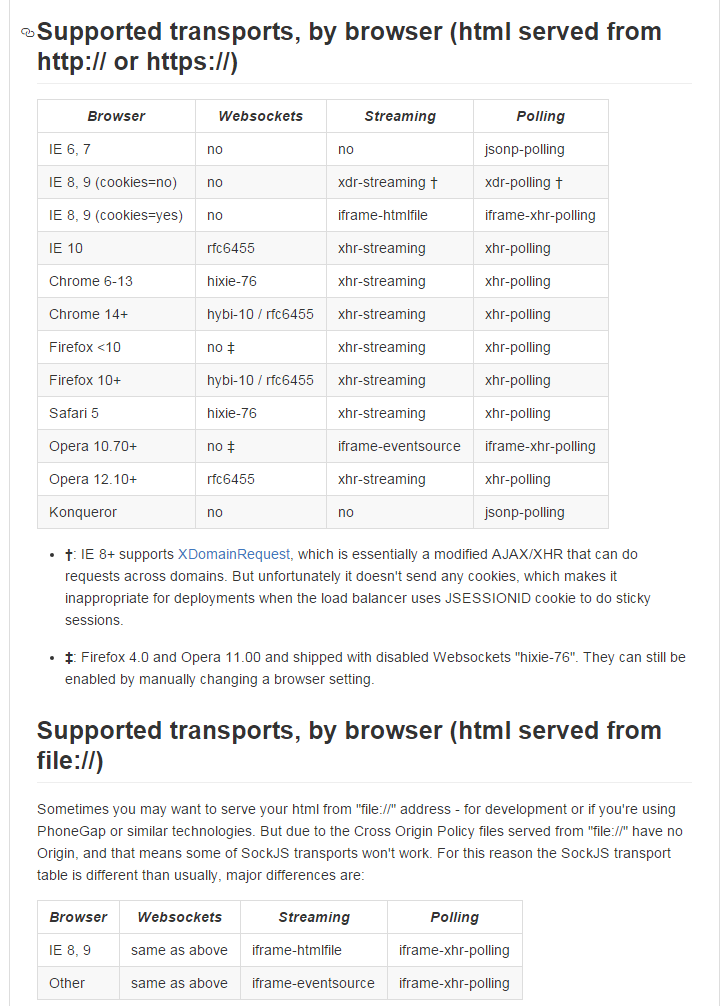
关于协议选择:在第一种连接方式超时时,sockjs会选择次优方式进行连接:
var _all_protocols = ['websocket',

                      'xdr-streaming',

                      'xhr-streaming',

                      'iframe-eventsource',

                      'iframe-htmlfile',

                      'xdr-polling',

                      'xhr-polling',

                      'iframe-xhr-polling',

                      'jsonp-polling'];

所有协议(连接方式)
检测所有可用协议并按优先级排序
utils.probeProtocols = function() {

    var probed = {};

    for(var i=0; i<_all_protocols.length; i++) {

        var protocol = _all_protocols[i];

        // User can have a typo in protocol name.

        probed[protocol] = SockJS[protocol] &&

                           SockJS[protocol].enabled();

    }

    return probed;

};

utils.detectProtocols = function(probed, protocols_whitelist, info) {

    var pe = {},

        protocols = [];

    if (!protocols_whitelist) protocols_whitelist = _all_protocols;

    for(var i=0; i<protocols_whitelist.length; i++) {

        var protocol = protocols_whitelist[i];

        pe[protocol] = probed[protocol];

    }

    var maybe_push = function(protos) {

        var proto = protos.shift();

        if (pe[proto]) {

            protocols.push(proto);

        } else {

            if (protos.length > 0) {

                maybe_push(protos);

            }

        }

    }

    // 1. Websocket

    if (info.websocket !== false) {

        maybe_push(['websocket']);

    }

    // 2. Streaming

    if (pe['xhr-streaming'] && !info.null_origin) {

        protocols.push('xhr-streaming');

    } else {

        if (pe['xdr-streaming'] && !info.cookie_needed && !info.null_origin) {

            protocols.push('xdr-streaming');

        } else {

            maybe_push(['iframe-eventsource',

                        'iframe-htmlfile']);

        }

    }

    // 3. Polling

    if (pe['xhr-polling'] && !info.null_origin) {

        protocols.push('xhr-polling');

    } else {

        if (pe['xdr-polling'] && !info.cookie_needed && !info.null_origin) {

            protocols.push('xdr-polling');

        } else {

            maybe_push(['iframe-xhr-polling',

                        'jsonp-polling']);

        }

    }

    return protocols;

}
连接时若超时切换协议的代码
while(1) {

        var protocol = that.protocol = that._protocols.shift();

        if (!protocol) {

            return false;

        }

        // Some protocols require access to `body`, what if were in

        // the `head`?

        if (SockJS[protocol] &&

            SockJS[protocol].need_body === true &&

            (!_document.body ||

             (typeof _document.readyState !== 'undefined'

              && _document.readyState !== 'complete'))) {

            that._protocols.unshift(protocol);

            that.protocol = 'waiting-for-load';

            utils.attachEvent('load', function(){

                that._try_next_protocol();

            });

            return true;

        }

//下面的to = 就是计算连接超时时间的,调用delay,在连接超时时关闭这个协议的连接。

        if (!SockJS[protocol] ||

              !SockJS[protocol].enabled(that._options)) {

            that._debug('Skipping transport:', protocol);

        } else {

            var roundTrips = SockJS[protocol].roundTrips || 1;

            var to = ((that._options.rto || 0) * roundTrips) || 5000;

            that._transport_tref = utils.delay(to, function() {

                if (that.readyState === SockJS.CONNECTING) {

                    // I can't understand how it is possible to run

                    // this timer, when the state is CLOSED, but

                    // apparently in IE everythin is possible.

                    that._didClose(2007, "Transport timeouted");

                }

            });

            var connid = utils.random_string(8);

            var trans_url = that._base_url + '/' + that._server + '/' + connid;

            that._debug('Opening transport:', protocol, ' url:'+trans_url,

                        ' RTO:'+that._options.rto);

            that._transport = new SockJS[protocol](that, trans_url,

                                                   that._base_url);

            return true;

        }

    }
观察上面报错信息中的uri:uri=http://xxx/user/854/qckzogtf/xhr_streaming; 因为正常情况下连接为websocket连接,这个uri应该为ws=http://xxx/user/854/qckzogtf/websocket,由此可见,这里应该是切换为xhr_streaming协议了
前面也说过,他们网络环境较慢,所以才想,应该是连接超时导致的,有上面可知,to为超时时间,计算公式为
var to = ((that._options.rto || 0) * roundTrips) || 5000;
关键在于that._options.rto,这个是new的时候的设置项,所以可以设置rto超时长一点。
结果发现设置中只有
that._options = {devel: false, debug: false, protocols_whitelist: [],info: undefined, rtt: undefined};
这几项,并没有rto,于是继续看
var SockJS = function(url, dep_protocols_whitelist, options) {

    if (this === _window) {

        // makes `new` optional

        return new SockJS(url, dep_protocols_whitelist, options);

    }

    var that = this, protocols_whitelist;

    that._options = {devel: false, debug: false, protocols_whitelist: [],

                     info: undefined, rtt: undefined};

    if (options) {

        utils.objectExtend(that._options, options);

    }

    that._base_url = utils.amendUrl(url);

    that._server = that._options.server || utils.random_number_string(1000);

    if (that._options.protocols_whitelist &&

        that._options.protocols_whitelist.length) {

        protocols_whitelist = that._options.protocols_whitelist;

    } else {

        // Deprecated API

        if (typeof dep_protocols_whitelist === 'string' &&

            dep_protocols_whitelist.length > 0) {

            protocols_whitelist = [dep_protocols_whitelist];

        } else if (utils.isArray(dep_protocols_whitelist)) {

            protocols_whitelist = dep_protocols_whitelist

        } else {

            protocols_whitelist = null;

        }

        if (protocols_whitelist) {

            that._debug('Deprecated API: Use "protocols_whitelist" option ' +

                        'instead of supplying protocol list as a second ' +

                        'parameter to SockJS constructor.');

        }

    }

    that._protocols = [];

    that.protocol = null;

    that.readyState = SockJS.CONNECTING;

    that._ir = createInfoReceiver(that._base_url);

    that._ir.onfinish = function(info, rtt) {

        that._ir = null;

        if (info) {

            if (that._options.info) {

                // Override if user supplies the option

                info = utils.objectExtend(info, that._options.info);

            }

            if (that._options.rtt) {

                rtt = that._options.rtt;

            }

            that._applyInfo(info, rtt, protocols_whitelist);

            that._didClose();

        } else {

            that._didClose(1002, 'Can\'t connect to server', true);

        }

    };

};
utils.objectExtend(that._options, options);这一句比较可疑是转移属性的,
that._applyInfo(info, rtt, protocols_whitelist);比较可疑,看一下
SockJS.prototype._applyInfo = function(info, rtt, protocols_whitelist) {

    var that = this;

    that._options.info = info;

    that._options.rtt = rtt;

    that._options.rto = utils.countRTO(rtt);

    that._options.info.null_origin = !_document.domain;

    var probed = utils.probeProtocols();

    that._protocols = utils.detectProtocols(probed, protocols_whitelist, info);

};
rto设置找到了!that._options.rto = utils.countRTO(rtt);
utils.countRTO = function (rtt) {

    var rto;

    if (rtt > 100) {

        rto = 3 * rtt; // rto > 300msec

    } else {

        rto = rtt + 200; // 200msec < rto <= 300msec

    }

    return rto;

}
好了,只用设置rtt既可以设置rto了。。。就这样,连接超时的问题算是解决了。
二、但是还没完,就算websocket连接超时导致协议切换为xhr_streaming,也不会导致后台报错的情况出现,下面解决这个问题:
报错处的代码:在AbstractHttpSockJsSession类中:
private void initRequest(ServerHttpRequest request, ServerHttpResponse response,

            SockJsFrameFormat frameFormat) {

        Assert.notNull(request, "Request must not be null");

        Assert.notNull(response, "Response must not be null");

        Assert.notNull(frameFormat, "SockJsFrameFormat must not be null");

        this.response = response;

        this.frameFormat = frameFormat;

        this.asyncRequestControl = request.getAsyncRequestControl(response);

    }
最后一句报错咯,看代码:
public ServerHttpAsyncRequestControl getAsyncRequestControl(ServerHttpResponse response) {

        if (this.asyncRequestControl == null) {

            Assert.isInstanceOf(ServletServerHttpResponse.class, response);

            ServletServerHttpResponse servletServerResponse = (ServletServerHttpResponse) response;

            this.asyncRequestControl = new ServletServerHttpAsyncRequestControl(this, servletServerResponse);//这一句报错了

        }

        return this.asyncRequestControl;

    }
new ServletServerHttpAsyncRequestControl时报错
public ServletServerHttpAsyncRequestControl(ServletServerHttpRequest request, ServletServerHttpResponse response) {

        Assert.notNull(request, "request is required");

        Assert.notNull(response, "response is required");

        Assert.isTrue(request.getServletRequest().isAsyncSupported(),

                "Async support must be enabled on a servlet and for all filters involved " +

                "in async request processing. This is done in Java code using the Servlet API " +

                "or by adding \"<async-supported>true</async-supported>\" to servlet and " +

                "filter declarations in web.xml. Also you must use a Servlet 3.0+ container");

        this.request = request;

        this.response = response;

    }
最长那一句断言报的错,说的是web.xml的servlet和filter中要加入<async-supported>true</async-supported>
看下web.xml中,filter中确实没有这一句,之所以一定要在filter中加入这一句,是因为websocket的切换协议请求,是通过filter拦截的,如果不在filter中配置async,则切换协议的请求将不是async的,所以上面就报错了。
filter中加上之后,就好了。
若为了让controller也支持async则需要在dispatcher中这样配置
<mvc:annotation-driven>

<!--  可不设置,使用默认的超时时间 -->

    <mvc:async-support default-timeout="3000"/>

</mvc:annotation-driven>
再返回上面initRequest方法,只有该类AbstractHttpSockJsSession的public void handleInitialRequest(ServerHttpRequest request, ServerHttpResponse response,SockJsFrameFormat frameFormat)方法与
public void handleSuccessiveRequest(ServerHttpRequest request,ServerHttpResponse response, SockJsFrameFormat frameFormat)中有调用,而调用这两个方法的只有AbstractHttpSockJsSession的实现类:StreamingSockJsSession才有,就是spring-websocket为sockjs支持的xhr-streaming方式的实现类,而平时使用websocket的则是另外一个实现类:
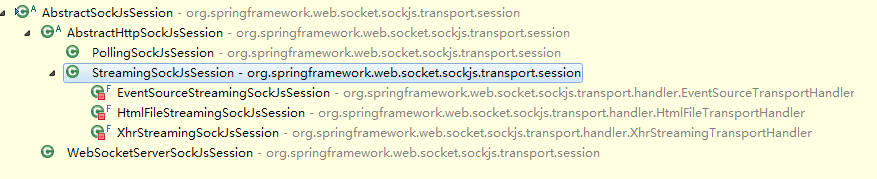
这就导致了之前一直没有报错,上了一个网络较差的地方就报错了,原因分析完毕。
上面用的sockjs 0.3.4,最新的是1.0.3有所改变,但是大致相同
补充:相同个毛线,1.0.3的rtt不再是通过参数传进去的,而是计算出来的
function InfoAjax(url, AjaxObject) {

  EventEmitter.call(this);

  var self = this;

  var t0 = +new Date();

  this.xo = new AjaxObject('GET', url);

  this.xo.once('finish', function(status, text) {

    var info, rtt;

    if (status === 200) {

      rtt = (+new Date()) - t0;

      if (text) {

        try {

          info = JSON3.parse(text);

        } catch (e) {

          debug('bad json', text);

        }

      }

      if (!objectUtils.isObject(info)) {

        info = {};

      }

    }

    self.emit('finish', info, rtt);

    self.removeAllListeners();

  });

}
也就是说,超时时间控制不了的...什么鬼
this._transportsWhitelist = options.transports;这个是设置白名单,优先使用这些方式。
Websocket出现的错误的更多相关文章
- 解决nginx转发websocket报400错误
解决nginx转发websocket报400错误 说明 由于个人服务器上面有多个项目,配置了二级域名,需要对二级域名进行转发,在转发工作这快采取了大名鼎鼎的nginx.在这之前所有的项目运行转发都没问 ...
- websocket通信1009错误,
问题说明: springboot继承 WebSocketConfigurer实现websocket通信服务,服务器端报错,"The decoded text message was too ...
- Spring WebSocket中403错误解决
最近测试了一下spring的websocket,遇到了一个比较恶心的问题,在这记录一下. 问题源自之前开发的一个h5项目,这个项目在80端口下一直放着,就顺便在里面随便加了几行代码测试websocke ...
- websocket报400错误
解决方案看了下讨论区说的方案,问题出现在nginx的配置文件,需要修改nginx.conf文件.在linux终端中敲入vim /etc/nginx/nginx.conf,找到location这个位置, ...
- webSocket错误收集
关于 使用WebSocket报如下错误, Uncaught InvalidStateError: Failed to execute 'send' on 'WebSocket': already in ...
- java使用websocket,并且获取HttpSession,源码分析
转载请在页首注明作者与出处 http://www.cnblogs.com/zhuxiaojie/p/6238826.html 一:本文使用范围 此文不仅仅局限于spring boot,普通的sprin ...
- HTML5学习总结-08 WebSocket 服务器推送
一 WebSocket 随着互联网的发展,传统的HTTP协议已经很难满足Web应用日益复杂的需求了.近年来,随着HTML5的诞生,WebSocket协议被提出,它实现了浏览器与服务器的全双工通信,扩展 ...
- Java后端WebSocket的Tomcat实现
转自:http://blog.chenzuhuang.com/archive/28.html 文章摘要随着互联网的发展,传统的HTTP协议已经很难满足Web应用日益复杂的需求了.近年来,随着HTML5 ...
- WebSocket简单介绍
Java后端WebSocket的Tomcat实现 一.WebSocket简单介绍 随着互联网的发展,传统的HTTP协议已经很难满足Web应用日益复杂的需求了.近年来,随着HTML5的诞生,WebSoc ...
随机推荐
- 编译安装php-5.4.44
编译安装php-5.4.44 1. 首先,安装必要的库文件,一面编译被打断: yum install -y gcc gcc-c++ make zlib zlib-devel pcre pcre-de ...
- CentOS iptables防火墙的基本应用讲解
iptables是Linux下不错的防火墙软件,本文主要给大家介绍下iptables的安装.规则增加和清除.开放指定端口.屏蔽指定ip和ip段等CentOS下iptables的基本应用. 一.ipta ...
- 关于centos7.5部署oelinker_php版本的问题点汇总
1.下载开源版本https://github.com/eolinker/eoLinker-AMS-Lite-For-PHP到本地,将release文件夹内容copy到apache的/var/www/h ...
- Unity3D的坑系列:动态加载dll
我现在参与的项目是做MMO手游,目标平台是Android和iOS,iOS平台不能动态加载dll(什么原因找乔布斯去),可以直接忽略,而在Android平台是可以动态加载dll的,有了这个就可以实现代码 ...
- yum安装cacti
环境: centos 6.5 -x64 cacti-0.8.7e.tar.gz mysql yum安装即可 yum服务使用centos自带的就行.如果是红帽请自行解决yum.本文不赘述. **注意:同 ...
- Rhythmk 一步一步学 JAVA (19): 注解 annotation
在编写注解的时候需要了解的四种注解: @Target 表示该注解可以用于什么地方,可能的ElementType参数有: CONSTRUCTOR:构造器的声明 FIELD:域声明(包括enum实例) L ...
- Spring Boot 16 条最佳实践
Spring Boot是最流行的用于开发微服务的Java框架.在本文中,我将与你分享自2016年以来我在专业开发中使用Spring Boot所采用的最佳实践.这些内容是基于我的个人经验和一些熟知的Sp ...
- vs配置D3D开发环境
其实很简单直接上图吧: 主要include和lib目录指定: $(DXSDK_DIR)Include $(DXSDK_DIR)Lib\x86 下面是连接器-输入项: 主要包含: dxgi.libdxg ...
- Redis 与 Lua Script
[Redis Script] 1.EVAL script numkeys key [key ...] arg [arg ...] 从 Redis 2.6.0 版本开始,通过内置的 Lua 解释器,可以 ...
- SELinux导致的docker启动失败
安装docker yum install -y docker 启动docker systemctl start docker 报错 Job for docker.service failed beca ...