
Python学习---JSONP学习180130
同源策略机制
同源:协议://IP:端口【协议,域名,端口相同】
跨域:知道对方接口,同时对方返回的数据也必须是Jsonp格式的
问题描述:Ajax跨域请求数据的时候,实际浏览器已经拿到数据,但是浏览器由于同源策略隐藏了这些内容,不给我们看这些数据。换言之,Ajax不能跨域请求数据。
问题解决:<script src="">
有src属性的标签都可以跨域请求数据,这也就是为什么img我们可以引用别的网站的图片
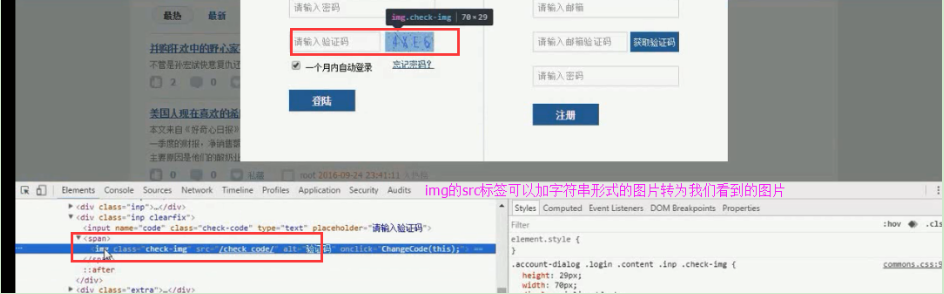

JSONP的原型:创建一个回调函数,然后在远程服务上调用这个函数并且将JSON 数据形式作为参数传递,完成回调。
JSONP一定是GET请求
JSONP就是用来跨域的,没有用XmlHttpRequest对象和Ajax来发送请求,是一个伪造的请求。
JSONP的本质就是动态的创建script标签,然后吧请求的url放入到自己的src标签里面【你请求的URL就是他的src】,拿到数据后[本地的函数接收并处理]最后动态的删除掉。再次发送则再次创建script标签
<script src=''127.0.0.1:8080/XXX.do''>
例如接收的数据是: li([1,2,3,4,5]) --->这里返回的数据li是个函数
function li(data){ // 本地函数
console.log(data)
}
JSONP的约定: 用函数名括起来加上数据 函数名([数据])
Jsonp自己实现JSONP
<!DOCTYPE html>

<html lang="en">

<head>

    <meta charset="UTF-8">

</head>

<body>

    <input type="button" onclick="jsonpRequest();" value="跨域请求jsonp">

</body>

    <script>

        tag = null;

        function jsonpRequest() {

            tag = document.createElement('script');

            tag.src = 'http://www.jxntv.cn/data/jmd-jxtv2.html?callback=list&_=1454376870403';

            document.head.appendChild(tag);  // 添加script到head里面

        }

        // 接收返回的JSONP的数据

        function list(data) {

            console.log(data);

            document.head.removeChild(tag);

        }

    </script>

</html>
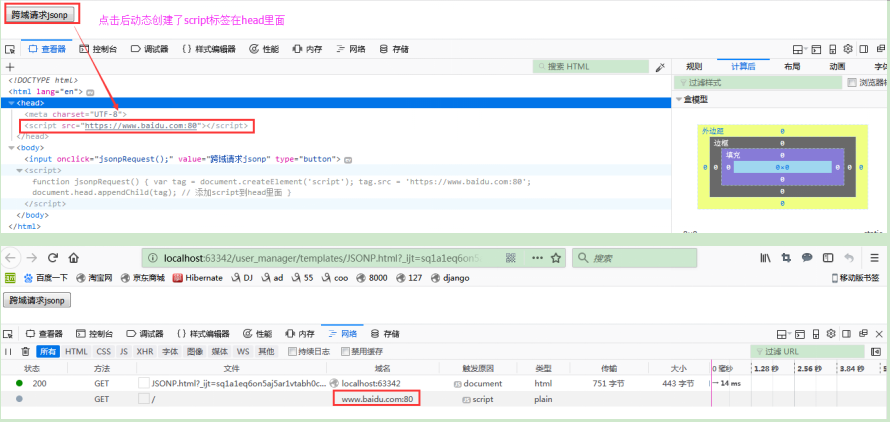

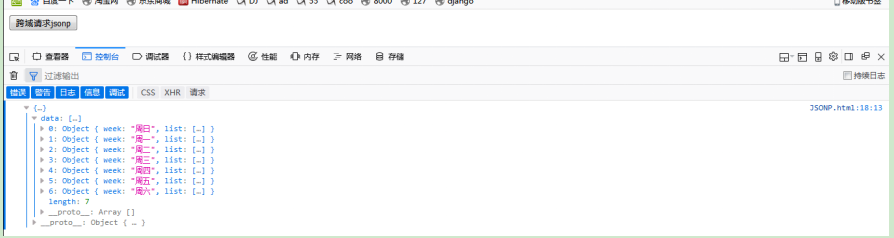
Jsonp实例一: 利用script标签的src属性
padding: 就是函数,将数据放在在函数内,然后打包发送给前台、
缺点:前台script里必须要有一个函数,处理一个写一个函数,因为本质是利用函数接收参数
正确应该动态添加script标签和内容
settigs.py:
'DIRS': [os.path.join(BASE_DIR, 'templates')],  # 设置templates的路径为Django以前版本

# 'DIRS': [],      # 注释掉该行,此为Django 2.0.1最新版本

# 'django.middleware.csrf.CsrfViewMiddleware',

         ...省略默认配置

STATIC_URL = '/static/'

TEMPLATE_DIRS = (os.path.join(BASE_DIR,  'templates'),)  # 原配置

# 静态资源文件

STATICFILES_DIRS = (os.path.join(BASE_DIR, "statics"),)   # 现添加的配置,这里是元组,注意逗号
templates/ajax_jquery.html
<!DOCTYPE html>

<html lang="en">

<head>

    <meta charset="UTF-8">

</head>

<script src="/static/jquery-3.2.1.js"></script>

<script>

    function test(data) {

        console.log(data)

    }

</script>

{#跨站请求内容#}

<script src="http://127.0.0.1:8081/jquery_ajax_test/"></script>

</html>
mysite2/urls.py
from django.contrib import admin

from django.urls import path

from blog import views

from django.conf.urls import url

urlpatterns = [

      # Jquery_Ajax

  url(r'ajax-jquery/', views.ajax_jquery),

  # jquery_ajax_test

  url(r'jquery_ajax_test/', views.jquery_ajax_test),

]
views.py
from django.shortcuts import render, HttpResponse

# Jquery --> ajax

def ajax_jquery(request):

    return render(request, 'ajax_jquery.html')

# Jquery --> ajax

import json

def jquery_ajax_test(request):

    print('request.POST', request.POST)

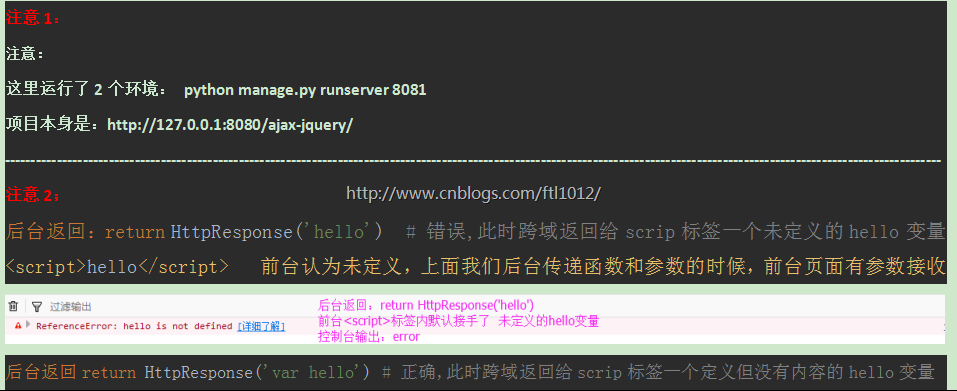
    # return HttpResponse('hello')   # 错误,此时跨域返回给scrip标签一个未定义的hello变量

     # return HttpResponse('var hello')   # 正确,此时跨域返回给scrip标签一个定义但没有内容的hello变量

    return HttpResponse('test("hello")')
页面显示:

动态的创建script的JSonp实例:
settigs.py:
'DIRS': [os.path.join(BASE_DIR, 'templates')],  # 设置templates的路径为Django以前版本

# 'DIRS': [],      # 注释掉该行,此为Django 2.0.1最新版本

# 'django.middleware.csrf.CsrfViewMiddleware',

         ...省略默认配置

STATIC_URL = '/static/'

TEMPLATE_DIRS = (os.path.join(BASE_DIR,  'templates'),)  # 原配置

# 静态资源文件

STATICFILES_DIRS = (os.path.join(BASE_DIR, "statics"),)   # 现添加的配置,这里是元组,注意逗号
templates/ajax_jquery.html
<!DOCTYPE html>

<html lang="en">

<head>

    <meta charset="UTF-8">

</head>

<body>

    <button onclick="f()">submit</button>

</body>

<script src="/static/jquery-3.2.1.js"></script>

{#动态跨站请求内容#}

<script>

    function addScriptTag(src){

     var script = document.createElement('script');

         script.setAttribute("type","text/javascript");

         script.src = src;

         document.body.appendChild(script);

        {# document.body.removeChild(script); #}

    }

    function SayHi(arg){

         alert("Hello " + arg)

    }

    function f(){

         addScriptTag("http://127.0.0.1:8081/jquery_ajax_test/?callback=SayHi")

    }

</script>

</html>
mysite2/urls.py
from django.contrib import admin

from django.urls import path

from blog import views

from django.conf.urls import url

urlpatterns = [

      # Jquery_Ajax

  url(r'ajax-jquery/', views.ajax_jquery),

  # jquery_ajax_test

  url(r'jquery_ajax_test/', views.jquery_ajax_test),

]
views.py
from django.shortcuts import render, HttpResponse

# Jquery --> ajax

def ajax_jquery(request):

    return render(request, 'ajax_jquery.html')

# Jquery --> ajax

def jquery_ajax_test(request):

    print('request.GET', request.GET)

    func = request.GET.get('callbacks', None)

    print('func;', func)

    return HttpResponse("%s('world')" % func)
页面显示:
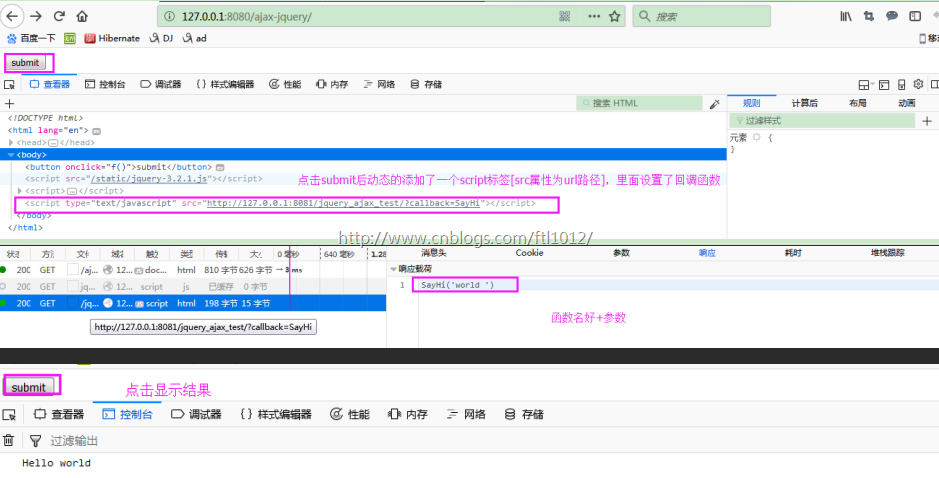
注意:
这里运行了2个环境: python manage.py runserver 8081
项目本身是:http://127.0.0.1:8080/ajax-jquery/
jQuery对JSONP的实现
1. 使用Jquery定义的回调函数名:
$.getJSON("http://127.0.0.1:8081/jquery_ajax_test?callback=?",function(arg){

    console.log("successfully, hello " + arg)

});
注意的是在url的后面必须添加一个callback参数,这样getJSON方法才会知道是用JSONP方式去访问服务,callback后面的那个问号是内部自动生成的一个回调函数名。
2. 使用自定义的函数名:
形式一: 自定义函数 + 调用指定函数 【不推荐】

function SayHi() {

      ...

}

$.ajax({

    url:"http://127.0.0.1:8002/get_byjsonp",

    dataType:"jsonp",  # 要求服务器返回一个JSONP格式的数据,一个函数套着一个数据形式,否则返回原类型

    jsonp: 'callback',

    jsonpCallback:"SayHi"

});

注意:jsonp: 'callback' + jsonpCallback:"SayHi"  --拼凑一个键值对发送过去---->  'callback':'SayHi'

形式二:自定义函数 + 不用指定函数名  【推荐】

$.ajax({

    url:"http://127.0.0.1:8002/get_byjsonp",

    dataType:"jsonp",            //必须有,告诉server,这次访问要的是一个jsonp的结果。

    jsonp: 'callback',          //jQuery帮助随机生成的:callback="wner"

    success:function(data){  # 接收后台传递过来的data数据即可

        alert(data)

    }

});
getJSON之使用JQuery定义的函数名--实例
settigs.py:
'DIRS': [os.path.join(BASE_DIR, 'templates')],  # 设置templates的路径为Django以前版本

# 'DIRS': [],      # 注释掉该行,此为Django 2.0.1最新版本

# 'django.middleware.csrf.CsrfViewMiddleware',

         ...省略默认配置

STATIC_URL = '/static/'

TEMPLATE_DIRS = (os.path.join(BASE_DIR,  'templates'),)  # 原配置

# 静态资源文件

STATICFILES_DIRS = (os.path.join(BASE_DIR, "statics"),)   # 现添加的配置,这里是元组,注意逗号
templates/ajax_jquery.html
<!DOCTYPE html>

<html lang="en">

<head>

    <meta charset="UTF-8">

    <title>Title</title>

</head>

<body>

    <button onclick="f()">submit</button>

</body>

<script src="/static/jquery-3.2.1.js"></script>

{# jQuery对JSONP的实现#}

<script type="text/javascript">

   function f() {

   $.getJSON("http://127.0.0.1:8081/jquery_ajax_test?callback=?",function(arg){

        console.log("successfully, hello " + arg)

    });

}

</script>

</html>
mysite2/urls.py
from django.contrib import admin

from django.urls import path

from blog import views

from django.conf.urls import url

urlpatterns = [

      # Jquery_Ajax

  url(r'ajax-jquery/', views.ajax_jquery),

  # jquery_ajax_test

  url(r'jquery_ajax_test/', views.jquery_ajax_test),

]
views.py
from django.shortcuts import render, HttpResponse

# Jquery --> ajax

def ajax_jquery(request):

    return render(request, 'ajax_jquery.html')

# Jquery --> ajax

def jquery_ajax_test(request):

    print('request.GET', request.GET)

    func = request.GET.get('callback', None)

    print('func;', func)

    return HttpResponse("%s('world 2020')" % func)
页面显示:
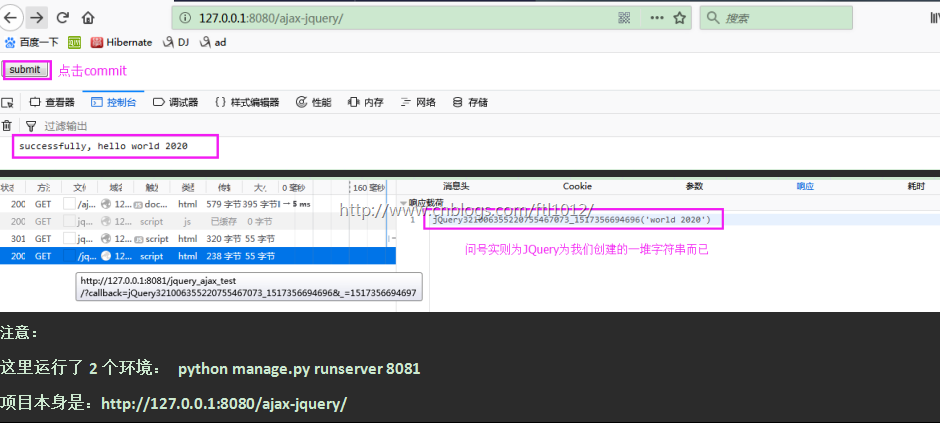
getJSON之使用自定义的函数名--实例:
settigs.py:
'DIRS': [os.path.join(BASE_DIR, 'templates')],  # 设置templates的路径为Django以前版本

# 'DIRS': [],      # 注释掉该行,此为Django 2.0.1最新版本

# 'django.middleware.csrf.CsrfViewMiddleware',

         ...省略默认配置

STATIC_URL = '/static/'

TEMPLATE_DIRS = (os.path.join(BASE_DIR,  'templates'),)  # 原配置

# 静态资源文件

STATICFILES_DIRS = (os.path.join(BASE_DIR, "statics"),)   # 现添加的配置,这里是元组,注意逗号
templates/ajax_jquery.html
<!DOCTYPE html>

<html lang="en">

<head>

    <meta charset="UTF-8">

    <title>Title</title>

</head>

<body>

    <button onclick="f()">submit</button>

</body>

<script src="/static/jquery-3.2.1.js"></script>

{# jQuery对JSONP的实现#}

<script type="text/javascript">

    $.getJSON("http://127.0.0.1:8081/jquery_ajax_test?callback=?",function(arg){

        console.log("successfully, hello " + arg)

    });

</script>

</html>
mysite2/urls.py
from django.contrib import admin

from django.urls import path

from blog import views

from django.conf.urls import url

urlpatterns = [

      # Jquery_Ajax

  url(r'ajax-jquery/', views.ajax_jquery),

  # jquery_ajax_test

  url(r'jquery_ajax_test/', views.jquery_ajax_test),

]
views.py
from django.shortcuts import render, HttpResponse

# Jquery --> ajax

def ajax_jquery(request):

    return render(request, 'ajax_jquery.html')

# Jquery --> ajax

def jquery_ajax_test(request):

    print('request.GET', request.GET)

    func = request.GET.get('callback', None)

    print('func;', func)

    return HttpResponse("%s('world 2020')" % func)
页面显示:
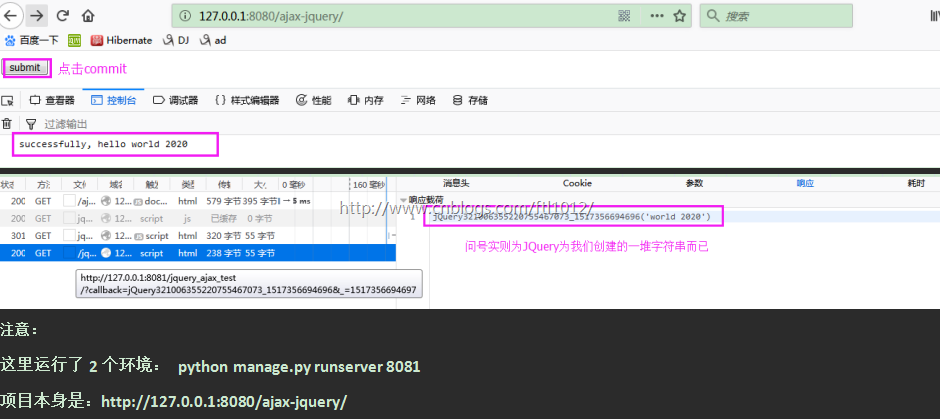
.ajax 跨域请求之指定函数
settigs.py:
'DIRS': [os.path.join(BASE_DIR, 'templates')],  # 设置templates的路径为Django以前版本

# 'DIRS': [],      # 注释掉该行,此为Django 2.0.1最新版本

# 'django.middleware.csrf.CsrfViewMiddleware',

         ...省略默认配置

STATIC_URL = '/static/'

TEMPLATE_DIRS = (os.path.join(BASE_DIR,  'templates'),)  # 原配置

# 静态资源文件

STATICFILES_DIRS = (os.path.join(BASE_DIR, "statics"),)   # 现添加的配置,这里是元组,注意逗号
templates/ajax_jquery.html
<!DOCTYPE html>

<html lang="en">

<head>

    <meta charset="UTF-8">

    <title>Title</title>

</head>

<body>

    <button onclick="f()">submit</button>

</body>

<script src="/static/jquery-3.2.1.js"></script>

{# jQuery对JSONP的实现#}

<script type="text/javascript">

    function SayHi() {

        console.log("hello, json")

    }

    function f() {

        $.ajax({

        url:"http://127.0.0.1:8081/jquery_ajax_test",

        dataType:"jsonp",

        jsonp: 'callback',

        jsonpCallback:"SayHi"

   });

}

</script>

</html>
mysite2/urls.py
from django.contrib import admin

from django.urls import path

from blog import views

from django.conf.urls import url

urlpatterns = [

      # Jquery_Ajax

  url(r'ajax-jquery/', views.ajax_jquery),

  # jquery_ajax_test

  url(r'jquery_ajax_test/', views.jquery_ajax_test),

]
views.py
from django.shortcuts import render, HttpResponse

# Jquery --> ajax

def ajax_jquery(request):

    return render(request, 'ajax_jquery.html')

# Jquery --> ajax

def jquery_ajax_test(request):

    print('request.GET', request.GET)

    func = request.GET.get('callback', None)

    return HttpResponse("%s('world 2020')" % func)   # func为[],因为根本不需要调用,前台已定义好
页面显示:
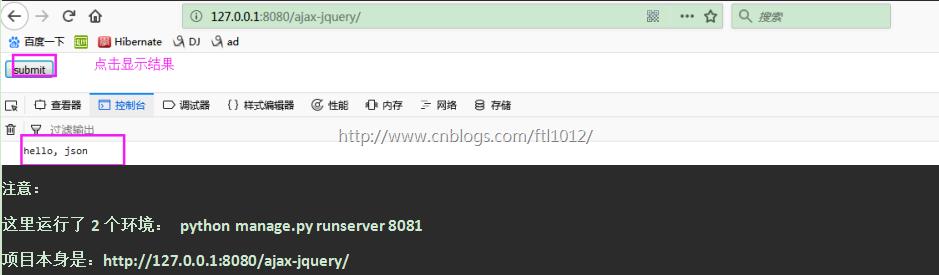
Python学习---JSONP学习180130的更多相关文章
- Python 装饰器学习
Python装饰器学习(九步入门) 这是在Python学习小组上介绍的内容,现学现卖.多练习是好的学习方式. 第一步:最简单的函数,准备附加额外功能 1 2 3 4 5 6 7 8 # -*- c ...
- Requests:Python HTTP Module学习笔记(一)(转)
Requests:Python HTTP Module学习笔记(一) 在学习用python写爬虫的时候用到了Requests这个Http网络库,这个库简单好用并且功能强大,完全可以代替python的标 ...
- 从Theano到Lasagne:基于Python的深度学习的框架和库
从Theano到Lasagne:基于Python的深度学习的框架和库 摘要:最近,深度神经网络以“Deep Dreams”形式在网站中如雨后春笋般出现,或是像谷歌研究原创论文中描述的那样:Incept ...
- Comprehensive learning path – Data Science in Python深入学习路径-使用python数据中学习
http://blog.csdn.net/pipisorry/article/details/44245575 关于怎么学习python,并将python用于数据科学.数据分析.机器学习中的一篇非常好 ...
- (转载)Python装饰器学习
转载出处:http://www.cnblogs.com/rhcad/archive/2011/12/21/2295507.html 这是在Python学习小组上介绍的内容,现学现卖.多练习是好的学习方 ...
- python网络爬虫学习笔记
python网络爬虫学习笔记 By 钟桓 9月 4 2014 更新日期:9月 4 2014 文章文件夹 1. 介绍: 2. 从简单语句中開始: 3. 传送数据给server 4. HTTP头-描写叙述 ...
- Python装饰器学习
Python装饰器学习(九步入门) 这是在Python学习小组上介绍的内容,现学现卖.多练习是好的学习方式. 第一步:最简单的函数,准备附加额外功能 ? 1 2 3 4 5 6 7 8 # -*- ...
- python数据分析入门学习笔记
学习利用python进行数据分析的笔记&下星期二内部交流会要讲的内容,一并分享给大家.博主粗心大意,有什么不对的地方欢迎指正~还有许多尚待完善的地方,待我一边学习一边完善~ 前言:各种和数据分 ...
- Python的基础学习(第二周)
模块初始 sys模块 import sys sys.path #打印环境变量 sys.argv#打印该文件路径 #注意:该文件名字不能跟导入模块名字相同 os模块 import os cmd_res ...
随机推荐
- No result defined for action and result input
今天在编程的时候,我遇到了No result defined for action and result input的错误,这个错误想必大家都有遇到过吧,我今天发了很长时间弄这个错误,我以为我的Act ...
- R语言格式化数字和字符串format函数
数字和字符串可以使用 format()函数的格式化为特定样式. 语法 format()函数的基本语法是: format(x, digits, nsmall,scientific,width,justi ...
- Android Anwendungsprogramm Entwicklung
1.Einführung des Androids 1.1 Grundlage der Anwendung Activity ist eine Spezifische Bespiel von Andr ...
- iOS 性能优化套路
*** 一级套路 *** 使用ARC管理内存- 防止内存泄露- 保证释放掉不再需要的内存,提高性能 在正确的地方使用 reuseIdentifier平时接触的需要考虑重用的视图有UICollect ...
- [转]Android Studio SQLite Database Multiple Tables Example
本文转自:http://instinctcoder.com/android-studio-sqlite-database-multiple-tables-example/ BY TAN WOON HO ...
- Cheatsheet: 2018 01.01 ~ 02.28
JAVA How to Improve the Performance of a Java Application Java Memory Management Writing Java Micros ...
- 7. Reverse Integer 反向输出整数 easy 9. Palindrome Number 判断是否是水仙花数 easy
Given a 32-bit signed integer, reverse digits of an integer. 将32位整数反向输出. Note:Assume we are dealing ...
- Guava限流工具RateLimiter使用
公司最近在推一个限流工具接入,提供的功能有单机限流.集群限流等.想了解一下限流的原理和设计,看了一下wiki里面有提到用了guava的ratelimiter工具,查了一些资料了解了一下 主要的限流算法 ...
- spss C# 二次开发 学习笔记(一)——配置数据源
由于项目的需要,使用Spss进行数据统计分析. Spss对于数据统计分析的功能有多强主要是客户关注的事情,我所主要关注的是,Spss的二次开发有多复杂. 学习的基本思路是: (1)首先了解统计基本知识 ...
- 基于netcore对ElasitSearch客户端NEST查询功能的简单封装NEST.Repository
NEST.Repository A simple encapsulation with NEST client for search data form elasticsearch. github A ...