
Java学习---Map的学习
1. Map
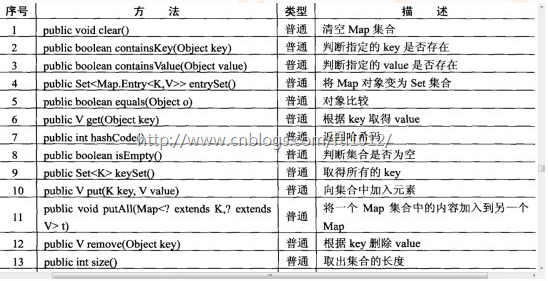
1.1. map中的方法
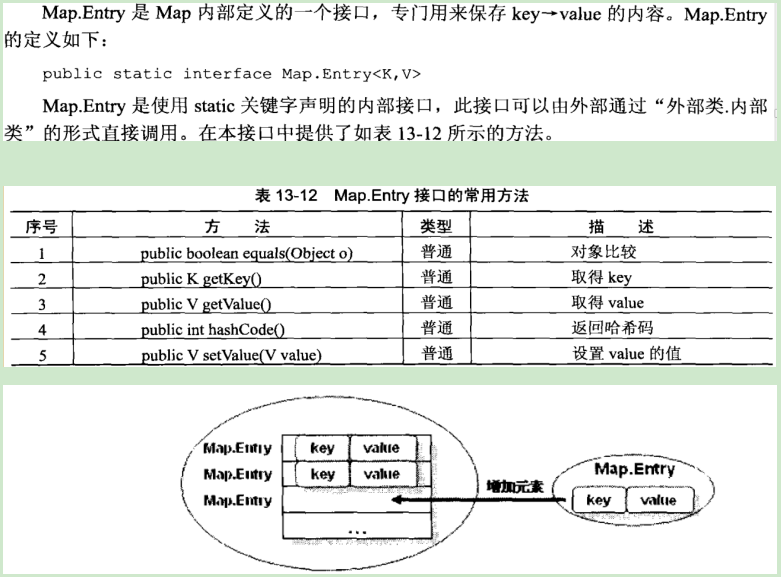
1.2. Map.Entry
对于集合来讲,就是把kye-value的数据保存在了Map.Entry的实例之后,再在Map集合中插入了一个Map.Entry的实例化对象
Map.Entry一般用于输出集合
1.3. Map接口的常用子类

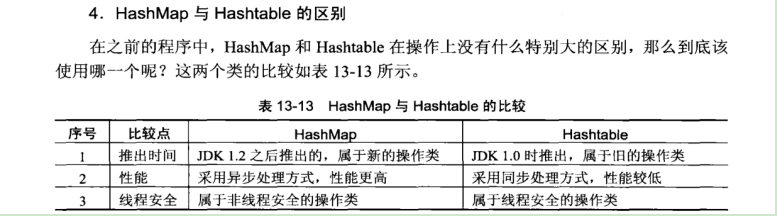
1.4. HashTable和HashMap区别
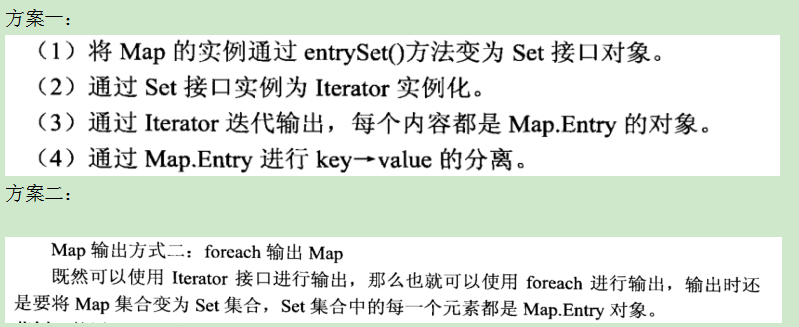
1.5. Map的标准输出(2个)
Map的方法使用集合
 package com.ftl;

 import java.util.*;

 class Person implements Comparable<Person>

 {

     private String name;

     private int age;

     public Person(String name, int age)

     {

         this.age = age;

         this.name = name;

     }

     @Override

     public String toString() {

         return "姓名:" + this.name + ", 年龄:" + this.age ;

     }

     public boolean equals(Object obj)

     {

         boolean flag = true;

         if ( this == obj)

         {

             return flag ;

         }

         if ( !(obj instanceof Person))

         {

             flag =  false;

         }

         Person p = (Person)obj;

             if (this.name.equals(p.name)

                     && this.age == p.age)

             {

                 return flag;

             }

             else

             {

                 flag = false;

             }

         return flag;

     }

     public int hashCode()

     {

         return this.name.hashCode() * this.age;

     }

     @Override

     public int compareTo(Person per) {

         if ( this.age > per.age)

         {

             return 1;

         }

         else if (this.age < per.age)

         {

             return -1;

         }

         else

         {

             return this.name.compareTo(per.name);

         }

     }

 }

 public class HelloFtl {

     public static void main(String[] args) throws Exception {

         // TODO 自动生成的方法存根

         System.out.println("--------------------------------------");

             List<String> allList = null;

             Collection<String> col = null;

             allList = new ArrayList<String>();

             col = new ArrayList<String>();

             allList.add("Hello");

             allList.add("world");

             System.out.println(allList);

         System.out.println("--------------------------------------");

             col.add("HHH");

             col.add("FTL");

             col.add("WM");

             allList.addAll(allList.size(), col);

             System.out.println(allList);

 //        System.out.println("--------------------------------------");

 //            allList.remove(0);

 //            System.out.println(allList);

 //        System.out.println("--------------------------------------");

             allList.removeAll(col);

 //            System.out.println(allList);

         System.out.println("--------------------------------------");

             for(int i = 0; i < allList.size(); i++)

             {

                 System.out.print(allList.get(i) + "、");

             }

         System.out.println();

         System.out.println("--------------------------------------");

             for(int i = allList.size()-1; i >=0 ; i--)

             {

                 System.out.print(allList.get(i) + "、");

             }

             System.out.println();

         System.out.println("--------------------------------------");

             Object[] obj = allList.toArray();

             for(int i = 0; i <obj.length; i++)

             {

                 String temp = (String)obj[i];

                 System.out.print(temp + "、");

             }

         System.out.println();

         System.out.println("--------------------------------------");

         System.out.println(allList.contains("HHH") ? "lv存在": "lv不存在");

         System.out.println(allList.contains("lv的位置是:" + allList.indexOf("HHH")));

         System.out.println(allList.contains("allList否为空" + allList.isEmpty() ));

         System.out.println("--------------------------------------");

         LinkedList<String> link = new LinkedList<String>();

         link.add("A");

         link.add("B");

         link.add("C");

         link.addFirst("Root");

         link.addLast("End");

         System.out.print(link);

         System.out.println();

         System.out.println("Element: " + link.element());

         System.out.println("Pool: " + link.poll());

         System.out.print(link);

         System.out.println();

         System.out.println("Peek: " + link.peek());

         System.out.print(link);

         System.out.println();

         System.out.println("--------------------------------------");

         for ( int i = 0; i < link.size(); i++)

             {

                 System.out.print("Pool: "

                         + "" + link.poll() + "、");

             }

         System.out.println();

         System.out.println("--------------------------------------");

         Set<Person > set = new HashSet<Person>();

 //        Set<Person> set = new TreeSet<Person>();

         set.add(new Person("Root2", 12));

         set.add(new Person("AA", 21));

         set.add(new Person("BB", 22));

         set.add(new Person("CC", 22));

         set.add(new Person("CC", 22));

         set.add(new Person("CC", 12));

         System.out.println( set);

         System.out.println("--------------------------------------");

         System.out.println("Iterator: ");

         Iterator<Person> iter = set.iterator();

         while(iter.hasNext())

         {

             System.out.print(iter.next() + "、");

         }

         System.out.println();

         System.out.println("--------------------------------------");

         while(iter.hasNext())

         {

             Person str = iter.next();

             if ("CC".equals(str))

             {

                 iter.remove();

             }

             else

             {

                 System.out.print(str + "、");

             }

         }

         System.out.println("--------------------------------------");

         Map<String ,String> map = null;

         map = new HashMap<String, String>();

         map.put("04122", "FTL1012");

         map.put("04122076", "FTL");

         map.put("04122078", "1012");

         System.out.println(map.containsKey("04122"));

         System.out.println(map.containsValue("04122"));

         System.out.println("04122 --> " + map.get("04122"));

         System.out.println("--------------------------------------");

         System.out.println("HashMap 中所有的Key:");

         Set<String> sset = map.keySet();

         Iterator<String> it = sset.iterator();

         while (it.hasNext())

         {

             String t = (String) it.next();

             System.out.print( t + "\t");

         }

         System.out.println("--------------------------------------");

         System.out.println("HashMap 中所有的Value:");

         Collection<String> co = map.values();

         Iterator<String> itt = co.iterator();

         while (itt.hasNext())

         {

             String tt = (String) itt.next();

             System.out.print( tt + "\t");

         }

         System.out.println("--------------------------------------");

         map = new TreeMap<String, String>();

         map.put("04122", "FTL1012");

         map.put("04122076", "FTL");

         map.put("04122078", "1012");

         Set<String> keys = map.keySet();

         Iterator<String> key = keys.iterator();

         System.out.println("TreeMap 中所有的Key:");

         while (key.hasNext())

         {

             String tt =   (String)key.next();

             System.out.print( key + "\t");

         }

         System.out.println("--------------------------------------");

         Collection<String> ccc = map.values();

         Iterator<String> ttt = ccc.iterator();

         System.out.println("TreeMap 中所有的Value:");

         while (ttt.hasNext())

         {

             String tt =  (String) ttt.next();

             System.out.print( ttt + "\t");

         }

         System.out.println("--------------------------------------");

     }

 };
Map的标准输出示例:
 package com.ftl;

 import java.util.Collection;

 import java.util.Iterator;

 import java.util.Map;

 import java.util.Map.Entry;

 import java.util.Set;

 import java.util.TreeMap;

 public class HelloFtl {

 public static void main(String[] args){

     Map<String,String>map = new TreeMap<>();

     map.put("Hello", "world");

     map.put("Hello1", "world1");

     map.put("Hello2", "world2");

     map.put("Hello3", "world3");

     String str = map.get("Hello");

     Set<String> set = map.keySet();

     Collection<String> values = map.values();

     Iterator<String> iterator = set.iterator();

     Iterator<String> iter = values.iterator();

     System.out.println("------------------------------------");

     System.out.println("\nforeach方法:");

     for (String s : values) {

     System.out.print(s+"、");

     }

     System.out.println("------------------------------------");

     System.out.println("\nIterator方法:");

     while(iterator.hasNext()){

     System.out.print(iterator.next()+"、");

     }

     System.out.println("------------------------------------");

     System.out.println("\nMap的标准输出_1(Map.entrySet):");

     Set<Entry<String,String>> entrySet = map.entrySet();

     Iterator<Map.Entry<String, String>> it = entrySet.iterator();

     while(it.hasNext()){

     Map.Entry<String, String> next = it.next();

     System.out.print(next.getKey()+"-->: "+next.getValue()+"\n");

     }

     System.out.println("------------------------------------");

     System.out.println("\nMap的标准输出_2(Foreach):");

     for (Map.Entry<String, String> entry : entrySet) {

     System.out.print(entry.getKey()+"-->: "+entry.getValue()+"\n");

     }

     System.out.println("------------------------------------");

     System.out.println("Map.entrySet()大小:"+map.entrySet().size());

     System.out.println("------------------------------------");

 }}
Map的迭代输出
 package test;

 import java.util.Collection;

 import java.util.HashMap;

 import java.util.Iterator;

 import java.util.Map;

 import java.util.Set;

 public class Test

 {

     public static void main(String[] args) throws Exception

     {

         Map<String,String> map = new HashMap();

         map.put("hello", "world");

         map.put("hello1", "world1");

         map.put("hello2", "world2");

         map.put("hello3", "world3");

         map.put("hello4", "world4");

         String str = map.get("hello");

         boolean containsKey = map.containsKey("hello");

         boolean containsValue = map.containsValue("world");

         Set<String> keySet = map.keySet();

         Collection<String> values = map.values();

         Iterator<String> iter = values.iterator();

         while(iter.hasNext()){

             String s = iter.next();

             System.out.println(s+"E");

         }

     }

 }
Java学习---Map的学习的更多相关文章
- Java集合Map接口与Map.Entry学习
Java集合Map接口与Map.Entry学习 Map接口不是Collection接口的继承.Map接口用于维护键/值对(key/value pairs).该接口描述了从不重复的键到值的映射. (1) ...
- sprinbcloud学习之-Failed to bind properties under 'logging.level' to java.util.Map<java.lang.String>
日志报错,提示Failed to bind properties under 'logging.level' to java.util.Map<java.lang.String>, 原因为 ...
- 吴裕雄--天生自然java开发常用类库学习笔记:Map接口使用的注意事项
import java.util.HashMap ; import java.util.Map ; import java.util.Set ; import java.util.Iterator ; ...
- 吴裕雄--天生自然java开发常用类库学习笔记:Map接口
import java.util.HashMap ; import java.util.Map ; public class HashMapDemo01{ public static void mai ...
- JavaSE中Map框架学习笔记
前言:最近几天都在生病,退烧之后身体虚弱.头疼.在床上躺了几天,什么事情都干不了.接下来这段时间,要好好加快进度才好. 前面用了三篇文章的篇幅学习了Collection框架的相关内容,而Map框架相对 ...
- java第5章学习总结
学号20145336 <Java程序设计>第5周学习总结 教材学习内容总结 try catch JVM会先尝试执行try区块中的内容,若发生错误且与catch后面的类型相符,则执行catc ...
- java struts2入门学习---拦截器学习
一.拦截器,拦截器栈 1.拦截器的作用 拦截器本质上和servlet的过滤器是一样的.在struts2中,拦截器能够对Action前后进行拦截,拦截器是一个可插拨的,你可以选择使用拦截器,也可以卸载拦 ...
- 2016-2017-2 20155309南皓芯java第五周学习总结
教材内容总结 这一周学习的进度和前几周比较的话是差不多的,都是学习两章. 异常处理 1.理解异常架构 2.牚握try...catch...finally处理异常的方法 3.会用throw,throws ...
- 20145118 《Java程序设计》第5周学习总结 教材学习内容总结
20145118 <Java程序设计>第5周学习总结 教材学习内容总结 1.Java中所有错误都会被打包成对象,可以通过try.catch语法对错误对象作处理,先执行try,如果出错则跳出 ...
随机推荐
- Ubuntu14.04下Ambari安装搭建部署大数据集群(图文分五大步详解)(博主强烈推荐)
不多说,直接上干货! 写在前面的话 (1) 最近一段时间,因担任我团队实验室的大数据环境集群真实物理机器工作,至此,本人秉持负责.认真和细心的态度,先分别在虚拟机上模拟搭建ambari(基于CentO ...
- hadoop-2.6.0-cdh5.4.5.tar.gz(CDH)的3节点集群搭建(含zookeeper集群安装)
前言 本人呕心沥血所写,经过好一段时间反复锤炼和整理修改.感谢所参考的博友们!同时,欢迎前来查阅赏脸的博友们收藏和转载,附上本人的链接 http://www.cnblogs.com/zlslch/p/ ...
- Spark Launcher
- js读取cookie信息
1. 第一种方式读取cookie信息:用document.cookie.split(“; “)的方式把字符串分割成几个段,然后遍历整个数组 //javascript方法 function getCoo ...
- Struts2 Validate
1.自定义action继承ActionSupport 2.复写validate方法,因为ActionSupport实现了Validate这个借口,而这个借口中定义了validate方法 3.当请求时, ...
- master线程的主循环,后台循环,刷新循环,暂停循环
InnoDB存储引擎的主要工作都是在一个单独的后台线程master thread中完成的.master thread的线程优先级别最高.其内部由几个循环(loop)组成:主循环(loop).后台循环( ...
- 重温js基础部分
临近面试,因此打算回过头来巩固一下js的一些基础部分,同时也是为了记录自己的一些比较薄弱的点. 1.typeof操作符 typeof返回一个基本数据类型,包括number,string,boolean ...
- Android 直接通过JNI访问驱动
package com.yang.jniaccesshardware; import android.os.Bundle; import android.support.v7.app.AppCompa ...
- [转]Web API OData V4 Keys, Composite Keys and Functions Part 11
本文转自:https://damienbod.com/2014/09/12/web-api-odata-v4-keys-composite-keys-and-functions-part-11/ We ...
- 将字符串 “ hello word,你 好 世 界 ! ” 两端空格去掉并且将其中的其他所有空格替换成一个空格 输出结果为“hello word,你 好 世界”
string str = " hello word,你 好 世 界 ! "; string msg = str.Trim(); //去掉首尾空格 //使用split分割字符串,st ...