
004.HAProxy的管理与维护
一 安装
1.1 yum安装
二 常见参数
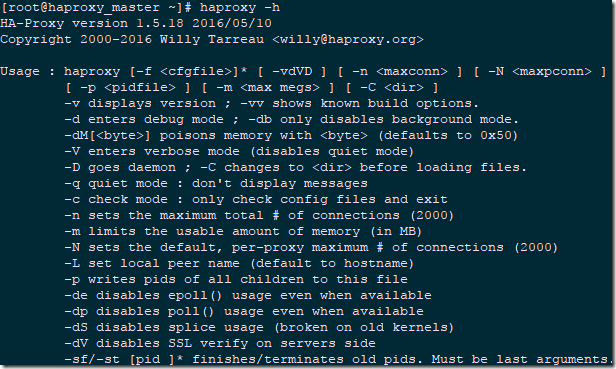
|
参数
|
说明
|
|
-v
|
显示当前版本信息:“-vv”显示已知的创建选项
|
|
-d
|
表示让警察运行在debug模式;-db表示禁用后台模式,让程序在前台运行。
|
|
-D
|
让程序以daemon模式启动,此选项也可以在HAProxy匹配文件中设置。
|
|
-q
|
表示无提示模式,程序运行不输出任何信息。
|
|
-c
|
对HAProxy配置文件进行语法检查,若配置文件错误,会输出对应的错误位置和错误信息。
|
|
-n
|
设置最大并发连接总数。
|
|
-m
|
限制可用的内存大小,以MB为单位。
|
|
-N
|
设置默认的连接数。
|
|
-p
|
设置HAProxy的PID文件路径。
|
|
-de
|
不是用epoll模型。
|
|
-ds
|
不是用speculative epoll。
|
|
-dp
|
不是用poll模型。
|
|
-sf
|
程序启动后向PID文件里的进程发送FINISH信号,此参数需要放在命令行最后。
|
|
-st
|
程序启动后向PID文件里的进程发送TERMINATE信号,此参数需要放在命令行最后。
|
三 HAProxy启动脚本
 #!/bin/sh

 #

 # haproxy

 #

 # chkconfig:   - 85 15

 # description:  HAProxy is a free, very fast and reliable solution \

 #               offering high availability, load balancing, and \

 #               proxying for TCP and  HTTP-based applications

 # processname: haproxy

 # config:      /etc/haproxy/haproxy.cfg

 # pidfile:     /var/run/haproxy.pid

 # Source function library.

 . /etc/rc.d/init.d/functions

 # Source networking configuration.

 . /etc/sysconfig/network

 # Check that networking is up.

 [ "$NETWORKING" = "no" ] && exit 0

 exec="/usr/sbin/haproxy"

 prog=$(basename $exec)

 [ -e /etc/sysconfig/$prog ] && . /etc/sysconfig/$prog

 cfgfile=/etc/haproxy/haproxy.cfg

 pidfile=/var/run/haproxy.pid

 lockfile=/var/lock/subsys/haproxy

 check() {

     $exec -c -V -f $cfgfile $OPTIONS

 }

 start() {

     $exec -c -q -f $cfgfile $OPTIONS

     if [ $? -ne 0 ]; then

         echo "Errors in configuration file, check with $prog check."

         return 1

     fi

     echo -n $"Starting $prog: "

     # start it up here, usually something like "daemon $exec"

     daemon $exec -D -f $cfgfile -p $pidfile $OPTIONS

     retval=$?

     echo

     [ $retval -eq 0 ] && touch $lockfile

     return $retval

 }

 stop() {

     echo -n $"Stopping $prog: "

     # stop it here, often "killproc $prog"

     killproc $prog

     retval=$?

     echo

     [ $retval -eq 0 ] && rm -f $lockfile

     return $retval

 }

 restart() {

     $exec -c -q -f $cfgfile $OPTIONS

     if [ $? -ne 0 ]; then

         echo "Errors in configuration file, check with $prog check."

         return 1

     fi

     stop

     start

 }

 reload() {

     $exec -c -q -f $cfgfile $OPTIONS

     if [ $? -ne 0 ]; then

         echo "Errors in configuration file, check with $prog check."

         return 1

     fi

     echo -n $"Reloading $prog: "

     $exec -D -f $cfgfile -p $pidfile $OPTIONS -sf $(cat $pidfile)

     retval=$?

     echo

     return $retval

 }

 force_reload() {

     restart

 }

 fdr_status() {

     status $prog

 }

 case "$1" in

     start|stop|restart|reload)

         $1

         ;;

     force-reload)

         force_reload

         ;;

     check)

         check

         ;;

     status)

         fdr_status

         ;;

     condrestart|try-restart)

   	[ ! -f $lockfile ] || restart

 	;;

     *)

         echo $"Usage: $0 {start|stop|status|restart|try-restart|reload|force-reload}"

         exit 2

 esac
004.HAProxy的管理与维护的更多相关文章
- 管理和维护RHCS集群
导读 管理和维护RHCS集群是一个非常复杂和繁琐的工作,要维护好一个RHCS集群,必须熟悉RHCS的基本运行原理,在集群管理方面,RHCS提供了两种方式:即Luci图形界面方式和命令行方式,这儿重点讲 ...
- Oracle RAC OCR 的管理与维护
OCR相当于Windows的注册表.对于Windows而言,所有的软件信息,用户,配置,安全等等统统都放到注册表里边.而集群呢,同样如此,所有和集群相关的资源,配置,节点,RAC数据库统统都放在这个仓 ...
- Linux基础三:linux目录结构和目录文件的浏览、管理及维护
目录文件的浏览.管理及维护(一) 1.Linux文件系统的层次结构 1)Linux文件系统的树状结构:在Linux或UNIX操作系统中,所有的文件和目录都被组织成一个以根节点开始的倒置的树状结构. 2 ...
- Oracle RAC管理及维护命令详解
Oracle Clusterware的命令集可以分为以下4种: 节点层:osnodes 网络层:oifcfg 集群层:crsctl, ocrcheck,ocrdump,ocrconfig 应用层:sr ...
- Couchbase IV(管理与维护)
Couchbase IV(管理与维护) 管理 常用命令 Command Description server-list List all servers in a cluster server-inf ...
- Mysql --分区表的管理与维护
改变一个表的分区方案只需使用alter table 加 partition_options 子句就可以了.和创建分区表时的create table语句很像 创建表 CREATE TABLE trb3 ...
- 数据切分——Mysql分区表的管理与维护
关于Mysql分区表的介绍可以参考: http://blog.csdn.net/jhq0113/article/details/44592865 关于Mysql分区表的创建可以参考: http://b ...
- 用手机管理及维护MySQL,Oracle等数据库
现在移动办公的情况及需求越来越多,平时MySQL,Oracle,SQLServer等数据库的管理都要通过客户端工具操作,现在有一款基于web网页的软件:TreeSoft数据库管理系统,在服务器布署一套 ...
- 首先给大家介绍一下数据库project师,数据库project师(Database Engineer),是从事管理和维护数据库管理系统(DBMS)
摘要 MySQL的最初的核心思想,主要是开源.简便易用.其开发可追溯至1985年,而第一个内部发行版本号诞生,已经是1995年. 到1998年,MySQL已经能够支持10中操作系统了.当中就包含win ...
随机推荐
- 【文件】使用word的xml模板生成.doc文件
一.编辑模板 替换地方以变量标记如“案件编号”可写成{caseNo} template.xml 二.准备数据 以HashMap封装数据,原理是替换模板中的变量 三.替换操作 选择输出位置:writeP ...
- mysql 案例 ~ 瘦身mysql系列(1)
一 简介:这一系列我们要进行如何瘦身mysql 二 目的:通过提高CPU利用率和节约成本,降低数据库容量及I/O负载,从而使数据吞吐率得到显著提高 三 方法: 利用innodb的COMPRESSED ...
- sql 中的null值
1.包含null的表达式都为空 select salary*12+nvl(bonus,0) nvl是虑空函数 2. null值永远!=null select * from emp where bo ...
- move_base
1>准备导航所需要的包. a.ros-indigo-gampping :我们不需要修改包内的东西,所以直接安装可执行文件就好了. sudo apt-get install ros-indigo- ...
- ES系列八、正排索Doc Values和Field Data
1.Doc Values 聚合使用一个叫Doc Values的数据结构.Doc Values使聚合更快.更高效且内存友好. Doc Values的存在是因为倒排索引只对某些操作是高效的.倒排索引的优势 ...
- jvm系列三、java GC算法 垃圾收集器
原文链接:http://www.cnblogs.com/ityouknow/p/5614961.html 概述 垃圾收集 Garbage Collection 通常被称为“GC”,它诞生于1960年 ...
- Python3学习笔记24-操作文件和目录
环境变量 在操作系统中定义的环境变量,全部保存在os.environ这个变量中,可以直接查看: import os print(os.environ) 操作文件和目录 操作文件和目录的函数一部分放在o ...
- 005_git专题
一.仓库管理 ➜ gittest git:(master) git config --local user.name "arunguang" ➜ gittest git:(mast ...
- Web Services基础学习(W3C)
1.Web services 使用 XML 来编解码数据,并使用 SOAP 来传输数据 2.基础的 Web Services 平台是 XML + HTTP. Web services 平台的元素: S ...
- 红包外挂史及AccessibilityService分析与防御
最近在做一个有趣的外挂的小玩意,前提我们要了解一个重要的类AccessibilityService 转载请注明出处:https://lizhaoxuan.github.io 前言 提起Accessib ...