
WCF简介-01
WCF Windows Communication Foundation
1.1 新建一个"空白解决方案"
1.2 在解决方案中添加类库IBLL
1.2.1 添加接口IUserInfoService
using System;

using System.Collections.Generic;

using System.Linq;

using System.ServiceModel;

using System.Text;

using System.Threading.Tasks;

namespace IBLL

{

    [ServiceContract]

   public  interface IUserInfo

    {

        [OperationContract]

        int Add(int a ,int b);

    }

}
IUserInfo
1.2.2 添加引用 System.ServiceModel
1.3 添加类库BLL
1.3.1 添加引用IBLL
1.3.2 添加类UserInfoService实现接口IBLL
using IBLL;

using System;

using System.Collections.Generic;

using System.Linq;

using System.Text;

using System.Threading.Tasks;

namespace BLL

{

   public class UserInfoService:IUserInfoService

    {

        public int Add(int a, int b)

        {

            return a + b;

        }

    }

}
UserInfoService
1.4 将WCF布置到控制台程序
1.4.1 添加控制台程序Host
1.4.2 添加引用BLL和IBLL
1.4.3 修改App.config文件
<?xml version="1.0" encoding="utf-8" ?>

<configuration>

  <system.serviceModel>

    <services>

      <service name="BLL.UserInfoService" behaviorConfiguration="behaviorConfiguration">

        <host>

          <baseAddresses>

            <add baseAddress="http://localhost:8000/"/>

          </baseAddresses>

        </host>

        <endpoint address="" binding="basicHttpBinding" contract="IBLL.IUserInfoService"></endpoint>

      </service>

    </services>

    <behaviors>

      <serviceBehaviors>

        <behavior name="behaviorConfiguration">

          <serviceMetadata httpGetEnabled="true"/>

        </behavior>

      </serviceBehaviors>

    </behaviors>

  </system.serviceModel>

</configuration>
App.config
1.4.4 添加引用System.ServiceModel
using System;

using System.Collections.Generic;

using System.Linq;

using System.ServiceModel;

using System.Text;

using System.Threading.Tasks;

namespace Host

{

    class Program

    {

        static void Main(string[] args)

        {

            using (ServiceHost host = new ServiceHost(typeof(BLL.UserInfoService)))

            {

                host.Open();

                Console.WriteLine("服务启动成功!");

                Console.ReadKey();

            }

        }

    }

}
Main
1.4.5 进入debug目录,以管理员身份启动

1.4.6 启动客户端测试服务程序
VS安装目录下F:\Program Files (x86)\Microsoft Visual Studio 12.0\Common7\IDE\WcfTestClient.exe

2 客户端程序
2.1 控制台程序-新建控制台程序
F:\Users\home\Documents\Visual Studio 2013\WCFDemo\Solution1\Client
svcutil http://localhost:8000/?wsdl /o:UserInfoServiceClient.cs

2.2 将生成的文件包括到项目中

2.3 勇output.config文件替换掉App.config文件(删App,将output重命名)
2.4 添加引用BLL,IBLL和ServiceModel
2.5 client 中main方法
using System;

using System.Collections.Generic;

using System.Linq;

using System.Text;

using System.Threading.Tasks;

namespace Client

{

    class Program

    {

        static void Main(string[] args)

        {

            UserInfoServiceClient client = new UserInfoServiceClient();

            int sum = client.Add(,);

            Console.WriteLine(sum);

            Console.ReadKey();

        }

    }

}
Main
2.6 改造自动生成的
//------------------------------------------------------------------------------

// <auto-generated>

//     此代码由工具生成。

//     运行时版本:4.0.30319.42000

//

//     对此文件的更改可能会导致不正确的行为,并且如果

//     重新生成代码,这些更改将会丢失。

// </auto-generated>

//------------------------------------------------------------------------------

//[System.CodeDom.Compiler.GeneratedCodeAttribute("System.ServiceModel", "4.0.0.0")]

//[System.ServiceModel.ServiceContractAttribute(ConfigurationName="IUserInfoService")]

//public interface IUserInfoService

//{

//    [System.ServiceModel.OperationContractAttribute(Action="http://tempuri.org/IUserInfoService/Add", ReplyAction="http://tempuri.org/IUserInfoService/AddResponse")]

//    int Add(int a, int b);

//    [System.ServiceModel.OperationContractAttribute(Action="http://tempuri.org/IUserInfoService/Add", ReplyAction="http://tempuri.org/IUserInfoService/AddResponse")]

//    System.Threading.Tasks.Task<int> AddAsync(int a, int b);

//}

using IBLL;

[System.CodeDom.Compiler.GeneratedCodeAttribute("System.ServiceModel", "4.0.0.0")]

public interface IUserInfoServiceChannel : IUserInfoService, System.ServiceModel.IClientChannel

{

}

[System.Diagnostics.DebuggerStepThroughAttribute()]

[System.CodeDom.Compiler.GeneratedCodeAttribute("System.ServiceModel", "4.0.0.0")]

public partial class UserInfoServiceClient : System.ServiceModel.ClientBase<IUserInfoService>, IUserInfoService

{

    public UserInfoServiceClient()

    {

    }

    public UserInfoServiceClient(string endpointConfigurationName) :

            base(endpointConfigurationName)

    {

    }

    public UserInfoServiceClient(string endpointConfigurationName, string remoteAddress) :

            base(endpointConfigurationName, remoteAddress)

    {

    }

    public UserInfoServiceClient(string endpointConfigurationName, System.ServiceModel.EndpointAddress remoteAddress) :

            base(endpointConfigurationName, remoteAddress)

    {

    }

    public UserInfoServiceClient(System.ServiceModel.Channels.Binding binding, System.ServiceModel.EndpointAddress remoteAddress) :

            base(binding, remoteAddress)

    {

    }

    public int Add(int a, int b)

    {

        return base.Channel.Add(a, b);

    }

    //public System.Threading.Tasks.Task<int> AddAsync(int a, int b)

    //{

    //    return base.Channel.AddAsync(a, b);

    //}

}
UserInfoServiceClient
2.7 分别启动两个exe文件
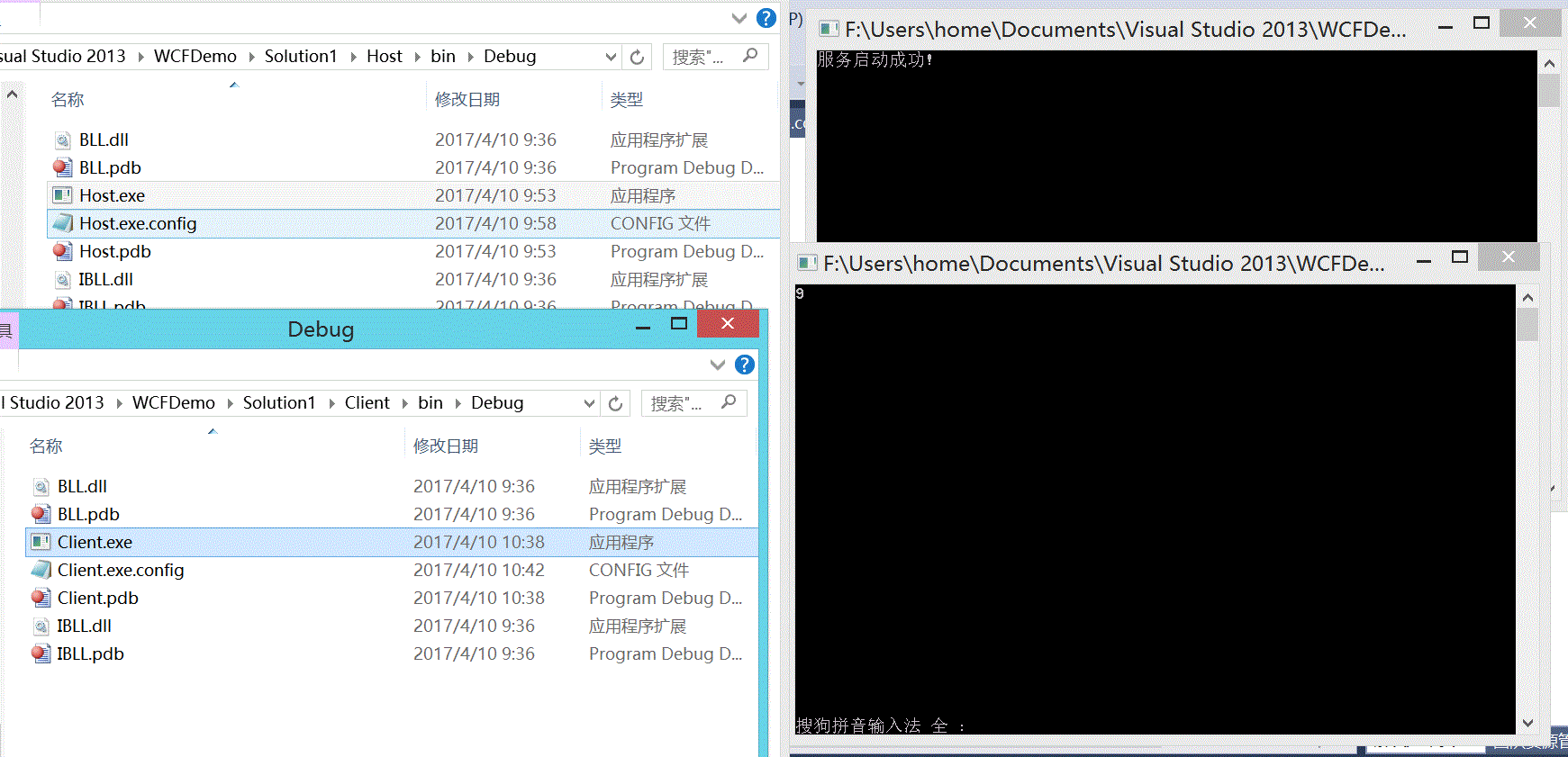
3 我们也可以自己建立一个客户端
3.1 创键控制台应用程序
3.2 添加服务引用

3.3 运行结果

WCF简介-01的更多相关文章
- WCF学习——WCF简介(三)
一.WCF简介 1.什么是WCF? WCF的全称是:Windows Communication Foundation.从本质上来说,它是一套软件开发包,是微软公司推出的符合SOA思想的技术框架. 2. ...
- 第1章WCF简介(WCF全面解析读书笔记2)
第1章 WCF简介 面向服务架构(SOA)是近年来备受业界关注的一个主题,它代表了软件架构的一种方向.顺应SOA发展潮流,微软于2006年年底推出了一种新的分布式通信框架Windows Communi ...
- WCF全面解析第一章 WCF 简介
1.WCF中的 "A","B","C" 介绍 我们先看个生活中的例子,某一天,公司的领导让你去送一份合同文件,送文件的过程你可以选择的交通方 ...
- WCF简介
WCF(Windows communication Foundation),顾名思义,就是在windows平台下解决通信的基础框架.WCF做为.NET Framework 3.0的一个组件发布出来的, ...
- WCF学习笔记(一):WCF简介
转:http://www.cnblogs.com/wengyuli/archive/2009/11/04/1595693.html MSDN上关于WCF给出如下注解: 设计 Windows Commu ...
- wcf例子01
一.概述 Windows Communication Foundation(WCF)是由微软发展的一组数据通信的应用程序开发接口,可以翻译为Windows通讯接口,它是.NET框架的一部分.由 .NE ...
- mysql高可用架构 -> MHA简介-01
作者简介 松信嘉範:MySQL/Linux专家2001年索尼公司入职2001年开始使用oracle2004年开始使用MySQL2006年9月-2010年8月MySQL从事顾问2010年-2012年 D ...
- Redis系列---redis简介01
一. 本章我们将用简短的几句话来帮助你快速的了解什么是redis,初学者不必深究 1 Redis简介 Remote Dictionary Server(Redis)是一个开源的使用ANSI C语言编写 ...
- 小步前进之WCF简介
WCF 前言 什么是WCF? 契约 合约 前言 在 .NET Framework2.0 以及前版本中,微软发展了 Web Service..NET Remoting 等通信支持. 如果要进行通信,对于 ...
随机推荐
- 学习windows编程 day3 之窗口绘画一:点线绘制
#include <windows.h> #include <math.h> LRESULT CALLBACK WndProc(HWND hwnd, UINT message, ...
- JS 中函数名后面加与不加括号的区别
a.onmouseover = fn1; a.onmouseout = fn2; function fn1(){ div.className = "erweima show"; } ...
- Oracle记录-开启与关闭数据库
1.配置tnsnames.ora/listener.ora #cd /usr/oracle/oracle/product/11.2.0/db_1/network/admin ---切换到安装目录 #v ...
- TCP和UDP的区别和优缺点
1.TCP与UDP区别总结: 1.TCP面向连接(如打电话要先拨号建立连接);UDP是无连接的,即发送数据之前不需要建立连接2.TCP提供可靠的服务.也就是说,通过TCP连接传送的数据,无差错,不丢失 ...
- myeclispe 一直运行debug问题
window->preferences->Myeclipse->Servers->Tomcat 然后找到你的相应的Tomcat服务器的版本,选中然后展开其下面的子菜单会发现有个 ...
- CF28D Don't fear, DravDe is kind
传送门 题意:\(n\)个位置,每个位置有价值\(v_i\)和重量\(p_i\),要选出一些位置,如果要选位置\(i\),那么前面选的重量之和要为\(l_i\),后面选的重量之和要为\(r_i\),求 ...
- kali linux 安装QQ
之前在kali上尝试过Wineqq2012,显示版本过低,放弃了.最近听说crossover比wine的支持要好,再次尝试. 1.下载 https://www.codeweavers.com/ 选择d ...
- SpringBoot集成SpringCloud
(1).新建一个普通Maven项目,用于存放一些公共服务接口及公共的Bean等. 项目结构: 公共Bean: package cn.coreqi.entities; import java.io.Se ...
- RNN(1) ------ “理解LSTM”(转载)
原文链接:http://www.jianshu.com/p/9dc9f41f0b29 Recurrent Neural Networks 人类并不是每时每刻都从一片空白的大脑开始他们的思考.在你阅读这 ...
- ARMV8 datasheet学习笔记4:AArch64系统级体系结构之Self-hosted debug
1. 前言 2. 关于self-hosted debug Debugger调试器 是操作系统或系统软件的一部分,它会处理debug exception或修改debug system register, ...