
struts2实现XML异步交互
异步交互,在不用重新提交整个页面的情况下可以实现页面局部信息与服务器的交互。在编写异步交互时需要用到一个架包:dom4j,下载地址为:https://dom4j.github.io/
下面通过例子说明struts异步交互的实现过程.
1、首先看一下文件目录
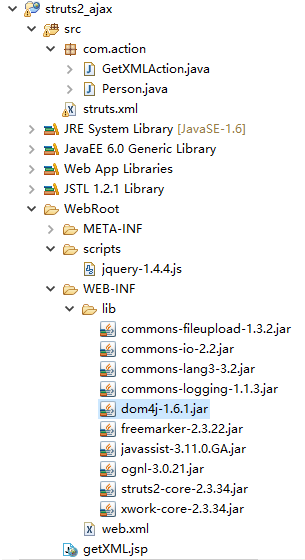
2、代码实现:
1) 首先创建一个Person类,该类用来映射个人信息
 package com.action;

 public class Person {

     private int id;

     private String name;

     private int age;

     private String address;

     public int getId() {

         return id;

     }

     public void setId(int id) {

         this.id = id;

     }

     public String getName() {

         return name;

     }

     public void setName(String name) {

         this.name = name;

     }

     public int getAge() {

         return age;

     }

     public void setAge(int age) {

         this.age = age;

     }

     public String getAddress() {

         return address;

     }

     public void setAddress(String address) {

         this.address = address;

     }

 }
2)GetXMLAction类
 package com.action;

 import java.io.PrintWriter;

 import javax.servlet.http.HttpServletResponse;

 import org.apache.struts2.ServletActionContext;

 import org.dom4j.*;

 import org.dom4j.io.OutputFormat;

 import org.dom4j.io.XMLWriter;

 import com.opensymphony.xwork2.ActionSupport;

 @SuppressWarnings("serial")

 public class GetXMLAction extends ActionSupport {

     private String name;

     public String getName() {

         return name;

     }

     public void setName(String name) {

         this.name = name;

     }

     @Override

     public String execute() throws Exception {

         //zhangsan

         Person person = new Person();

         person.setId(1);

         person.setName("zhangsan");

         person.setAge(30);

         person.setAddress("beijing");

         //lisi

         Person person2 = new Person();

         person2.setId(2);

         person2.setName("lisi");

         person2.setAge(50);

         person2.setAddress("tianjin");

         //创建一个Document对象

         Document document = DocumentHelper.createDocument();

         //创建根元素

         Element rootElement = document.addElement("persons");

         //增加注释

         rootElement.addComment("This is comment");

         //向根元素中添加子元素

         Element e = rootElement.addElement("person");

         Element idElement = e.addElement("id");

         Element nameElement = e.addElement("name");

         Element ageElement = e.addElement("age");

         Element addressElement = e.addElement("address");

         if("zhangsan".equals(name)){

             idElement.setText(person.getId() + "");

             nameElement.setText(person.getName()+"");

             ageElement.setText(person.getAge()+"");

             addressElement.setText(person.getAddress()+"");

         }else{

             idElement.setText(person2.getId() + "");

             nameElement.setText(person2.getName()+"");

             ageElement.setText(person2.getAge()+"");

             addressElement.setText(person2.getAddress()+"");

         }

         //获取HttpServletResponse对象

         HttpServletResponse response = ServletActionContext.getResponse();

         //设置文档内容类型

         response.setContentType("text/xml;charset=GB18030");

         //设置http响应头禁用浏览器的缓冲

         response.setHeader("cache-control", "no-cache");

         PrintWriter out = response.getWriter();

         //格式化xml

         OutputFormat format = OutputFormat.createPrettyPrint();

         //指定编码方式编码

         format.setEncoding("GB18030");

         XMLWriter writer = new XMLWriter(out,format);

         writer.write(document);

         out.flush();

         out.close();

         return null;

     }

 }
3) getXML.jsp
 <%@ page language="java" import="java.util.*" pageEncoding="GB18030"%>

 <%

 String path = request.getContextPath();

 String basePath = request.getScheme()+"://"+request.getServerName()+":"+request.getServerPort()+path+"/";

 %>

 <!DOCTYPE HTML PUBLIC "-//W3C//DTD HTML 4.01 Transitional//EN">

 <html>

   <head>

     <base href="<%=basePath%>">

     <title>My JSP 'getXML.jsp' starting page</title>

     <script type="text/javascript" src="scripts/jquery-1.4.4.js"></script>

     <meta http-equiv="pragma" content="no-cache">

     <meta http-equiv="cache-control" content="no-cache">

     <meta http-equiv="expires" content="0">

     <meta http-equiv="keywords" content="keyword1,keyword2,keyword3">

     <meta http-equiv="description" content="This is my page">

     <!--

     <link rel="stylesheet" type="text/css" href="styles.css">

     -->

     <script type="text/javascript">

         function getInfo(){

             $.post("getXMLAction.action",

             {

                 name:$("#name").val()

             },function(returnedData,status)

             {

                 var id= $(returnedData).find("id").text();

                 var name = $(returnedData).find("name").text();

                 var age = $(returnedData).find("age").text();

                 var address = $(returnedData).find("address").text();

                 var html = "<table width='60%' border='1' align='center'><tr><th>id</th><th>name</th><th>age</th><th>address</th><tr align='center'><td>"+id+"</td><td>"+name+"</td><td>"+age+"</td><td>"+address+"</td></tr></tr></table>";

                 $("#theBody table:eq(0)").remove();//找到id为theBody的body中的第0个table(即第一个table表)将其的内容删除掉,防止出现累加

                 $("#theBody").append(html);//将构建的HTML加入到id为theBody的body中

             });

         }

     </script>

   </head>

   <body id="theBody">

     <select id="name">

         <option value="zhangsan">zhangsan</option>

         <option value="lisi">lisi</option>

     </select>

     <input type="button" value="get information" onclick="getInfo();">

   </body>

 </html>
4) struts.xml中的配置信息
 <?xml version="1.0" encoding="UTF-8"?>

 <!DOCTYPE struts PUBLIC

     "-//Apache Software Foundation//DTD Struts Configuration 2.0//EN"

     "http://struts.apache.org/dtds/struts-2.3.dtd">

 <struts>

     <!-- 设置Struts运行模式为开发者模式,如果value为false则关闭开发者模式 -->

     <constant name="struts2.devMode" value="true"></constant>

     <package name="struts2_ajax" namespace="/" extends="struts-default">

         <action name="getXMLAction" class="com.action.GetXMLAction">

         </action>

     </package>

 </struts>
web.xml总的配置
 <?xml version="1.0" encoding="UTF-8"?>

 <web-app xmlns:xsi="http://www.w3.org/2001/XMLSchema-instance" xmlns="http://java.sun.com/xml/ns/javaee" xsi:schemaLocation="http://java.sun.com/xml/ns/javaee http://java.sun.com/xml/ns/javaee/web-app_3_0.xsd" id="WebApp_ID" version="3.0">

   <display-name>struts2_ajax</display-name>

   <welcome-file-list>

     <welcome-file>index.jsp</welcome-file>

   </welcome-file-list>

   <filter>

       <filter-name>testStruts2</filter-name>

       <filter-class>org.apache.struts2.dispatcher.ng.filter.StrutsPrepareAndExecuteFilter</filter-class>

   </filter>

   <filter-mapping>

       <filter-name>testStruts2</filter-name>

       <url-pattern>/*</url-pattern>

   </filter-mapping>

 </web-app>
运行结果:


struts2实现XML异步交互的更多相关文章
- struts2实现jQuery的异步交互
struts2中jQuery的异步交互有两种方式: 1)是利用构造字符串的方式来实现: 使用该方法主要是在服务器端根据前端的请求,返回一个字符串信息,然后前端的jQuery通过解析该字符串信息得到对应 ...
- AJAX 异步交互基本总结
AJAX (Asynchronous JavaScript and Xml) 直译中文 - javascript和XML的异步 同步与异步的区别: 同步交互 执行速度相对比较慢 响应的是完整的HTML ...
- spring mvc 和ajax异步交互完整实例
Spring MVC 异步交互demo: 1.jsp页面: <%@ page language="java" contentType="text/html; cha ...
- Ajax异步交互基础
1. ajax是什么? * asynchronous javascript and xml:异步的js和xml * 它能使用js访问服务器,而且是异步访问! * 服务器给客户端的响应一般是整个页面,一 ...
- AsyncTask异步交互和httpurlconnection结合使用
//网络请求数据 package com.baidu.myutils; import java.io.BufferedReader; import java.io.InputStreamReader; ...
- 实现AJAX的异步交互的步骤
<input type="button" value="异步请求"id="btn"> <script> 实现ajax ...
- ajax_异步交互-get/post方式
Ajax的异步交互: 客户端向服务器端发送请求,直到服务器端进行响应,这个过程中,用户可以做任何其他事情(不等). 实现Ajax的异步交互步骤(举例说明): get方式: 1.创建XMLHttpReq ...
- 基于SOAP的xml网络交互心得
感谢小二同学将遇到的问题分享给我们,再此给以掌声.如果看不懂下面文章的建议查找一下HTTP协议的文艺,对HTTP协议要有个概念. XML网络交互心得 目录 一. xml解析 1.根路径下 2. ...
- struts2+ajax实现异步验证实现
由于老师布置作业的需要,在添加管理员的时候,要实现验证添加的管理员的用户名是否在数据库中已经存在,然后再客户端给用户一个提示.我首先想到的就是利用ajax实现异步验证技术,由于利用的ssh框架,所以在 ...
随机推荐
- 函数调用堆栈及活动记录 堆栈溢出 stack overflow
小结: 1.当被调函数返回主调函数时,被调函数的 活动记录-activation record / 堆栈帧-stack frame 被 弹出-popping 程序执行栈-program executi ...
- 运行或开发.NET Core 的先决条件(支持项目、依赖项)
Windows 上 .NET Core 的先决条件 https://docs.microsoft.com/zh-cn/dotnet/core/windows-prerequisites?tabs=ne ...
- cruise-control
https://github.com/linkedin/cruise-control https://engineering.linkedin.com/blog/2017/08/open-sourci ...
- 深度剖析fork()的原理及用法
我们都知道通过fork()系统调用我们可以创建一个和当前进程印象一样的新进程.我们通常将新进程称为子进程,而当前进程称为父进程.而子进程继承了父进程的整个地址空间,其中包括了进程上下文,堆栈地址,内存 ...
- 如何使用List<HashMap<String, String>>详细讲解
场景:要循环界面Table数据源与导出Excel数据源作对比. 说明: List<HashMap<String,String>> List中每一项都是一个HashMap Ha ...
- oracle中not in 和 in 的替代写法
-- not in 的替代写法select col from table1 where col not in(select col from table2); select col,table2.co ...
- MySQL模拟Oralce闪回操作
在前面的文章中我们介绍了MySQL误操作后数据恢复(update,delete忘加where条件),大概操作是通过sed命令把binlog中相关SQL误操作给逆向回来,然后导入SQL文件来恢复错误操作 ...
- vs2015智能提示英文改为中文
vs2015智能提示英文改为中文 C:\Program Files (x86)\Reference Assemblies\Microsoft\Framework\.NETFramework 进入 \v ...
- jquery的widget源代码剖析
dialog_obj(别名): Widget_obj(别名): 调用widget方法 $.widget("ui.dialog",dialog_obj); // jquery.ui. ...
- Python3学习之路~2.10 修改haproxy配置文件
需求: .查 输入:www.oldboy.org 获取当前backend下的所有记录 .新建 输入: arg = { 'bakend': 'www.oldboy.org', 'record':{ 's ...