
go https json
好吧,再来一个看起来高档点的吧
自从知道 Go有本地调用后,我就回到windows了
哈哈,以下内容,均在win10下搞定
预备:先做两个文件,服务器端的私钥KEY和公钥证书
1. openssl genrsa -out server.key 2048
2. openssl req -new -x509 -key server.key -out server.crt -days 3650
3.现在你应该有了server.key和server.crt两个文件,因为是自签名证书,所以,把server.crt安装到浏览器受信任证书存储区(这个我不多说了,一堆知识,大家自己去百度吧)
一 GO https server
//https.go
package main
import (
"fmt"
"net/http"
"encoding/json"
)
type MyData struct {
Name string `json:"item"`
Other float32 `json:"amount"`
}
func handler(w http.ResponseWriter, r *http.Request) {
var detail MyData
detail.Name = "1"
detail.Other = 2
body, err := json.Marshal(detail)
if err != nil {
panic(err.Error())
}
fmt.Fprintf(w, string(body))
}
func main() {
http.HandleFunc("/", handler)
fmt.Println("http server listens at 8086")
http.ListenAndServeTLS(":8086", "server.crt", "server.key", nil)
}
//启动服务
go run https.go
二 Go https client
//https -client.go
package main
import (
"fmt"
"io/ioutil"
"net/http"
"github.com/bitly/go-simplejson"
"crypto/tls"
"encoding/json"
)
func main() {
tr := &http.Transport{
TLSClientConfig: &tls.Config{InsecureSkipVerify: true},
}
client := &http.Client{Transport: tr}
resp, err := client.Get("https://localhost:8086")
//resp, err := http.Get("https://localhost:8086")
if err != nil {
fmt.Println("error:", err)
return
}
defer resp.Body.Close()
body, err := ioutil.ReadAll(resp.Body)
fmt.Println(string(body))
//decode json
js, err := simplejson.NewJson(body)
if err != nil {
panic(err.Error())
}
fmt.Printf("%T:%v\n",js,js)
type MyData struct {
Name string `json:"item"`
Other float32 `json:"amount"`
}
var res MyData
err = json.Unmarshal([]byte(body), &res)
fmt.Println(res)
fmt.Println(res.Name, res.Other)
}
//运行客户端
go run https-client.go
//结果
{"item":"1","amount":2}
*simplejson.Json:&{map[item:1 amount:2]}
{1 2}
1 2
三 browser client
//Microsoft Edge
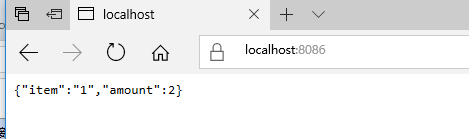
Finally:
嗯,很好,很强大,可以考虑搞点儿RESTful 服务啦
你呢?
说你呢!
你想干吗?
多说一句:Go 做https客户端,响应速度明显慢于Edge。不知道为啥。还好,一般都用浏览器来干活嘛!无关紧要的啦。哈哈
go https json的更多相关文章
- VSCode package.json warning: Problems loading reference 'https://json.schemastore.org/package'...
报错内容 Problems loading reference 'https://json.schemastore.org/package': Unable to load schema from ' ...
- 后台web请求代码(含https,json提交)
后台web请求 namespace XXXX.Utilites { using System; using System.Collections.Generic; using System.IO; u ...
- JSON资料汇总
网络入门学习资料 1.W3School的JSON教程:http://www.w3school.com.cn/json/index.asp 2.Introducing JSON[介绍JSON]:http ...
- json.net json转换神器
json.nethttps://json.codeplex.com/ api documenthttp://james.newtonking.com/json/help/index.html#
- ballerina 学习二十 http/https
提供http && https server && client 访问功能 client endpoint 说白了就是http client 参考代码 import b ...
- Linq to JSON/Json.NET
Can I LINQ a JSON? http://stackoverflow.com/questions/18758361/can-i-linq-a-json Json.NET https://js ...
- 什么是json? 什么是xml?JSON与XML的区别比较
JSON(JavaScript Object Notation) 是一种轻量级的数据交换格式.它使得人们很容易的进行阅读和编写.同时也方便了机器进行解析和生成.它是基于 JavaScript Prog ...
- JavaScript 获得客户端IP
Below are all the free active IP lookup services I could find and the information they return. If yo ...
- es的返回数据结构
ES即简单又复杂,你可以快速的实现全文检索,又需要了解复杂的REST API.本篇就通过一些简单的搜索命令,帮助你理解ES的相关应用.虽然不能让你理解ES的原理设计,但是可以帮助你理解ES,探寻更多的 ...
随机推荐
- ARM Linux Oops使用小结(转)
出现Oops消息的大部分错误时因为对NULL指针取值或者因为用了其他不正确的指针值. Oops如何产生的解释如下: 由于处理器使用的地址几乎都是虚拟地址,这些地址通过一个被称为“页表”的结构被 ...
- F#周报2018年第49期
新闻 ML.NET 0.8--Machine Learning for .NET .NET Core 3预览 1以及开源Windows桌面框架 .NET Core 2.2 尝试C# 8.0 .NET ...
- apache中端口与目录的关系
apache中,如果设置了监听了端口而没有配置对应的虚拟目录,则访问时会指向<Directory >节所指向的目录.
- POJ 1179 - Polygon - [区间DP]
题目链接:http://poj.org/problem?id=1179 Time Limit: 1000MS Memory Limit: 10000K Description Polygon is a ...
- Maven Tomcat Plugin
<!-- 本地Tomcat --> <dependency> <groupId>org.apache.tomcat.maven</groupId> &l ...
- Altium Designer 绘图流程及快捷键
1.Shift+Ctrl+g 设置栅格捕捉大小 2.Q 切换单位 3.E+N +点击字体 改变字体大小 4.自动布线前需在Mechanical 层和keepout层添加一个边框 5.打过孔实现双面走线 ...
- python之路(转载)
Python之路 Python生产环境部署(fastcgi,uwsgi) Django 缓存.队列(Memcached.redis.RabbitMQ) Python(九) Python ...
- Excel--数据对比方法
1.函数对比: 适用于两列数据对比 =IF(EXACT(A2,B2)=TRUE,"相同","不同") 2.快捷键对比: 适用于少数数据对比 选中对比两列数据,快 ...
- 【Python爬虫】正则表达式与re模块
正则表达式与re模块 阅读目录 在线正则表达式测试 常见匹配模式 re.match re.search re.findall re.compile 实战练习 在线正则表达式测试 http://tool ...
- caffe中在某一层获得迭代次数的方法以及caffe编译时报错 error: 'to_string' is not a member of 'std'解决方法
https://stackoverflow.com/questions/38369565/how-to-get-learning-rate-or-iteration-times-when-define ...