
mysql命令大全用户管理相关命令


 这个参数了~
注意:当权限是ALL PRIVILEGES时,执行revoke select on test.* from zx_root1@'%';会报错

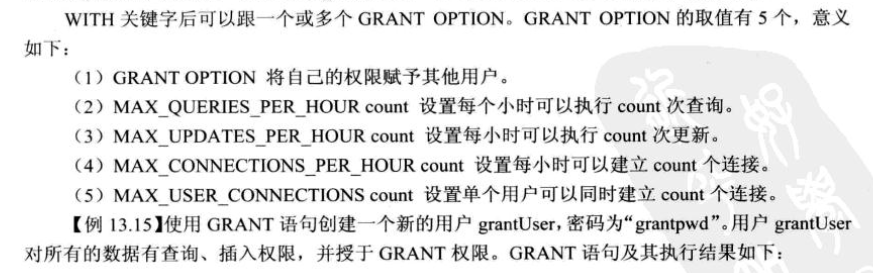
mysql> grant 权限1,权限2,…权限n on 数据库名称.表名称 to 用户名@用户地址 identified by ‘连接口令’;
权限1,权限2,…权限n代表select,insert,update,delete,create,drop,index,alter,grant,references,reload,shutdown,process,file等14个权限。
当权限1,权限2,…权限n被all privileges或者all代替,表示赋予用户全部权限。
当数据库名称.表名称被*.*代替,表示赋予用户操作服务器上所有数据库所有表的权限。
用户地址可以是localhost,也可以是ip地址、机器名字、域名。也可以用’%'表示从任何地址连接。
‘连接口令’不能为空,否则创建失败。
例如:
mysql>grant select,insert,update,delete,create,drop on vtdc.employee to joe@10.163.225.87 identified by ‘123′;
给来自10.163.225.87的用户joe分配可对数据库vtdc的employee表进行select,insert,update,delete,create,drop等操作的权限,并设定口令为123。
mysql>grant all privileges on vtdc.* to joe@10.163.225.87 identified by ‘123′;
给来自10.163.225.87的用户joe分配可对数据库vtdc所有表进行所有操作的权限,并设定口令为123。
mysql>grant all privileges on *.* to joe@10.163.225.87 identified by ‘123′;
给来自10.163.225.87的用户joe分配可对所有数据库的所有表进行所有操作的权限,并设定口令为123。
mysql>grant all privileges on *.* to joe@localhost identified by ‘123′;
给本机用户joe分配可对所有数据库的所有表进行所有操作的权限,并设定口令为123。
grant 普通数据用户,查询、插入、更新、删除 数据库中所有表数据的权利。
grant select on testdb.* to common_user@’%’
grant insert on testdb.* to common_user@’%’
grant update on testdb.* to common_user@’%’
grant delete on testdb.* to common_user@’%’
或者,用一条 MySQL 命令来替代:
grant select, insert, update, delete on testdb.* to common_user@’%’
9>.grant 数据库开发人员,创建表、索引、视图、存储过程、函数。。。等权限。
grant 创建、修改、删除 MySQL 数据表结构权限。
grant create on testdb.* to developer@’192.168.0.%’;
grant alter on testdb.* to developer@’192.168.0.%’;
grant drop on testdb.* to developer@’192.168.0.%’;
grant 操作 MySQL 外键权限。
grant references on testdb.* to developer@’192.168.0.%’;
grant 操作 MySQL 临时表权限。
grant create temporary tables on testdb.* to developer@’192.168.0.%’;
grant 操作 MySQL 索引权限。
grant index on testdb.* to developer@’192.168.0.%’;
grant 操作 MySQL 视图、查看视图源代码 权限。
grant create view on testdb.* to developer@’192.168.0.%’;
grant show view on testdb.* to developer@’192.168.0.%’;
grant 操作 MySQL 存储过程、函数 权限。
grant create routine on testdb.* to developer@’192.168.0.%’; -- now, can show procedure status
grant alter routine on testdb.* to developer@’192.168.0.%’; -- now, you can drop a procedure
grant execute on testdb.* to developer@’192.168.0.%’;
10>.grant 普通 DBA 管理某个 MySQL 数据库的权限。
grant all privileges on testdb to dba@’localhost’
其中,关键字 “privileges” 可以省略。
11>.grant 高级 DBA 管理 MySQL 中所有数据库的权限。
grant all on *.* to dba@’localhost’
12>.MySQL grant 权限,分别可以作用在多个层次上。
1. grant 作用在整个 MySQL 服务器上:
grant select on *.* to dba@localhost; -- dba 可以查询 MySQL 中所有数据库中的表。
grant all on *.* to dba@localhost; -- dba 可以管理 MySQL 中的所有数据库
2. grant 作用在单个数据库上:
grant select on testdb.* to dba@localhost; -- dba 可以查询 testdb 中的表。
3. grant 作用在单个数据表上:
grant select, insert, update, delete on testdb.orders to dba@localhost;
4. grant 作用在表中的列上:
grant select(id, se, rank) on testdb.apache_log to dba@localhost;
5. grant 作用在存储过程、函数上:
grant execute on procedure testdb.pr_add to ’dba’@’localhost’
grant execute on function testdb.fn_add to ’dba’@’localhost’
注意:修改完权限以后 一定要刷新服务,或者重启服务,刷新服务用:FLUSH PRIVILEGES。
| 权限 | 说明 |
| all | |
| alter | |
| alter routine | 使用alter procedure 和drop procedure |
| create | |
| create routine | 使用create procedure |
| create temporary tables | 使用create temporary table |
| create user | |
| create view | |
| delete | |
| drop | |
| execute | 使用call和存储过程 |
| file | 使用select into outfile 和load data infile |
| grant option | 可以使用grant和revoke |
| index | 可以使用create index 和drop index |
| insert | |
| lock tables | 锁表 |
| process | 使用show full processlist |
| reload | 使用flush |
| replication client | 服务器位置访问 |
| replocation slave | 由复制从属使用 |
| select | |
| show databases | |
| show view |
| shutdown | 使用mysqladmin shutdown 来关闭mysql |
| super | |
| update | |
| usage | 无访问权限 |
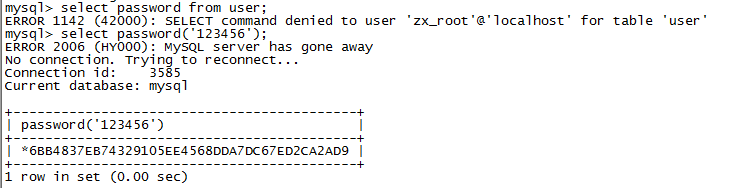
grant select on *.* to 'zx_root'@'%' identified by '6BB4837EB74329105EE4568DDA7DC67ED2CA2AD9';
mysql命令大全用户管理相关命令的更多相关文章
- centos的用户管理相关命令所在的包
用户管理命令是指:useradd userdel groupadd groupdel 这些 这些命令出自一个叫 shadow-utils 的包. 对于配置文件 /etc/shadow ,则来自一个叫 ...
- Linux用户和用户组管理 用户管理相关命令
用户添加命令 useradd 注意: 新添加的用户如果不设定密码是不能够登录系统的 命令格式: [root@localhost ~]#useradd [选项] 用户名 选项说明: 选项 选项说明 -u ...
- linux应用之用户管理相关命令
1. useradd useradd 命令可以创建一个新的用户帐号,其最基本用法为: useradd 用户名 如输入以下命令: useradd newuser 系统将创建一个新用户 newuser,该 ...
- 『学了就忘』Linux用户管理 — 51、用户管理相关命令
目录 1.添加用户(useradd命令) 2.设定密码(passwd命令) 3.用户信息修改(usermod命令) 4.删除用户(userdel命令) 5.切换用户身份(su命令) 1.添加用户(us ...
- linux用户管理相关命令
查看用户以及用户组: cat /etc/group [root@izuf60kjjii4iwkhdsly3bz html]# cat /etc/group 内容具体分析 /etc/group ...
- Linux 用户管理相关命令
1 sudo adduser username # 添加用户 2 sudo adduser --system username # 添加系统用户 3 sudo deluser username # 删 ...
- Linux - 用户权限相关命令
用户权限相关命令 目标 用户 和 权限 的基本概念 用户管理 终端命令 组管理 终端命令 修改权限 终端命令 01. 用户 和 权限 的基本概念 1.1 基本概念 用户 是 Linux 系统工作中重要 ...
- No-6.用户权限相关命令
用户权限相关命令 目标 用户 和 权限 的基本概念 用户管理 终端命令 组管理 终端命令 修改权限 终端命令 01. 用户 和 权限 的基本概念 1.1 基本概念 用户 是 Linux 系统工作中重要 ...
- 1.5linux用户权限相关命令
用户权限相关命令 目标 用户 和 权限 的基本概念 用户管理 终端命令 组管理 终端命令 修改权限 终端命令 01. 用户 和 权限 的基本概念 1.1 基本概念 用户 是 Linux 系统工作中重要 ...
随机推荐
- 如何唯一的标识一台Android设备?
UUID : (Universally Unique Identifier)全局唯一标识符,是指在一台机器上生成的数字,它保证对在同一时空中的所有机器都是唯一的.由以下几部分的组合:当前日期和时间(U ...
- Spark机器学习(11):协同过滤算法
协同过滤(Collaborative Filtering,CF)算法是一种常用的推荐算法,它的思想就是找出相似的用户或产品,向用户推荐相似的物品,或者把物品推荐给相似的用户.怎样评价用户对商品的偏好? ...
- linux达人养成计划学习笔记(七)—— 用户登录查看命令
一.查看用户登录信息 1.命令格式 w 2.命令结果 第一行信息是:系统当前时间 系统运行总时间 登录用户数量 一分钟/五分钟/十分钟的系统负载(越大越差) 二.who命令 1 ...
- 高性能Javascript(1)
第一部分 加载与运行 <html> <head> <title>Script Example</title> </head> <bod ...
- CSS3 选择器 基本选择器介绍
CSS是一种用于屏幕上渲染html,xml等一种语言,CSS主要是在相应的元素中应用样式,来渲染相对应用的元素,那么这样我们选择相应的元素就很重要了,如何选择对应的元素,此时就需要我们所说的选择器.选 ...
- MySQL 数据的 截取,数据清洗
Mysql字符串截取函数SUBSTRING的用法说明 函数: 1.从左开始截取字符串 left(str, length) 说明:left(被截取字段,截取长度) 例:select left(conte ...
- SNF快速开发平台MVC-EasyUI3.9之-WebApi身份验证问题解决方案
在我们的整体bs框架当中前端采用的是MVC+WebApi的处理方式.WebApi使用起来确实很方便但也会有新的麻烦事,就是身份验证. 如果没有启用身份认证,那么任何匿名用户只要知道了我们服务的url, ...
- Disruptor学习笔记
前言 以前一直听说有Disruptor这个东西,都说性能很强大,所以这几天自己也看了一下. 下面是自己的学习笔记,另外推荐几篇自己看到写的比较好的博客: Disruptor——一种可替代有界队列完成并 ...
- bindpose定义
根据常识,有: 但根据骨骼动画的定义,又有: 对比两式,可得bindpose的定义: 即骨骼bone的bindpose是:在绑定时刻,将顶点由mesh的局部空间变换到bone的局部空间的变换.
- Intent的作用和表现形式简单介绍
Intent的作用和表现形式简单介绍 1.描写叙述:Intent负责相应用中一次操作的动作,动作涉及的数据,附加数据进行描写叙述.系统或者应用依据此Intent的描写叙述,负责找到相应的组件,将Int ...