
Cryptopp iOS 使用 RSA加密解密和签名验证签名
Cryptopp 是一个c++写的功能完善的密码学工具,类似于openssl
官网:https://www.cryptopp.com
以下主要演示Cryptopp 在iOS上的RSA加密解密签名与验证签名
1. 编译cryptopp为iOS上使用的静态库
我整理好了一份 cryptopp5.6.2版本的打包脚本随后在下面DEMO中一起发布,需要可自行下载
编译其他版本的,简单修改脚本就行
终端运行脚本
sh build-cryptopp.sh
就会生成如下目录结构,
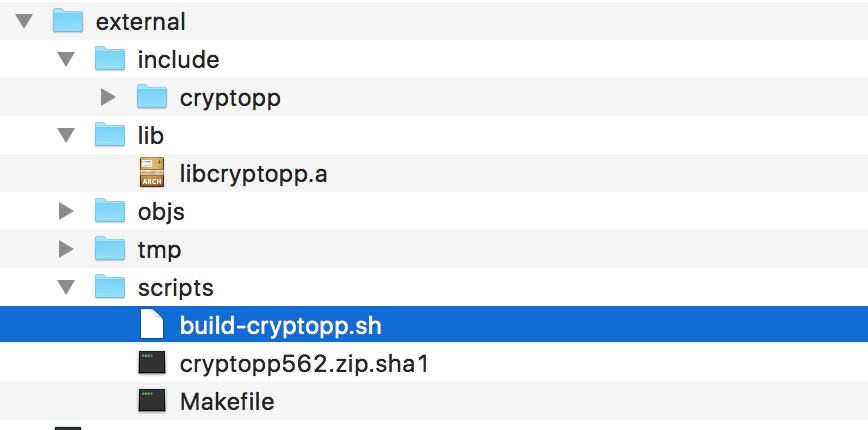
生成的静态库是通用版的,真机模拟器合并的,比较大200多M,实测打包之后几百K,
打包之后libcryptopp.a 和 include 的头文件,在ios上使用
2. 将上述打包的静态库以及 头文件导入DEMO工程CryptoppDemo
将测试用的viewController.m 修改为 ViewController.mm
主要为了实现 oc ,c++的混编
3. 使用 md5
当然还支持其他hash算法
-(NSData*)getMD5Value:(NSData*)data {

    CryptoPP::MD5 md5;

    byte digest[ CryptoPP::MD5::DIGESTSIZE ];

    md5.CalculateDigest(digest, (const byte*)[data bytes], [data length]);

    NSData * hashVale = [NSData dataWithBytes:digest length:sizeof digest];

    return hashVale;

}

    //MD5

    NSString *testStr = @"hello world md5";

    NSData *testDAT = [testStr dataUsingEncoding:NSUTF8StringEncoding];

    NSData *md5Dat = [self getMD5Value:testDAT];

    NSLog(@"%lu",md5Dat.length);

    NSMutableString *s = [NSMutableString string];

    unsigned char * hashValue = (byte *)[md5Dat bytes];

    int i;

    for (i = ; i < [md5Dat length]; i++) {

        [s appendFormat:@"%02x", hashValue[i]];

    }

    NSLog(@"%@",s);
4. RSA 密钥对生成
    //RSA 生成密钥对

    char seed[]={};

    unsigned int keyLength = ;

    char *privFilename = "/Users/cocoajin/Desktop/priKey.txt";

    char *pubFilename = "/Users/cocoajin/Desktop/pubKey.txt";

    CryptoPP::RandomPool randPool;

    randPool.IncorporateEntropy((byte *)seed, strlen(seed));

    CryptoPP::RSAES_OAEP_SHA_Decryptor priv(randPool, keyLength);

    CryptoPP::HexEncoder privFile(new CryptoPP::FileSink(privFilename));

    priv.DEREncode(privFile);

    privFile.MessageEnd();

    CryptoPP::RSAES_OAEP_SHA_Encryptor pub(priv);

    CryptoPP::HexEncoder pubFile(new CryptoPP::FileSink(pubFilename));

    pub.DEREncode(pubFile);

    pubFile.MessageEnd();
5. RSA 加密与解密
    //RSA 加密

    char seed[]={};

    char *pubFilename = "/Users/cocoajin/Desktop/pubKey.txt";

    char *message = "hello ios cryptopp";

    printf("%s\n",message);

    CryptoPP::FileSource pubFile(pubFilename, true, new CryptoPP::HexDecoder);

    CryptoPP::RSAES_OAEP_SHA_Encryptor pub(pubFile);

    CryptoPP::RandomPool randPool;

    randPool.IncorporateEntropy((byte *)seed, strlen(seed));

    std::string encresult;

    CryptoPP::StringSource(message, true, new CryptoPP::PK_EncryptorFilter(randPool, pub, new CryptoPP::HexEncoder(new CryptoPP::StringSink(encresult))));

    std::cout << encresult << std::endl;

    //RSA 解密

    char *privFilename = "/Users/cocoajin/Desktop/priKey.txt";

    CryptoPP::FileSource privFile(privFilename, true, new CryptoPP::HexDecoder);

    CryptoPP::RSAES_OAEP_SHA_Decryptor priv(privFile);

    CryptoPP::AutoSeededRandomPool _rng;

    CryptoPP::RSAES_OAEP_SHA_Decryptor tpriv(_rng, );

    std::string decresult;

    CryptoPP::StringSource(encresult.c_str(), true, new CryptoPP::HexDecoder(new CryptoPP::PK_DecryptorFilter(_rng, priv, new CryptoPP::StringSink(decresult))));

    std::cout << decresult << std::endl;
6. 签名与验证签名
    //RSA 签名与较验签名

    char *privFilename = "/Users/cocoajin/Desktop/priKey.txt";

    char *pubFilename = "/Users/cocoajin/Desktop/pubKey.txt";

    char *signatureFilename = "/Users/cocoajin/Desktop/sin.txt";

    char *messageFileName = "/Users/cocoajin/Desktop/NOTES.txt";

    CryptoPP::FileSource privFile(privFilename, true, new CryptoPP::HexDecoder);

    //GlobalRNG

    CryptoPP::AutoSeededRandomPool _rng;

    CryptoPP::RSAES_OAEP_SHA_Decryptor tpriv(_rng, );

    CryptoPP::RSASSA_PKCS1v15_SHA_Signer priv(privFile);

    CryptoPP::FileSource f(messageFileName, true, new CryptoPP::SignerFilter(_rng, priv, new CryptoPP::HexEncoder(new CryptoPP::FileSink(signatureFilename))));

    //验证签名

    CryptoPP::FileSource pubFile(pubFilename, true, new CryptoPP::HexDecoder);

    CryptoPP::RSASSA_PKCS1v15_SHA_Verifier pub(pubFile);

    CryptoPP::FileSource signatureFile(signatureFilename, true, new CryptoPP::HexDecoder);

    if (signatureFile.MaxRetrievable() != pub.SignatureLength())

    {

        printf("\nNO\n");

        return;

    }

    CryptoPP::SecByteBlock signature(pub.SignatureLength());

    signatureFile.Get(signature, signature.size());

    CryptoPP::VerifierFilter *verifierFilter = new CryptoPP::VerifierFilter(pub);

    verifierFilter->Put(signature, pub.SignatureLength());

    CryptoPP::FileSource ff(messageFileName, true, verifierFilter);

    printf("\n%d\n",verifierFilter->GetLastResult());
7. 其他相关cryptopp的用法可以参考:源码test.cpp
8. CryptoppDemo下载
https://github.com/cocoajin/TDDDemo/tree/master/CryptoppDemo
参考:
https://github.com/3ign0n/CryptoPP-for-iOS
https://my.oschina.net/u/566591/blog/168520
Cryptopp iOS 使用 RSA加密解密和签名验证签名的更多相关文章
- openssl 非对称加密 RSA 加密解密以及签名验证签名
1. 简介 openssl rsa.h 提供了密码学中公钥加密体系的一些接口, 本文主要讨论利用rsa.h接口开发以下功能 公钥私钥的生成 公钥加密,私钥解密 私钥加密,公钥解密 签名:私钥签名 验 ...
- RSA 加密 解密 公钥 私钥 签名 加签 验签
http://blog.csdn.net/21aspnet/article/details/7249401# http://www.ruanyifeng.com/blog/2013/06/rsa_al ...
- RSA加密解密与签名验证
关于RSACryption帮助类定义见RSACryption 一.加密与解密 //定义明文和密文变量 string plaintext = "天道酬勤,厚德载物!"; string ...
- iOS RSA加密解密及签名验证
1.首先要下载openssl,这个不用说,直接官网下载或者用brew install openssl下载 2.终端生成私钥密钥 2.1生成私钥 openssl genrsa - 2.2生成密钥 ope ...
- iOS RSA 加密解密及签名验证
1.首先要下载openssl.这个不用说,直接官网下载或者用brew install openssl下载. 2.终端生成私钥密钥. 2.1生成私钥 openssl genrsa - 2.2生成密钥 o ...
- iOS使用Security.framework进行RSA 加密解密签名和验证签名
iOS 上 Security.framework为我们提供了安全方面相关的api: Security框架提供的RSA在iOS上使用的一些小结 支持的RSA keySize 大小有:512,768,10 ...
- iOS常用加密之RSA加密解密
前言: iOS常用的加密有很多种,前两天在工作中遇到了RSA加密,现在把代吗分享出来. RSA基本原理 RSA使用"秘匙对"对数据进行加密解密.在加密解密数据前,需要先生成公钥(p ...
- RSA加密解密及数字签名Java实现--转
RSA公钥加密算法是1977年由罗纳德·李维斯特(Ron Rivest).阿迪·萨莫尔(Adi Shamir)和伦纳德·阿德曼(Leonard Adleman)一起提出的.当时他们三人都在麻省理工学院 ...
- RSA加密解密和读取公钥、私钥
/// <summary> /// RSA加密解密及RSA签名和验证 /// </summary> public class RSADE { ...
随机推荐
- [转]使用Gradle发布Android开源项目到JCenter
转自:http://blog.csdn.net/maosidiaoxian/article/details/43148643 使用Gradle发布Android开源项目到JCenter 分类: G ...
- VMware安装Linux第一天
今天上午下载了VMware-workstation_full_12.1.1.6932,它的Key是5A02H-AU243-TZJ49-GTC7K-3C61N,这些都是网络上搜罗到的. VMWare安装 ...
- LeetCode Graph Valid Tree
原题链接在这里:https://leetcode.com/problems/graph-valid-tree/ 题目: Given n nodes labeled from 0 to n - 1 an ...
- mac上卸载oracle jdk 1.8.0_31
mac上卸载oracle jdk 1.8.0_31版本,因为版本太高了.得安装旧版本才行.卸载的顺序是:进入finder,然后点应用程序,按command+向上箭头键,分别进入根目录的系统与资源库找到 ...
- 基于docker+etcd+confd + haproxy构建高可用、自发现的web服务
基于docker+etcd+confd + haproxy构建高可用.自发现的web服务 2016-05-16 15:12 595人阅读 评论(0) 收藏 举报 版权声明:本文为博主原创文章,未经博主 ...
- 文件上传(java web)
文件上传: 对表单的要求: * method="post" * enctype="multipart/form-data" * 表单中需要添加文件表单项:< ...
- UNIX操作系统和Linux操作系统介绍
UNIX操作系统(尤尼斯),是一个强大的多用户.多任务操作系统,支持多种处理器架构,按照操作系统的分类,属于分时操作系统,最早由KenThompson.DennisRitchie和DouglasMcI ...
- jQuery----函数和选择器
1. $(document).ready 几乎所有的jQuery代码都是以如下方式开始的 $(document).ready(function() { Do something }); $(docum ...
- WDR7500 花生壳问题
新进一WDR7500 居然不能解析花生壳. 百度一番, 发现别人有同样的问题. 找来找去从别人的只言片语中发现需要升级固件. 好不容易加入一个群, 把固件下下来. 升级固件, 重新设置, 解析成功. ...
- VS2010使用TTS
最近在写纯车牌停车管理系统,需要用到语音合成功能. 目前最常用的Windows Speech SDK版本有三种:5.1.5.3和5.4. Windows Speech SDK 5.1版本 ...