
[转]ASP.NET MVC Dynamic Themes
本文转自:http://www.codeproject.com/Articles/32847/ASP-NET-MVC-Dynamic-Themes
Introduction
I really needed to enable themes for my application, and I found an interesting article about it by Chris Pietschmann. In my point of view, the only problem with his approach is that you need to repeat each page for all themes. Well, I only want to create one page per theme, and have a master page and CSS files for each theme.
Using the code
For this project, I made some assumptions:
- The master page for each theme has the name Site.Master.
- The master page file and CSS files will be placed on a folder with the name of the theme.
- All the theme folders will be placed in the Content folder.
The file structure will be like this:
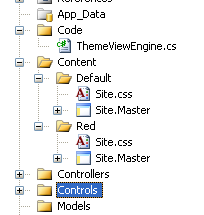
Now, let’s write a custom View Engine that will inherit from WebFormViewEngine. This code is only a sketch of what I want to implement. For instance, I want to save the user theme selection so that, in the next login, the user has his option set.
 Copy Code
public class ThemeViewEngine : WebFormViewEngine
{
public ThemeViewEngine()
{
base.ViewLocationFormats = new string[] {
"~/Views/{1}/{0}.aspx",
"~/Views/{1}/{0}.ascx",
"~/Views/Shared/{0}.aspx",
"~/Views/Shared/{0}.ascx"
}; base.MasterLocationFormats = new string[] {
"~/Content/{2}/Site.master"
}; base.PartialViewLocationFormats = new string[] {
"~/Views/{1}/{0}.aspx",
"~/Views/{1}/{0}.ascx",
"~/Views/Shared/{0}.aspx",
"~/Views/Shared/{0}.ascx"
};
} public override ViewEngineResult FindView(ControllerContext controllerContext,
string viewName, string masterName)
{
if (controllerContext == null)
{
throw new ArgumentNullException("controllerContext");
}
if (string.IsNullOrEmpty(viewName))
{
throw new ArgumentException("Value is required.", "viewName");
} string themeName = this.GetThemeToUse(controllerContext); string[] searchedViewLocations;
string[] searchedMasterLocations; string controllerName =
controllerContext.RouteData.GetRequiredString("controller"); string viewPath = this.GetViewPath(this.ViewLocationFormats, viewName,
controllerName, out searchedViewLocations);
string masterPath = this.GetMasterPath(this.MasterLocationFormats, viewName,
controllerName, themeName, out searchedMasterLocations); if (!(string.IsNullOrEmpty(viewPath)) &&
(!(masterPath == string.Empty) || string.IsNullOrEmpty(masterName)))
{
return new ViewEngineResult(
(this.CreateView(controllerContext, viewPath, masterPath)), this);
}
return new ViewEngineResult(
searchedViewLocations.Union<string>(searchedMasterLocations));
} public override ViewEngineResult FindPartialView(ControllerContext controllerContext,
string partialViewName)
{
if (controllerContext == null)
{
throw new ArgumentNullException("controllerContext");
}
if (string.IsNullOrEmpty(partialViewName))
{
throw new ArgumentException("Value is required.", partialViewName);
} string themeName = this.GetThemeToUse(controllerContext); string[] searchedLocations; string controllerName = controllerContext.RouteData.GetRequiredString("controller"); string partialPath = this.GetViewPath(this.PartialViewLocationFormats,
partialViewName, controllerName, out searchedLocations); if (string.IsNullOrEmpty(partialPath))
{
return new ViewEngineResult(searchedLocations);
}
return new ViewEngineResult(this.CreatePartialView(controllerContext,
partialPath), this);
} private string GetThemeToUse(ControllerContext controllerContext)
{
if (controllerContext.HttpContext.Request.QueryString.AllKeys.Contains("theme"))
{
string themeName = controllerContext.HttpContext.Request.QueryString["theme"];
controllerContext.HttpContext.Session.Add("Theme", themeName);
}
else if (controllerContext.HttpContext.Session["Theme"] == null)
{
controllerContext.HttpContext.Session.Add("Theme", "Default");
}
return controllerContext.HttpContext.Session["Theme"].ToString();
} private string GetViewPath(string[] locations, string viewName,
string controllerName, out string[] searchedLocations)
{
string path = null; searchedLocations = new string[locations.Length]; for (int i = 0; i < locations.Length; i++)
{
path = string.Format(CultureInfo.InvariantCulture, locations[i],
new object[] { viewName, controllerName });
if (this.VirtualPathProvider.FileExists(path))
{
searchedLocations = new string[0];
return path;
}
searchedLocations[i] = path;
}
return null;
} private string GetMasterPath(string[] locations, string viewName,
string controllerName, string themeName, out string[] searchedLocations)
{
string path = null; searchedLocations = new string[locations.Length]; for (int i = 0; i < locations.Length; i++)
{
path = string.Format(CultureInfo.InvariantCulture, locations[i],
new object[] { viewName, controllerName, themeName });
if (this.VirtualPathProvider.FileExists(path))
{
searchedLocations = new string[0];
return path;
}
searchedLocations[i] = path;
}
return null;
}
}
To finish this sample, just change the global.asax, removing all engines from the View Engine and adding the custom one:
protected void Application_Start()

{

    RegisterRoutes(RouteTable.Routes);

    ViewEngines.Engines.Clear();

    ViewEngines.Engines.Add(new ThemeViewEngine());

}
Well, hope that’s useful.
License
This article, along with any associated source code and files, is licensed under The Code Project Open License (CPOL)
[转]ASP.NET MVC Dynamic Themes的更多相关文章
- 七天学会ASP.NET MVC(七)——创建单页应用
系列文章 七天学会ASP.NET MVC (一)——深入理解ASP.NET MVC 七天学会ASP.NET MVC (二)——ASP.NET MVC 数据传递 七天学会ASP.NET MVC (三)— ...
- 微冷的雨ASP.NET MVC之葵花宝典(MVC)
微冷的雨ASP.NET MVC之葵花宝典 By:微冷的雨 第一章 ASP.NET MVC的请求和处理机制. 在MVC中: 01.所有的请求都要归结到控制器(Controller)上. 02.约定优于配 ...
- 7 天玩转 ASP.NET MVC — 第 7 天
目录 第 1 天 第 2 天 第 3 天 第 4 天 第 5 天 第 6 天 第 7 天 0. 前言 今天是开心的一天.因为我们终于来到了系列学习的最后一节.我相信你喜欢之前的课程,并从中学到了许多. ...
- Bootstrap 与 ASP.NET MVC 4 不使用 NuGet Package 笔记
转自 http://www.mytecbits.com/microsoft/dot-net/bootstrap-with-asp-net-mvc-4-step-by-step 单位最近做了一个Boot ...
- BrnShop开源网上商城第二讲:ASP.NET MVC框架
在团队设计BrnShop的web项目之初,我们碰到了两个问题,第一个是数据的复用和传递,第二个是大mvc框架和小mvc框架的选择.下面我依次来说明下. 首先是数据的复用和传递:对于BrnShop的每一 ...
- 返璞归真 asp.net mvc (9) - asp.net mvc 3.0 新特性之 View(Razor)
原文:返璞归真 asp.net mvc (9) - asp.net mvc 3.0 新特性之 View(Razor) [索引页][源码下载] 返璞归真 asp.net mvc (9) - asp.ne ...
- 【ASP.NET】第一个ASP.NET MVC应用程序
本系列目录:ASP.NET MVC4入门到精通系列目录汇总 开发流程 新建Controller 创建Action 根据Action创建View 在Action获取数据并生产ActionResult传递 ...
- [转]Using the HTML5 and jQuery UI Datepicker Popup Calendar with ASP.NET MVC - Part 4
本文转自:http://www.asp.net/mvc/overview/older-versions/using-the-html5-and-jquery-ui-datepicker-popup-c ...
- 七天学会ASP.NET MVC(七)——创建单页应用 【转】
http://www.cnblogs.com/powertoolsteam/p/MVC_Seven.html 系列文章 七天学会ASP.NET MVC (一)——深入理解ASP.NET MVC 七天学 ...
随机推荐
- var和dynamic的区别及如何正确使用dynamic ?
C#中的很多关键词用法比较容易混淆,var和dynamic就是其中一组,他们都可以申明动态类型的变量,但是本质上他们还是有不少区别的.var 在编译阶段已经确定类型,在初始化时候,必须提供初始化的值, ...
- jQuery总体架构
第一章 总体架构 1.设计理念 jQuery的理念就是“写更少的代码,做更多的事”,而且做到代码的高度兼容性. 2.总体架构 大致可以分为三个部分:构造模块,底层支持模块和功能模块. 3.使用自调用 ...
- iOS 正则 检测是否为手机号
- (BOOL)validateMobile:(NSString *)mobileNum { NSString *regex = @"^1[3|5|7|8][0-9]\\d{8}$" ...
- Thoughts on an Article from Science 'A network framework of cultural history'
Apparently, this is an excellent interdisciplinary study. This paper drawn on a simple but large dat ...
- <转>关于Certificate、Provisioning Profile、App ID的介绍及其之间的关系
转自:http://www.cnblogs.com/cywin888/p/3263027.html 刚接触iOS开发的人难免会对苹果的各种证书.配置文件等不甚了解,可能你按照网上的教程一步一步的成功申 ...
- [Android L]SEAndroid开放设备文件结点权限(读或写)方法(涵盖常用操作:sys/xxx、proc/xxx、SystemProperties)
温馨提示 建议你先了解一下上一篇博文([Android L]SEAndroid增强Androd安全性背景概要及带来的影响)所讲的内容,先对SEAndroid窥个全貌,然后再继续本节内容. ...
- iPhone 信号格转变数字
?在拨号键输入*3001#12345#* ?按呼叫键,就会进入Field Test页面 ?你就会看到信号格变为了数字,然而只要按home键返回就又会变为信号格 ?如果想一直变为数字的话,在Field ...
- GIT在iOS开发中的使用
前言 在iOS开发中,很多公司对项目的版本控制管理都使用了git,当然也有部分公司使用的是svn.当年我最初接触的是svn,觉得使用起来挺方便的,但是每次切分支都需要下载一份新的代码起来,这实在太麻烦 ...
- GitHub Android Libraries Top 100 简介
本项目主要对目前 GitHub 上排名前 100 的 Android 开源库进行简单的介绍, 至于排名完全是根据 GitHub 搜索 Java 语言选择 (Best Match) 得到的结果, 然后过 ...
- IOS设计模式-组合设计模式
前言:本篇博文将让你学会软件开发中的"何为树形结构"."何为组合模式"."组合模式可以解决的问题"等相关知识. 内容大纲: 1.树形结构 2 ...