
angularjs工具方法
1、angular.extend
var dst = {name: 'xxx', country: 'China'};
var src1 = {name: 'yyy', age: 10};
var src2 = {sex:'famale',height:'tall'};
angular.extend(dst,src1,src2);//You can specify multiple src objects.可以指定多个源对象
console.log(dst);
console.log(src1);

从输出结果可以看出如果源元素中有与destination中相同的元素属性时,destination中的属性值会被覆盖
2、angular.toJson

angular.toJson()中第二个参数为true时,代表将json形式的string格式化;
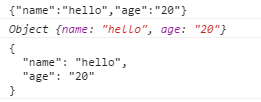
格式化后更清晰。
3、angular.forEach
     var values = {name: 'misko', gender: 'male'};

  var log = [];

  angular.forEach(values,function(value,key){

    console.log(value + ' ' + key);

    console.log(this);//此处this指log数组

    this.push(key + ":" + value);

  },log);

  console.log(log);
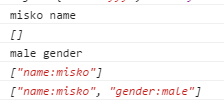
在forEach中this指的是第三个参数,要将数据放入的对象。
上面的对象只需要循环一次就可以,而下面的数据则需要循环两次:
            var values2 = [

                        {name: 'misko', gender: 'male'},

                        {name: 'Amy', gender: 'female'}

                    ];

                    var log2 = [];

                    angular.forEach(values2,function(value,key){

                        console.log(key);//0 1

                        console.log(value);//Object {name: "misko", gender: "male"}    Object {name: "Amy", gender: "female"}

                        angular.forEach(value,function(val,k){

                            console.log(k);//name,gender,name,gender

                            console.log(val);//misko male Amy female

                            console.log(this);//

                            this.push(k + ":" + val);

                        },log2);//存放数据的对象要放在内部循环中

                        console.log(log2);//["name:misko", "gender:male", "name:Amy", "gender:female"]

                    });

4、angular.bind
传递参数的方法:
第一种:
var ele = {"name":"Amy"};

var bind = angular.bind(ele,function(age){

          console.log(this);

          console.log(this.name + ' is ' + age);

});

bind(25);
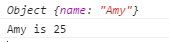
第二种:
var ele = {"name":"Amy"};

var bind = angular.bind(ele,function(job){

        console.log(this);

        console.log(this.name + ' is ' + job);

},'a marketer');//传递参数方法二

bind();

5、angular.bootstrap
angular.bootstrap手动初始化module,一个应用只能有一个ng-app,而通过angular.bootstrap可以手动启动多个module,实例如下:
    <div id="div1" ng-controller="myCtrl1">

        {{name}}

    </div>

    <div id="div2" ng-controller="myCtrl2">

        {{name}}

    </div>

    <script src="../angular.min.js"></script>

    <script>

        var myapp1 = angular.module('myApp1',[]);

        var myapp2 = angular.module('myApp2',[]);

        myapp1.controller('myCtrl1',['$scope',function($scope){

            $scope.name="zhangsan";

        }]);

        myapp2.controller('myCtrl2',['$scope',function($scope){

            $scope.name="lisi";

        }]);

        var div1 = document.getElementById('div1');

        var div2 = document.getElementById('div2');

        angular.element(document).ready(function(){//此页面没有使用ng-app指定任一module,而是动态添加

            angular.bootstrap(div1,['myApp1']);

            angular.bootstrap(div2,['myApp2']);

        });

        /*window.onload = function(){//整个页面加载完成时

            angular.bootstrap(div1,['myApp1']);

            angular.bootstrap(div2,['myApp2']);

        }*/

    </script>
此段代码中没有指定ng-app,而是通过angular.bootstrap来手动加载module。
模块之间相关依赖注入:
<body ng-app="myApp">

    <div ng-controller="firstCtrl">

        {{name}}

    </div>

    <div ng-controller="secondCtrl">

        {{name}}

    </div>

    <div ng-controller="thirdCtrl">

        {{name}}

    </div>

    <script src="../angular.min.js"></script>

    <script src="module2.js"></script>

    <script>

        angular.module('myApp',['myApp2'])//将myApp2注入到myApp中

                .controller('firstCtrl',['$scope',function($scope){

                    $scope.name="zhangsan";

                }]);

    </script>

</body>
module2.js:js文件中定义了模块myApp2和secondCtrl及thirdCtrl
angular.module('myApp2',[])

.controller('secondCtrl',['$scope',function($scope){

    $scope.name="lisi";

}])

.controller('thirdCtrl',['$scope',function($scope){

    $scope.name="wangwu";

}]);
angularjs工具方法的更多相关文章
- angularjs——工具方法
1.fromJson 把json字符串转成JSON对象 var jsonStr='[{"Name":"abc","age":12},{&qu ...
- angularjs 工具方法
<!DOCTYPE HTML> <html ng-app> <head> <meta http-equiv="Content-Type" ...
- javascript 的工具方法 --- 类型判断
Javascript中常见类型对象有: Boolean, Number, String, Function, Array, Date, RegExp, Object, Error, Symbol等等. ...
- JQuery操作类数组的工具方法
JQuery学习之操作类数组的工具方法 在很多时候,JQuery的$()函数都返回一个类似数据的JQuery对象,例如$('div')将返回div里面的所有div元素包装的JQuery对象.在这中情况 ...
- 当AngularJS POST方法碰上PHP
问题描述 怎么POST过去给PHP都收不到资料? $_POST方法取不到正确的传入值! 原理说明 AngularJS这套framework使用的AJAX方法中,资料传递的格式为JSON,送出去的hea ...
- jQuery工具方法
目录 常用工具方法 判断数据类型的方法 Ajax操作 $.ajax 简便写法 Ajax事件 返回值 JSONP 文件上传 参考链接 jQuery函数库提供了一个jQuery对象(简写为$),这个对象本 ...
- jQuery晦涩的底层工具方法们
这里整理的是jQuery源码中一些比较晦涩难懂的.内部的.最底层的工具方法,它们多为jQuery的上层api方法服务,目前包括: jQuery.access jQuery.access: functi ...
- angular的工具方法笔记(equals, HashKey)
分别是angular脏值检测的工具方法equals和 类HashKey的使用方法 <!DOCTYPE html PUBLIC "-//W3C//DTD XHTML 1.0 Transi ...
- JavaScript文件中调用AngularJS内部方法或改变$scope变量
需要在其他JavaScript文件中调用AngularJS内部方法或改变$scope变量,同时还要保持双向数据绑定: 首先获取AngularJS application: 方法一:通过controll ...
随机推荐
- Android多线程文件下载
版本信息 apply plugin: 'com.android.application' android { compileSdkVersion 23 buildToolsVersion " ...
- Sharepoint 杂记
在Sharepoint中复制Settle.html,粘贴后改名为km.html,修改km.html会自动更新km.master,修改好模板后需要在站点发布. 添加List添加WebPart,继承KmW ...
- 1116Xlinux初学习之正则表达式和通配符
一.正则表达式: 元字符是用来阐释字符表达式意义的字符,简言之,就是用来描述字符的字符. 正则表达式RE(Regular Expression)是由一串字符和元字符构成的字符串. 正则表达式的主要功能 ...
- Linux 下以其他用户身份运行程序—— su、sudo、runuser
本文综合分析了Linux系统下,如何使用runuser命令.su命令和sudo命令以其他用户身份来运行程序,以及这三个命令的运行效率比较. 一.su 命令临时切换用户身份 SU:( Switch ...
- [转]为什么我要用 Node.js? 案例逐一介绍
原文地址:http://blog.jobbole.com/53736/ 介绍 JavaScript 高涨的人气带来了很多变化,以至于如今使用其进行网络开发的形式也变得截然不同了.就如同在浏览器中一样, ...
- git 查看生成对象
1. find . 查看目录中所有对象 2. find .git/objects 查看所有对象 3. git cat-file -p 散列值 输出文件内容
- poj3694 缩点边双连通分量
Network Time Limit: 5000MS Memory Limit: 65536K Total Submissions: 8669 Accepted: 3175 Descripti ...
- hdu3437 划分树 区间内小于第K大的值得和
Minimum Sum Time Limit: 16000/8000 MS (Java/Others) Memory Limit: 65536/32768 K (Java/Others) Tot ...
- maven2-snapshot快照库和release发布库的应用
在项目中应用snapshot和release库,应用snapshot和release库达到不同环境下发布不同的版本的目的,首先看一个pom文件的定义: <project> <mode ...
- Splay伸展树学习笔记
Splay伸展树 有篇Splay入门必看文章 —— CSDN链接 经典引文 空间效率:O(n) 时间效率:O(log n)插入.查找.删除 创造者:Daniel Sleator 和 Robert Ta ...