
Windows下对文件夹下所有图片批量重命名(附C++,python,matlab代码)
https://blog.csdn.net/u011574296/article/details/72956446:
Windows下对文件夹下所有图片批量重命名(附C++,python,matlab代码)
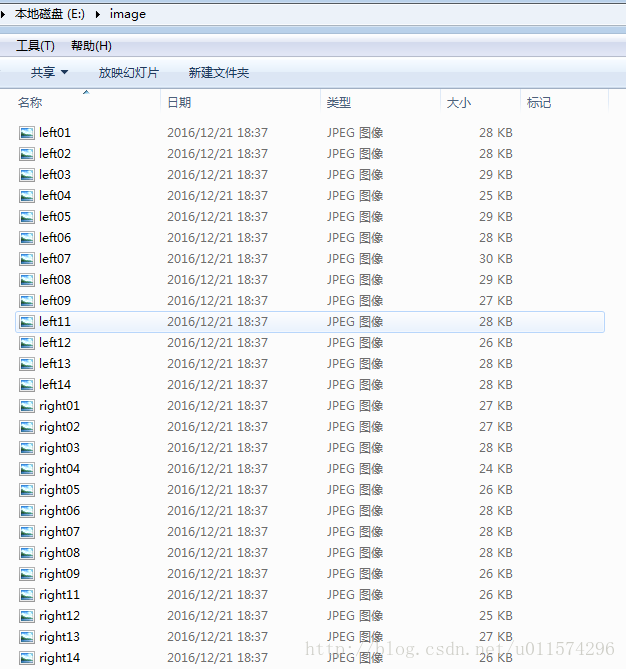
原文件夹
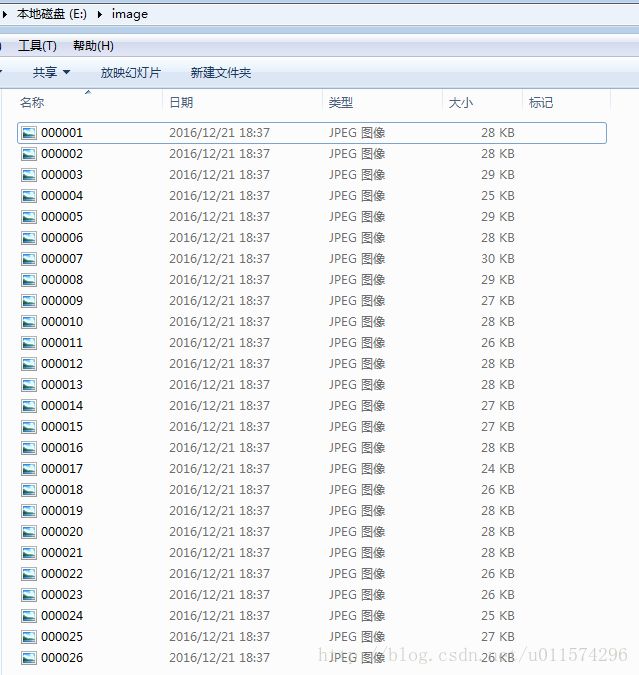
重命名之后
C++
#include <iostream>

#include <io.h>  //对系统文件进行操作的头文件

#include <string>

#include <sstream>

#include<vector>

using namespace std;

const int N = 6;   //整型格式化输出为字符串后的长度,例如,N=6,则整型转为长度为6的字符串,12转为为000012

const string FileType = ".jpg";    // 需要查找的文件类型

/* 函数说明 整型转固定格式的字符串

输入:

n 需要输出的字符串长度

i 需要结构化的整型

输出:

返回转化后的字符串

*/

string int2string(int n, int i)

{

    char s[BUFSIZ];

    sprintf(s, "%d", i);

    int l = strlen(s);  // 整型的位数

    if (l > n)

    {

        cout << "整型的长度大于需要格式化的字符串长度!";

    }

    else

    {

        stringstream M_num;

        for (int i = 0;i < n - l;i++)

            M_num << "0";

        M_num << i;

        return M_num.str();

    }

}

int main()

{

    _finddata_t c_file;   // 查找文件的类

    string File_Directory ="E:\\image";   //文件夹目录

    string buffer = File_Directory + "\\*" + FileType;

    //long hFile;  //win7系统,_findnext()返回类型可以是long型

    intptr_t hFile;   //win10系统 ,_findnext()返回类型为intptr_t ,不能是long型

    hFile = _findfirst(buffer.c_str(), &c_file);   //找第一个文件

    if (hFile == -1L)   // 检查文件夹目录下存在需要查找的文件

        printf("No %s files in current directory!\n", FileType);

    else

    {

        printf("Listing of files:\n");

        int i = 0;

        string newfullFilePath;

        string oldfullFilePath;

        string str_name;

        do

        {

            oldfullFilePath.clear();

            newfullFilePath.clear();

            str_name.clear();

            //旧名字

            oldfullFilePath = File_Directory + "\\" + c_file.name;

            //新名字

            ++i;

            str_name = int2string(N, i);    //整型转字符串

            newfullFilePath = File_Directory + "\\"+ str_name + FileType;

            /*重命名函数rename(const char* _OldFileName,const char* _NewFileName)

              第一个参数为旧文件路径,第二个参数为新文件路径*/

            int c = rename(oldfullFilePath.c_str(), newfullFilePath.c_str());

            if (c == 0)

                puts("File successfully renamed");

            else

                perror("Error renaming file");

        } while (_findnext(hFile, &c_file) == 0);  //如果找到下个文件的名字成功的话就返回0,否则返回-1

        _findclose(hFile);

    }

    return 0;

}- 1
- 2
- 3
- 4
- 5
- 6
- 7
- 8
- 9
- 10
- 11
- 12
- 13
- 14
- 15
- 16
- 17
- 18
- 19
- 20
- 21
- 22
- 23
- 24
- 25
- 26
- 27
- 28
- 29
- 30
- 31
- 32
- 33
- 34
- 35
- 36
- 37
- 38
- 39
- 40
- 41
- 42
- 43
- 44
- 45
- 46
- 47
- 48
- 49
- 50
- 51
- 52
- 53
- 54
- 55
- 56
- 57
- 58
- 59
- 60
- 61
- 62
- 63
- 64
- 65
- 66
- 67
- 68
- 69
- 70
- 71
- 72
- 73
- 74
- 75
- 76
- 77
- 78
- 79
- 80
- 81
- 82
- 83
- 84
- 85
- 86
- 87
- 88
- 89
- 90
- 91
- 92
将整型格式化输出到字符串中,我是使用了stringstream类,写了一个函数实现这个功能,还有一种实现方式是,使用sprintf将数字转为字符串,同时可以格式化字符串。如下:
char s[50];
int i = 1;
sprintf(s,”%06d”, i); // 将整型i转为字符串s,指定宽度为6,不足的左边补0
sprintf 的更多用法,可以参考博客:C++字符串格式化 sprintf、printf
/* 函数说明 整型转固定格式的字符串

输入:

n 需要输出的字符串长度

i 需要结构化的整型

输出:

返回转化后的字符串

*/

string int2string(int n, int i)

{

    char s[BUFSIZ];

    sprintf(s, "%d", i);

    int l = strlen(s);  // 整型的位数

    if (l > n)

    {

        cout << "整型的长度大于需要格式化的字符串长度!";

    }

    else

    {

        stringstream M_num;

        for (int i = 0;i < n - l;i++)

            M_num << "0";

        M_num << i;

        return M_num.str();

    }

}
- 1
- 2
- 3
- 4
- 5
- 6
- 7
- 8
- 9
- 10
- 11
- 12
- 13
- 14
- 15
- 16
- 17
- 18
- 19
- 20
- 21
- 22
- 23
- 24
- 25
- 26
- 27
- 28
python
import os

path = "E:\\image"

filelist = os.listdir(path) #该文件夹下所有的文件(包括文件夹)

count=0

for file in filelist:

    print(file)

for file in filelist:   #遍历所有文件

    Olddir=os.path.join(path,file)   #原来的文件路径

    if os.path.isdir(Olddir):   #如果是文件夹则跳过

        continue

    filename=os.path.splitext(file)[0]   #文件名

    filetype=os.path.splitext(file)[1]   #文件扩展名

    Newdir=os.path.join(path,str(count).zfill(6)+filetype)  #用字符串函数zfill 以0补全所需位数

    os.rename(Olddir,Newdir)#重命名

count+=1- 1
- 2
- 3
- 4
- 5
- 6
- 7
- 8
- 9
- 10
- 11
- 12
- 13
- 14
- 15
matlab
%%

%图片保存路径为:

%E:\image\car

%E:\image\person

%car和person是保存车和行人的文件夹

%这些文件夹还可以有多个,

%放在image文件夹里就行

%该代码的作用是将图片名字改成000123.jpg这种形式

%%

clc;

clear;

maindir='E:\image\';

name_long=6; %图片名字的长度,如000123.jpg为6,最多9位,可修改

num_begin=1; %图像命名开始的数字如000123.jpg开始的话就是123

subdir = dir(maindir);

n=1;

for i = 1:length(subdir)

  if ~strcmp(subdir(i).name ,'.') && ~strcmp(subdir(i).name,'..')

     subsubdir = dir(strcat(maindir,subdir(i).name));

    for j=1:length(subsubdir)

         if ~strcmp(subsubdir(j).name ,'.') && ~strcmp(subsubdir(j).name,'..')

            img=imread([maindir,subdir(i).name,'\',subsubdir(j).name]);

            imshow(img);

            str=num2str(num_begin,'%09d');

            newname=strcat(str,'.jpg');

            newname=newname(end-(name_long+3):end);

            system(['rename ' [maindir,subdir(i).name,'\',subsubdir(j).name] ' ' newname]);

            num_begin=num_begin+1;

            fprintf('当前处理文件夹%s',subdir(i).name);

            fprintf('已经处理%d张图片\n',n);

            n=n+1;

           pause(0.1);%可以将暂停去掉

         end

    end

  end

end - 1
- 2
- 3
- 4
- 5
- 6
- 7
- 8
- 9
- 10
- 11
- 12
- 13
- 14
- 15
- 16
- 17
- 18
- 19
- 20
- 21
- 22
- 23
- 24
- 25
- 26
- 27
- 28
- 29
- 30
- 31
- 32
- 33
- 34
- 35
- 36
- 37
- 38
- 39
后记:Python大法好!
Windows下对文件夹下所有图片批量重命名(附C++,python,matlab代码)的更多相关文章
- Windows操作系统单文件夹下到底能存放多少文件及单文件的最大容量
本文是转自:http://hi.baidu.com/aqgjoypubihoqxr/item/c896921f8c2eaba5feded5f2 最近需要了解Windows中单个文件夹下 ...
- 引用AForge.video.ffmpeg,打开时会报错:找不到指定的模块,需要把发行包第三方文件externals\ffmpeg\bin里的dll文件拷到windows的system32文件夹下。
引用AForge.video.ffmpeg,打开时会报错:找不到指定的模块,需要把发行包第三方文件externals\ffmpeg\bin里的dll文件拷到windows的system32文件夹下. ...
- cocos2d-x3.2下获取文件夹下所有文件名的方法
这里提供一个函数获取文件夹下所有文件名的方法,直接上代码了. 原文地址:http://blog.csdn.net/qqmcy/article/details/36184733 // // Visib ...
- linux_添加定时任务,每5min清理下某个文件夹下的文件
性能测试的过程中会生成大量的日志文件,导致无法继续进行,linux可以增加一个定时任务,进行定时清理 1. 先编写一个sh脚本,该sh脚本用于文件夹文件清理,脚本编写完成后拷贝到服务器上,且授予权限 ...
- Windows下.svn文件夹的最简易删除方法(附linux)
如果想删除Windows下的.svn文件夹,通过手动删除的渠道是最麻烦的,因为每个文件夹下面都存在这样的文件.下面是一个好办法:建立一个文本文件,取名为kill-svn-folders.reg(扩展名 ...
- Java-Maven(九):Maven 项目pom文件引入工程根目录下lib文件夹下的jar包
由于项目一些特殊需求,pom依赖的包可能是非Maven Repository下的包文件,因此无法自己从网上下载.此时,我们团队git上对该jar使用. Maven项目pom引入lib下jar包 在ec ...
- Delphi下遍历文件夹下所有文件的递归算法
{------------------------------------------------------------------------------- 过程名: MakeFileLis ...
- windows下遍历文件夹下的文件
#include <io.h>#include <stdio.h>#include <iostream>using namespace std;int ReadSt ...
- 关于SpringBoot下template文件夹下html页面访问的一些问题
springboot整合了springmvc的拦截功能.拦截了所有的请求.默认放行的资源是:resources/static/ 目录下所有静态资源.(不走controller控制器就能直接访问到资源) ...
随机推荐
- G - Traffic
vin is observing the cars at a crossroads. He finds that there are n cars running in the east-west d ...
- Day 24:XML基础
Q: 什么是XML,为什么学习XML? A:XML为可扩展标记语言. 标签由开发者自己制定的(要按照一定的语法定义)描述带关系的数据(作为软件的配置文件): 包含与被包含的关系 properties文 ...
- 51nod 1055:最长等差数列
1055 最长等差数列 基准时间限制:2 秒 空间限制:262144 KB 分值: 80 难度:5级算法题 收藏 取消关注 N个不同的正整数,找出由这些数组成的最长的等差数列. 例如:1 3 5 ...
- pr cs6安装教程
这是通过我自己实践操作,网上查询整理的安装流程: 安装 1.下载:http://www.smzy.com/smzy/smzy93225.html 2.断网,安装 如果到2%显示安装失败,在这里有详细解 ...
- 统计返回的Decimal/long型数据转换问题
mysql数据库在进行统计时候,返回的count()是个long型,sum()返回的是bigDecimal类型,前段需要的是int型故而需要进行转换. <select id="getD ...
- netty权威指南学习笔记六——编解码技术之MessagePack
编解码技术主要应用在网络传输中,将对象比如BOJO进行编解码以利于网络中进行传输.平常我们也会将编解码说成是序列化/反序列化 定义:当进行远程跨进程服务调用时,需要把被传输的java对象编码为字节数组 ...
- s5pc100开发板Nand flash移植
相关软件下载地址:http://pan.baidu.com/s/16yo8Y fsc100开发板 交叉编译工具:arm-cortex_a8-linux-gnueabi-gcc 添加针对我们平台 ...
- 132-PHP子类和父类同名函数的调用
<?php class father{ //定义father类 public function cook(){ return '烹饪'; } } class son extends father ...
- 第十篇 Form表单
Form表单 阅读目录(Content) Form介绍 普通的登录 使用form组件 Form那些事儿 常用字段演示 校验 使用Django Form流程 补充进阶 应用Bootstrap样式 批量添 ...
- SOA--基于银行系统实例分析
阅读以下关于 Web 系统设计的叙述 [说明] 某银行拟将以分行为主体的银行信息系统,全面整合为由总行统一管理维护的银行信息系统,实现统一的用户账户管理.转账汇款.自助缴费.理财投资.贷款管理.网上支 ...