
nginx源码包安装
一、下载码源包
1. 获得源码包途径
官方网站,可以获得最新的软件包
Nginx: www.nginx.org
2.具体实例展示(tengine)
下载源码包,准备软件包
准备编译环境如编译器gcc、make
# yum -y install gcc make zlib-devel pcre pcre-devel openssl-devel
(pcre: 支持正则表达式,地址重写rewrite)
解压(下载在真机上的,rz上传,rz在vm虚拟机不可用,在xsheel、final shell可用)
# useradd www(用root用户的话权限太大)
# tar xvf tengine-2.2.0.tar.gz
# cd tengine-2.2.0
配置
./configure --prefix=/srv/nginx --with-file-aio --with-http_auth_request_module --with-http_ssl_module --with-http_v2_module --with-http_realip_module --with-http_addition_module --with-http_xslt_module=dynamic --with-http_geoip_module=dynamic --with-http_sub_module --with-http_dav_module --with-http_flv_module --with-http_mp4_module --with-http_gunzip_module --with-http_gzip_static_module --with-http_random_index_module --with-http_secure_link_module --with-http_degradation_module --with-http_slice_module --with-http_stub_status_module --with-http_perl_module=dynamic --with-pcre --with-pcre-jit --with-stream=dynamic --with-stream_ssl_module
编译
# make
安装
# make install
二、码源安装过程错误
error1:
the HTTP XSLT module requires the libxml2/libxslt
libraries. You can either do not enable the module or install the libraries.
解决方案:
# yum -y install libxml2 libxml2-dev libxslt-devel
error2:
perl module ExtUtils::Embed is required
解决方案:
#yum -y install perl-devel perl-ExtUtils-Embed
error3:
the GeoIP module requires the GeoIP library.
You can either do not enable the module or install the library.
解决方案:
# yum -y install GeoIP GeoIP-devel GeoIP-data
三、安装完成还有一堆麻烦事
1、启动测试报错
# /srv/nginx/sbin/nginx
nginx: [emerg] bind() to 0.0.0.0:80 failed (98: Address already in use)
nginx: [emerg] bind() to 0.0.0.0:80 failed (98: Address already in use)
nginx: [emerg] bind() to 0.0.0.0:80 failed (98: Address already in use)
nginx: [emerg] bind() to 0.0.0.0:80 failed (98: Address already in use)
nginx: [emerg] bind() to 0.0.0.0:80 failed (98: Address already in use)
nginx: [emerg] still could not bind()
2、systemctl 查看状态
# systemctl status nginx (restart也不行)
Unit nginx.service could not be found.
# chmod +x /usr/lib/systemd/system/nginx.service
#vim /usr/lib/systemd/system/nginx.service
[Unit] //对服务的说明
Description=nginx - high performance web server //描述服务
After=network.target remote-fs.target nss-lookup.target //描述服务类别
[Service] //服务的一些具体运行参数的设置
Type=forking //后台运行的形式
PIDFile=/srv/nginx/logs/nginx.pid //PID文件的路径
ExecStartPre=/srv/nginx/sbin/nginx -t -c /srv/nginx/conf/nginx.conf //启动准备
ExecStart=/srv/nginx/sbin/nginx -c /srv/nginx/conf/nginx.conf //启动命令
ExecReload=/srv/nginx/sbin/nginx -s reload //重启命令
ExecStop=/srv/nginx/sbin/nginx -s stop //停止命令
ExecQuit=/srv/nginx/sbin/nginx -s quit //快速停止
PrivateTmp=true //给服务分配临时空间
[Install]
WantedBy=multi-user.target //服务用户的模式
4、启动服务
#systemctl daemon-reload
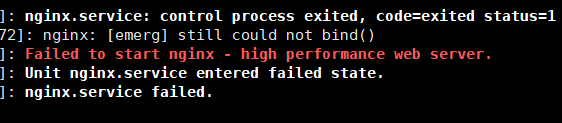
5、还是报错
# systemctl status nginx.service -l
6、# ps aux|grep nginx
root 11675 0.0 0.1 46088 1156 ? Ss 02:20 0:00 nginx: master process /srv/ngin/sbin/nginx
nobody 11676 0.0 0.2 46548 2180 ? S 02:20 0:00 nginx: worker process
root 28181 0.0 0.0 112660 968 pts/0 R+ 02:35 0:00 grep --color=auto nginx
# kill -9 11675
# kill -9 11676
# ps aux|grep nginx
root 28183 0.0 0.0 112660 964 pts/0 R+ 02:35 0:00 grep --color=auto nginx
# systemctl restart nginx
# systemctl status nginx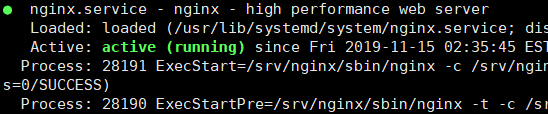
# /srv/nginx/sbin/nginx -v
nginx version: nginx/1.14.2
至此大功告成
nginx源码包安装的更多相关文章
- 部署企业本地yum源及源码包安装
YUM命令 yum list //列出每个软件包(包括未安装和已安装) rpm -q repolist //列出所以仓库名称 info //查看软件信息 rpm -qi install //安装 rp ...
- CentOS源码包安装apache、nginx服务
1.通过官网下载apache.nginx源码包 2.进入apache源码包所在目录,解压tar -xf httpd-2.4.12.tar.gz 3.cd httpd-2.4.12 4.阅读README ...
- centos 7 源码包安装、卸载nginx
1.源码包安装之前,首页安装依赖包 yum -y install gcc gcc-c++ make libtool zlib zlib-devel openssl openssl-devel pcre ...
- yum 仓库搭建与源码包安装实战
目录 一.yum 仓库自建示例: 二.源码包安装实践 基础环境 服务端配置 下载及安装fpm软件 客户端: 一.yum 仓库自建示例: 1.安装ftp服务 yum -y install vsftpd ...
- Linux进阶之Linux破解密码、yum源配置、防火墙设置及源码包安装
一.老师语录: 所有要求笔试的公司都是垃圾公司 笔试(是考所有的涉及到的点) 要有自己的卖点.专长(给自己个标签)(至少一个) 生产环境中,尽量使用mv(mv到一个没用的目录下),少使用rm 二.防火 ...
- Linux之源码包安装软件
安装准备 安装c语言编辑器 gcc 压缩包 node-v6.2.0-linux-x64.tar.gz 源码包保存位置 /usr/local/src/ 源码包安装位置 /us ...
- Apache源码包安装和子配置文件介绍--update.2014-12-5
安装apache: 官网:http://httpd.apache.org/download.cgi#apache24 1.wget http://mirror.bit.edu.cn/apache//h ...
- Zabbix源码包安装
Zabbix源码包安装 Cenos5.3 Basic server 安装顺序 Libxml2 Libmcrypt Zlib Libpng Jpeg:需要创建目录jpeg /bin /lib / ...
- Lamp源码包安装实录
Lamp源码包安装实录 附件中是安装步骤,下载站点里包含视频(http://down.51cto.com/data/460776) 本文出自 "李晨光原创技术博客" 博客,请务必保 ...
随机推荐
- Kattis - heapsoffun Heaps of Fun (概率密度函数+dp)
题意:有一棵含有n个结点(n<=300)的根树,树上每个结点上的权值是从[0,ai](ai<=1e9)区间内随机的一个实数,问这棵树能形成一个最小堆的概率. 由于结点取值范围是1e9而且是 ...
- Android Studio 创建项目后“Cannot resolve symbol” 解决办法
报错位置显示 “Cannot resolve symbol XXX”, 解决方法如下: 点击菜单中的 “File” -> “Invalidate Caches / Restart”,然后点击对话 ...
- grunt-contrib-imagemin 图像压缩
grunt-contrib-imagemin:图像压缩 安装插件:npm install grunt-contrib-imagemin --save-dev 参数 optimizationLevel( ...
- qt5---步长调节器SpinBox和QDoubleSpinBox
#include <QSpinBox> #include <QDoubleSpinBox> QSpinBox 用于整数的显示和输入,一般显示十进制数,也可 ...
- java笔记1-面向对象思想
合适的方法放在合适的类之中. 设计中,分解出应该具有哪些对象(面向对象),不要再想步骤了(这是面向过程).设计过程: step1:问题中有哪些类和对象(找名词,之后区分是类还是属性) step2:这些 ...
- docker和Dockerfile
目录: 1.docker为什么会出现? 2.docker的理念 3.容器化技术 4.docker三要素 5.docker安装 6.docker帮助命令 7.Docker阿里云镜像加速器配置. 8.do ...
- mongodb性能测试:long时间戳与string格式时间
string格式时间写入数据: { "_id" : ObjectId("5d314731a96f332d6c3193d4"), "news_id&qu ...
- no matches for kind "ReplicaSet" in version "extensions/v1beta1"
原来的yaml的资源清单为 apiVersion: extensions/v1beta1 kind: ReplicaSet metadata: name: frontend spec: replica ...
- LeetCode 59. 螺旋矩阵 II(Spiral Matrix II)
题目描述 给定一个正整数 n,生成一个包含 1 到 n2 所有元素,且元素按顺时针顺序螺旋排列的正方形矩阵. 示例: 输入: 3 输出: [ [ 1, 2, 3 ], [ 8, 9, 4 ], [ 7 ...
- Springboot2.x使用redis作为缓存
一.Springboot2.x关于配置redis作为缓存. 基本配置如下: (1)在application.properties文件中 spring.redis.database=2 //第几个数据库 ...