
centos7 ngxin启动失败:Job for nginx.service failed(80端口被占用的解决办法)
问题描述:
(flaskApi) [root@67 flaskDemo]# service nginx start

Redirecting to /bin/systemctl start nginx.service

Job for nginx.service failed because the control process exited with error code. See "systemctl status nginx.service" and "journalctl -xe" for details.
确认问题:
当不能使用service nginx start 开启或者使用service nginx stop 关闭时,查看systemctl status nginx 会有一定的错误提示
systemctl status nginx -l
-l表示:可以展示全部错误信息,否则可能错误信息会被折叠
Hint: Some lines were ellipsized, use -l to show in full.
返回的错误提示:
从这里我们可以看出,是80端口被占用了
9月 17 14:54:21 67.59.247.60.static.bjtelecom.net nginx[25531]: nginx: [emerg] bind() to [::]:80 failed (98: Address already in use)
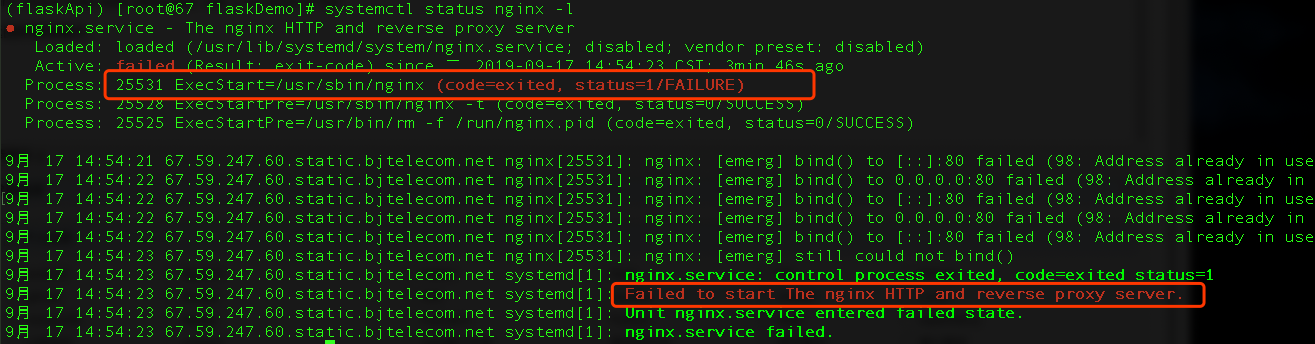
通过命令查看80端口被哪个进程占用了
netstat -tpnul
可以看到是httpd,这个进程需要是24小时启动了,不能关掉

所以接下来的解决办法有2种
- 修改nginx的配置文件nginx.conf指定nginx启动时使用别的端口号,例如81
- 或者杀掉占用80端口的进程,参照:centOS7杀死进程命令
查看nginx的安装目录,并找到nginx.conf的目录:
rpm -ql grep nginx

或者直接使用find命令查找 nginx.conf
(flaskApi) [root@67 flaskDemo]# find / -name nginx.conf

/etc/nginx/nginx.conf
使用nano命令编辑nginx.conf配置文件,图示中2处默认为80的端口号改为81
nano /etc/nginx/nginx.conf

另外应当注意:
service nginx start 是centos6.x的命令 , centos7.x使用 systemctl start nginx
再次启动nginx,没看到启动成功的提示信息
(flaskApi) [root@67 flaskDemo]# /bin/systemctl start nginx.service
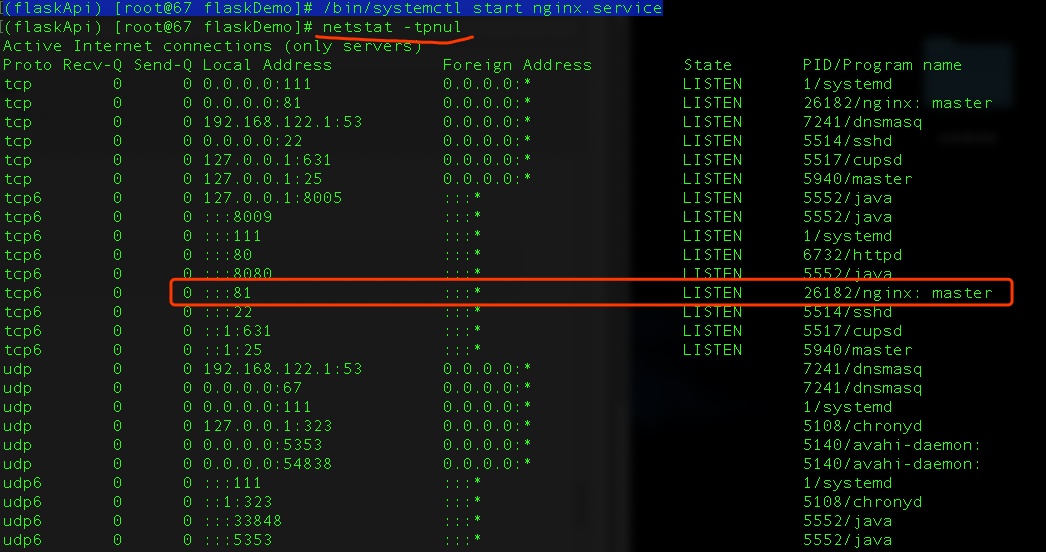
打印一下当前的进程,可以看到nginx已经启动了,并且使用的是81端口
参照文档:
nginx 在Centos 7 版本的yum安装 和目录解释
nginx启动报错的处理办法,参照:
https://blog.csdn.net/qq_40907977/article/details/91989353
centos7 ngxin启动失败:Job for nginx.service failed(80端口被占用的解决办法)的更多相关文章
- MySQL安装过程net start mysql 启动失败 报“错误2,系统找不到文件”的解决办法
MySQL安装过程net start mysql 启动失败 报“错误2,系统找不到文件”的解决办法 错误2,系统找不到文件. 开始...运行... regedit 注册表项: HKEY_LOCAL_ ...
- apache无法正常启动,80端口被占用的解决方法
apache无法正常启动,80端口被占用的解决方法 网上的方法: 仔细查看提示: make_sock: could not bind to address 0.0.0.0:80 恍然大悟,计算机上安装 ...
- 启用nginx报错80端口被占用
最近在本机跑nginx,启动后报错,怀疑80端口被占用 netstat -ano|findstr 尝试一:查看后发现端口被一个System pid 为4的一个程序占用.我在资源管理器中尝试将Syste ...
- 启动Nginx服务失败:Job for nginx.service failed because the control process exited with error code. See "systemctl status nginx.service" and "journalctl -xe" for details.
首次接触nginx,安装完使用命令 service nignx restart 后,出现这个错误,并按照提示给出的命令查看错误详情 systemctl status nginx.service ...
- docker 启动失败 Job for docker.service failed because the control process exited with error code. See "systemctl status docker.service" and "journalctl -xe" for details.
CentOS7安装docker,安装成功后,启动失败 提示: 我们可以看到此处它提示是Failed to start Docker Application Container Engine. 于是在网 ...
- DOCKER启动失败Job for docker.service failed because the control process exited with error code. See "syste mctl status docker.service" and "journalctl -xe" for details.
[root@localhost ~]# systemctl start docker Job for docker.service failed because the control process ...
- CentOS7端口被占用的解决办法
1.根据端口号得到其占用的进程的详细信息 netstat -tlnp|grep 80tcp 0 0 192.168.33.10:80 0.0.0.0:* ...
- Windows下启动ActiveMq端口被占用的解决办法
cd /D E:\RuntimeSoft\apache-activemq-5.11.0\binactivemq.bat start结果提示:端口号被占用. Windows下查看端口号被占用开始--运行 ...
- centos7.2安装paramiko报error: command 'gcc' failed with exit status 1的解决办法
安装依赖 yum install kernel-devel libxslt-devel libffi-devel python-devel mysql-devel zlib-devel openssl ...
随机推荐
- Java面试总结 -2018(补录)
参考详见:https://blog.csdn.net/jackfrued/article/details/44921941 https://blog.csdn.net/jackfrued/articl ...
- 安装与学习laravel
安装 composer cd /var/www/html curl -sS https://getcomposer.org/installer | php mv composer.phar /usr/ ...
- navicat修改表的主键自增长报错
这周自己在构思一个项目的表的设计,由于是第一次,所以走了很多弯路,也遇到了几个问题,这里暂时贴上来. 我用PowerDesign设计出一部分关联表的ER图之后,导出了sql文件之后用navicat导入 ...
- web性能优化--算法优化(四)
避免for-in 把数组长度保存在局部变量中 较少迭代次数(Duffs Device) 基于函数的循环比基于循环的迭代消耗性能更多 优化if-else,一般switch比if-else速度快(hash ...
- UIScrollView的简单使用
UIScrollView *scrollView = [[UIScrollView alloc] initWithFrame:self.view.bounds]; //将scrollView添加到当前 ...
- JAVA笔记20-容器之四Map接口、自动打包、泛型(重要)
一.Map接口 Map提供的是key到value的映射.key不能重复,每个key只能映射一个value. 注:重复是指equals,但用equals()方法效率低,所以此处用hashCode()方法 ...
- 给DEDECMS广告管理中增加图片上传功能
dedecms的广告管理功能稍微有点次,本文就是在dedecms广告管理原有的基础上增加广告图片上传功能. 安装方法,对应自己的dedecms版本下载对应的编码然后解压把里面的文件放在后台目录覆盖即可 ...
- CSS设置背景色
最好用background-color:rgba(37,77,113,1); 因为用opacity会让所有自标签都改变
- TTTTTTTTTTTTTTTTT HDU 2586 How far away LCA的离线算法 Tarjan
链接: How far away ? Time Limit: 2000/1000 MS (Java/Others) Memory Limit: 32768/32768 K (Java/Other ...
- quartz的配置文件说明
# Default Properties file for use by StdSchedulerFactory # to create a Quartz Scheduler Instance, if ...