
day22 常用模块(上)
一、时间模块
1 time模块
获取时间的三种格式:
第一种:time.time()
时间戳(timestamp):从1970年到现在的秒数
#应用场景:计算时间差 可以对时间加减,返回值为浮点型

print(time.time())

>>>1585556158.2177124
第二种:time.strftime()
获取当前具体时间(Format String)
#应用场景:获取当前具体时间,返回值为字符串

print(time.strftime('%Y %m %d %X'))

>>>2020 03 30 16:19:29

具体内置格式化字符串按照需求写

%a    Locale’s abbreviated weekday name.

%A    Locale’s full weekday name.

%b    Locale’s abbreviated month name.

%B    Locale’s full month name.

%c    Locale’s appropriate date and time representation.

%d    Day of the month as a decimal number [01,31].

%H    Hour (24-hour clock) as a decimal number [00,23].

%I    Hour (12-hour clock) as a decimal number [01,12].

%j    Day of the year as a decimal number [001,366].

%m    Month as a decimal number [01,12].

%M    Minute as a decimal number [00,59].

%p    Locale’s equivalent of either AM or PM.    (1)

%S    Second as a decimal number [00,61].    (2)

%U    Week number of the year (Sunday as the first day of the week) as a decimal number [00,53]. All days in a new year preceding the first Sunday are considered to be in week 0.    (3)

%w    Weekday as a decimal number [0(Sunday),6].

%W    Week number of the year (Monday as the first day of the week) as a decimal number [00,53]. All days in a new year preceding the first Monday are considered to be in week 0.    (3)

%x    Locale’s appropriate date representation.

%X    Locale’s appropriate time representation.

%y    Year without century as a decimal number [00,99].

%Y    Year with century as a decimal number.

%z    Time zone offset indicating a positive or negative time difference from UTC/GMT of the form +HHMM or -HHMM, where H represents decimal hour digits and M represents decimal minute digits [-23:59, +23:59].

%Z    Time zone name (no characters if no time zone exists).

%%    A literal '%' character.
第三种:time.locatime()
struct_time元组共有9个元素共九个元素:(年,月,日,时,分,秒,一年中第几周,一年中第几天,夏令时)
#应用场景:获取具体的单个时间,返回值是一个对象,但是可以看作一个元组对其操作,也可以.元素

res = time.localtime()

print(res)

>>>time.struct_time(tm_year=2020, tm_mon=3, tm_mday=30, tm_hour=16, tm_min=20, tm_sec=38, tm_wday=0, tm_yday=90, tm_isdst=0)

print(res.tm_year)

print(res[0])

>>>2020

>>>2020
重点1
计算机能识别的时间只能是时间戳,而人类能识别的时间是格式化时间,所以有了以下的转化
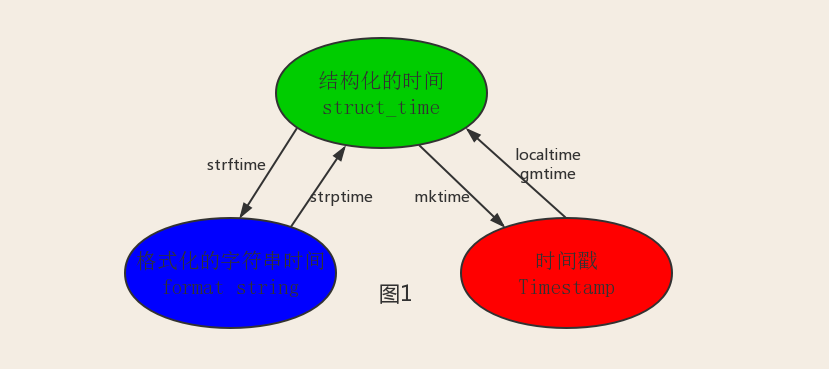
需求:我们要对‘1999-4-11’时间加1天
#format string--->struct_time--->timestamp

'1999-04-11'

struct_time = time.strptime('1999-04-11','%Y-%m-%d')

print(struct_time)

timestamp = time.mktime(struct_time)+86400

print(timestamp)

new_timestamp = time.localtime(timestamp)

print(new_timestamp)

new_struct_time = time.strftime('%Y-%m-%d-%X',new_timestamp)

print(new_struct_time)

>>>time.struct_time(tm_year=1999, tm_mon=4, tm_mday=11, tm_hour=0, tm_min=0, tm_sec=0, tm_wday=6, tm_yday=101, tm_isdst=-1)

>>>923846400.0

>>>time.struct_time(tm_year=1999, tm_mon=4, tm_mday=12, tm_hour=0, tm_min=0, tm_sec=0, tm_wday=0, tm_yday=102, tm_isdst=0)

>>>1999-04-12-00:00:00
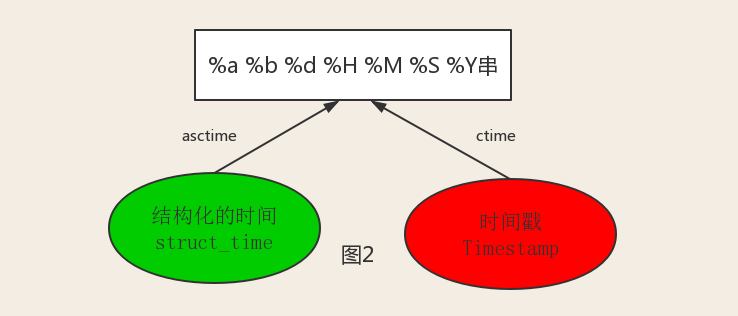
重点2
#--------------------------按图2转换时间

# asctime([t]) : 把一个表示时间的元组或者struct_time表示为这种形式:'Sun Jun 20 23:21:05 1993'。

# 如果没有参数,将会将time.localtime()作为参数传入。

print(time.asctime())

>>>Mon Mar 30 16:49:38 2020

# ctime([secs]) : 把一个时间戳(按秒计算的浮点数)转化为time.asctime()的形式。如果参数未给或者为None的时候,将会默认time.time()为参数。它的作用相当于time.asctime(time.localtime(secs))。

print(time.ctime())

>>>Mon Mar 30 16:52:04 2020

print(time.ctime(time.time()))

>>>Mon Mar 30 16:52:04 2020
2 datetime模块
datetime.datetime.now()
获得当前时间,精确到毫秒
print(datetime.datetime.now())

print(datetime.datetime.now()+datetime.timedelta(days=3))#可以对时间加减

>>>2020-03-30 16:31:23.727911

>>>2020-04-02 16:31:23.728907

print(datetime.datetime.now().replace(minute=3,hour=2)) #可以替换当前时间
二、random模块
import random

print(random.random())#(0,1)----float

>>>#随机取大于0且小于1之间的小数

print(random.randint(1,3))  #[1,3]

>>>#大于等于1且小于等于3之间的整数

print(random.randrange(1,3)) #[1,3)  取头不取尾

>>>#大于等于1且小于3之间的整数

print(random.choice([1,'23',[4,5]])) #在一个列表中随机取元素

>>>#1或者23或者[4,5]

print(random.sample([1,'23',[4,5]],2))

>>>#列表元素任意2个组合

print(random.uniform(1,3))

>>>#大于1小于3的小数,如1.927109612082716

item=[1,3,5,7,9]

random.shuffle(item) #打乱item的顺序,相当于"洗牌"

print(item)
需求:写一个验证码,要求有数字大小写字母
import random

def make_code(size):

    str0 = ""

    for i in range(size):

        str1 = chr(random.randint(65,90))

        str2 = chr(random.randint(97,122))

        num = str(random.randint(0,9))

        str0 += random.choice([str1,str2,num])

    return str0

print(make_code(10))
三、os模块
os模块的应用
os.getcwd() 获取当前工作目录,即当前python脚本工作的目录路径

os.chdir("dirname")  改变当前脚本工作目录;相当于shell下cd

os.curdir  返回当前目录: ('.')

os.pardir  获取当前目录的父目录字符串名:('..')

os.makedirs('dirname1/dirname2')    可生成多层递归目录

os.removedirs('dirname1')    若目录为空,则删除,并递归到上一级目录,如若也为空,则删除,依此类推

os.mkdir('dirname')    生成单级目录;相当于shell中mkdir dirname

os.rmdir('dirname')    删除单级空目录,若目录不为空则无法删除,报错;相当于shell中rmdir dirname

os.listdir('dirname')    列出指定目录下的所有文件和子目录,包括隐藏文件,并以列表方式打印

os.remove()  删除一个文件

os.rename("oldname","newname")  重命名文件/目录

os.stat('path/filename')  获取文件/目录信息

os.sep    输出操作系统特定的路径分隔符,win下为"\\",Linux下为"/"

os.linesep    输出当前平台使用的行终止符,win下为"\t\n",Linux下为"\n"

os.pathsep    输出用于分割文件路径的字符串 win下为;,Linux下为:

os.name    输出字符串指示当前使用平台。win->'nt'; Linux->'posix'

os.system("bash command")  运行shell命令,直接显示

os.environ  获取系统环境变量

os.path.abspath(path)  返回path规范化的绝对路径

os.path.split(path)  将path分割成目录和文件名二元组返回

os.path.dirname(path)  返回path的目录。其实就是os.path.split(path)的第一个元素

os.path.basename(path)  返回path最后的文件名。如何path以/或\结尾,那么就会返回空值。即os.path.split(path)的第二个元素

os.path.exists(path)  如果path存在,返回True;如果path不存在,返回False

os.path.isabs(path)  如果path是绝对路径,返回True

os.path.isfile(path)  如果path是一个存在的文件,返回True。否则返回False

os.path.isdir(path)  如果path是一个存在的目录,则返回True。否则返回False

os.path.join(path1[, path2[, ...]])  将多个路径组合后返回,第一个绝对路径之前的参数将被忽略

os.path.getatime(path)  返回path所指向的文件或者目录的最后存取时间

os.path.getmtime(path)  返回path所指向的文件或者目录的最后修改时间

os.path.getsize(path) 返回path的大小
需要掌握的
import os

#1 os.path.getsize("path") 计算该文件的大小

size=os.path.getsize(r'C:\Users\HZ\PycharmProjects\py学习测试代码\pystudy\text1.py')

print(size)

>>>303

#2 os.path.dirname/basename('path') 获得改文件的父级目录/获得改文件的文件名

print(os.path.dirname(r'/a/b/c/d.txt'))

>>>/a/b/c

print(os.path.basename(r'/a/b/c/d.txt'))

>>>d.txt

#3 如果path是一个存在的文件,返回True。否则返回False

#如果path是一个存在的目录,则返回True。否则返回False

print(os.path.isfile(r'aaa'))

print(os.path.isdir(r'aaa'))

#4 路径处理,返回的是字符串

os.path.dirname(os.path.dirname(os.path.abspath(__file__)))

#获取当前文件的父级的父级路径
四、sys模块
sys模块应用
1 sys.argv           命令行参数List,第一个元素是程序本身路径

2 sys.exit(n)        退出程序,正常退出时exit(0)

3 sys.version        获取Python解释程序的版本信息

4 sys.maxint         最大的Int值

5 sys.path           返回模块的搜索路径,初始化时使用PYTHONPATH环境变量的值

6 sys.platform       返回操作系统平台名称
需要掌握
#我们可以通过设置环境变量的路径来解决跨文件导包的问题

import os,sys

#1 sys.path(本质上是一个列表)

res= os.path.dirname(os.path.dirname(os.path.abspath(__file__)))

sys.path.append(res)

#2 sys.argv(本质上也是个列表)

#这个方法是从文件外部传参的工具

sys.argv[0]=='改文件的路径'

#在终端执行脚本代码   我们在写路径之后可以在写几个值,这些值可以通过sys.argv[]索引的方式找到
补充
#进度条功能

import time

def progress(percent,width=50):

    if percent>1:

        percent=1

    show_str = ('[%%-%ds]'%width)%(int(percent*width)*'#')

    print('\r%s %d%%' % (show_str, int(100 * percent)),  end='')

data_size = 1024

rev_size = 0

while rev_size<data_size:

    time.sleep(0.1)

    rev_size+=16

    percent = rev_size/data_size

    progress(percent)
五、shutil模块
import shutil

shutil.copyfileobj(open('old.xml','r'), open('new.xml', 'w'))

#将文件内容拷贝到另一个文件中

shutil.copyfile('f1.log', 'f2.log') #目标文件无需存在

#拷贝文件

shutil.copymode('f1.log', 'f2.log') #目标文件必须存在

#仅拷贝权限。内容、组、用户均不变

shutil.copystat('f1.log', 'f2.log') #目标文件必须存在

#仅拷贝状态的信息,包括:mode bits, atime, mtime, flags

shutil.copy('f1.log', 'f2.log')

#拷贝文件和权限

shutil.copy2('f1.log', 'f2.log')

#拷贝文件和状态信息
day22 常用模块(上)的更多相关文章
- Day22 常用模块01
1. collections模块collections模块主要封装了⼀些关于集合类的相关操作. 比如, 我们学过的Iterable,Iterator等等. 除了这些以外, collections还提供 ...
- atitit 商业项目常用模块技术知识点 v3 qc29
atitit 商业项目常用模块技术知识点 v3 qc29 条码二维码barcodebarcode 条码二维码qrcodeqrcode 条码二维码dm码生成与识别 条码二维码pdf147码 条码二维码z ...
- 《Ansible权威指南》笔记(3)——Ad-Hoc命令集,常用模块
五.Ad-Hoc命令集1.Ad-Hoc命令集通过/usr/bin/ansible命令实现:ansible <host-pattern> [options] -v,--verbose ...
- python学习笔记(5)--迭代器,生成器,装饰器,常用模块,序列化
生成器 在Python中,一边循环一边计算的机制,称为生成器:generator. 如: >>> g = (x * x for xin range(10)) >>> ...
- 进击的Python【第五章】:Python的高级应用(二)常用模块
Python的高级应用(二)常用模块学习 本章学习要点: Python模块的定义 time &datetime模块 random模块 os模块 sys模块 shutil模块 ConfigPar ...
- Python模块之常用模块,反射以及正则表达式
常用模块 1. OS模块 用于提供系统级别的操作,系统目录,文件,路径,环境变量等 os.getcwd() 获取当前工作目录,即当前python脚本工作的目录路径 os.chdir("di ...
- python学习笔记之常用模块(第五天)
参考老师的博客: 金角:http://www.cnblogs.com/alex3714/articles/5161349.html 银角:http://www.cnblogs.com/wupeiqi/ ...
- day--6_python常用模块
常用模块: time和datetime shutil模块 radom string shelve模块 xml处理 configparser处理 hashlib subprocess logging模块 ...
- Tengine 常用模块使用介绍
Tengine 和 Nginx Tengine简介 从2011年12月开始:Tengine是由淘宝网发起的Web服务器项目.它在Nginx的基础上,针对大访问量网站的需求,添加了很多高级功能 和特性. ...
随机推荐
- springmvc无法进入controller,且报错404
今天搭建一个springmvc项目时,前台一直报错404,在controller中调试发现程序没有进入controller. 通过多次刷新前台页面,发现第一次进入是会弹出错误提示,第二次之后就直接40 ...
- 3.vue计算属性
1.计算属性 再vue中如果出现表达式过长或者逻辑比较复杂,这时会导致代码不清晰,臃肿,难以维护所以我们会使用计算属性进行书写 再计算属性中可以放负责的逻辑,可以是函数,表达式等,但最终会返回一个 ...
- openshift v1.5 不能登录system:admin 问题
这个好像是无法解决的,我按照github和google所有步骤试过了,还是不能登录system:admin .需要密码.弄了两个小时,后来放弃了,直接使用新版本3.6的,按照官网方法部署,可以使用直接 ...
- 在c++MFC下用PCL显示操作点云文件 MFC对话框显示操作PCL点云
原文作者:aircraft 原文地址:https://www.cnblogs.com/DOMLX/p/13115873.html 第一步 下载PCL库 我的版本是1.8.1的 你都要MFC下跑PCL ...
- (九)maven-surefire-plugin常用配置
原文链接:https://www.cnblogs.com/pixy/p/4718176.html 对maven-surefire-plugin有想了解的,看这篇:https://www.cnblogs ...
- Windows程序设计(2) -API-01 初识
Windows 程序原理 一,CPU的保护模式和windows操作系统 [x] windows 是多任务实现 [x] 虚拟内存和 各个进程的地址空间安排:2G系统空间,2G用户空间,2G用户空间是各个 ...
- rust 生命周期2
之前定义的结构体,都是不含引用的. 如果想定义含引用的结构体,请定义生命周期注解 #[warn(unused_variables)] struct ImportantExcerpt<'a> ...
- 前端笔记:div只显示两行内容,多出内容以...显示
代码: text-overflow: -o-ellipsis-lastline;overflow: hidden;text-overflow: ellipsis;display: -webkit-bo ...
- (二)、JAVA运行时数据区域
根据<Java 虚拟机规范(Java SE 7版)>规定,Java虚拟机所管理的内存,将会包括以下几个运行时数据区域: 注: 1.由所有线程共享的数据区: 对应 java内存模型的主内存, ...
- JavaWeb网上图书商城完整项目--day02-6.ajax校验功能之页面实现
1 .现在我们要在regist.js中实现ajax的功能,使用用户名到后台查询是否注册,邮箱是否到后台注册,验证码是否正确的功能 我们来看regist.js的代码 //该函数在html文档加载完成之后 ...