
serverless 如何调试(三)
在上篇文章中,我们讲解了如何调用我们的hello-world应用,只需要使用命令:
serverless invoke -f hello -l
,但是我们总不可能修改一次代码,就调用一下这个命令吧,或者说我们需要调试我们的代码的时候,总不能每次都要部署到AWS服务器端吧,那么这样的效率非常低。因此我们需要在本地调式完成后,我们最后部署到我们的AWS服务器上即可。
1. 使用 Terminal调式
我们只需要在 invoke 后加 local 就可以了,如命令:serverless invoke local -f hello -l 如下所示:
但是如上调式,也不是最好的方案,因此我们需要使用工具调试就好了。为了解决这个问题,在serverless中也有类似的工具。
2. 使用工具调试
2.1 安装 serverless-offline 命令如下所示:
npm install serverless-offline -D
2.2 修改 serverless.yml
我们需要打开我们的根目录下的 serverless.yml, 添加如下配置信息:
events:

      - http:

          path: hello/{name}

          method: get

plugins:

  - serverless-offline
因此 serverless.yml 所有配置代码如下:
service: hello-world

provider:

  name: aws

  runtime: nodejs10.x

functions:

  hello:

    handler: handler.hello

    events:

      - http:

          path: hello/{name}

          method: get

plugins:

  - serverless-offline
2.3 修改handler.js
现在我们在handler.js 中添加如下代码:
const {pathParameters = {}} = event;

const {name = 'xxx111'} = pathParameters;

const message = `您好,${ name }.`;
handler.js 的完整的代码如下所示:
'use strict';

module.exports.hello = async (event, context, callback) => {

  console.log(event);

  console.log(context);

  const {pathParameters = {}} = event;

  const {name = 'xxx111'} = pathParameters;

  const message = `您好,${ name }.`;

  const html = `

    <html>

     <style>

      h2 {color:red;}

     </style>

     <body>

       <h1>第一个hello world 应用</h1>

       <h2>${message}</h2>

     </body>

    </html>`;

  return {

    statusCode: 200,

    headers: {

      'Content-Type': 'text/html'

    },

    body: html

  }

};
如上代码打印,我们打印 console.log(event); 后,我们打印的信息如下所示:
{ headers:

   { Host: 'localhost:3000',

     Connection: 'keep-alive',

     Pragma: 'no-cache',

     'Cache-Control': 'no-cache',

     'Upgrade-Insecure-Requests': '1',

     'User-Agent':

      'Mozilla/5.0 (Macintosh; Intel Mac OS X 10_13_6) AppleWebKit/537.36 (KHTML, like Gecko) Chrome/75.0.3770.100 Safari/537.36',

     Accept:

      'text/html,application/xhtml+xml,application/xml;q=0.9,image/webp,image/apng,*/*;q=0.8,application/signed-exchange;v=b3',

     'Accept-Encoding': 'gzip, deflate, br',

     'Accept-Language': 'zh-CN,zh;q=0.9,en;q=0.8' },

  multiValueHeaders:

   { Host: [ 'localhost:3000' ],

     Connection: [ 'keep-alive' ],

     Pragma: [ 'no-cache' ],

     'Cache-Control': [ 'no-cache' ],

     'Upgrade-Insecure-Requests': [ '1' ],

     'User-Agent':

      [ 'Mozilla/5.0 (Macintosh; Intel Mac OS X 10_13_6) AppleWebKit/537.36 (KHTML, like Gecko) Chrome/75.0.3770.100 Safari/537.36' ],

     Accept:

      [ 'text/html,application/xhtml+xml,application/xml;q=0.9,image/webp,image/apng,*/*;q=0.8,application/signed-exchange;v=b3' ],

     'Accept-Encoding': [ 'gzip, deflate, br' ],

     'Accept-Language': [ 'zh-CN,zh;q=0.9,en;q=0.8' ] },

  path: '/hello/2',

  pathParameters: { name: '2' },

  requestContext:

   { accountId: 'offlineContext_accountId',

     resourceId: 'offlineContext_resourceId',

     apiId: 'offlineContext_apiId',

     stage: 'dev',

     requestId: 'offlineContext_requestId_03349087551215857',

     identity:

      { cognitoIdentityPoolId: 'offlineContext_cognitoIdentityPoolId',

        accountId: 'offlineContext_accountId',

        cognitoIdentityId: 'offlineContext_cognitoIdentityId',

        caller: 'offlineContext_caller',

        apiKey: 'offlineContext_apiKey',

        sourceIp: '127.0.0.1',

        cognitoAuthenticationType: 'offlineContext_cognitoAuthenticationType',

        cognitoAuthenticationProvider: 'offlineContext_cognitoAuthenticationProvider',

        userArn: 'offlineContext_userArn',

        userAgent:

         'Mozilla/5.0 (Macintosh; Intel Mac OS X 10_13_6) AppleWebKit/537.36 (KHTML, like Gecko) Chrome/75.0.3770.100 Safari/537.36',

        user: 'offlineContext_user' },

     authorizer:

      { principalId: 'offlineContext_authorizer_principalId',

        claims: undefined },

     protocol: 'HTTP/1.1',

     resourcePath: '/hello/{name}',

     httpMethod: 'GET',

     requestTimeEpoch: 1561535723603 },

  resource: '/hello/{name}',

  httpMethod: 'GET',

  queryStringParameters: null,

  multiValueQueryStringParameters: null,

  stageVariables: null,

  body: null,

  isOffline: true }
然后我们打印我们的 console.log(context); 后,打印的信息如下所示:
{ done: [Function],

  fail: [Function: fail],

  succeed: [Function: succeed],

  getRemainingTimeInMillis: [Function: getRemainingTimeInMillis],

  awsRequestId: 'offline_awsRequestId_7749009079208731',

  clientContext: {},

  functionName: 'hello-world-dev-hello',

  functionVersion: 'offline_functionVersion_for_hello-world-dev-hello',

  identity: {},

  invokedFunctionArn: 'offline_invokedFunctionArn_for_hello-world-dev-hello',

  logGroupName: 'offline_logGroupName_for_hello-world-dev-hello',

  logStreamName: 'offline_logStreamName_for_hello-world-dev-hello',

  memoryLimitInMB: undefined }
2.4 启动服务
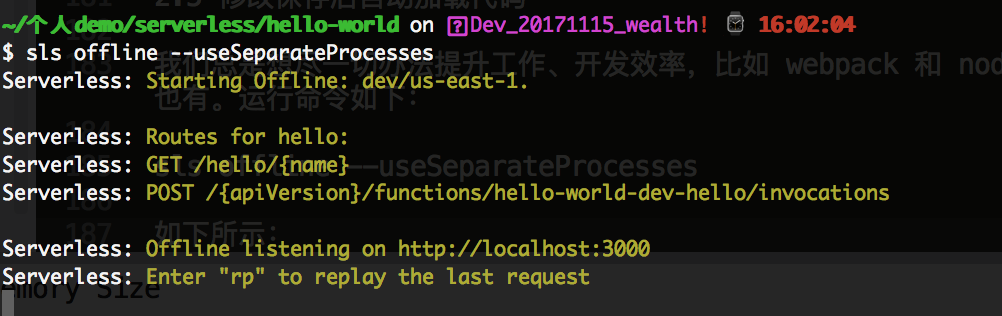
如上配置代码完成后,我们可以通过命令:sls offline 来运行了,如果启动成功,我们就会绑定3000端口了,如下所示:

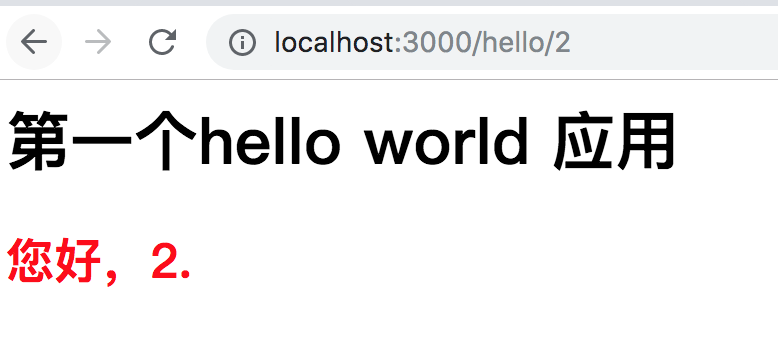
这个时候,我们在浏览器 http://localhost:3000/hello/2 访问的时候,可以看到如下信息了;如下所示:
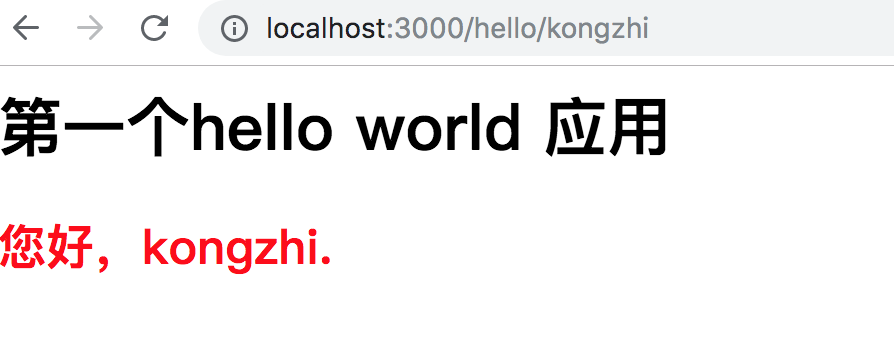
当我们把上面的地址改下的话,比如 http://localhost:3000/hello/kongzhi, 那么页面变成如下了,如下所示:
2.5 修改保存后自动加载代码
我们总是想尽一切办法提升工作、开发效率,比如 webpack 和 nodemon 有 reload 的功能,当然 serverless-offline 也有。运行命令如下:
sls offline --useSeparateProcesses
如下所示:
现在当我修改了下 handler.js 代码,然后会命令行中会自动打包,但是命令行中不会有任何提示,但是当我们刷新页面的时候,发现内容是最新的了如下所示: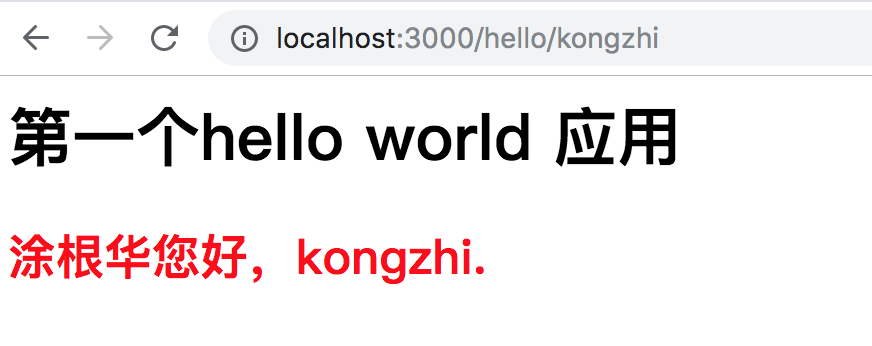
serverless 如何调试(三)的更多相关文章
- 应用调试(三)oops
目录 应用调试(三)oops 引入 配置内核打开用户oops CONFIG_DEBUG_USER user_debug 设置启动参数测试 打印用户堆栈 分析栈 main的调用 title: 应用调试( ...
- 驱动调试(三)oops确定函数PC
目录 驱动调试(三)oops确定函数PC 什么是oops 流程简述 代码仓库 模块例子分析 找到PC值 判断是否属于模块 查看符号表 找到模块 反汇编模块 内核例子分析 找到PC值 判断是否属于模块 ...
- phone 调试三种工具
1. Phonegap桌面开发工具 Phonegap Desktop-App与 手机客户端调试工具PhoneGap Developer App 此工具方便.快捷.自动.可以在真机中查看 无法设置断点. ...
- XE6 /XE8 & IOS开发之免证书真机调试三步走,生成iPA文件并安装到其它苹果设备上
XE6 & IOS开发之免证书真机调试(1):颁发属于自己的App签名证书(有图有真相) XE6 & IOS开发之免证书真机调试(2):连接真机并运行App(有图有真相) XE6 &a ...
- gcc gdb调试 (三)
编写代码过程中少不了调试.在windows下面,我们有visual studio工具.在linux下面呢,实际上除了gdb工具之外,你没有别的选择.那么,怎么用gdb进行调试呢?我们可以一步一步来试试 ...
- pr_debug、dev_dbg等动态调试三
内核版本:Linux-3.14 作者:彭东林 邮箱:pengdonglin137@163.com 如果没有使用CONFIG_DYNAMIC_DEBUG,那么就需要定义DEBUG,那么此时pr_debu ...
- Serverless 工程实践 | Serverless 应用优化与调试秘诀
作者|刘宇 前言:本文将以阿里云函数计算为例,提供了在线调试.本地调试等多种应用优化与调试方案. Serverless 应用调试秘诀 在应用开发过程中,或者应用开发完成,所执行结果不符合预期时,我 ...
- 阿里小程序Serverless 操作指南
小程序云 小程序云(Mini Program Cloud)是阿里云面向小程序场景提供的一站式云服务,帮助开发者实现一云多端的业务战略,提供了有服务器和无服务器两种模式.云应用是有服务器模式,提供了包括 ...
- 从函数计算到 Serverless 架构
前言 随着 Serverless 架构的不断发展,各云厂商和开源社区都已经在布局 Serverless 领域,一方面表现在云厂商推出传统服务/业务的 Serverless 化版本,或者 Serverl ...
随机推荐
- copy running-config startup-config 与 copy startup-config running-config
1.copy running-config startup-config 与 copy startup-config running-config 两者有什么不同???ANS:running-conf ...
- LeetCode 1284. Minimum Number of Flips to Convert Binary Matrix to Zero Matrix (最少翻转次数将二进制矩阵全部置为0)
给一个矩阵mat,每个格子都是0或1,翻转一个格子会将该格子以及相邻的格子(有共同边)全部翻转(0变为1,1变为0) 求问最少需要翻转几次将所有格子全部置为0. 这题的重点是数据范围,比赛结束看了眼数 ...
- pgsql 的函数
因为pgsql中没有存储过程和包,所以类似功能通过函数来实现 PostgreSQL的存储过程简单入门 http://blog.csdn.net/rachel_luo/article/details/8 ...
- prometheus exporter简介
一.服务分类 在线服务:请求的客户端和发起者需要立即响应(高并发.低延迟:并发数.接口响应时间.错误数.延迟时间),面对突发流量能进行资源的自动伸缩 离线服务:请求发送到服务端但不要求立即获取结果(监 ...
- linux 开启oracle监听
secureCRT连接到数据库所在的linux机器,切换到oracle用户模式下 [root@nstlbeta ~]# su - oracle 步骤阅读 2 然后用sqlplus登录到数据库,关闭数据 ...
- 人生苦短,我用Python(目录)
目前Django分类的文章正在整顿中,届时将呈现更加丰富的内容,另外整体排版也将会更改,感谢支持!! 一.Python基础 二.并发编程 三.数据库 四.Web 五.Python Web 框架 六.爬 ...
- 【java】查看Java字节码文件内容的方法+使用javap找不到类 解决方法
研究synchronized底层实现,涉及到查看java字节码的需要 前提是,你的PC已经成功安装了JDK并别配置了环境变量. ==========查看方法========= 一.javap查看简约字 ...
- Python range() 函数用法及字符串下标
range() 函数用法 range() 函数可创建一个整数列表,一般用在 for 循环中 range() 函数的表示方法: range(start, stop[, step]) start: 计数从 ...
- .NET[C#]使用LINQ从List<T>集合中获取最后N条数据记录的方法有哪些?
https://codedefault.com/2018/using-linq-to-get-the-last-n-elements-of-a-collection-in-csharp-applica ...
- 关于SQL server事务