
OpenCV 学习笔记(14)为轮廓创建边界旋转框和椭圆
https://docs.opencv.org/3.4/de/d62/tutorial_bounding_rotated_ellipses.html
不旋转
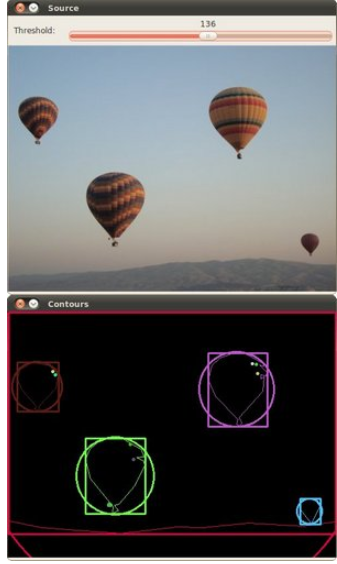
#include "opencv2/imgcodecs.hpp"

#include "opencv2/highgui.hpp"

#include "opencv2/imgproc.hpp"

#include <iostream>

using namespace cv;

using namespace std;

Mat src_gray;

int thresh = 100;

RNG rng(12345);

void thresh_callback(int, void*);

int main(int argc, char** argv)

{

//	CommandLineParser parser(argc, argv, "{@input | stuff.jpg | input image}");

	Mat src = imread("p1.png");

	if (src.empty())

	{

		cout << "Could not open or find the image!\n" << endl;

		cout << "usage: " << argv[0] << " <Input image>" << endl;

		return -1;

	}

	cvtColor(src, src_gray, COLOR_BGR2GRAY);

	blur(src_gray, src_gray, Size(3, 3));

	const char* source_window = "Source";

	namedWindow(source_window,0);

	imshow(source_window, src);

	const int max_thresh = 255;

	createTrackbar("Canny thresh:", source_window, &thresh, max_thresh, thresh_callback);

	thresh_callback(0, 0);

	waitKey();

	return 0;

}

void thresh_callback(int, void*)

{

	Mat canny_output;

	Canny(src_gray, canny_output, thresh, thresh * 2);

	vector<vector<Point> > contours;

	findContours(canny_output, contours, RETR_TREE, CHAIN_APPROX_SIMPLE);

	vector<vector<Point> > contours_poly(contours.size());

	vector<Rect> boundRect(contours.size());

	vector<Point2f>centers(contours.size());

	vector<float>radius(contours.size());

	for (size_t i = 0; i < contours.size(); i++)

	{

		approxPolyDP(contours[i], contours_poly[i], 3, true);

		boundRect[i] = boundingRect(contours_poly[i]);

		minEnclosingCircle(contours_poly[i], centers[i], radius[i]);

	}

	Mat drawing = Mat::zeros(canny_output.size(), CV_8UC3);

	for (size_t i = 0; i< contours.size(); i++)

	{

		Scalar color = Scalar(rng.uniform(0, 256), rng.uniform(0, 256), rng.uniform(0, 256));

		drawContours(drawing, contours_poly, (int)i, color);

		rectangle(drawing, boundRect[i].tl(), boundRect[i].br(), color, 2);

		circle(drawing, centers[i], (int)radius[i], color, 2);

	}

	namedWindow("Contours", 0);

	imshow("Contours", drawing);

}
旋转 https://docs.opencv.org/3.4/de/d62/tutorial_bounding_rotated_ellipses.html
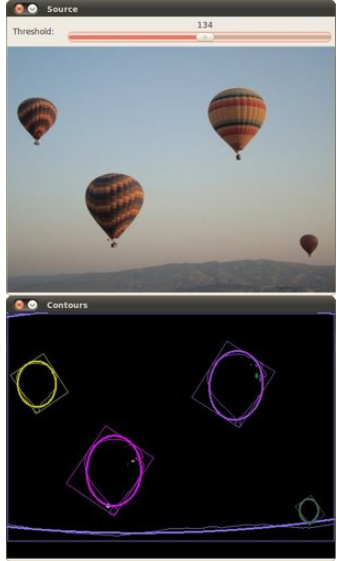
#include "opencv2/imgcodecs.hpp"

#include "opencv2/highgui.hpp"

#include "opencv2/imgproc.hpp"

#include <iostream>

using namespace cv;

using namespace std;

Mat src_gray;

int thresh = 100;

RNG rng(12345);

void thresh_callback(int, void* );

int main( int argc, char** argv )

{

    CommandLineParser parser( argc, argv, "{@input | stuff.jpg | input image}" );

    Mat src = imread( samples::findFile( parser.get<String>( "@input" ) ) );

    if( src.empty() )

    {

        cout << "Could not open or find the image!\n" << endl;

        cout << "Usage: " << argv[0] << " <Input image>" << endl;

        return -1;

    }

    cvtColor( src, src_gray, COLOR_BGR2GRAY );

    blur( src_gray, src_gray, Size(3,3) );

    const char* source_window = "Source";

    namedWindow( source_window );

    imshow( source_window, src );

    const int max_thresh = 255;

    createTrackbar( "Canny thresh:", source_window, &thresh, max_thresh, thresh_callback );

    thresh_callback( 0, 0 );

    waitKey();

    return 0;

}

void thresh_callback(int, void* )

{

    Mat canny_output;

    Canny( src_gray, canny_output, thresh, thresh*2 );

    vector<vector<Point> > contours;

    findContours( canny_output, contours, RETR_TREE, CHAIN_APPROX_SIMPLE, Point(0, 0) );

    vector<RotatedRect> minRect( contours.size() );

    vector<RotatedRect> minEllipse( contours.size() );

    for( size_t i = 0; i < contours.size(); i++ )

    {

        minRect[i] = minAreaRect( contours[i] );

        if( contours[i].size() > 5 )

        {

            minEllipse[i] = fitEllipse( contours[i] );

        }

    }

    Mat drawing = Mat::zeros( canny_output.size(), CV_8UC3 );

    for( size_t i = 0; i< contours.size(); i++ )

    {

        Scalar color = Scalar( rng.uniform(0, 256), rng.uniform(0,256), rng.uniform(0,256) );

        // contour

        drawContours( drawing, contours, (int)i, color );

        // ellipse

        ellipse( drawing, minEllipse[i], color, 2 );

        // rotated rectangle

        Point2f rect_points[4];

        minRect[i].points( rect_points );

        for ( int j = 0; j < 4; j++ )

        {

            line( drawing, rect_points[j], rect_points[(j+1)%4], color );

        }

    }

    imshow( "Contours", drawing );

}
OpenCV 学习笔记(14)为轮廓创建边界旋转框和椭圆的更多相关文章
- OpenCV学习笔记(14)——轮廓的性质
提取一些经常使用的对象特征 1.长宽比 边界矩形的宽高比 x,y,w,h = cv2.boundingRect(cnt) a ...
- 【OpenCV学习笔记】之六 手写图像旋转函数---万丈高楼平地起
话说,平凡之处显真格,这一点也没错! 比如,对旋转图像进行双线性插值,很简单吧? 可,对我,折腾了大半天,也没有达到预期效果! 尤其是三个误区让我抓瞎好久: 1,坐标旋转公式. 这东西,要用 ...
- OpenCV 学习笔记03 边界框、最小矩形区域和最小闭圆的轮廓
本节代码使用的opencv-python 4.0.1,numpy 1.15.4 + mkl 使用图片为 Mjolnir_Round_Car_Magnet_300x300.jpg 代码如下: impor ...
- opencv学习笔记(二)寻找轮廓
opencv学习笔记(二)寻找轮廓 opencv中使用findContours函数来查找轮廓,这个函数的原型为: void findContours(InputOutputArray image, O ...
- 【opencv学习笔记八】创建TrackBar轨迹条
createTrackbar这个函数我们以后会经常用到,它创建一个可以调整数值的轨迹条,并将轨迹条附加到指定的窗口上,使用起来很方便.首先大家要记住,它往往会和一个回调函数配合起来使用.先看下他的函数 ...
- [C++学习笔记14]动态创建对象(定义静态方法实现在map查找具体类名对应的创建函数,并返回函数指针,map真是一个万能类)good
[C++学习笔记14]动态创建对象 C#/Java中的反射机制 动态获取类型信息(方法与属性) 动态创建对象 动态调用对象的方法 动态操作对象的属性 前提:需要给每个类添加元数据 动态创建对象 实 ...
- OpenCV 学习笔记03 findContours函数
opencv-python 4.0.1 1 函数释义 词义:发现轮廓! 从二进制图像中查找轮廓(Finds contours in a binary image):轮廓是形状分析和物体检测和识别的 ...
- OpenCV 学习笔记 07 目标检测与识别
目标检测与识别是计算机视觉中最常见的挑战之一.属于高级主题. 本章节将扩展目标检测的概念,首先探讨人脸识别技术,然后将该技术应用到显示生活中的各种目标检测. 1 目标检测与识别技术 为了与OpenCV ...
- OpenCV 学习笔记03 boundingRect、minAreaRect、minEnclosingCircle、boxPoints、int0、circle、rectangle函数的用法
函数中的代码是部分代码,详细代码在最后 1 cv2.boundingRect 作用:矩形边框(boundingRect),用于计算图像一系列点的外部矩形边界. cv2.boundingRect(arr ...
随机推荐
- python2升级python3
需求: centos环境,python2.7需要升级为python3.x 1.请先手动(再次)安装 openssl .否则你升级之后,你的pip不能下载,会各种报错的. 比如这种错误: ImportE ...
- 《Interest Rate Risk Modeling》阅读笔记——第一章:利率风险建模概览
目录 第一章:利率风险建模概览 思维导图 一些想法 第一章:利率风险建模概览 思维导图 一些想法 久期向量模型类似于研究组合收益的高阶矩. 久期向量模型用的是一般多项式表达高阶久期,试试正交多项式? ...
- 那些前端二进制操作API
一直以来,前端的工作主要涉及的是字符串操作,而对二进制的数据接触较少.但是这种需求却一直存在着,尤其是HTML5之后,随着web应用越来越复杂,File,Blob,TypedArray这些API的出现 ...
- SCCM+WSUS的方式分发补丁
简单来说,System Center Configuration Manager(SCCM/ConfigMgr)由SMS(Systems Management Server)发展而来,其作为一款针对企 ...
- 目标检测算法之Fast R-CNN和Faster R-CNN原理
一.Fast R-CNN原理 在SPPNet中,实际上特征提取和区域分类两个步骤还是分离的.只是使用ROI池化层提取了每个区域的特征,在对这些区域分类时,还是使用传统的SVM作为分类器.Fast R- ...
- 深入V8引擎-AST(6)
花了5篇才把一个字符串词法给解析完,不知道要多久才能刷完整个流程,GC.复杂数据类型的V8实现那些估计又是几十篇,天呐,真是给自己挖了个大坑. 前面几篇实际上只是执行了scanner.Initiali ...
- C# do...while循环
一.简介 在for和while的循环是在头部写测试循环条件,而do....while的循环是在循环的尾部写测试条件 do...while的循环和while的类似,但是do...while的最少执行一次 ...
- 代码语法高亮踩坑-原理,问题, PRE元素及htmlentity
语法高亮库基础原理 在研究使用能够在web页面上代码语法高显的解决方案时,发现有很多现成的开源库.比较中意的有prism.js,highlightjs.他们的原理基本上核心就两点: 1. 利用html ...
- 2019 医渡云java面试笔试题 (含面试题解析)
本人5年开发经验.18年年底开始跑路找工作,在互联网寒冬下成功拿到阿里巴巴.今日头条.医渡云等公司offer,岗位是Java后端开发,因为发展原因最终选择去了医渡云,入职一年时间了,也成为了面试官 ...
- 洛谷P1523 旅行商简化版(DP)
题目: P1523 旅行商简化版 解析 可以看做是两个人同时从西往东走,经过不一样的点,走到最东头的方案数 设\(f[i][j]\)表示一个人走到i,一个人走到j的最短距离(\(i<j\)) 第 ...