
OpenCV 学习笔记(14)为轮廓创建边界旋转框和椭圆
https://docs.opencv.org/3.4/de/d62/tutorial_bounding_rotated_ellipses.html
不旋转
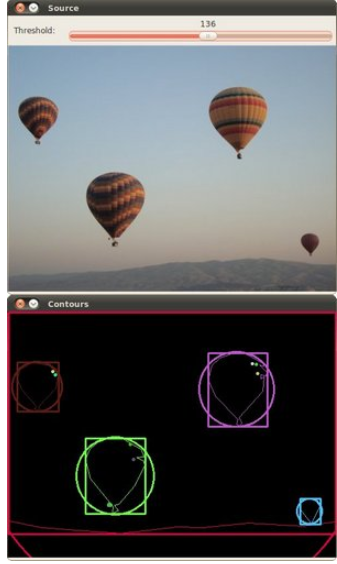
#include "opencv2/imgcodecs.hpp"

#include "opencv2/highgui.hpp"

#include "opencv2/imgproc.hpp"

#include <iostream>

using namespace cv;

using namespace std;

Mat src_gray;

int thresh = 100;

RNG rng(12345);

void thresh_callback(int, void*);

int main(int argc, char** argv)

{

//	CommandLineParser parser(argc, argv, "{@input | stuff.jpg | input image}");

	Mat src = imread("p1.png");

	if (src.empty())

	{

		cout << "Could not open or find the image!\n" << endl;

		cout << "usage: " << argv[0] << " <Input image>" << endl;

		return -1;

	}

	cvtColor(src, src_gray, COLOR_BGR2GRAY);

	blur(src_gray, src_gray, Size(3, 3));

	const char* source_window = "Source";

	namedWindow(source_window,0);

	imshow(source_window, src);

	const int max_thresh = 255;

	createTrackbar("Canny thresh:", source_window, &thresh, max_thresh, thresh_callback);

	thresh_callback(0, 0);

	waitKey();

	return 0;

}

void thresh_callback(int, void*)

{

	Mat canny_output;

	Canny(src_gray, canny_output, thresh, thresh * 2);

	vector<vector<Point> > contours;

	findContours(canny_output, contours, RETR_TREE, CHAIN_APPROX_SIMPLE);

	vector<vector<Point> > contours_poly(contours.size());

	vector<Rect> boundRect(contours.size());

	vector<Point2f>centers(contours.size());

	vector<float>radius(contours.size());

	for (size_t i = 0; i < contours.size(); i++)

	{

		approxPolyDP(contours[i], contours_poly[i], 3, true);

		boundRect[i] = boundingRect(contours_poly[i]);

		minEnclosingCircle(contours_poly[i], centers[i], radius[i]);

	}

	Mat drawing = Mat::zeros(canny_output.size(), CV_8UC3);

	for (size_t i = 0; i< contours.size(); i++)

	{

		Scalar color = Scalar(rng.uniform(0, 256), rng.uniform(0, 256), rng.uniform(0, 256));

		drawContours(drawing, contours_poly, (int)i, color);

		rectangle(drawing, boundRect[i].tl(), boundRect[i].br(), color, 2);

		circle(drawing, centers[i], (int)radius[i], color, 2);

	}

	namedWindow("Contours", 0);

	imshow("Contours", drawing);

}
旋转 https://docs.opencv.org/3.4/de/d62/tutorial_bounding_rotated_ellipses.html
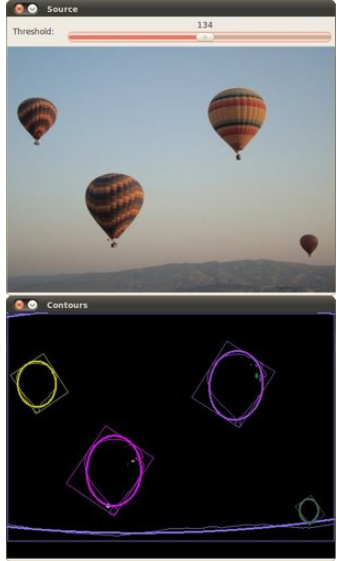
#include "opencv2/imgcodecs.hpp"

#include "opencv2/highgui.hpp"

#include "opencv2/imgproc.hpp"

#include <iostream>

using namespace cv;

using namespace std;

Mat src_gray;

int thresh = 100;

RNG rng(12345);

void thresh_callback(int, void* );

int main( int argc, char** argv )

{

    CommandLineParser parser( argc, argv, "{@input | stuff.jpg | input image}" );

    Mat src = imread( samples::findFile( parser.get<String>( "@input" ) ) );

    if( src.empty() )

    {

        cout << "Could not open or find the image!\n" << endl;

        cout << "Usage: " << argv[0] << " <Input image>" << endl;

        return -1;

    }

    cvtColor( src, src_gray, COLOR_BGR2GRAY );

    blur( src_gray, src_gray, Size(3,3) );

    const char* source_window = "Source";

    namedWindow( source_window );

    imshow( source_window, src );

    const int max_thresh = 255;

    createTrackbar( "Canny thresh:", source_window, &thresh, max_thresh, thresh_callback );

    thresh_callback( 0, 0 );

    waitKey();

    return 0;

}

void thresh_callback(int, void* )

{

    Mat canny_output;

    Canny( src_gray, canny_output, thresh, thresh*2 );

    vector<vector<Point> > contours;

    findContours( canny_output, contours, RETR_TREE, CHAIN_APPROX_SIMPLE, Point(0, 0) );

    vector<RotatedRect> minRect( contours.size() );

    vector<RotatedRect> minEllipse( contours.size() );

    for( size_t i = 0; i < contours.size(); i++ )

    {

        minRect[i] = minAreaRect( contours[i] );

        if( contours[i].size() > 5 )

        {

            minEllipse[i] = fitEllipse( contours[i] );

        }

    }

    Mat drawing = Mat::zeros( canny_output.size(), CV_8UC3 );

    for( size_t i = 0; i< contours.size(); i++ )

    {

        Scalar color = Scalar( rng.uniform(0, 256), rng.uniform(0,256), rng.uniform(0,256) );

        // contour

        drawContours( drawing, contours, (int)i, color );

        // ellipse

        ellipse( drawing, minEllipse[i], color, 2 );

        // rotated rectangle

        Point2f rect_points[4];

        minRect[i].points( rect_points );

        for ( int j = 0; j < 4; j++ )

        {

            line( drawing, rect_points[j], rect_points[(j+1)%4], color );

        }

    }

    imshow( "Contours", drawing );

}
OpenCV 学习笔记(14)为轮廓创建边界旋转框和椭圆的更多相关文章
- OpenCV学习笔记(14)——轮廓的性质
提取一些经常使用的对象特征 1.长宽比 边界矩形的宽高比 x,y,w,h = cv2.boundingRect(cnt) a ...
- 【OpenCV学习笔记】之六 手写图像旋转函数---万丈高楼平地起
话说,平凡之处显真格,这一点也没错! 比如,对旋转图像进行双线性插值,很简单吧? 可,对我,折腾了大半天,也没有达到预期效果! 尤其是三个误区让我抓瞎好久: 1,坐标旋转公式. 这东西,要用 ...
- OpenCV 学习笔记03 边界框、最小矩形区域和最小闭圆的轮廓
本节代码使用的opencv-python 4.0.1,numpy 1.15.4 + mkl 使用图片为 Mjolnir_Round_Car_Magnet_300x300.jpg 代码如下: impor ...
- opencv学习笔记(二)寻找轮廓
opencv学习笔记(二)寻找轮廓 opencv中使用findContours函数来查找轮廓,这个函数的原型为: void findContours(InputOutputArray image, O ...
- 【opencv学习笔记八】创建TrackBar轨迹条
createTrackbar这个函数我们以后会经常用到,它创建一个可以调整数值的轨迹条,并将轨迹条附加到指定的窗口上,使用起来很方便.首先大家要记住,它往往会和一个回调函数配合起来使用.先看下他的函数 ...
- [C++学习笔记14]动态创建对象(定义静态方法实现在map查找具体类名对应的创建函数,并返回函数指针,map真是一个万能类)good
[C++学习笔记14]动态创建对象 C#/Java中的反射机制 动态获取类型信息(方法与属性) 动态创建对象 动态调用对象的方法 动态操作对象的属性 前提:需要给每个类添加元数据 动态创建对象 实 ...
- OpenCV 学习笔记03 findContours函数
opencv-python 4.0.1 1 函数释义 词义:发现轮廓! 从二进制图像中查找轮廓(Finds contours in a binary image):轮廓是形状分析和物体检测和识别的 ...
- OpenCV 学习笔记 07 目标检测与识别
目标检测与识别是计算机视觉中最常见的挑战之一.属于高级主题. 本章节将扩展目标检测的概念,首先探讨人脸识别技术,然后将该技术应用到显示生活中的各种目标检测. 1 目标检测与识别技术 为了与OpenCV ...
- OpenCV 学习笔记03 boundingRect、minAreaRect、minEnclosingCircle、boxPoints、int0、circle、rectangle函数的用法
函数中的代码是部分代码,详细代码在最后 1 cv2.boundingRect 作用:矩形边框(boundingRect),用于计算图像一系列点的外部矩形边界. cv2.boundingRect(arr ...
随机推荐
- 第17课 lambda表达式
一. lambda表达式 (一)语法定义:[capture](paramters) mutable ->returnType{statement} 1.[capture]:捕获列表 (1)lam ...
- oracle数据库安装过程中的疑惑—该记录是本人以前写在微博上的文章
转行IT初学者关于oracle数据库整理第一次安装数据库的时候都是按照操作步骤一步一步进行安装,并没有对操作步骤产生过怀疑或者为什么要这么进行操作?2017年12月8日再次阅读安装操作说明书的时候有了 ...
- ng 打包给路径添加前缀
1.ng build --base --href /前缀名/--common - chunk --output-hashing=all --optimization 2.更改ts和html中的路径,将 ...
- Java 8创建Stream流的5种方法
不知不觉间,Java已经发展到13了,来不及感慨时间过得真的太快了,来不及学习日新月异的技术更新,目前大多数公司还是使用的JDK8版本,一方面是版本的稳定,另一方面是熟悉,所以很多公司都觉得不升级也挺 ...
- go ---MQTT client
Paho GO Client 语言 GO 协议 EPL AND EDL 官网地址 http://www.eclipse.org/paho/ API类型 Asynchronous 描述 Paho ...
- 《 .NET并发编程实战》阅读指南 - 第6章
先发表生成URL以印在书里面.等书籍正式出版销售后会公开内容.
- Python学习笔记之replace()
10-2 可使用方法replace()将字符串中的特定单词都替换为另一个单词. 读取你刚创建的文件learning_python.txt 中的每一行,将其中的Python 都替换为另一门语言的名称,如 ...
- Java中的集合类(List,Set.Map)
1.List 1.1 Arraylist 与 LinkedList 区别 是否保证线程安全: ArrayList 和 LinkedList 都是不同步的,也就是不保证线程安全: 底层数据结构: Arr ...
- 用node发布一个包
手把手教你用npm发布一个包 注:本文引用于简书 http://www.jianshu.com/p/36d3e0e00157 但是内容的话,还是一样的,也就是继续之前的工作,将那个autoRout ...
- cocos2d-js中jsc逆向为js攻略
笔记: 主要发现有两个工具 存档记录一下 https://github.com/OEDx/cocos-jsc-endecryptor python的 解密需要秘钥 推荐这个: https://git ...