
spring boot 用@CONFIGURATIONPROPERTIES 和 @Configuration两种方法读取配置文件
spring cloud 读取 配置文件属性值
1、bean
@Data

public class LocalFileConfig {

    /**

     * 文件存储地址

     */

    private String fileServerPath;

    private String fileDownloadUrl;

    private String defaultCutSize;

    private String fileValidateType;

    private Long fileSize;

}
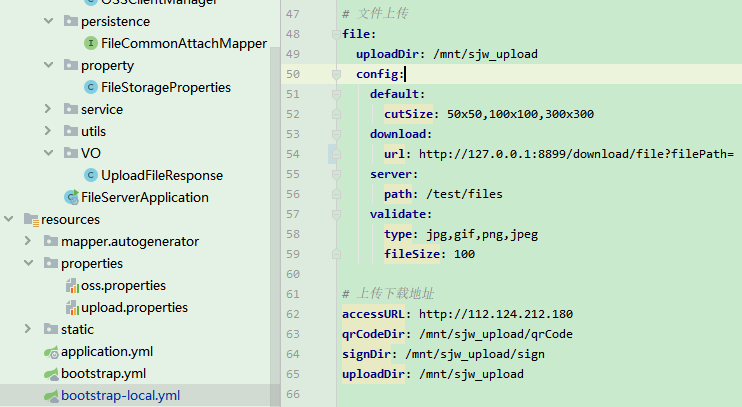
配置
@Configuration

@PropertySource(value = { "classpath:properties/oss.properties" })

public class LocalFileConfigConfiguration {

    @Value("${file.config.server.path}")

    private String fileServerPath;

    @Value("${file.config.download.url}")

    private String fileDownloadUrl;

    @Value("${file.config.default.cutSize}")

    private String fileDefaultCutSize;

    @Value("${file.config.validate.type}")

    private String fileValidateType;

    @Value("${file.config.validate.fileSize}")

    private Long fileSize;

    @Bean

    public LocalFileConfig localFileConfig(){

        LocalFileConfig localFileConfig = new LocalFileConfig();

        localFileConfig.setFileServerPath(fileServerPath);

        localFileConfig.setFileDownloadUrl(fileDownloadUrl);

        localFileConfig.setFileValidateType(fileValidateType);

        localFileConfig.setDefaultCutSize(fileDefaultCutSize);

        localFileConfig.setFileSize(fileSize);

        return localFileConfig;

    }

}
2、
@NoArgsConstructor
@AllArgsConstructor
@Component
@ConfigurationProperties(prefix = "file")
public class FileStorageProperties {
    private String uploadDir;

    public String getUploadDir() {
        return uploadDir;
    }

    public void setUploadDir(String uploadDir) {
        this.uploadDir = uploadDir;
    }
}

网上找到第二种方法,级联应用
链接:https://www.cnblogs.com/lihaoyang/p/10223339.html
SPRINGBOOT用@CONFIGURATIONPROPERTIES获取配置文件值
SpringBoot的配置文件有yml和properties两种,看一些文章说yml以数据为中心,比较好。个人觉得properties更好用,所以这里以properties格式为例来说。
我们都知道@Value 注解可以从配置文件读取一个配置,如果只是配置某个值,比如 某一个域名,配置为xxx.domain = www.xxx.com ,这样直接在代码里用@Value获取,比较方便。
但是如果是一组相关的配置,比如验证码相关的配置,有图片验证码、手机验证码、邮箱验证码,如果想把验证码的长度做成可配置。是否能像springboot的配置,
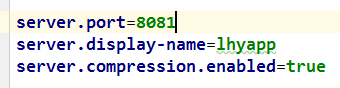
参照着写成:
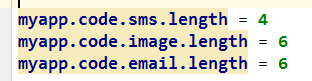
肯定是可以的!
参照源码是最好的学习方式,下面来看springboot是怎么做的
server对应着一个配置类:ServerProperties(只粘贴出了部分成员变量,来说明问题)

@ConfigurationProperties(prefix = "server", ignoreUnknownFields = true)

public class ServerProperties

        implements EmbeddedServletContainerCustomizer, EnvironmentAware, Ordered {

    /**

     * Server HTTP port.

     */

    private Integer port;

    @NestedConfigurationProperty

    private Compression compression = new Compression();

  //省略其他成员变量、getter 、setter
Compression类部分代码:
public class Compression {

    /**

     * If response compression is enabled.

     */

    private boolean enabled = false;
看过后应该很明白了,之所以能写成server.port=8081,server.display-name=lhyapp,server.compression.enabled=true ,是因为 ServerProperties 类上使用了
@ConfigurationProperties(prefix = "server", ignoreUnknownFields = true) 注解,其中prefix 指定配置文件里的前缀, 如果想弄成这样式的 server.compression.enabled = true ,就需要再声名一个类 Compression ,然后在ServerProperties 中引用这个类,属性名对应配置文件中的配置名。
@ConfigurationProperties:
告诉SpringBoot将本类中的所有属性和配置文件中相关的配置进行绑定;
prefix = "xxx":配置文件中哪个下面的所有属性进行一一映射
只有这个组件是容器中的组件,才能容器提供的@ConfigurationProperties功能;
@ConfigurationProperties(prefix = "xxx")默认从全局配置文件中获取值;
下边实现上面说的验证码配置,需要的类:

代码:
CoreConfiguration.java
@Configuration

@EnableConfigurationProperties(SecurityProperties.class)

public class CoreConfiguration {

    //配置一些bean

    //@Bean

    //public XXXX xxxx(){}

}
SecurityProperties.java
@ConfigurationProperties(prefix = "myapp")

public class SecurityProperties {

    private ValidateCodeProperties code = new ValidateCodeProperties();

    public ValidateCodeProperties getCode() {

        return code;

    }

    public void setCode(ValidateCodeProperties code) {

        this.code = code;

    }

}
ValidateCodeProperties.java
public class ValidateCodeProperties {

    private SmsCodeProperties sms = new SmsCodeProperties();

    private ImageCodeProperties image = new ImageCodeProperties();

    public SmsCodeProperties getSms() {

        return sms;

    }

    public void setSms(SmsCodeProperties sms) {

        this.sms = sms;

    }

    public ImageCodeProperties getImage() {

        return image;

    }

    public void setImage(ImageCodeProperties image) {

        this.image = image;

    }

}
SmsCodeProperties.java
public class SmsCodeProperties {

    private int length = 4;

    public int getLength() {

        return length;

    }

    public void setLength(int length) {

        this.length = length;

    }

}
在application.properties 里配置
myapp.code.sms.length = 10
使用配置:
  @Autowired

    private SecurityProperties securityProperties;

    @RequestMapping("/length")

    public @ResponseBody String length(){

        int length = securityProperties.getCode().getSms().getLength();

        return String.valueOf(length);

    }
spring boot 用@CONFIGURATIONPROPERTIES 和 @Configuration两种方法读取配置文件的更多相关文章
- spring boot 解决 跨域 的两种方法 -- 前后端分离
1.前言 以前做项目 ,基本上是使用 MVC 模式 ,使得视图与模型绑定 ,前后端地址与端口都一样 , 但是现在有些需求 ,需要暴露给外网访问 ,那么这就出现了个跨域问题 ,与同源原则冲突, 造成访问 ...
- spring boot 下websocket实现的两种方法
websocket前台实现代码,保存为html执行就好 html代码来自:https://blog.csdn.net/M348915654/article/details/53616837 <h ...
- Spring Boot定义系统启动任务的两种方式
Spring Boot定义系统启动任务的两种方式 概述 如果涉及到系统任务,例如在项目启动阶段要做一些数据初始化操作,这些操作有一个共同的特点,只在项目启动时进行,以后都不再执行,这里,容易想到web ...
- Spring Boot 入门系列(二十五)读取配置文件的几种方式详解!
在项目开发中经常会用到配置文件,之前介绍过Spring Boot 资源文件属性配置的方法,但是很多朋友反馈说介绍的不够详细全面.所以, 今天完整的分享Spring Boot读取配置文件的几种方式! S ...
- 创建一个 Spring Boot 项目,你会几种方法?
我最早是 2016 年底开始写 Spring Boot 相关的博客,当时使用的版本还是 1.4.x ,文章发表在 CSDN 上,阅读量最大的一篇有 42W+,如下图: 2017 年由于种种原因,就没有 ...
- Spring Boot 中实现定时任务的两种方式
在 Spring + SpringMVC 环境中,一般来说,要实现定时任务,我们有两中方案,一种是使用 Spring 自带的定时任务处理器 @Scheduled 注解,另一种就是使用第三方框架 Qua ...
- Spring Boot 排除自动配置的 4 种方法,关键时刻很有用!
Spring Boot 提供的自动配置非常强大,某些情况下,自动配置的功能可能不符合我们的需求,需要我们自定义配置,这个时候就需要排除/禁用 Spring Boot 某些类的自动化配置了. 比如:数据 ...
- 【springboot】【socket】spring boot整合socket,实现服务器端两种消息推送
参考地址:https://www.cnblogs.com/hhhshct/p/8849449.html
- 禁用 Spring Boot 中引入安全组件 spring-boot-starter-security 的方法
1.当我们通过 maven 或 gradle 引入了 Spring boot 的安全组件 spring-boot-starter-security,Spring boot 默认开启安全组件,这样我们就 ...
随机推荐
- mysql开放远程连接
1.检查端口是否被监听,没有的话请启动mysql. netstat -atnp | grep 3306 2.检查用户是否具备远程连接,即host字段值不是 % mysql -uroot -p你的密码 ...
- 带状矩阵的存储(c++)
2 1 0 0 3 1 3 0 0 5 2 7 0 0 9 0 这个程序对于三对角矩阵都是有效的,为了精 ...
- dubbo架构角色
角色 Dubbo有5个参与者:其中Monitor.Registry不是必须的 Provider 暴露服务的服务提供方 Consumer 调用远程服务的服务消费方(负载均衡) Registry 服务注册 ...
- Nginx配置SSL证书部署HTTPS网站(颁发证书)
一.Http与Https的区别HTTP:是互联网上应用最为广泛的一种网络协议,是一个客户端和服务器端请求和应答的标准(TCP),用于从WWW服务器传输超文本到本地浏览器的传输协议,它可以使浏览器更加高 ...
- ERROR: relation "pg_buffercache" does not exist
创建pg_buffercache后,查询时报错: postgres=# create extension pg_buffercache; postgres=# select * from pg_buf ...
- 伟程君解决端口被占用问题(接口jmeter 本地端口被占用完了,jmeter报错的问题)(亲测是可以的)
1.在目录下创建文件local.conf(没有就创建目录和文件) touch /etc/sysctl.d/local.conf mkdir(创建文件夹) touch(创建文件) 2.往local.co ...
- PAT 甲级 1080 Graduate Admission (30 分) (简单,结构体排序模拟)
1080 Graduate Admission (30 分) It is said that in 2011, there are about 100 graduate schools ready ...
- iOS - 点击UIButton不变灰,button的image不变灰
要想让uibutton点击不变灰 初始化的时候就不能 UIButton *button = [[UIButton alloc]init]; 初始化的时候酱紫,可以保证button点击时不变灰 UIBu ...
- .Net Core个人笔记
目录 前言 IOC注册 三种生命周期 如何注册一个IOC服务 .Net Core部署IIS之后500错误 管道和中间件 示意图 管道方法 中间件 加日志观看 使用MVC MVC服务注入 MVC管道调用 ...
- [LeetCode] 114. Flatten Binary Tree to Linked List 将二叉树展平为链表
Given a binary tree, flatten it to a linked list in-place. For example, given the following tree: 1 ...