
用vue做todolist
<template>

  <div class="hello">

      <div style="height:25px;line-height:25px;color:#a26777">This is Todos</div>

       <input type="text" style="width: 100%;height: 30px;border: 1px solid #a26777;padding: 0 3px;

    box-sizing: border-box;" v-model="getActivity" placeholder="宝贝,请输入你的日常计划~"  @keyup.enter="onEnter">

       <ul>

          <li style="width:100%;background-color:#87d1d0;height:25px;margin:0;border:1px solid white;line-height:25px" :class="{becomeRed:item.isfinished}" @click="todos(item)" v-for="(item,index) in todoList" :key="index">{{item.eat}}

            <span style="float: right;" @click="deleteMe(index)">delete!</span>

          </li>

       </ul>

       <div @click="checkAll()" style="width: 30%;margin: 0 auto;background-color: #a26777;height: 25px;line-height: 25px;border-radius:4px;color:white" :class="{checkedColor:checkedOrNot}">Check all</div>

       <div style="margin-top: 10px; width: 50%;margin: 10px auto; background-color: #a26777;height: 25px;line-height: 25px;

    border-radius:4px;color:white" v-if="getTheChange" >{{numleft}}</div>

     <div style="margin-top: 10px; width: 50%;margin: 10px auto; background-color: #a26777;height: 25px;line-height: 25px;

    border-radius:4px;color:white" v-if="!getTheChange"  @click="deleteAll()" >Delete completed</div>

    <div style="border-bottom:1px dashed #a26777"></div>

    <div style="width:50px;height:50px;border-radius:25px;line-height:50px;color:white;text-align:center;background-color:#a26777;font-size:12px;margin:10px auto;background:linear-gradient(to right, #87D1D0 , #a26777);" @click="toRecord">

        Records

    </div>

  </div>

</template>

<script>

import Store from './store.js'

import router from '../router/index.js'

export default {

  data () {

    return {

      getActivity:'',

      todoList:Store.fetch()||[],

      checked:false,

      checked2:false,

      numleft:Store.fetch().length+'times left',//这个是获取缓存里面有多少项没有完成

      newIndex:0,

      getTheChange:true,

      checkedList:[],

      checkedOrNot:false,

      count:0,

      allList:Store.fetchAll()||[],//注意了,Store.fetchAll()如果不写的话,让你从第一个页面进入第二个,再进入第一个页面输入enter时,会重新计算

      getTime:''

    }

  },

  methods:{

    //这个表示我想选中这个项来删除,实在是不想做圆圈的样式,宝宝们懂就好~

    todos:function (item){

      item.isfinished=!item.isfinished

    },

    //你enter的时候,就会多一项,你要完成的东东

    onEnter:function () {

        this.todoList.push ({  //这里的存储是为了时时更新所有显示的list的状态

          eat:this.getActivity,

          isfinished:false

        })

        this.allList.push({  //为了第二个页面去获取你所有写过的list

            eat:this.getActivity,

            isfinished:false,

            time:this.getTime

        })

        this.getActivity='' //这里置空主要是为了好输入啦

    },

    deleteMe:function (index){ //删除某一项

      this.todoList.splice(index,1)

    },

    checkAll:function(){  //全选,全选可以表示已完成,欲删除的状态

      this.checkedOrNot=!this.checkedOrNot

      var _this=this

      if(_this.checkedOrNot){

        _this.todoList.forEach(element => {

            element.isfinished=true

        });

      }else{

        _this.todoList.forEach(element => {

            element.isfinished=false

        });

      }

    },

  deleteAll:function (){//删除所有的,就是将整个数据做一个删选,文字变白就表示欲删除,将不需要删除的 (isfinished==false)留下来

       this.checked=true

       this.todoList= this.todoList.filter((element)=>{

         return element.isfinished==false;

       })

    },

    getSomeInit:function(){//只有有欲删除的,会显示deleted completed,没有就显示num+times left

       this.checkedList=this.todoList.filter((element)=>{

         return element.isfinished==false;

       })

        if(this.checkedList<this.todoList){

           this.getTheChange=false;

        }else{

           this.getTheChange=true;

        }

    },

    toRecord:function (){

       router.push({ path: `/loginDetail` })

    },

    getNow:function(){  //这里是当前时间的转化,存到内存里面去,在第二个页面显示

        var date = new Date();

        var year = date.getFullYear();

        var month = date.getMonth() + 1;

        var day = date.getDate();

        if (month < 10) {

            month = "0" + month;

        }

        if (day < 10) {

            day = "0" + day;

        }

        this.getTime= year + "-" + month + "-" + day;

    }

  },

  watch:{

    todoList:{

      handler:function (item) {

        Store.setSome(item)

        this.index=item.length

        this.numleft=this.index+'times left'

        this.checkedList=this.todoList.filter((element)=>{

         return element.isfinished==false;

        })

        if(this.checkedList<this.todoList){

           this.getTheChange=false;

        }else{

           this.getTheChange=true;

        }

      },

      deep:true  //必须要加

    },

    allList:{

       handler:function (item) {

           Store.setAllSome(item)

      },

      deep:true

    }

  },

  created:function () {

    this.getSomeInit()

    this.getNow()

  }

}

</script>

<!-- Add "scoped" attribute to limit CSS to this component only -->

<style scoped>

.becomeRed{

  color:white;

}

h1, h2 {

  font-weight: normal;

}

ul {

  list-style-type: none;

  padding: 0;

}

li {

  display: inline-block;

  margin: 0 10px;

}

a {

  color: #42b983;

}

@import "../assets/var.less";

@loading-bar-color: @color-white;

.checkedColor{

  color:white;

}

#loadingbar {

  position: fixed;

  z-index: 2147483647;

  top: 100px;

  left: -6px;

  width: 1%;

  height: 2px;

  background: @loading-bar-color;

  -moz-border-radius: 1px;

  -webkit-border-radius: 1px;

  border-radius: 1px;

  -moz-transition: all 500ms ease-in-out;

  -ms-transition: all 500ms ease-in-out;

  -o-transition: all 500ms ease-in-out;

  -webkit-transition: all 500ms ease-in-out;

  transition: all 500ms ease-in-out;

}

.checkedColor,.checked2{

  color:white;

}

#loadingbar.left {

  left: 100%;

  right: 0px;

  width: 100%;

}

#loadingbar.up {

  left: 0px;

  top: 100%;

  width: 5px;

  bottom: 0px;

  height: 100%;

}

#loadingbar.down {

  left: 0;

  width: 5px;

  height: 0;

}

#loadingbar.waiting dd, #loadingbar.waiting dt {

  -moz-animation: pulse 2s ease-out 0s infinite;

  -ms-animation: pulse 2s ease-out 0s infinite;

  -o-animation: pulse 2s ease-out 0s infinite;

  -webkit-animation: pulse 2s ease-out 0s infinite;

  animation: pulse 2s ease-out 0s infinite;

}

#loadingbar dt {

opacity: .6;

width: 180px;

right: -80px;

clip: rect(-6px,90px,14px,-6px);

}

#loadingbar dd {

  opacity: .6;

  width: 20px;

  right: 0;

  clip: rect(-6px,22px,14px,10px);

}

#loadingbar dd, #loadingbar dt {

  position: absolute;

  top: 0;

  height: 2px;

  -moz-box-shadow: rgb(255, 156, 50) 1px 0 6px 1px;

  -ms-box-shadow: rgb(255, 156, 50) 1px 0 6px 1px;

  -webkit-box-shadow: rgb(255, 156, 50) 1px 0 6px 1px;

  box-shadow: rgb(255, 156, 50) 1px 0 6px 1px;

  -moz-border-radius: 100%;

  -webkit-border-radius: 100%;

  border-radius: 100%;

}

#loadingbar.left dt {

opacity: .6;

width: 180px;

left: -4px;

clip: rect(-6px,185px,14px,25px);

}

#loadingbar.left dd {

  opacity: .6;

  width: 20px;

  left: 0;

  margin: 0;

  clip: rect(-6px,22px,14px,0px);

}

#loadingbar.left dd, #loadingbar.left dt {

  top: 0;

  height: 2px;

}

#loadingbar.down dt {

  opacity: .6;

  height: 180px;

  top: auto;

  bottom: -47px;

  clip: rect(-6px,20px,130px,-6px);

}

#loadingbar.down dd {

  opacity: .6;

  height: 20px;

  top: auto;

  bottom: 0;

  clip: rect(-6px,22px,20px,10px);

  margin: 0;

}

#loadingbar.down dd, #loadingbar.down dt {

  left: -5px;

  right: auto;

  width: 10px;

}

#loadingbar.up dt {

  opacity: .6;

  height: 180px;

  bottom: auto;

  top: -10px;

  clip: rect(13px,20px,190px,-6px);

}

#loadingbar.up dd {

  opacity: .6;

  height: 20px;

  bottom: auto;

  top: 0;

  clip: rect(-6px,22px,25px,10px);

  margin: 0;

}

#loadingbar.up dd, #loadingbar.up dt {

  left: -5px;

  right: auto;

  width: 10px;

}

@keyframes pulse {

  30% { opacity:0.6; }

  60% { opacity:0; }

  100% { opacity:0.6; }

}

@-moz-keyframes pulse

{

  30% { opacity:0.6; }

  60% { opacity:0; }

  100% { opacity:0.6; }

}

@-ms-keyframes pulse

{

  30% { opacity:0.6; }

  60% { opacity:0; }

  100% { opacity:0.6; }

}

@-webkit-keyframes pulse

{

  30% { opacity:0.6; }

  60% { opacity:0; }

  100% { opacity:0.6; }

}

.loadingbar-wrapper {

  position: absolute;

  top: 0;

  left: 0;

  z-index: 1000;

  width: 100%;

}

.loadingbar-wrapper::after {

  position: absolute;

  right: 5px;

  top: 10px;

  z-index: 1001;

  content: '';

  width: 16px;

  height: 16px;

  border-radius: 100%;

  -webkit-animation-fill-mode: both;

          animation-fill-mode: both;

  border: 2px solid @loading-bar-color;

  border-bottom-color: transparent;

  -webkit-animation: rotate 0.75s 0s linear infinite;

          animation: rotate 0.75s 0s linear infinite;

}

@keyframes rotate {

  0% {

    -webkit-transform: rotate(0deg);

            transform: rotate(0deg); }

  100% {

    -webkit-transform: rotate(360deg);

            transform: rotate(360deg) }

}

</style>
store.js
const store_Key='todolist'

const store_all_key='allTodolist'

export default{

    fetch (){

        return JSON.parse(window.localStorage.getItem(store_Key)||'[]')

    },

    fetchAll() {

        return JSON.parse(window.localStorage.getItem(store_all_key) || '[]')

    },

    setSome(item){

        window.localStorage.setItem(store_Key, JSON.stringify(item))

    },

    setAllSome(item){

        window.localStorage.setItem(store_all_key, JSON.stringify(item))

    }

}
router/index.js
import Vue from 'vue'

import Router from 'vue-router'

import HelloWorld from '@/components/HelloWorld'

import loginDetail from '@/components/loginDetail'

Vue.use(Router)

export default new Router({

  routes: [

    {

      path: '/',

      name: 'HelloWorld',

      component: HelloWorld

    },

    {

      path: '/loginDetail',

      name: 'loginDetail',

      component: loginDetail

    }

  ]

})
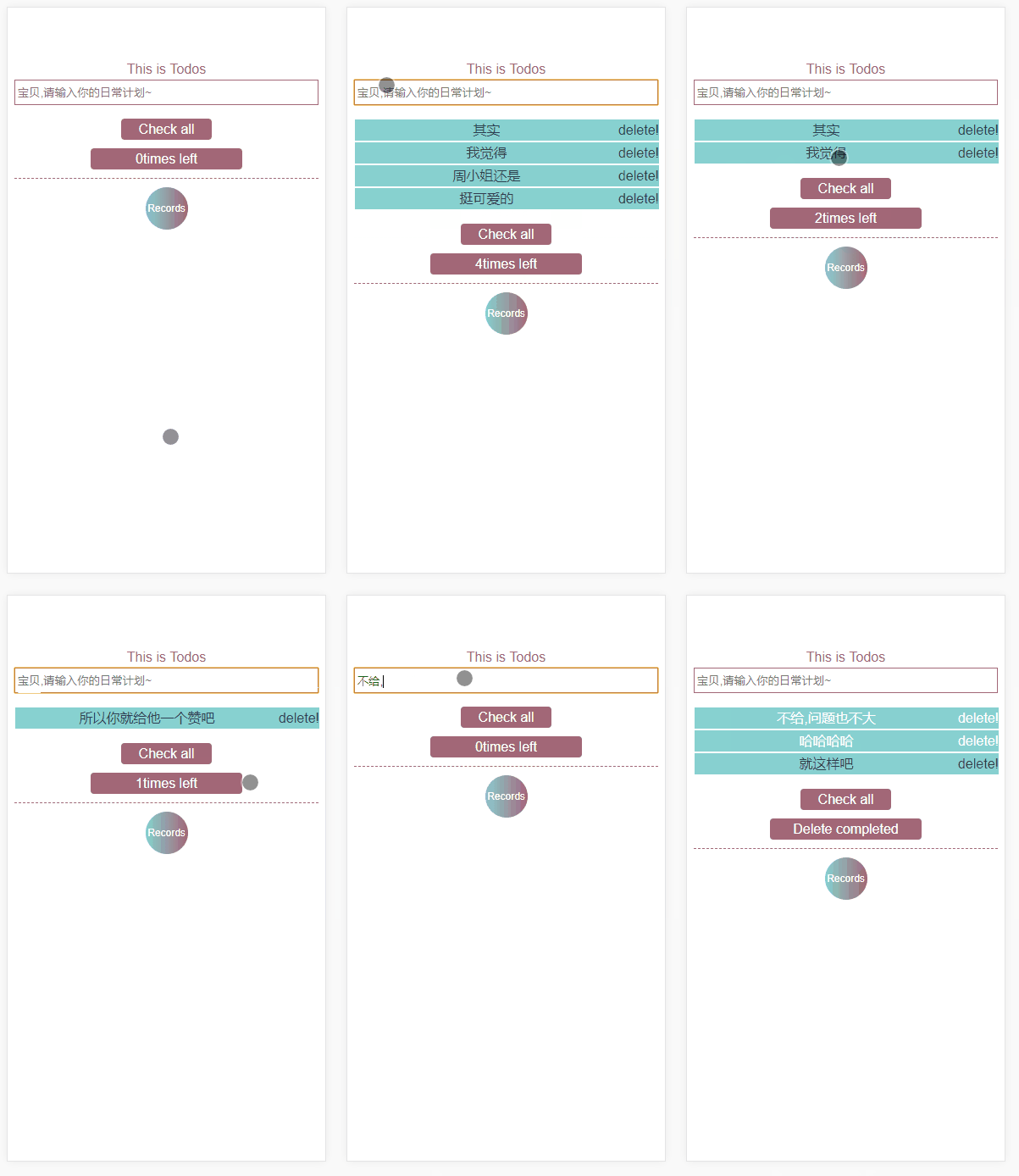
这个功能有点仿小程序高校todos,后面的储存记录在状态上没有做处理~
实现了什么?
1.全部删除
2.单个删除
3.欲删除的状态的下面文字的变化
4.怎么把所有的数据存储起来
具体的都写在了那个里面
要是不足之处,欢迎指正~
多运动,记得提前养发,劳逸结合-_-
用vue做todolist的更多相关文章
- vue 做一个简单的TodoList
目录结构 index.html <!DOCTYPE html> <html> <head> <meta charset="utf-8"&g ...
- 用vue做app内嵌页遇到的坑
公司要求用vue做一个微信端的网站,其中还包含一些app的内嵌页.开始的时候没想那么多,就直接用vue-cli搭了一个单页的vue项目,可随着项目越做越大,页面越来越多,问题就开始暴露出来了. 众所周 ...
- vue做的第二个app
用vue做应用最好的还是组件的复用上次做饿了吗的app封装了一个评分star的组件只要引入组件传入size大小和score分数就行了,这次做豆瓣直接就就用上了不用重复写代码.不过vue做单页应用全部挂 ...
- 使用vue做项目
使用vue做项目需要用到node.js的npm来管理包 所以我们需要先下载node.js然后通过node的npm来管理包 安装完 nodejs后 我们需要执行 npm install vue-cli ...
- vue demo todo-list
html <input type='text' v-model="todoItem" v-on:keyup.enter='addItem'> <ul> &l ...
- Vue 做项目经验
Vue 做项目经验 首先需要知道最基本的东西是: Vue 项目打包:npm run build Vue生成在网页上看的端口:npm run dev 修改端口号的地方在: config文件夹下index ...
- Vue源码分析(一) : new Vue() 做了什么
Vue源码分析(一) : new Vue() 做了什么 author: @TiffanysBear 在了解new Vue做了什么之前,我们先对Vue源码做一些基础的了解,如果你已经对基础的源码目录设计 ...
- 使用vue做项目如何提高代码效率
最近做了两个vue项目,算上之前做的两个项目,总共有四个vue项目的经验了,但是总体来说写的代码质量不是很高,体现在以下几点 1.代码没有高效的复用 自从使用vue做项目之后,以前使用面向过程变成的习 ...
- vue 实现todolist,包含添加,删除,统计,清空,隐藏功能
vue 实现todolist,包含添加,删除,统计,清空,隐藏功能 添加:生成列表结构(v-for+数组).获取用户输入(v-model).通过回车新增数据(v-on+.enter) 删除:点击删除指 ...
随机推荐
- spark源码阅读--SparkContext启动过程
##SparkContext启动过程 基于spark 2.1.0 scala 2.11.8 spark源码的体系结构实在是很庞大,从使用spark-submit脚本提交任务,到向yarn申请容器,启 ...
- tp框架防止表单重复提交
转载 框架官方 http://www.thinkphp.cn/topic/9090.html 第三方 https://my.oschina.net/caomenglong/blog/728908
- JAVA - 普通类读取WEB-INF里面配置文件
服务器:Tomcat 9 注意问题:配置文件应该放入Tomcat的正式工程目录中测试. 可用代码: package com.daoen.rtis.test; import java.io.FileRe ...
- Multipath 多路径配置说明
查看主机或者存储交换机上的www号,在存储上将LUN映射给需要的主机 cat /sys/class/fc_host/host*/port_name 0x2002d0431efb7f5d 6d 该ww ...
- dede 对 单个 字段 编辑
{dede:field.body runphp='yes'} $body = str_replace("src=\"/uploads","src=\" ...
- 关于MySql升级JDBC架包导致时区问题报错(The server time zone value '?й???????' is unrecognized or represents more than one time zone)
报错信息: The server time zone value '?й???????' is unrecognized or represents more than one time zone. ...
- mysql遇到时区问题的坑(Java解决方案)
最近项目遇到一个坑,就是server和db之间存在时区问题,本人的db是utc时间, 可以使用代码设置时区来解决,本人这里使用joda三方包,joda蛮好用的,具体用法这里不做详细描述. 先引入pom ...
- ubuntu---画图工具(类似win中的画图软件)
参考 https://zhidao.baidu.com/question/622412096845238452.html https://jingyan.baidu.com/article/6525d ...
- SpringBoot 注册Servlet三大组件【Servlet、Filter、Listener】-原生代码+@Bean+效果展示
由于SpringBoot默认是以jar包的方式启动嵌入式的Servlet容器来启动SpringBoot的web应用,没有web.xml文件. 注册三大组件,class MyServlet()/clas ...
- 题解 洛谷P2258 【子矩阵】
应该很容易想到暴力骗分. 我们考虑暴力\(dfs\)枚举所有行的选择,列的选择,每次跑一遍记下分值即可. 时间复杂度:\(O(C_n^r \times C_m^c \times r \times c) ...