
201871010136 -赵艳强《面向对象程序设计(java)》第十六周学习总结
201871010136-赵艳强《面向对象程序设计(java)》第十六周学习总结
|
项目 |
内容 |
|
这个作业属于哪个课程 |
<任课教师博客主页链接>https://www.cnblogs.com/nwnu-daizh/ |
|
这个作业的要求在哪里 |
<作业链接地址>https://www.cnblogs.com/nwnu-daizh/p/12031970.html |
|
作业学习目标 |
(1) 掌握Java应用程序的打包操作; (2) 掌握线程概念; (3) 掌握线程创建的两种技术。 (4) 学习设计应用程序的GUI。 |
第一部分:总结教材14.1-14.3知识内容
1.线程的概念:
程序是一段静态的代码,它是应用程序执行的蓝本。
进程是程序的一次动态执行,它对应了从代码加载、执行至执行完毕的一个完整过程。
多线程是进程执行过程中产生的多条执行线索。线程是比进程执行更小的单位。
线程不能独立存在,必须存在于进程中,同一进程的各线程间共享进程空间的数据。
‐每个线程有它自身的产生、存在和消亡的过程,是一个动态的概念。
‐多线程意味着一个程序的多行语句可以看上去几乎在同一时间内同时运行。
(2)Java中实现多线程的途径有两种:
l 创建Thread类的子类
<1>用Thread类的子类创建线程
首先需从Thread类派生出一个子类,在该子类中重写run()方法。
例:
class hand extends Thread
{
public void run()
{……}
}
<2>然后用创建该子类的对象
Lefthand left=new Lefthand();
Righthand right=new Righthand();
<3>最后用start()方法启动线程
left.start();
right.start();
用Thread类的子类创建多线程的关键性操作:–定义Thread类的子类并实现用户线程操作,即run()方法的实现。
–在适当的时候启动线程。
由于Java只支持单重继承,用这种方法定义的类不可再继承其他父类。在程序中定义实现Runnable接口的类
(2)用Runnable()接口实现线程:
<1> 首先设计一个实现Runnable接口的类;
<2> 然后在类中根据需要重写run方法;
<3> 再创建该类对象,以此对象为参数建立Thread类的对象;
<4> 调用Thread类对象的start方法启动线程,将CPU执行权转交到run方法。
2.中断线程:
⚫ 当线程的run方法执行方法体中最后一条语句后,或者出现了在run方法中没有捕获的异常时,线程将终止,让出CPU使用权。
⚫ 调用interrupt()方法也可终止线程。
void interrupt()
– 向一个线程发送一个中断请求,同时把这个线程的“interrupted”状态置为true。
– 若该线程处于 blocked 状态,会抛出InterruptedException。
(2)测试线程是否被中断的方法
Java提供了几个用于测试线程是否被中断的方法。
⚫ static boolean interrupted()
– 检测当前线程是否已被中断 , 并重置状态“interrupted”值为false。
⚫ boolean isInterrupted()
– 检测当前线程是否已被中断 , 不改变状态“interrupted”值 。
3.线程状态:
利用各线程的状态变换,可以控制各个线程轮流使用CPU,体现多线程的并行性特征。
⚫ 线程有如下7种状态:
➢ New (新建)
⚫ new(新建)
线程对象刚刚创建,还没有启动,此时线程还处于不可运行状态。例如:Thread thread=new Thread(r);此时线程thread处于新建状态,有了相应的内存空间以及其它资源。
➢ Runnable (可运行)
⚫ runnable(可运行状态)
➢ 此时线程已经启动,处于线程的run()方法之中。
➢ 此时的线程可能运行,也可能不运行,只要CPU一空闲,马上就会运行。
➢ 调用线程的start()方法可使线程处于“可运行”状态。例如:thread.start();
➢ Running(运行)
➢ Blocked (被阻塞)
⚫ blocked (被阻塞)
➢ 一个正在执行的线程因特殊原因,被暂停执行,进入阻塞状态。
➢ 阻塞时线程不能进入队列排队,必须等到引起阻塞的原因消除,才可重新进入排队队列。
➢ 引起阻塞的原因很多,不同原因要用不同的方法解除。
⚫ sleep(),wait()是两个常用引起线程阻塞的方法。
➢ Waiting (等待)
⚫ 等待阻塞 -- 通过调用线程的wait()方法,让线程等待某工作的完成。
➢ Timed waiting (计时等待)
➢ Terminated (被终止)
⚫ Terminated (被终止) 线程被终止的原因有二:
➢ 一是run()方法中最后一个语句执行完毕而自然死亡。
➢ 二是因为一个没有捕获的异常终止了run方法而意外死亡。
➢ 可以调用线程的 stop 方 法 杀 死 一 个 线 程(thread.stop();),但是,stop方法已过时,不要在自己的代码中调用它。
其他判断和影响线程状态的方法
➢join():等待指定线程的终止。
➢join(long millis):经过指定时间等待终止指定的线程。
➢isAlive():测试当前线程是否在活动。
➢yield():让当前线程由“运行状态”进入到“就绪状态”从而让其它具有相同优先级的等待线程获取执行权。
4.多线程调度:
– Java提供一个线程调度器来监控程序启动后进入可运行状态的所有线程。线程调度器按照线程的优先级决定应调度哪些线程来执行。
– 处于可运行状态的线程首先进入就绪队列排队等候处理器资源,同一时刻在就绪队列中的线程可能有多个。Java的多线程系统会给每个线程自动分配一个线程的优先级。
⚫ Java 的线程调度采用优先级策略:
➢ 优先级高的先执行,优先级低的后执行;
➢ 多线程系统会自动为每个线程分配一个优先级,缺省时,继承其父类的优先级;
➢ 任务紧急的线程,其优先级较高;
➢ 同优先级的线程按“先进先出”的队列原则;
⚫ 下面几种情况下,当前运行线程会放弃CPU:
– 线程调用了yield() 或sleep() 方法;
– 抢先式系统下,有高优先级的线程参与调度;
– 由于当前线程进行I/O访问、外存读写、等待用户输入等操作导致线程阻塞;或者是为等候一个条件变量,以及线程调用wait() 方法。
多线程并发执行中的问题:
◆多个线程相对执行的顺序是不确定的。
◆线程执行顺序的不确定性会产生执行结果的不确定性。
◆在多线程对共享数据操作时常常会产生这种不确定性。
5.线程同步:
多线程并发运行不确定性问题解决方案:引入线程同步机制,使得另一线程要使用该方法,就只能等待。
第二部分:实验部分
1、实验目的与要求
(1) 掌握Java应用程序的打包操作;
(2) 掌握线程概念;
(3) 掌握线程创建的两种技术。
第二部分:实验部分
实验1:测试程序1(10分)
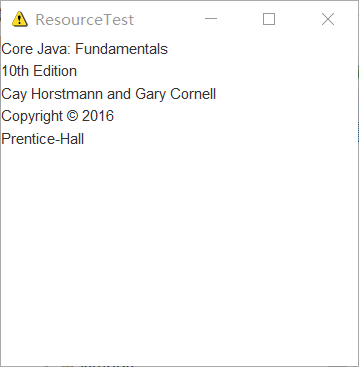
在elipse IDE中调试运行教材585页程序13-1,结合程序运行结果理解程序;
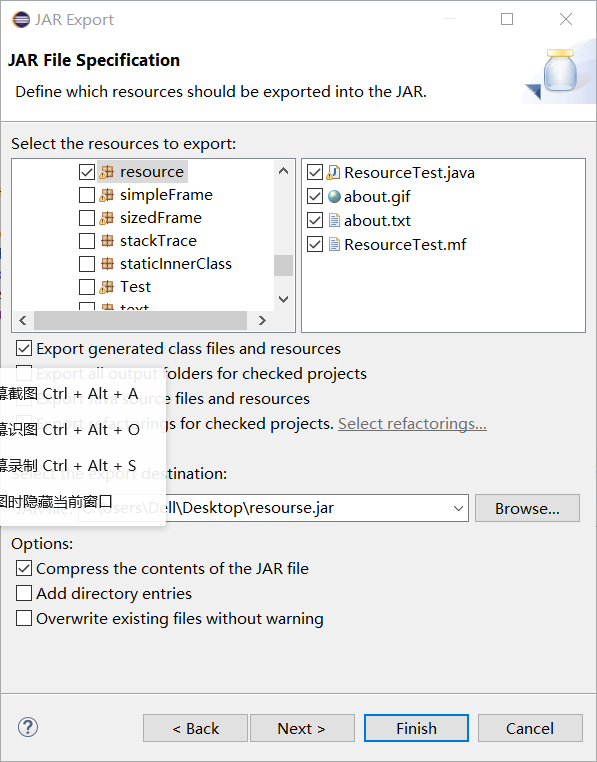
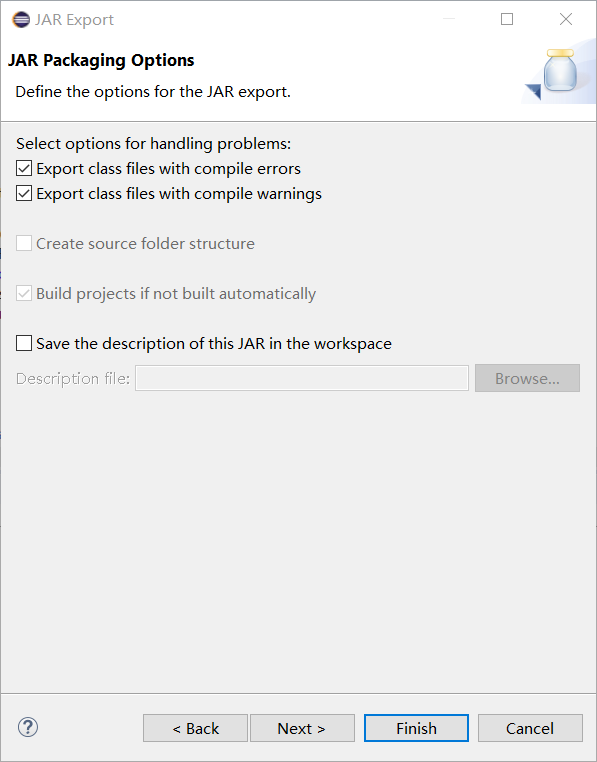
将所生成的JAR文件移到另外一个不同的目录中,再运行该归档文件,以便确认程序是从JAR文件中,而不是从当前目录中读取的资源。
掌握创建JAR文件的方法;
|
1
2
3
4
5
6
7
8
9
10
11
12
13
14
15
16
17
18
19
20
21
22
23
24
25
26
27
28
29
30
31
32
33
34
35
36
37
38
39
40
41
42
43
44
45
46
47
48
49
50
|
package resource;import java.awt.*;import java.io.*;import java.net.*;import java.util.*;import javax.swing.*;/** * @version 1.41 2015-06-12 * @author Cay Horstmann */public class ResourceTest{ public static void main(String[] args) { EventQueue.invokeLater(() -> { JFrame frame = new ResourceTestFrame(); frame.setTitle("ResourceTest"); frame.setDefaultCloseOperation(JFrame.EXIT_ON_CLOSE); frame.setVisible(true); }); }}/** * A frame that loads image and text resources. */class ResourceTestFrame extends JFrame{ private static final int DEFAULT_WIDTH = 300; private static final int DEFAULT_HEIGHT = 300; public ResourceTestFrame() { setSize(DEFAULT_WIDTH, DEFAULT_HEIGHT); URL aboutURL = getClass().getResource("about.gif");//找到指定位置的图像文件,返回一个可以加载资源的URL Image img = new ImageIcon(aboutURL).getImage();//将加载的about.gif图像设置为图标 setIconImage(img); JTextArea textArea = new JTextArea(); InputStream stream = getClass().getResourceAsStream("about.txt");//读取about.txt文本文件内容 try (Scanner in = new Scanner(stream, "UTF-8"))//将读取到的about.txt文本文件里内容显示到文本区 { while (in.hasNext())//读取文本文件 textArea.append(in.nextLine() + "\n"); } add(textArea); }} |
归档:




测试程序2:
l 在elipse IDE中调试运行ThreadTest,结合程序运行结果理解程序;
l 掌握线程概念;
l 掌握用Thread的扩展类实现线程的方法;
利用Runnable接口改造程序,掌握用Runnable接口创建线程的方法。
|
1
2
3
4
5
6
7
8
9
10
11
12
13
14
15
16
17
18
19
20
21
22
23
24
25
26
27
28
29
30
31
32
33
|
class Lefthand extends Thread { public void run() { for(int i=0;i<=5;i++) { System.out.println("You are Students!"); try{ sleep(500); } catch(InterruptedException e) { System.out.println("Lefthand error.");} } }}class Righthand extends Thread { public void run() { for(int i=0;i<=5;i++) { System.out.println("I am a Teacher!"); try{ sleep(300); } catch(InterruptedException e) { System.out.println("Righthand error.");} } }}public class ThreadTest{ static Lefthand left; static Righthand right; public static void main(String[] args) { left=new Lefthand(); right=new Righthand(); left.start(); right.start(); }} |
注释代码如下:
|
1
2
3
4
5
6
7
8
9
10
11
12
13
14
15
16
17
18
19
20
21
22
23
24
25
26
27
28
29
30
31
32
33
34
35
36
37
38
39
|
package a; //构建Thread类的子类定义线程 class Lefthand extends Thread { public void run() { for(int i=0;i<=5;i++) { System.out.println("You are Students!"); try{ sleep(500); //暂停,每0.5秒输出一次 } catch(InterruptedException e) { System.out.println("Lefthand error.");} } } } class Righthand extends Thread { public void run() { for(int i=0;i<=5;i++) { System.out.println("I am a Teacher!"); //静态方法强制当前正在执行的线程休眠 try{ sleep(300); } catch(InterruptedException e) { System.out.println("Righthand error.");} } } } public class ThreadTest { static Lefthand left; static Righthand right; public static void main(String[] args) { left=new Lefthand(); right=new Righthand(); left.start();//启动这个线程,引发调用run()方法。立即返回,新线程并发运行 right.start(); } } |
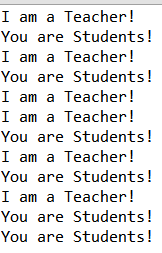
运行结果如图:
利用Runnable接口改造程序如下:
|
1
2
3
4
5
6
7
8
9
10
11
12
13
14
15
16
17
18
19
20
21
22
23
24
25
26
27
28
29
30
31
32
33
34
35
36
37
38
39
40
41
42
|
package a;import javax.print.attribute.standard.RequestingUserName;class Lefthand implements Runnable { public void run() { for(int i=0;i<=5;i++) { System.out.println("You are Students!"); try{ Thread.sleep(500); } catch(InterruptedException e) { System.out.println("Lefthand error.");} } } } class Righthand implements Runnable { public void run() { for(int i=0;i<=5;i++) { System.out.println("I am a Teacher!"); try{ Thread.sleep(300); } catch(InterruptedException e) { System.out.println("Righthand error.");} } } } public class ThreadTest { //static Lefthand left; //static Righthand right; public static void main(String[] args) { // left=new Lefthand(); //right=new Righthand(); Runnable lefthand=new Lefthand(); Thread left=new Thread(lefthand);// Runnable没有start这个方法,需要将Runnable的对象被Thread引用才可在Thread中调用start方法 Runnable righthand=new Righthand(); Thread right=new Thread(righthand); left.start(); right.start(); } } |
测试程序3:
l 在Elipse环境下调试教材625页程序14-1、14-2 、14-3,结合程序运行结果理解程序;
l 在Elipse环境下调试教材631页程序14-4,结合程序运行结果理解程序;
l 对比两个程序,理解线程的概念和用途;
l 掌握线程创建的两种技术。
Ball.java:
|
1
2
3
4
5
6
7
8
9
10
11
12
13
14
15
16
17
18
19
20
21
22
23
24
25
26
27
28
29
30
31
32
33
34
35
36
37
38
39
40
41
42
43
44
45
46
47
48
49
50
51
52
53
54
55
56
57
|
package bounce;import java.awt.geom.*;/** A ball that moves and bounces off the edges of a rectangle * @version 1.33 2007-05-17 * @author Cay Horstmann*/public class Ball//该类主要定义了小球的大小及其属性{ private static final int XSIZE = 15; private static final int YSIZE = 15; private double x = 0; private double y = 0; private double dx = 1; private double dy = 1; /** Moves the ball to the next position, reversing direction if it hits one of the edges */ public void move(Rectangle2D bounds) { x += dx; y += dy; if (x < bounds.getMinX()) { x = bounds.getMinX(); dx = -dx; } if (x + XSIZE >= bounds.getMaxX()) { x = bounds.getMaxX() - XSIZE; dx = -dx; } if (y < bounds.getMinY()) { y = bounds.getMinY(); dy = -dy; } if (y + YSIZE >= bounds.getMaxY()) { y = bounds.getMaxY() - YSIZE; dy = -dy; } } /** Gets the shape of the ball at its current position. */ public Ellipse2D getShape() { return new Ellipse2D.Double(x, y, XSIZE, YSIZE); }} |
BallComponent.java:
|
1
2
3
4
5
6
7
8
9
10
11
12
13
14
15
16
17
18
19
20
21
22
23
24
25
26
27
28
29
30
31
32
33
34
35
36
37
38
39
|
package bounce;import java.awt.*;import java.util.*;import javax.swing.*;/** * The component that draws the balls. * @version 1.34 2012-01-26 * @author Cay Horstmann */public class BallComponent extends JComponent{ private static final int DEFAULT_WIDTH = 450; private static final int DEFAULT_HEIGHT = 350; private java.util.List<Ball> balls = new ArrayList<>();//构造一个初始容量为 10 的空列表。//此接口的用户可以对列表中每个元素的插入位置进行精确地控制。用户可以根据元素的整数索引(在列表中的位置)访问元素,并搜索列表中的元素。 /** * Add a ball to the panel. * @param b the ball to add */ public void add(Ball b) { balls.add(b); } public void paintComponent(Graphics g) { Graphics2D g2 = (Graphics2D) g; for (Ball b : balls) { g2.fill(b.getShape()); } } public Dimension getPreferredSize() { return new Dimension(DEFAULT_WIDTH, DEFAULT_HEIGHT); }} |
BounceFrame.java:
|
1
2
3
4
5
6
7
8
9
10
11
12
13
14
15
16
17
18
19
20
21
22
23
24
25
26
27
28
29
30
31
32
33
34
35
36
37
38
39
40
41
42
43
44
45
46
47
48
49
50
51
52
53
54
55
56
57
58
59
60
61
62
63
64
65
66
67
68
69
70
71
72
73
74
75
76
77
78
79
80
81
82
83
84
|
package bounce;import java.awt.*;import java.awt.event.*;import javax.swing.*;/** * Shows an animated bouncing ball. * @version 1.34 2015-06-21 * @author Cay Horstmann */public class Bounce{ public static void main(String[] args) { EventQueue.invokeLater(() -> { JFrame frame = new BounceFrame(); frame.setDefaultCloseOperation(JFrame.EXIT_ON_CLOSE); frame.setVisible(true); }); }}/** * The frame with ball component and buttons. */class BounceFrame extends JFrame{ private BallComponent comp; public static final int STEPS = 1000; public static final int DELAY = 3; /** * Constructs the frame with the component for showing the bouncing ball and * Start and Close buttons */ public BounceFrame() { setTitle("Bounce"); comp = new BallComponent(); add(comp, BorderLayout.CENTER);//将自建的swing组件放在居中的位置 JPanel buttonPanel = new JPanel(); addButton(buttonPanel, "Start", event -> addBall()); addButton(buttonPanel, "Close", event -> System.exit(0));//将两个组件注册为事件源并添加到buttonpanel中 add(buttonPanel, BorderLayout.SOUTH);//将一个buttonpanel放到框架的南端 pack(); } /** * Adds a button to a container. * @param c the container * @param title the button title * @param listener the action listener for the button */ public void addButton(Container c, String title, ActionListener listener) { JButton button = new JButton(title); c.add(button); button.addActionListener(listener); }//用addbutton方法将两个按钮组合为一个整体 /** * Adds a bouncing ball to the panel and makes it bounce 1,000 times. */ public void addBall() { try { Ball ball = new Ball(); comp.add(ball); for (int i = 1; i <= STEPS; i++) { ball.move(comp.getBounds()); comp.paint(comp.getGraphics()); Thread.sleep(DELAY);//调用sleep并未创建线程对象,只是为了将两个球的轨迹可以显示出来 } } catch (InterruptedException e) { } }} |
BounceFrame.java:
|
1
2
3
4
5
6
7
8
9
10
11
12
13
14
15
16
17
18
19
20
21
22
23
24
25
26
27
28
29
30
31
32
33
34
35
36
37
38
39
40
41
42
43
44
45
46
47
48
49
50
51
52
53
54
55
56
57
58
59
60
61
62
63
64
65
66
67
68
69
70
71
72
73
74
75
76
77
78
79
80
81
82
83
84
85
86
87
88
|
package bounceThread;import java.awt.*;import java.awt.event.*;import javax.swing.*;/** * Shows animated bouncing balls. * @version 1.34 2015-06-21 * @author Cay Horstmann */public class BounceThread{ public static void main(String[] args) { EventQueue.invokeLater(() -> { JFrame frame = new BounceFrame(); frame.setTitle("BounceThread"); frame.setDefaultCloseOperation(JFrame.EXIT_ON_CLOSE); frame.setVisible(true); }); }}/** * The frame with panel and buttons. */class BounceFrame extends JFrame{ private BallComponent comp; public static final int STEPS = 1000; public static final int DELAY = 5; /** * Constructs the frame with the component for showing the bouncing ball and * Start and Close buttons */ public BounceFrame() { comp = new BallComponent(); add(comp, BorderLayout.CENTER); JPanel buttonPanel = new JPanel(); addButton(buttonPanel, "Start", event -> addBall()); addButton(buttonPanel, "Close", event -> System.exit(0)); add(buttonPanel, BorderLayout.SOUTH); pack(); } /** * Adds a button to a container. * @param c the container * @param title the button title * @param listener the action listener for the button */ public void addButton(Container c, String title, ActionListener listener) { JButton button = new JButton(title); c.add(button); button.addActionListener(listener); } /** * Adds a bouncing ball to the canvas and starts a thread to make it bounce */ public void addBall() { Ball ball = new Ball(); comp.add(ball); Runnable r = () -> { //使用匿名内部类 try { for (int i = 1; i <= STEPS; i++) { ball.move(comp.getBounds()); comp.repaint(); Thread.sleep(DELAY); } } catch (InterruptedException e) { } }; Thread t = new Thread(r); t.start();//使得小球的移动成为其中的一个子线程 }} |
运行结果如图:
开始截图:
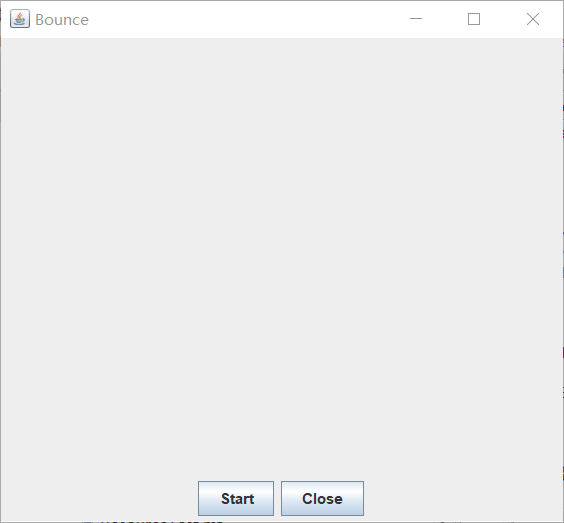
未改进代码截图:
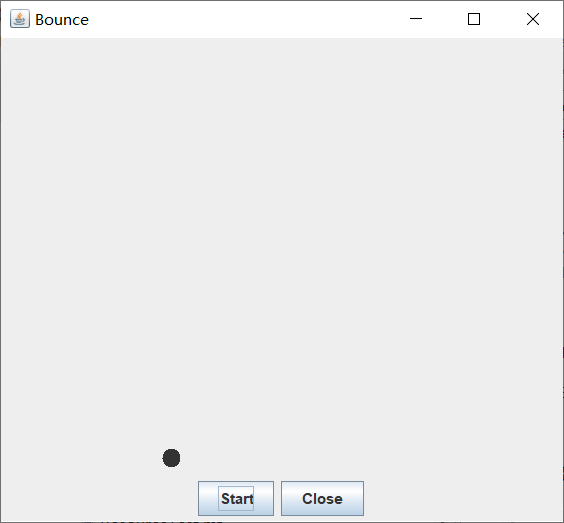
改进后的截图:

实验总结:
这周学习了JAR文件相关的知识,还学习了有关线程的知识。用Runnable()接口实现线程,实现其中的run方法,理解和掌握了线程的优先级属性及调度方法。还有很多还有不太理解的地方,希望在之后的学习中能学到更多。
201871010136 -赵艳强《面向对象程序设计(java)》第十六周学习总结的更多相关文章
- 201571030332 扎西平措 《面向对象程序设计Java》第八周学习总结
<面向对象程序设计Java>第八周学习总结 项目 内容 这个作业属于哪个课程 https://www.cnblogs.com/nwnu-daizh/ 这个作业的要求在哪里 https: ...
- 201771010118马昕璐《面向对象程序设计java》第八周学习总结
第一部分:理论知识学习部分 1.接口 在Java程序设计语言中,接口不是类,而是对类的一组需求描述,由常量和一组抽象方法组成.Java为了克服单继承的缺点,Java使用了接口,一个类可以实现一个或多个 ...
- 201771010134杨其菊《面向对象程序设计java》第八周学习总结
第八周学习总结 第一部分:理论知识 一.接口.lambda和内部类: Comparator与comparable接口: 1.comparable接口的方法是compareTo,只有一个参数:comp ...
- 201771010134杨其菊《面向对象程序设计java》第七周学习总结
第七周学习总结 第一部分:理论知识 1.继承是面向对象程序设计(Object Oriented Programming-OOP)中软件重用的关键技术.继承机制使用已经定义的类作为基础建立新的类定义,新 ...
- 201771010128 王玉兰《面象对象程序设计 (Java) 》第六周学习总结
---恢复内容开始--- 第一部分:基础知识总结: 1.继承 A:用已有类来构建新类的一种机制,当定义了一个新类继承一个类时,这个新类就继承了这个类的方法和域以适应新的情况: B:特点:具有层次结构. ...
- 周强201771010141《面向对象程序设计Java》第八周学习总结
一.理论知识学习部分 Java为了克服单继承的缺点,Java使用了接口,一个类可以实现一个或多个接口. 接口体中包含常量定义和方法定义,接口中只进行方法的声明,不提供方法的实现. 类似建立类的继承关系 ...
- 马凯军201771010116《面向对象程序设计Java》第八周学习总结
一,理论知识学习部分 6.1.1 接口概念 两种含义:一,Java接口,Java语言中存在的结构,有特定的语法和结构:二,一个类所具有的方法的特征集合,是一种逻辑上的抽象.前者叫做“Java接口”,后 ...
- 201871010126 王亚涛《面向对象程序设计 JAVA》 第十三周学习总结
内容 这个作业属于哪个课程 https://www.cnblogs.com/nwnu-daizh/ 这个作业的要求在哪里 https://www.cnblogs.com/nwnu-daizh/p/ ...
- 201777010217-金云馨《面向对象程序设计Java》第八周学习总结
项目 内容 这个作业属于哪个课程 https://www.cnblogs.com/nwnu-daizh/ 这个作业的要求在哪里 https://www.cnblogs.com/nwnu-daizh/p ...
- 201871010126 王亚涛 《面向对象程序设计 (Java)》第十七周学习总结
内容 这个作业属于哪个课程 https://www.cnblogs.com/nwnu-daizh/ 这个作业的要求在哪里 https://www.cnblogs.com/nwnu-daizh/p/12 ...
随机推荐
- Redis与python
一.Redis介绍 Redis是完全开源免费的,遵守BSD协议,是一个高性能的key-value数据库(非关系型数据库). 本质:将数据保存在内存中. 用途:缓存.消息队列. 1.Redis的特点 R ...
- Note | PyTorch1.2 + CUDA10.0 + cuDNN7.6 + Anaconda3配置
目标: 在2080Ti GPU上,运行PyTorch1.2 GPU版本. 经过确认,PyTorch1.2可以搭配CUDA10.0,而CUDA10.0搭配cuDNN7.6(官网下载页面可以直接看到). ...
- T-SQL(SQLSERVER)
使用自定义类型名 CREATE DATABASE Student GO USE Student GO Exec sp_addtype char20,'varchar(20)','null' GO 在库 ...
- redis集群之Sentinel
目前我们讲的 Redis 还只是主从方案,最终一致性.读者们可思考过,如果主节点凌晨3 点突发宕机怎么办?就坐等运维从床上爬起来,然后手工进行从主切换,再通知所有的程序把地址统统改一遍重新上线么?毫无 ...
- CompletableFuture2
public class CompletableFuture2 { public static void main(String[] args) throws InterruptedException ...
- WPF 通过EventTrigger修改鼠标样式
难倒是不难. 除去eventtrigger之外还有别的触发器可以实现. 这个主要是难在对xaml的数据理解上. 代码实现 <Button Content=" > <Butt ...
- pip下载速度慢解决方法
添加镜像链接 解决方式: 更改pip的数据源.目前国内比较知名的有豆瓣的,清华的.都是pipy官网的镜像. 清华:https://pypi.tuna.tsinghua.edu.cn/simple 阿里 ...
- jmeter入门操作 = 接口
1.没安装工具的朋友,不熟悉菜单插件使用的朋友,请先看:https://www.cnblogs.com/beile/p/11007754.html 2.开始调用http请求 测试地址:http://h ...
- Java生鲜电商平台-技术方案与文档下载
Java生鲜电商平台-技术方案与文档下载 说明:任何一个好的项目,都应该有好的文档与设计方案,包括需求文档,概要设计,详细设计,测试用例,验收报告等等,类似下面这个图: 有以下几个管理域: 1. 开发 ...
- PhaseScorer:感慨高手写的代码就是精炼
看懂了PhaseScorer的算法后,回想起前面看的算法和代码,感慨高手写的代码总是那么精炼,没有一句废话,多一句不行,少一句不行.明天来了写下PhaseScorer算法的实现:todo