
Kubernetes-Istio之Gateway和VirtualService
1: 确定入口IP和端口
执行以下命令以确定Kubernetes集群是否在支持外部负载均衡器的环境中运行:
 kubectl get svc istio-ingressgateway -n istio-system

NAME                   TYPE           CLUSTER-IP     EXTERNAL-IP   PORT(S)                                                                                                                                      AGE

istio-ingressgateway   LoadBalancer   10.108.152.2   <pending>     15020:32736/TCP,80:31380/TCP,443:31390/TCP,31400:31400/TCP,15029:32101/TCP,15030:32222/TCP,15031:30551/TCP,15032:31262/TCP,15443:30129/TCP   3d1h
如果EXTERNAL-IP设置了该值,则环境具有可用于入口网关的外部负载平衡器。如果EXTERNAL-IP值是<none>(或永久<pending>),则环境不为入口网关提供外部负载平衡器。在这种情况下,您可以使用服务的节点端口来访问网关。
我的pending,使用服务的节点端口来访问:
设置入口端口:
export INGRESS_PORT=$(kubectl -n istio-system get service istio-ingressgateway -o jsonpath='{.spec.ports[?(@.name=="http2")].nodePort}')
export SECURE_INGRESS_PORT=$(kubectl -n istio-system get service istio-ingressgateway -o jsonpath='{.spec.ports[?(@.name=="https")].nodePort}')
设置入口IP取决于群集提供者:
export INGRESS_HOST=$(kubectl get po -l istio=ingressgateway -n istio-system -o jsonpath='{.items[0].status.hostIP}')
2: 开启一个服务, istio-a.yml:
apiVersion: apps/v1

kind: Deployment

metadata:

  name: istio-a

spec:

  selector:

    matchLabels:

       name: istio-a

  replicas: 1

  template:

    metadata:

      annotations:

        sidecar.istio.io/inject: "true"  # 开启sidecar自动注入

      labels:

        name: istio-a

    spec:

      containers:

      - name: istio-a

         #  我自己的一个镜像

        image: registry.cn-shenzhen.aliyuncs.com/zsifan/istio-a:v1

        imagePullPolicy: Always

        ports:

        - containerPort: 10001

---

apiVersion: v1

kind: Service

metadata:

   name: istio-a

spec:

  ports:

    - port: 10001

#  # ClusterIP, NodePort, LoadBalancer

  type: ClusterIP

  selector:

    name: istio-a
3:使用Istio网关配置入口
1): 创建一个Istio Gateway
apiVersion: networking.istio.io/v1alpha3

kind: Gateway

metadata:

  name: httpbin-gateway

spec:

  selector:

    istio: ingressgateway # use Istio default gateway implementation

  servers:

  - port:

      number: 80

      name: http

      protocol: HTTP

    hosts:

    - "k8s.test.com"
2): 创建一个VirtualService,配置通过以下路径进入的流量的路由Gateway
apiVersion: networking.istio.io/v1alpha3

kind: VirtualService

metadata:

  name: httpbin-a

spec:

  hosts:

  - "k8s.test.com"      #  对应gateway 的hosts

  gateways:

  - httpbin-gateway    #  对应gateway name

  http:

  - match:

    - uri:

        prefix: /a     # 允许路径/a的通过

    rewrite:

      uri: /          # 重写url

    route:

    - destination:

        port:

          number: 10001  # 服务端口号

        host: istio-a      # 对用的服务

      timeout: 10s
3): 使用curl访问istio-a服务:
curl -I -HHost:k8s.test.com http://$INGRESS_HOST:$INGRESS_PORT/a/test

HTTP/1.1 200 OK

content-type: text/plain;charset=UTF-8

content-length: 13

date: Wed, 13 Nov 2019 13:27:44 GMT

x-envoy-upstream-service-time: 80

server: istio-envoy
我的istio-a服务中就写了一个test:
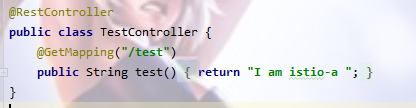
如果访问url不是/a开头的而是未知的,将显示404:
curl -I -HHost:k8s.test.com http://$INGRESS_HOST:$INGRESS_PORT/b

HTTP/1.1 404 Not Found

vary: Origin,Access-Control-Request-Method,Access-Control-Request-Headers

content-type: application/json

date: Wed, 13 Nov 2019 13:32:06 GMT

x-envoy-upstream-service-time: 21

server: istio-envoy

transfer-encoding: chunked
如果我们想使用浏览器访问入口服务:
可以将gateway中的hosts修改为*,相应的VirtualService的hosts也要修改为*
apiVersion: networking.istio.io/v1alpha3

kind: Gateway

metadata:

  name: httpbin-gateway

spec:

  selector:

    istio: ingressgateway # use Istio default gateway implementation

  servers:

  - port:

      number: 80

      name: http

      protocol: HTTP

    hosts:

    - "*"

---

apiVersion: networking.istio.io/v1alpha3

kind: VirtualService

metadata:

  name: httpbin-a

spec:

  hosts:

  - "*"

  gateways:

  - httpbin-gateway

  http:

  - match:

    - uri:

        prefix: /a

    rewrite:

      uri: /

    route:

    - destination:

        port:

          number: 10001

        host: istio-a

      timeout: 10s
先输出ip和port确定请求地址:
echo $INGRESS_HOST:$INGRESS_PORT

192.168.17.210:31380
在浏览器请求<ip>:<port>/a/test

就搭建成功了
Kubernetes-Istio之Gateway和VirtualService的更多相关文章
- kubernetes istio之gateway
[root@master istio-]# kubectl apply -f samples/httpbin/httpbin.yaml service/httpbin created deployme ...
- Istio Routing 实践掌握virtualservice/gateway/destinationrule/AB版本发布/金丝雀发布
原文 在学习像 Istio 这样的新技术时,看一下示例应用程序总是一个好主意. Istio repo 有一些示例应用程序,但它们似乎有各种不足. 文档中的 BookInfo 是一个很好的示例. 但是, ...
- kubernetes + istio进行流量管理
实验目的: 本文介绍如何通过istio实现域名访问k8s部署的nginx服务 前提: 已经安装了kubernetes的服务器 了解 kubernetes 基本命令如何使用 (kubectl creat ...
- kubernetes istio的快速安装和使用例子
安装 [root@master ~]# wget https://github.com/istio/istio/releases/download/1.1.5/istio-1.1.5-linux.ta ...
- 15分钟在笔记本上搭建 Kubernetes + Istio开发环境
11月13~15日,KubeCon 上海大会召开,云原生是这个秋天最火热的技术.很多同学来问如何上手 Kubernetes和Istio 服务网格开发.本文将帮助你利用Docker CE桌面版,15分钟 ...
- Kubernetes+Istio
Kubernetes+Istio 微服务.SpringCloud.k8s.Istio杂谈 一.微服务与SOA “微服务”是一个名词,没有这个名词之前也有“微服务”,一个朗朗上口的名词能让大家产 ...
- ambassador kubernetes native api gateway
github 上的介绍: Ambassador is an open source Kubernetes-native API Gateway built on Envoy, designed for ...
- kubernetes istio之流量管理
1.部署 Bookinfo 应用 要在 Istio 中运行这一应用,无需对应用自身做出任何改变.我们只要简单的在 Istio 环境中对服务进行配置和运行,具体一点说就是把 Envoy sidecar ...
- 部署Bookinfo示例程序详细过程和步骤(基于Kubernetes集群+Istio v1.0)
部署Bookinfo示例程序详细过程和步骤(基于Kubernetes集群+Istio v1.0) 部署Bookinfo示例程序 在下载的Istio安装包的samples目录中包含了示例应用程序. ...
随机推荐
- Docker CentOS / Ubuntu容器开启 SSH 服务
Docker CentOS / Ubuntu容器开启 SSH 服务 在CentOS容器内执行 yum install passwd openssl openssh-server -y # Ubuntu ...
- [Bayes] Concept Search and LSI
基于术语关系的贝叶斯网络信息检索模型扩展研究 LSI 阅读笔记 背景知识 提出一种改进的共现频率法,利用该方法挖掘了索引术语之间的相关关系,将这种相关关系引入信念网络模型,提出了一个具有两层术语节点的 ...
- 【linux基础】ubuntu16.04 安装后,屏幕分辨率过低且不可调节
前言 安装CUDA和NVIDIA驱动之后,屏幕分辨率过低且不可调节,尝试了几种方法都没成功解决,特此讲解决方法记录下来. 解决过程 注销进入登录界面,按ctrl+alt+F1进入命令行终端,输入账户名 ...
- 乐橙平台大华监控Android端实时预览播放
一.初始化 首先我们需要到乐橙开放平台下载android对应的开发包,将sdk中提供的jar和so文件添加到项目中: 二.获取监控列表 监控列表我们是通过从自家后台服务器中获取的,这个自己根据需要调整 ...
- (一)Python的特点(优点和缺点)
Python 是一种面向对象.解释型的脚本语言,同时也是一种功能强大而完善的通用型语言.相比其他编程语言(比如 Java),Python 代码非常简单,上手非常容易. Python优点: (1)简单易 ...
- QT QML与C++混搭
"那些杀不死我的必使我更加强大"----尼采 QML与C++混合编程就是使用QML高效便捷地构建UI,而C++则用来实现业务逻辑和复杂算法. ML访问C++Qt集成了QML引擎和Q ...
- c#动态类转json,再由json转xml
直接上代码了,多说无意了. using System; using System.Collections; using System.Collections.Generic; using System ...
- LeetCode | 152. 乘积最大子序列
原题(Medium): 给定一个整数数组 nums ,找出一个序列中乘积最大的连续子序列(该序列至少包含一个数). 思路: 遍历数组时且逐元素相乘时,如果遇到了0,在求乘积最大值的情况下,0左边的元素 ...
- gdb调试常用功能
一.gdb中宏定义 macro define list_entry(ptr, type, member) ((type)( (char)ptr - (unsigned long)(&((typ ...
- List集合String字符串按照汉语拼音排序
public static void main(String[] args) { List<Map<String, Object>> mapList = new ArrayLi ...