
利用ITextSharp导出PDF文件
最近项目中需要导出PDF文件,最后上网搜索了一下,发现ITextSharp比较好用,所以做了一个例子:
public string ExportPDF()

        {

            //ITextSharp Usage

            //Steps:1. Add content to cell;2. Add cell to table;3. Add table to document;4. Add document to rectangle;

            string sAbsolutePath = ControllerContext.HttpContext.Server.MapPath(this.path);

            string FileName = string.Format("Notice_{0}.pdf", DateTime.Now.ToString("yyyyMMddHHmmss"));

            BaseFont bf = BaseFont.CreateFont("C:/WINDOWS/Fonts/Arial.TTF", BaseFont.IDENTITY_H, BaseFont.NOT_EMBEDDED);

            Rectangle rec = new Rectangle(, );

            Document document = new Document(rec);

            document.SetMargins(10f, 10f, 10f, 10f);

            PdfWriter pdfwriter = PdfWriter.GetInstance(document,

                    new System.IO.FileStream(sAbsolutePath + "\\" + FileName, System.IO.FileMode.Create)

                );

            document.Open();

            Font font = new Font(bf);

            try

            {

                PdfPTable pdftable = new PdfPTable();

                pdftable.HorizontalAlignment = ;

                //Set cell width

                float[] cellwidth = { 3f, 5f, 5f, 3.5f, 5f };

                pdftable.SetWidths(cellwidth);

                //Header

                Font PDFFontA = FontFactory.GetFont("Arial", , Font.BOLD);

                Font PDFFontB = FontFactory.GetFont("Arial", , Font.BOLD);

                Font PDFFontC = FontFactory.GetFont("Arial", );

                //Image Object

                Image jpeg = Image.GetInstance(HttpContext.Server.MapPath("../images/buddy.jpg"));

                PdfPCell cell = new PdfPCell(jpeg);

                cell.FixedHeight = 40f;

                cell.Colspan = ;

                cell.Rowspan = ;

                cell.Border = ;

                pdftable.AddCell(cell);

                cell = new PdfPCell(new Phrase(("Did You Know?"), PDFFontB));

                cell.Colspan = ;

                cell.Rowspan = ;

                cell.Border = ;

                cell.BackgroundColor = new BaseColor(, , );//RGB Color Value

                cell.HorizontalAlignment = ;

                pdftable.AddCell(cell);

                cell = new PdfPCell(new Phrase("\nTitle: Hello World!\nDate: " + DateTime.Now.ToString("MM/dd/yyyy") + "\n\n", PDFFontC));

                cell.Colspan = ;

                cell.Rowspan = ;

                cell.Border = ;

                cell.BackgroundColor = new BaseColor(, , );//RGB Color Value

                cell.HorizontalAlignment = ;

                pdftable.AddCell(cell);

                cell = new PdfPCell(new Phrase("Notice", PDFFontA));

                cell.BackgroundColor = new BaseColor(, , );//RGB Color Value

                cell.Colspan = ;

                cell.Padding = 5f;

                cell.HorizontalAlignment = ;

                pdftable.AddCell(cell);

                string[] AssHeader = { "DateTime", "Name", "Description", "Icon", "Notes"};

                for (int i = ; i < AssHeader.Length; i++)

                {

                    cell = new PdfPCell(new Phrase(AssHeader[i], PDFFontB));

                    cell.HorizontalAlignment = ;

                    cell.VerticalAlignment = Element.ALIGN_MIDDLE;

                    cell.BackgroundColor = new BaseColor(, , );

                    cell.PaddingBottom = 4f;

                    cell.PaddingTop = 4f;

                    pdftable.AddCell(cell);

                }

                for (int i = ; i < ; i++)

                {

                    cell = new PdfPCell(new Phrase(new DateTime().ToShortDateString(), PDFFontC));

                    cell.HorizontalAlignment = ;

                    cell.VerticalAlignment = Element.ALIGN_MIDDLE;

                    cell.PaddingBottom = 4f;

                    cell.PaddingTop = 4f;

                    pdftable.AddCell(cell);

                    cell = new PdfPCell(new Phrase("Jack Chean", PDFFontC));

                    cell.HorizontalAlignment = ;

                    cell.VerticalAlignment = Element.ALIGN_MIDDLE;

                    cell.PaddingBottom = 4f;

                    cell.PaddingTop = 4f;

                    pdftable.AddCell(cell);

                    cell = new PdfPCell(new Phrase("Just for my testing!!", PDFFontC));

                    cell.HorizontalAlignment = ;

                    cell.VerticalAlignment = Element.ALIGN_MIDDLE;

                    cell.PaddingBottom = 4f;

                    cell.PaddingTop = 4f;

                    pdftable.AddCell(cell);

                    cell = new PdfPCell(new Phrase("ICON", PDFFontC));

                    cell.HorizontalAlignment = ;

                    cell.VerticalAlignment = Element.ALIGN_MIDDLE;

                    cell.PaddingBottom = 4f;

                    cell.PaddingTop = 4f;

                    pdftable.AddCell(cell);

                    cell = new PdfPCell(new Phrase("For Tom!", PDFFontC));

                    cell.HorizontalAlignment = ;

                    cell.VerticalAlignment = Element.ALIGN_MIDDLE;

                    cell.PaddingBottom = 4f;

                    cell.PaddingTop = 4f;

                    pdftable.AddCell(cell);

                }

                //Very important

                //You can display the header in each page through this properity:HeaderRows

                pdftable.HeaderRows = ;

                document.Add(pdftable);

                //Pager

                float tableheight = pdftable.CalculateHeights();

                if (tableheight <  && tableheight > )

                {

                    document.NewPage();

                }

                document.NewPage();

                document.Close();

            }

            catch (Exception ex)

            {

                document.Add(new Paragraph(ex.Message.ToString(), font));

            }

            return FileName;

        }
最后的显示效果:
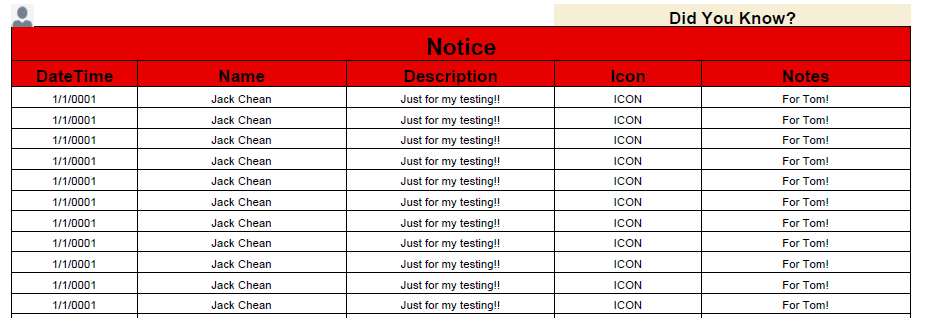
参考文章:http://blog.csdn.net/adgjlxxx/article/details/43307227
利用ITextSharp导出PDF文件的更多相关文章
- C# 利用ITextSharp导出PDF文件
最近项目中需要导出PDF文件,最后上网搜索了一下,发现ITextSharp比较好用,所以做了一个例子: public string ExportPDF() { //ITextSharp Usage / ...
- .Net导出pdf文件,C#实现pdf导出
最近碰见个需求需要实现导出pdf文件,上网查了下代码资料总结了以下代码.可以成功的实现导出pdf文件. 在编码前需要在网上下载个itextsharp.dll,此程序集是必备的.楼主下载的是5.0版本, ...
- ITextSharp导出PDF表格和图片(C#)
文章主要介绍使用ITextSharp导出PDF表格和图片的简单操作说明,以下为ITextSharp.dll下载链接 分享链接:http://pan.baidu.com/s/1nuc6glj 密码:3g ...
- 纯前端导出pdf文件
纯前端js导出pdf,已经用于生产环境. 工具: 1.html2canvas,一种让html转换为图片的工具. 2.pdfmake或者jspdf ,一种生成.编辑pdf,并且导出pdf的工具. pdf ...
- .Net导出pdf文件,C#实现pdf导出 转载 http://www.cnblogs.com/hmYao/p/5842958.html
导出pdf文件. 在编码前需要在网上下载个itextsharp.dll,此程序集是必备的.楼主下载的是5.0版本,之前下了个5.4的似乎不好用. 下载之后直接添加引用. <%@ Page Lan ...
- asp.net2.0导出pdf文件完美解决方案【转载】
asp.net2.0导出pdf文件完美解决方案 作者:清清月儿 PDF简介:PDF(Portable Document Format)文件格式是Adobe公司开发的电子文件格式.这种文件格式与操作系统 ...
- iTextSharp - 建立PDF文件
原文 iTextSharp - 建立PDF文件 01 using iTextSharp.text; 02 using iTextSharp.text.pdf; 03 ... 04 private vo ...
- 史上最全的springboot导出pdf文件
最近项目有一个导出报表文件的需求,我脑中闪过第一念头就是导出pdf(产品经理没有硬性规定导出excel还是pdf文件),于是赶紧上网查看相关的资料,直到踩了无数的坑把功能做出来了才知道其实导出exce ...
- 利用FR导出PDF汉字乱码的处理
利用FR导出pdf,然后在unigui中显示,发现汉字乱码,改成gb2312,不乱码,但不自动折行,最后是改成DefaultCharSet搞定.FR版本:5.4.6 后记:有的浏览器中还是乱码,把字体 ...
随机推荐
- C# .ToString() 格式化
c# ToString() 格式化字符串 格式化数值:有时,我们可能需要将数值以一定的格式来呈现,就需要对数值进行格式化.我们使用格式字符串指定格式.格式字符串采用以下形式:Axx,其中 A 为格式 ...
- springmvc配置文件-2
项目3 WEB.xml: <?xml version="1.0" encoding="UTF-8"?> <web-app xmlns:xsi= ...
- 华东交通大学2016年ACM“双基”程序设计竞赛 1002
Problem Description 今天小学弟又训练完了,但是小学弟又不想看球赛,于是小学弟看马赛了.他发现马鞍是一个奇怪的东西.于是小学弟根据马鞍定义了一种马鞍数:在一个二位矩阵中,马鞍数在当前 ...
- C# 对Xml的常用操作
using System.Xml; //初始化一个xml实例 XmlDocument xml=new XmlDocument(); //导入指定xml文件 xml.Load(path); ...
- centOS6.5安装SUN-jdk7
一.下载SUN-JDK1.7.tar.gz文件他 地址:http://www.oracle.com/technetwork/java/javase/downloads/jdk7-downloads-1 ...
- Objective-C协议与非正式协议
http://blog.csdn.net/siemenliu/article/details/7836499
- 配置Python+selenium+firefox自动化测试
1.安装python.默认安装 2.安装pip.下载pip-1.5.4包,解压pip-1.5.4,放在C盘,进入pip目录-->键入命令:python setup.py install 再进入 ...
- 怎样为DataTable设置主键及找行数据
只要是数据集中都应该存在主键,以确定数据集中唯一的值.那么,我们要如何为DataTable设置主键及利用主键在DataTable索引值呢? 步骤/方法 为DataTable设置主键 DataT ...
- 如何用linux远程登录windows计算机
大家可能试过用windows远程登录另一个windows pc机,今天大家将会学到如何用 linux远程登录你的windows系统. 首先大家要做到得救是将自己linux和windows操作机的IP地 ...
- .Net操作注册表--un
C#操作注册表 导入命名空间 Using MicroSoft.Win32;//64位系统装的64位版本