
对于fmri的hrf血液动力学响应函数的一个很直观的解释-by 西南大学xulei教授
%%%%%%%%%%%%%%%%%%%%%%%%%%%%%%%%%

clear all;clc;

%%%%%%%%%%%%%%%%%%%%%%%%%%%%%%%%%%%%%%%%%%%%%%%%%%%%%%%%%%%%%%%%%%

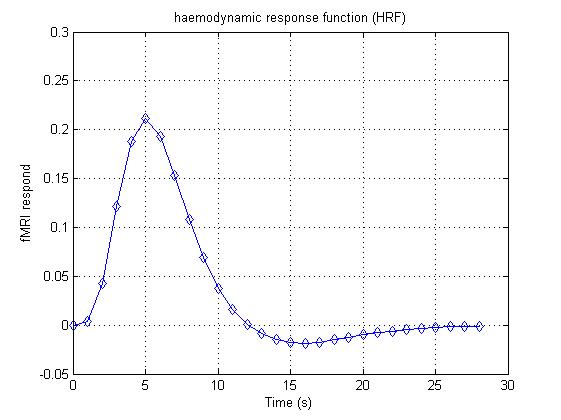
% haemodynamic response function: BOLD signal has stereotyped shape every

% time a stimulus hits it. We usually use the spm_hrf.m in SPM toolbox to

% produce HRF. Here, we use the 29 vector to represent HRF from 0 s to

% 28 s. In this simulation, we suppose TR=1 s.

HRF = [0 0.004 0.043 0.121 0.188 0.211 0.193 0.153 0.108 0.069 0.038 0.016 0.001 -0.009 -0.015 -0.018 -0.019 -0.018 -0.015 -0.013 -0.010 -0.008 -0.006 -0.004 -0.003 -0.002 -0.001 -0.001 -0.001];

% We will plot its shape with figure 1:

figure(1)

% here is the x-coordinates

t = [0:28];

plot(t,HRF,'d-');

grid on;

xlabel('Time (s)');

ylabel('fMRI respond');

title('haemodynamic response function (HRF)');
结果:
%%%%%%%%%%%%%%%%%%%%%%%%%%%%%%%%%%%%%%%%%%%%%%%%%%%%%%%%%%%%%%%%%%

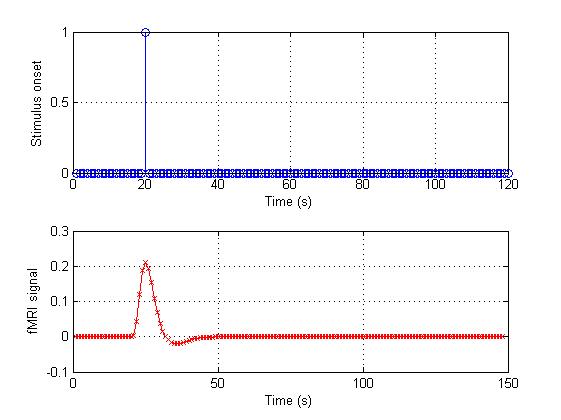
% Suppose that our scan for 120 s, we will have 120 point (because TR = 1

% s). If a stimulus onset at t=20 s, we can use a vector to represent this

% stimulation.

onset_1 = [zeros(1,19) 1 zeros(1,100)];

% i.e. the whole vector is maked with 19 zeros, a single 1, and then 100

% zeros. As we have the stimulus onset vector and HRF we can convolve them.

% In Matlab, the command to convolve two vectors is "conv":

conv_1 = conv(HRF,onset_1);

% Let's plot the result in figure 2

figure(2);

% This figure will have 2 rows of subplots.

subplot(2,1,1);

% "Stem" is a good function for showing discrete events:

stem(onset_1);

grid on;

xlabel('Time (s)');

ylabel('Stimulus onset');

subplot(2,1,2);

plot(conv_1,'rx-');

grid on;

xlabel('Time (s)');

ylabel('fMRI signal');
结果:
%%%%%%%%%%%%%%%%%%%%%%%%%%%%%%%%%%%%%%%%%%%%%%%%%%%%%%%%%%%%%%%%%%

% Usually, we have repeat a task many times in a run. If three stimulus

% onsets at t=20, 50, 80 s, we also can use a vector to represent this

% stimulation.

onset_2 = [zeros(1,19) 1 zeros(1,29) 1 zeros(1,29) 1 zeros(1,20)];

% Here we use the conv again:

conv_2 = conv(HRF,onset_2);

% Let's plot the result in figure 3

figure(3);

% This figure will have 2 rows of subplots.

subplot(2,1,1);

% "Stem" is a good function for showing discrete events:

stem(onset_2);

grid on;

xlabel('Time (s)');

ylabel('Stimulus onset');

subplot(2,1,2);

plot(conv_2,'rx-');

grid on;

xlabel('Time (s)');

ylabel('fMRI signal');
结果: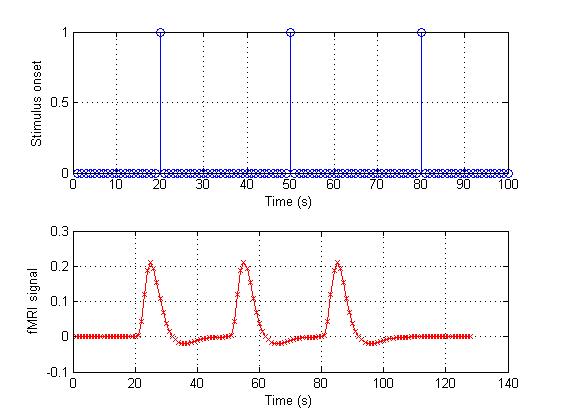
%%%%%%%%%%%%%%%%%%%%%%%%%%%%%%%%%%%%%%%%%%%%%%%%%%%%%%%%%%%%%%%%%%

% Now let's think about the fast event design. In this condition, we will

% have many task during a short time. If three stimulus onsets at t=20, 25,

% 30 s:

onset_3 = [zeros(1,19) 1 zeros(1,4) 1 zeros(1,4) 1 zeros(1,70)];

conv_3 = conv(HRF,onset_3);

figure(4);

subplot(2,1,1);

stem(onset_3);

grid on;

xlabel('Time (s)');

ylabel('Stimulus onset');

subplot(2,1,2);

plot(conv_3,'rx-');

grid on;

xlabel('Time (s)');

ylabel('fMRI signal');
结果:
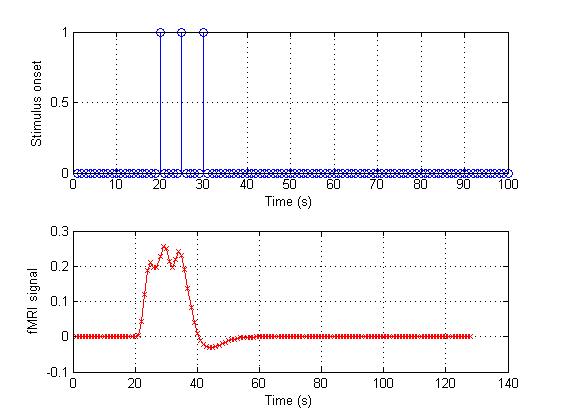
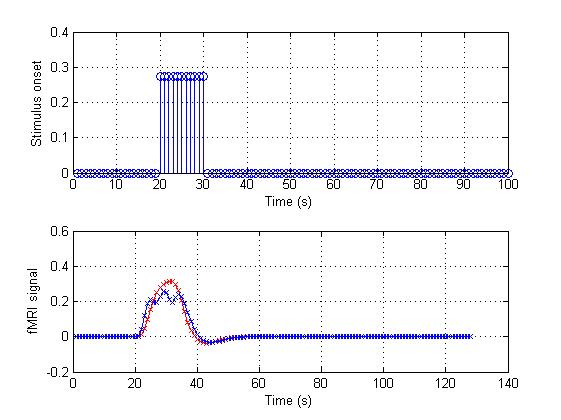
% The three events are so closed, the result signal is like a blocked

% design. Such as:

onset_4 = [zeros(1,19) ones(1,11) zeros(1,70)]*(3/11);

conv_4 = conv(HRF,onset_4);

figure(5);

subplot(2,1,1);

stem(onset_4);

grid on;

xlabel('Time (s)');

ylabel('Stimulus onset');

subplot(2,1,2);

plot(conv_4,'rx-');

% We will compare the result

hold on; % plot more than one time on a figure

plot(conv_3,'bx-');

grid on;

xlabel('Time (s)');

ylabel('fMRI signal');
结果:
对于fmri的hrf血液动力学响应函数的一个很直观的解释-by 西南大学xulei教授的更多相关文章
- 对于fmri的设计矩阵构造的一个很直观的解释-by 西南大学xulei教授
本程序意在解释这样几个问题:完整版代码在本文的最后. 1.实验的设计如何转换成设计矩阵? 2.设计矩阵的每列表示一个刺激条件,如何确定它们? 3.如何根据设计矩阵和每个体素的信号求得该体素对刺激的敏感 ...
- fmri的图像数据在matlab中显示,利用imagesc工具进行显示,自带数据集-by 西南大学xulei教授
这里包含了这样一个数据集:slice_data.mat. 这个数据集中包含的mri数据是:64*64*25.共有25个slice.每个slice的分辨率是64*64. 程序非常简短: load sli ...
- [.NET] 打造一个很简单的文档转换器 - 使用组件 Spire.Office
打造一个很简单的文档转换器 - 使用组件 Spire.Office [博主]反骨仔 [原文]http://www.cnblogs.com/liqingwen/p/6024827.html 序 之前,& ...
- [转载]config文件的一个很好的实现
以下是转载于网上的一个很好的config文件的实现,留存以备案 //Config.h #pragma once #include <string> #include <map> ...
- route 一个很奇怪的现象:我的主机能ping通同一网段的其它主机,并也能xshell 远程其它的主机,而其它的主机不能ping通我的ip,也不能远程我和主机
一个很奇怪的现象:我的主机能ping通同一网段的其它主机,并也能xshell 远程其它的主机,而其它的主机不能ping通我的ip,也不能远程我和主机. [root@NB Desktop]# route ...
- C语言 在VS环境下一个很有意思的报错:stack around the variable was corrupted
今天做一个很简单的oj来温习下c 语言 题目如下 输入 3位正整数 输出 逆置后的正整数 代码如下: #include"stdio.h"int main(){ float h,su ...
- [C语言]一个很实用的服务端和客户端进行TCP通信的实例
本文给出一个很实用的服务端和客户端进行TCP通信的小例子.具体实现上非常简单,只是平时编写类似程序,具体步骤经常忘记,还要总是查,暂且将其记下来,方便以后参考. (1)客户端程序,编写一个文件clie ...
- 一个很好的Delphi博客
一个很好的Delphi博客,主人叫万一 http://www.cnblogs.com/del/archive/2011/09/21/2183007.html
- 一个很不错的bash脚本编写教程
转自 http://blog.chinaunix.net/uid-20328094-id-95121.html 一个很不错的bash脚本编写教程,至少没接触过BASH的也能看懂! 建立一个脚本 Lin ...
随机推荐
- AC自动机总结
AC自动机的模板 void buildAC() { while(!q.empty()) q.pop(); q.push(); while(!q.empty()) { int x=q.front();q ...
- 关于playmaker play animation出现警告 The AnimationClip 'xxx' used by the Animati ...
转载自网络: 出现这个提示: The AnimationClip 'xxx' used by the Animation component 'xxx' must be marked as Legac ...
- JavaWeb项目开发案例精粹-第4章博客网站系统-003Dao层
1. package com.sanqing.dao; import java.util.List; import com.sanqing.fenye.Page; import com.sanqing ...
- Python3导入自定义模块的3种方式
前话 最近跟着廖雪峰的教程学到 模块 这一节.关于如何自定义一个模块,如果大家不懂的话还请先看下面这篇博文 ↓ http://www.liaoxuefeng.com/wiki/001431608955 ...
- iOS NSPredicate和正则表达式
简述:Cocoa 提供了NSPredicate 用于指定过滤条件,谓词是指在计算机中表示计算真假值的函数,它使用起来有点儿像SQL 的查询条件,主要用于从集合中分拣出符合条件的对象,也可以用于字符串的 ...
- 解决COS、FileUpload上传文件时中文文件名乱码问题
方法: MultipartParser mp = new MultipartParser(request, 10*1024*1024); mp.setEncoding("GBK") ...
- LinuxMint使用中文输入法
自从转战linux系统以来,最痛苦的事情就是没有一款能让我满意的中文输入法了 不过今天我终于发现了一个让我比较满意的输入法(小小输入法),真的很不错 我试过不少输入法,但是还是小小输入法最适合我: 搜 ...
- USACO Section 3.3: A Game
第一次碰到博弈论题目,是很棘手,博弈论题目要考虑全局最优的解法,我第一次用了局部最优的,而且vector也没pop_front()操作.后来看了网上的用dp的方法解的. 博弈论的题目基本都得用dp法子 ...
- js 鼠标上移 图片放大
<!DOCTYPE html PUBLIC "-//W3C//DTD XHTML 1.0 Transitional//EN" "http://www.w3.org/ ...
- hbase-0.94.16 在hadoop-1.2.1的安装配置
1. ZooKeeper的安装: ZooKeeper是一个分布式的服务框架.可用于处理分布式的一些数据管理问题,如统一命名服务.状态同步服务.集群管理.分布式应用配置项的管理等. 步骤如下: a. 准 ...