
So easy Webservice 3.使用HttpClient工具调用Webservice接口
首先,看看webservice服务调用演示:
b) 单击手机查询服务
c) 选择要调用的方法 例如: getMobileCodeInfo
输入要查询的手机号单击”调用” 截图如下, 免费用户 UserID为null
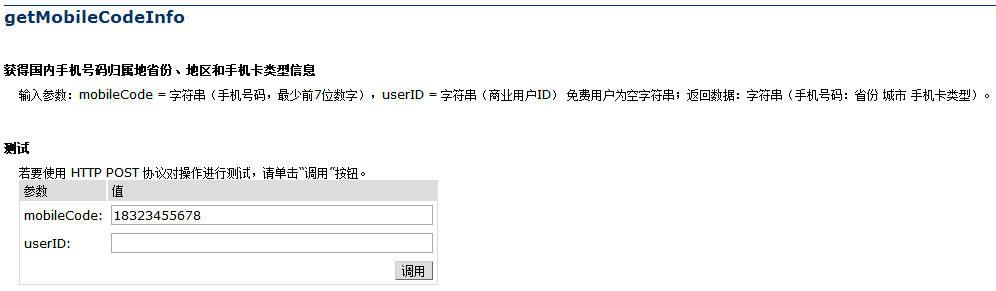
返回结果:

HttpClient工具调用WS服务接口:
HttpClient使用步骤如下:
- 创建 HttpClient 的实例
- 创建某种连接方法的实例,在这里是 GetMethod。在 GetMethod 的构造函数中传入待连接的地址
- 配置要传输的参数,和消息头信息
- 调用第一步中创建好的实例的 execute 方法来执行第二步中创建好的 method 实例
- 通过response读取字符串
6. 释放连接。无论执行方法是否成功,都必须释放连接
代码:下面是分别发送http get、post和soap post请求:
import java.io.FileInputStream;

import org.apache.commons.httpclient.HttpClient;

import org.apache.commons.httpclient.methods.GetMethod;

import org.apache.commons.httpclient.methods.PostMethod;

public class MyHttpClient

{

    //webservice请求地址

    private static String wsURL=

        "http://webservice.webxml.com.cn/WebServices/MobileCodeWS.asmx/getMobileCodeInfo";

    //创建HttpClient 的实例

    private static HttpClient httpClient = new HttpClient();

    /**

     * 发送get请求

     */

    public static void sendGet() throws Exception{

        //创建get对象

        GetMethod get = new GetMethod(wsURL + "?mobileCode=18323455678&userID=");

        //发送get请求

        int resultCode = httpClient.executeMethod(get);

        System.out.println("Get请求结果:resultCode="+resultCode +", message="+get.getResponseBodyAsString());

        //释放get请求资源

        get.releaseConnection();

    }

    /**

     * 发送post请求

     */

    public static void sendPost() throws Exception{

        //创建get对象

        PostMethod post = new PostMethod(wsURL);

        post.setRequestHeader("Content-Type", "application/x-www-form-urlencoded");

        post.setRequestBody("mobileCode=18323455678&userID=");

        //发送get请求

        int resultCode = httpClient.executeMethod(post);

        System.out.println("Post请求结果:resultCode="+resultCode +", message="+post.getResponseBodyAsString());

        //释放get请求资源

        post.releaseConnection();

    }

    /**

     * soap方式的post请求

     * soap:在http的基础上,可以发送xml格式数据

     */

    public static void sendSoapPost() throws Exception {

        // 创建一个post请求,类似Post请求

        PostMethod postMethod = new PostMethod("http://webservice.webxml.com.cn/WebServices/MobileCodeWS.asmx");

        // 设置传送信息的格式

        postMethod.setRequestHeader("Content-Type","text/xml; charset=utf-8");

        postMethod.setRequestBody(new FileInputStream("C:/a.txt"));

        int code = httpClient.executeMethod(postMethod);

        System.out.println("SOAP请求start..." + code);

        System.out.println("消息码为:" + code);

        System.out.println("返回的消息为:" + postMethod.getResponseBodyAsString());

        postMethod.releaseConnection();

    }

    public static void main(String[] args) throws Exception

    {

        sendGet();

        sendPost();

        sendSoapPost();

    }

}
查看运行结果:
Get请求结果:resultCode=200, message=<?xml version="1.0" encoding="utf-8"?>

<string xmlns="http://WebXml.com.cn/">18323455678:重庆 重庆 重庆移动全球通卡</string>

Post请求结果:resultCode=200, message=<?xml version="1.0" encoding="utf-8"?>

<string xmlns="http://WebXml.com.cn/">18323455678:重庆 重庆 重庆移动全球通卡</string>

SOAP请求start...

消息码为:200

返回的消息为:<?xml version="1.0" encoding="utf-8"?><soap:Envelope xmlns:soap="http://schemas.xmlsoap.org/soap/envelope/" xmlns:xsi="http://www.w3.org/2001/XMLSchema-instance" xmlns:xsd="http://www.w3.org/2001/XMLSchema"><soap:Body><getMobileCodeInfoResponse xmlns="http://WebXml.com.cn/"><getMobileCodeInfoResult>18323455678:重庆 重庆 重庆移动全球通卡</getMobileCodeInfoResult></getMobileCodeInfoResponse></soap:Body></soap:Envelope>
So easy Webservice 3.使用HttpClient工具调用Webservice接口的更多相关文章
- Java调用WebService方法总结(4)--Axis调用WebService
Axis是比较常用的WebService框架,该项目在2006实现了最终版,后面就没有更新了.文中demo所使用到的软件版本:Java 1.8.0_191.Axis 1.4. 1.准备 参考Java调 ...
- 浅谈WebService开发三(动态调用WebService)转
在前两讲里,我已经向大家演示了如何使用WebService.同步, 异步调用WebService,而在实际开发过程中,可能会有多个WebService接口供你选择,而在程序执行过程中才决定使用哪一个 ...
- Httpclient远程调用WebService示例(Eclipse+httpclient)
package cn.com.taiji.pos.httpserver; import java.io.BufferedInputStream;import java.io.ByteArrayOutp ...
- cxf 和 httpclient 客户端调用 webservice 接口
一.cxf 生成 webservice 客户端 1.接口路径 http://ws.webxml.com.cn/WebServices/WeatherWS.asmx 2.进入你需要放置 webservi ...
- Java调用WebService方法总结(3)--wsimport调用WebService
wsimport是JDK自带的把WSDL转成Java的工具,可以很方便的生成调用WebService的代码.文中所使用到的软件版本:Java 1.8.0_191. 1.准备 参考Java调用WebSe ...
- JAVA6开发WebService (四)——SAAJ调用WebService
转载自http://wuhongyu.iteye.com/blog/810571 前面写了个JAX-WS的小例子,看到用JAVA6开发WebService确实很简单,也很方便,不过前面也说了,JAVA ...
- struts1+spring+myeclipse +cxf 开发webservice以及普通java应用调用webservice的实例
Cxf + Spring+ myeclipse+ cxf 进行 Webservice服务端开发 使用Cxf开发webservice的服务端项目结构 Spring配置文件applicationCont ...
- C#开发WEBService服务 C++开发客户端调用WEBService服务
编写WEBService服务端应用程序并部署 http://blog.csdn.net/u011835515/article/details/47615425 编写调用WEBService的C++客户 ...
- Java调用WebService方法总结(7)--CXF调用WebService
CXF = Celtix + XFire,继承了Celtix和XFire两大开源项目的精华,是一个开源的,全功能的,容易使用的WebService框架.文中所使用到的软件版本:Java 1.8.0_1 ...
随机推荐
- iOS OC与swift相互调用
小哥("我"的自称)个人混编的时候喜欢先创建OC项目,然后在项目中创建swift类.这样有个好处就是桥文件可以自动创建的同事路径不需要我手动去写了,另外还有个目的就是现在小哥自我感 ...
- 【python cookbook】【字符串与文本】15.给字符串中的变量名做插值处理
问题:想创建一个字符串,其中嵌入的变量名称会以变量的字符串值形式替换掉 解决方法:str.format().str.format_map() >>> s = '{name} has ...
- Spring注解@Scheduled定时任务
一.首先配置applicationContext-task.xml (1)添加 xmlns:task="http://www.springframework.org/schema/task& ...
- mount源码分析 【转】
转自:http://blog.chinaunix.net/uid-10769062-id-3230811.html Busybox- 在util-linux/mount.c的line:1609行首先映 ...
- 怎样新建Oracle数据库
新建Oracle数据库三种方法:1.通过运行Oracle Database Configuration Assistant 创建配置或删除数据库(也可在命令行下输入dbca):2.用命令行的方式建立数 ...
- Linux下Date命令的用法
转自http://blog.chinaunix.net/uid-8223172-id-2511672.html linux下date的用法比较复杂,但是也用的比较多,尤其是shell里面.现总结一下自 ...
- apache php 开启伪静态
打开apache的配置文件httpd.conf 找到 #LoadModule rewrite_module modules/mod_rewrite.so 把前面#去掉.没有则添加,但必选独占一行,使a ...
- Oracle字符集设置
客户端与服务端字符集不一致会造成乱码问题. 在服务端: sql>SELECT * FROM NLS_DATABASE_PARAMETERS; 在查询结果中关注如下参数: nls_language ...
- Ajax中GET和POST的区别
Get方式: 用get方式可传送简单数据,但大小一般限制在1KB下,数据追加到url中发送(http的header传送),也就是说,浏览器将各个表单字段元素及其数据按照URL参数的格式附加在请求行中的 ...
- PHP生成 excl、word文件
PHP生成 excl.word文件 $time = time(); $filename = date("Y年m月d日h点m分s秒", $time).'问卷数据'; $rows ...