
FontMetrics ----- 绘制文本,获取文本高度
Canvas 绘制文本时,使用FontMetrics对象,计算位置的坐标。
 public static class FontMetrics {

     /**

      * The maximum distance above the baseline for the tallest glyph in

      * the font at a given text size.

      */

     public float   top;

     /**

      * The recommended distance above the baseline for singled spaced text.

      */

     public float   ascent;

     /**

      * The recommended distance below the baseline for singled spaced text.

      */

     public float   descent;

     /**

      * The maximum distance below the baseline for the lowest glyph in

      * the font at a given text size.

      */

     public float   bottom;

     /**

      * The recommended additional space to add between lines of text.

      */

     public float   leading;

 }
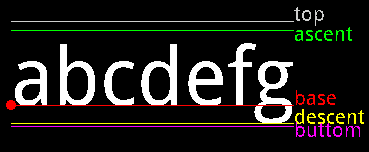
它的各基准线可以参考下图:
 /** 绘制FontMetrics对象的各种线 */

 mPaint.reset();

 mPaint.setColor(Color.WHITE);

 mPaint.setTextSize(80);

 // FontMetrics对象

 FontMetrics fontMetrics = mPaint.getFontMetrics();

 String text = "abcdefg";

 // 计算每一个坐标

 float textWidth = mPaint.measureText(text);

 float baseX = 30;

 float baseY = 700;

 float topY = baseY + fontMetrics.top;

 float ascentY = baseY + fontMetrics.ascent;

 float descentY = baseY + fontMetrics.descent;

 float bottomY = baseY + fontMetrics.bottom;

 // 绘制文本

 canvas.drawText(text, baseX, baseY, mPaint);

 // BaseLine描画

 mPaint.setColor(Color.RED);

 canvas.drawLine(baseX, baseY, baseX + textWidth, baseY, mPaint);

 mPaint.setTextSize(20);

 canvas.drawText("base", baseX + textWidth, baseY, mPaint);

 // Base描画

 canvas.drawCircle(baseX, baseY, 5, mPaint);

 // TopLine描画

 mPaint.setColor(Color.LTGRAY);

 canvas.drawLine(baseX, topY, baseX + textWidth, topY, mPaint);

 canvas.drawText("top", baseX + textWidth, topY, mPaint);

 // AscentLine描画

 mPaint.setColor(Color.GREEN);

 canvas.drawLine(baseX, ascentY, baseX + textWidth, ascentY, mPaint);

 canvas.drawText("ascent", baseX + textWidth, ascentY + 10, mPaint);

 // DescentLine描画

 mPaint.setColor(Color.YELLOW);

 canvas.drawLine(baseX, descentY, baseX + textWidth, descentY, mPaint);

 canvas.drawText("descent", baseX + textWidth, descentY, mPaint);

 // ButtomLine描画

 mPaint.setColor(Color.MAGENTA);

 canvas.drawLine(baseX, bottomY, baseX + textWidth, bottomY, mPaint);

 canvas.drawText("buttom", baseX + textWidth, bottomY + 10, mPaint);
相信通过以上程序,能够很好的理解topLine,buttomLine,baseLine,ascentLine,descentLine。
另外:Paint类有两个方法
 /**

  * Return the distance above (negative) the baseline (ascent) based on the

  * current typeface and text size.

  *

  * @return the distance above (negative) the baseline (ascent) based on the

  *         current typeface and text size.

  */

 public native float ascent();

 /**

  * Return the distance below (positive) the baseline (descent) based on the

  * current typeface and text size.

  *

  * @return the distance below (positive) the baseline (descent) based on

  *         the current typeface and text size.

  */

 public native float descent();
ascent():the distance above the baseline(baseline以上的height)
descent():the distance below the baseline(baseline以下的height)
所以ascent() + descent() 可以看成文字的height。
到此为止,怎么获取文字的height和width都已经揭晓了:
获取height : mPaint.ascent() + mPaint.descent()
获取width : mPaint.measureText(text)
FontMetrics ----- 绘制文本,获取文本高度的更多相关文章
- jquery设置文本框值 与获取文本框的值
<!DOCTYPE html> <html> <head lang="en"> <meta charset="UTF-8&quo ...
- iOS 动态计算文本内容的高度
关于ios 下动态计算文本内容的高度,经过查阅和网上搜素,现在看到的有以下几种方法: 1. // 获取字符串的大小 ios6 - (CGSize)getStringRect_:(NSString* ...
- 【NLP】Python NLTK获取文本语料和词汇资源
Python NLTK 获取文本语料和词汇资源 作者:白宁超 2016年11月7日13:15:24 摘要:NLTK是由宾夕法尼亚大学计算机和信息科学使用python语言实现的一种自然语言工具包,其收集 ...
- textarea文本域的高度随内容的变化而变化
用css控制textarea文本域的高度随内容的变化而变化,不出现滚动条. CSS代码: 复制代码 代码如下: .t_area{ width:300px; overflow-y:visible } & ...
- 使用contenteditable+div模拟textarea文本域实现高度自适应
使用contenteditable+div模拟textarea文本域实现高度自适应 开发过程中由于需要在发送消息的时候需要有一个可以高度自适应的文本域,一开始是使用textarea并搭配auto-si ...
- iOS之自动调节输入文本框的高度
//自动调节输入文本框的高度 - (void)textViewDidChange:(UITableView *)textView{ float height; if ([[[UIDevice curr ...
- js/jquery获取文本框的值与改变文本框的值
我们就用它来学习获取文本框的值及改变文本框的值. 代码如下 复制代码 <script>function get1(){ document.getElementById("txtb ...
- Jquery实现textarea根据文本内容自适应高度
本文给大家分享的是Jquery实现textarea根据文本内容自适应高度,这些在平时的项目中挺实用的,所以抽空封装了一个文本框根据输入内容自适应高度的插件,这里推荐给小伙伴们. autoTextare ...
- jquery获取文本框的内容
使用jquery获取文本框的内容有以下几种: 1.根据ID取值(id属性): // javascript <script type="text/javascript"> ...
- 【原】文本图片自适应高度小bug以及解决办法
自定义cell的文本图片自适应高度代码,如果存在自定义的cell赋值封装,就必须将自适应高度代码写在这个方法中
随机推荐
- ios开发--编码格式
1.url编码 ios中http请求遇到汉字的时候,需要转化成UTF-8,用到的方法是: NSString * encodingString = [urlString stringByAddingPe ...
- 针对安卓java入门:运算符和表达式
逻辑运算符 &&和&判断是一样的,区别在于过程,&会把整个过程算一遍,&&一旦碰到false就不会往下
- Sublime Text 2安装汉化破解、插件包安装教程
原文地址: Sublime Text 2安装汉化破解.插件包安装教程_百度经验 http://jingyan.baidu.com/article/ff4116259b057c12e48237b8.ht ...
- Java基本开发环境搭建
转http://blog.csdn.net/cxwen78/article/details/6400798 eclipse怎么编写JAVA,然后运行 1.新建一个Java project取个名字(首字 ...
- powerdesigner jdbc 连接 oracle
实验环境: powerdesigner 15 oracle 11g jdk1.6.0_43 提示:jdk必须选择32位,64位会报 "Could not Initialize JavaVM ...
- Mac下无法拷贝文件到移动硬盘
Mac下无法拷贝文件到移动硬盘? 是移动硬盘的文件格式的问题. Mac系统无法识别 NTFS 格式的文件. 将移动硬盘格式化为 exFAT 格式的. 别担心,exFAT 格式的硬盘在Windows下也 ...
- 几条复杂的SQL语句
表结构:CREATE TABLE [dbo].[Exam]( [S_date] [datetime] NOT NULL, [Order_Id] [varchar](50) NOT NULL ...
- Incorrect key file for table '/tmp/#sql_882_0.MYI'; try to repair it
修表方法如下: 一法:. check table 和 repair table 方法1,进入Mysql 的Dos控制台,输入密码进入 2,use database;(你的数据库名) 3, check ...
- HDU 1850 (Nim博弈 取胜方案数) Being a Good Boy in Spring Festival
考虑到Bouton定理的证明过程,设n个数的Nim和(异或和)为X,其最高位的1在第k位,那么n个数中一定有个y的第k为也是个1. 将y的数量变为X xor y,那么n的数的Nim和为0,便转为先手必 ...
- memcached的LRU删除机制
1)memcached不会自动清空缓存的值如果add了一个值,但不去get它,那么这个值过期了,它也不会被清空.解释:memcached不自动检测和清空值,它只当你需要get这个值的时候,才检测这个值 ...