
FontMetrics ----- 绘制文本,获取文本高度
Canvas 绘制文本时,使用FontMetrics对象,计算位置的坐标。
 public static class FontMetrics {

     /**

      * The maximum distance above the baseline for the tallest glyph in

      * the font at a given text size.

      */

     public float   top;

     /**

      * The recommended distance above the baseline for singled spaced text.

      */

     public float   ascent;

     /**

      * The recommended distance below the baseline for singled spaced text.

      */

     public float   descent;

     /**

      * The maximum distance below the baseline for the lowest glyph in

      * the font at a given text size.

      */

     public float   bottom;

     /**

      * The recommended additional space to add between lines of text.

      */

     public float   leading;

 }
它的各基准线可以参考下图:
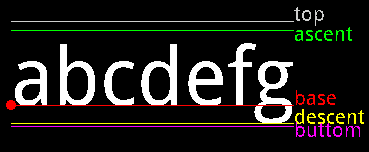
 /** 绘制FontMetrics对象的各种线 */

 mPaint.reset();

 mPaint.setColor(Color.WHITE);

 mPaint.setTextSize(80);

 // FontMetrics对象

 FontMetrics fontMetrics = mPaint.getFontMetrics();

 String text = "abcdefg";

 // 计算每一个坐标

 float textWidth = mPaint.measureText(text);

 float baseX = 30;

 float baseY = 700;

 float topY = baseY + fontMetrics.top;

 float ascentY = baseY + fontMetrics.ascent;

 float descentY = baseY + fontMetrics.descent;

 float bottomY = baseY + fontMetrics.bottom;

 // 绘制文本

 canvas.drawText(text, baseX, baseY, mPaint);

 // BaseLine描画

 mPaint.setColor(Color.RED);

 canvas.drawLine(baseX, baseY, baseX + textWidth, baseY, mPaint);

 mPaint.setTextSize(20);

 canvas.drawText("base", baseX + textWidth, baseY, mPaint);

 // Base描画

 canvas.drawCircle(baseX, baseY, 5, mPaint);

 // TopLine描画

 mPaint.setColor(Color.LTGRAY);

 canvas.drawLine(baseX, topY, baseX + textWidth, topY, mPaint);

 canvas.drawText("top", baseX + textWidth, topY, mPaint);

 // AscentLine描画

 mPaint.setColor(Color.GREEN);

 canvas.drawLine(baseX, ascentY, baseX + textWidth, ascentY, mPaint);

 canvas.drawText("ascent", baseX + textWidth, ascentY + 10, mPaint);

 // DescentLine描画

 mPaint.setColor(Color.YELLOW);

 canvas.drawLine(baseX, descentY, baseX + textWidth, descentY, mPaint);

 canvas.drawText("descent", baseX + textWidth, descentY, mPaint);

 // ButtomLine描画

 mPaint.setColor(Color.MAGENTA);

 canvas.drawLine(baseX, bottomY, baseX + textWidth, bottomY, mPaint);

 canvas.drawText("buttom", baseX + textWidth, bottomY + 10, mPaint);
相信通过以上程序,能够很好的理解topLine,buttomLine,baseLine,ascentLine,descentLine。
另外:Paint类有两个方法
 /**

  * Return the distance above (negative) the baseline (ascent) based on the

  * current typeface and text size.

  *

  * @return the distance above (negative) the baseline (ascent) based on the

  *         current typeface and text size.

  */

 public native float ascent();

 /**

  * Return the distance below (positive) the baseline (descent) based on the

  * current typeface and text size.

  *

  * @return the distance below (positive) the baseline (descent) based on

  *         the current typeface and text size.

  */

 public native float descent();
ascent():the distance above the baseline(baseline以上的height)
descent():the distance below the baseline(baseline以下的height)
所以ascent() + descent() 可以看成文字的height。
到此为止,怎么获取文字的height和width都已经揭晓了:
获取height : mPaint.ascent() + mPaint.descent()
获取width : mPaint.measureText(text)
FontMetrics ----- 绘制文本,获取文本高度的更多相关文章
- jquery设置文本框值 与获取文本框的值
<!DOCTYPE html> <html> <head lang="en"> <meta charset="UTF-8&quo ...
- iOS 动态计算文本内容的高度
关于ios 下动态计算文本内容的高度,经过查阅和网上搜素,现在看到的有以下几种方法: 1. // 获取字符串的大小 ios6 - (CGSize)getStringRect_:(NSString* ...
- 【NLP】Python NLTK获取文本语料和词汇资源
Python NLTK 获取文本语料和词汇资源 作者:白宁超 2016年11月7日13:15:24 摘要:NLTK是由宾夕法尼亚大学计算机和信息科学使用python语言实现的一种自然语言工具包,其收集 ...
- textarea文本域的高度随内容的变化而变化
用css控制textarea文本域的高度随内容的变化而变化,不出现滚动条. CSS代码: 复制代码 代码如下: .t_area{ width:300px; overflow-y:visible } & ...
- 使用contenteditable+div模拟textarea文本域实现高度自适应
使用contenteditable+div模拟textarea文本域实现高度自适应 开发过程中由于需要在发送消息的时候需要有一个可以高度自适应的文本域,一开始是使用textarea并搭配auto-si ...
- iOS之自动调节输入文本框的高度
//自动调节输入文本框的高度 - (void)textViewDidChange:(UITableView *)textView{ float height; if ([[[UIDevice curr ...
- js/jquery获取文本框的值与改变文本框的值
我们就用它来学习获取文本框的值及改变文本框的值. 代码如下 复制代码 <script>function get1(){ document.getElementById("txtb ...
- Jquery实现textarea根据文本内容自适应高度
本文给大家分享的是Jquery实现textarea根据文本内容自适应高度,这些在平时的项目中挺实用的,所以抽空封装了一个文本框根据输入内容自适应高度的插件,这里推荐给小伙伴们. autoTextare ...
- jquery获取文本框的内容
使用jquery获取文本框的内容有以下几种: 1.根据ID取值(id属性): // javascript <script type="text/javascript"> ...
- 【原】文本图片自适应高度小bug以及解决办法
自定义cell的文本图片自适应高度代码,如果存在自定义的cell赋值封装,就必须将自适应高度代码写在这个方法中
随机推荐
- 修改webapp底图
从webapp目录可以看出地图归mapManager处理,所以在MapManager.js中找关于加载地图的方法, 很容易在里面找到showMap方法: 下面有另一个方法_showMap方法,查看定义 ...
- 【Spring开发】—— Spring Core
原文:[Spring开发]-- Spring Core 前言 最近由于一些工作的需要,还有自己知识的匮乏再次翻开spring.正好整理了一下相关的知识,弥补了之前对spring的一些错误认知.这一次学 ...
- Objective-C:三种文件导入的方式以及atomic和nonatomic的区别
一.三种文件导入的方式比较: 类的前项声明@class.import.include: 1.采用@class 类名的方式,它会告诉编译器有这么一个类,目前不需要知道它内部的实例变量和方法是如何定义 ...
- JavaScript一些关键概念
垃圾回收:http://www.cnblogs.com/dolphinX/p/3348468.html 引用计数和标记清除 作用链和闭包:http://www.cnblogs.com/dolphinX ...
- jdk、apache-ant结合yuicompressor配置的CSS与JS合并压缩工具
前序:网上很多css与js合并打包工具,其中最流行的就是ant结合yui-compressor,鉴于学习与工作需要今天就学习了一下这种方式,供大家学习交流. 步骤:1.安装jdk,并配置其变量环境:有 ...
- 开发板上修改时间方法date命令【转】
转自:http://blog.chinaunix.net/uid-25906157-id-3138157.html 之前使用开发板时发现每次开机后,系统的时间都恢复到初始状态1970年. 一. 先说一 ...
- Android HTTPS(3) IOException: Hostname 解决方案
Common Problems with Hostname Verification As mentioned at the beginning of this article, there are ...
- UVA 11019 Matrix Matcher(ac自动机)
题目链接:http://uva.onlinejudge.org/index.php?option=com_onlinejudge&Itemid=8&page=show_problem& ...
- lightOJ 1366 Pair of Touching Circles(统计矩形内相切圆对)
题目链接:http://lightoj.com/volume_showproblem.php?problem=1366 题意:给出一个矩形,在内部画两个圆A和B使得AB都完全在矩形内且AB相切且AB的 ...
- leetcode:Reverse Linked List II
Reverse a linked list from position m to n. Do it in-place and in one-pass. For example:Given 1-> ...