
ASP.NET MVC5+EF6+EasyUI 后台管理系统(47)-工作流设计-补充
系列目录
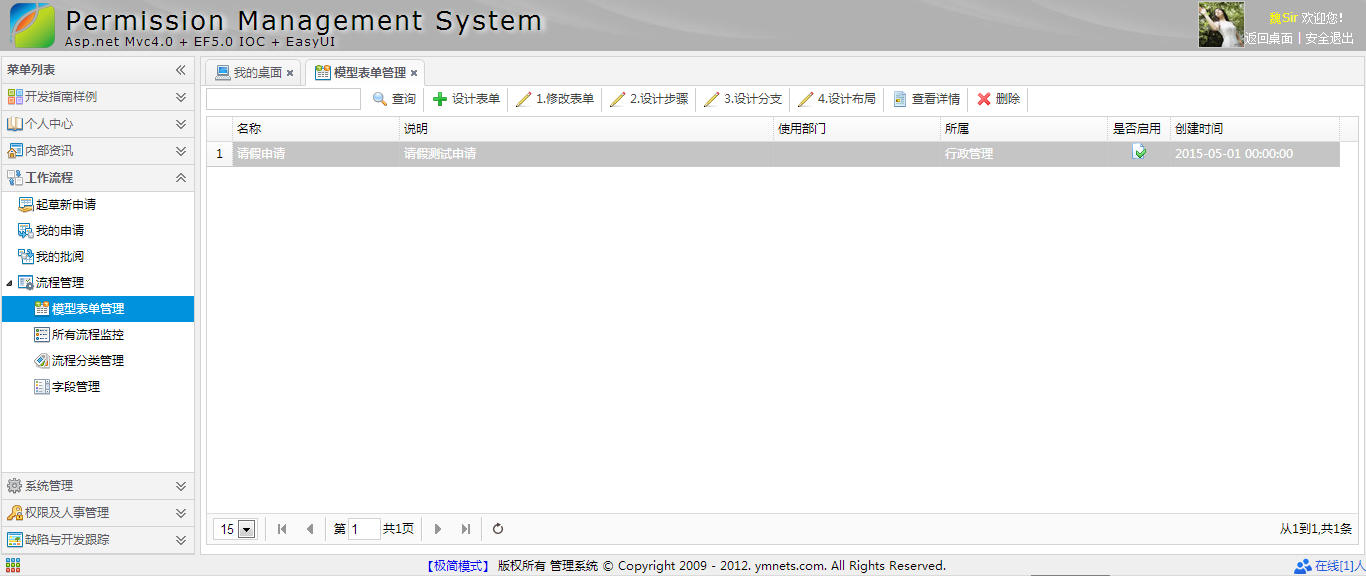
补充一下,有人要表单的代码,这个用代码生成器生成表Flow_Form表的Index代码就可以
加上几个按钮就可以了
<div class="mvctool">

    <input id="txtQuery" type="text" class="searchText" />

    @Html.ToolButton("btnQuery", "icon-search", "查询", perm, "Query", true)

    @Html.ToolButton("btnCreate", "icon-add", "设计表单", perm, "Create", true)

    @Html.ToolButton("btnEdit", "icon-edit", "1.修改表单", perm, "Edit", true)

    @Html.ToolButton("btnEditStep", "icon-edit", "2.设计步骤", perm, "Edit", true)

    @Html.ToolButton("btnEditStepRule", "icon-edit", "3.设计分支", perm, "Edit", true)

    @Html.ToolButton("btnEditLayout", "icon-edit", "4.设计布局", perm, "Edit", true)

    @Html.ToolButton("btnDetails", "icon-details", "查看详情", perm, "Details", true)

    @Html.ToolButton("btnDelete", "icon-remove", "删除", perm, "Delete", true)

</div>
然后再补充个查看详情
@model App.Models.Flow.Flow_FormModel

@using App.Common;

@using App.Models.Flow;

@using App.Admin;

@using App.Models.Sys;

@{

    ViewBag.Title = "创建";

    Layout = "~/Views/Shared/_Index_LayoutEdit.cshtml";

    List<permModel> perm = (List<permModel>)ViewBag.Perm;

    if (perm == null)

    {

        perm = new List<permModel>();

    }

}

<style>

    .tbdetail { width: 98%; border-collapse: collapse; }

.tbdetail .alignRight { width: 150px; text-align: right; }

.tbdetail td { border-bottom: 1px solid #F4F4F4; height: 30px; word-wrap:break-word; word-break:break-all; }

.tbcalendar, .tbcalendar td, .tbcalendar th { border: 1px solid #cccccc; border-collapse: collapse; padding: 5px; text-align: center; }

.tbcalendar th{ background: #f4f4f4; }

</style>

       <div class="tc" style="padding:10px;"> @Model.Name</div>

 <table class="tbdetail">

@{

    int i = 0;

    foreach (var item in Model.stepList)

    {

        i++;

            <tr>

                <td align="center">

         <table class="tbdetail">

                        <tr>

                            <td class="alignRight">

                                第

                                @i

                                步:

                            </td>

                            <td>

                                @item.Name

                            </td>

                        </tr>

                        <tr>

                            <td class="alignRight">

                                流转规则:

                            </td>

                            <td>

                               按@(item.FlowRule)

                            </td>

                        </tr>

                        @{

                            int j = 0;

                            foreach (var judge in item.stepRuleList)

                            {

                                j++;

                                            <tr>

                                                <td class="alignRight">

                                                    分支

                                                    @j:

                                                </td>

                                                <td>

                                                    @String.Format("如果 [{0} {1} {2}] → [{3}]", judge.AttrName, judge.Operator, judge.Result, judge.NextStep == "0" ? "流程结束" : judge.NextStepName)

                                                </td>

                                            </tr>

                            }

                         }

                    </table>

                </td>

            </tr>

            <tr>

                <td align="center">

                    ↓

                </td>

            </tr>

    }

}

        <tr>

            <td align="center">

                流程结束

            </td>

        </tr>

        </table>
Details
 #region 详细

       [SupportFilter(ActionName = "Edit")]

        public ActionResult Details(string id)

        {

            ViewBag.Perm = GetPermission();

            Flow_FormModel flowFormModel = m_BLL.GetById(id);

            //获取现有的步骤

            GridPager pager = new GridPager()

            {

                rows = 1000,

                page = 1,

                sort = "Id",

                order = "asc"

            };

            flowFormModel.stepList = new List<Flow_StepModel>();

            flowFormModel.stepList = stepBLL.GetList(ref pager, flowFormModel.Id);

            for (int i = 0; i < flowFormModel.stepList.Count; i++)//获取步骤下面的步骤规则

            {

                flowFormModel.stepList[i].stepRuleList = new List<Flow_StepRuleModel>();

                flowFormModel.stepList[i].stepRuleList = GetStepRuleListByStepId(flowFormModel.stepList[i].Id);

            }

            return View(flowFormModel);

        }

        #endregion
Details Action
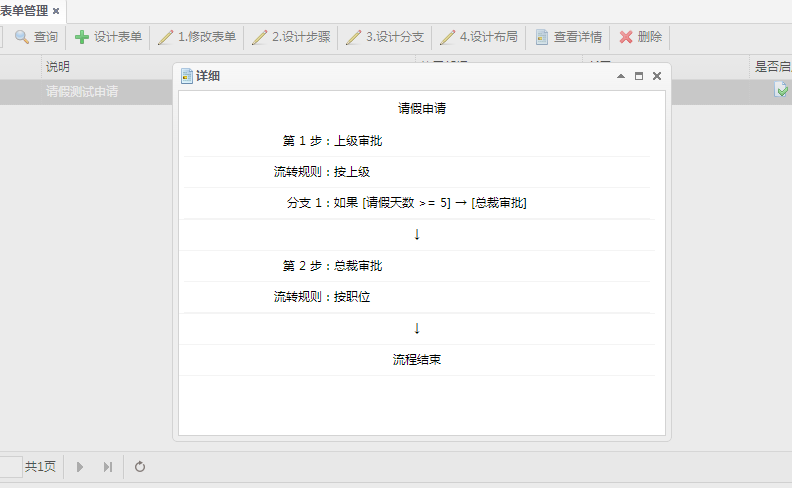
到目前为止,终于有点范儿了。
ASP.NET MVC5+EF6+EasyUI 后台管理系统(47)-工作流设计-补充的更多相关文章
- ASP.NET MVC5+EF6+EasyUI 后台管理系统(64)-补充WebApi与Unity注入-配置文件
系列目录 上一篇演示了WebApi利用Unity注入 很多人问我如何用配置文件来配置注入,本节演示如何利用配置文件来注入,道理是一样的,跳转到上一节下载源码一起来动手! 1.打开源码定位到文件Depe ...
- ASP.NET MVC5+EF6+EasyUI 后台管理系统(1)-前言与目录(持续更新中...)
开发工具:VS2015(2012以上)+SQL2008R2以上数据库 您可以有偿获取一份最新源码联系QQ:729994997 价格 666RMB 升级后界面效果如下: 任务调度系统界面 http: ...
- ASP.NET MVC5+EF6+EasyUI 后台管理系统(1)-前言与目录(转)
开发工具:VS2015(2012以上)+SQL2008R2以上数据库 您可以有偿获取一份最新源码联系QQ:729994997 价格 666RMB 升级后界面效果如下: 日程管理 http://ww ...
- ASP.NET MVC5+EF6+EasyUI 后台管理系统(63)-Excel导入和导出-自定义表模导入
系列目录 前言 上一节使用了LinqToExcel和CloseXML对Excel表进行导入和导出的简单操作,大家可以跳转到上一节查看: ASP.NET MVC5+EF6+EasyUI 后台管理系统(6 ...
- ASP.NET MVC5+EF6+EasyUI 后台管理系统-WebApi的用法与调试
1:ASP.NET MVC5+EF6+EasyUI 后台管理系统(1)-WebApi与Unity注入 使用Unity是为了使用我们后台的BLL和DAL层 2:ASP.NET MVC5+EF6+Easy ...
- ASP.NET MVC5+EF6+EasyUI 后台管理系统(51)-系统升级
系统很久没有更新内容了,期待已久的更新在今天发布了,最近花了2个月的时间每天一点点,从原有系统 MVC4+EF5+UNITY2.X+Quartz 2.0+easyui 1.3.4无缝接入 MVC5+E ...
- ASP.NET MVC5+EF6+EasyUI 后台管理系统(58)-DAL层重构
系列目录 前言:这是对本文系统一次重要的革新,很久就想要重构数据访问层了,数据访问层重复代码太多.主要集中增删该查每个模块都有,所以本次是为封装相同接口方法 如果你想了解怎么重构普通的接口DAL层请查 ...
- ASP.NET MVC5+EF6+EasyUI 后台管理系统(34)-文章发布系统①-简要分析
系列目录 最新比较闲,为了学习下Android的开发构建ASP.NET MVC4+EF5+EasyUI+Unity2.x注入的后台管理系统(1)-前言与,虽然有点没有目的的学习,但还是了解了Andro ...
- ASP.NET MVC5+EF6+EasyUI 后台管理系统(54)-工作流设计-所有流程监控
系列目录 先补充一个平面化登陆页面代码,自己更换喜欢的颜色背景 @using Apps.Common; @{ Layout = null; } <!DOCTYPE html> <ht ...
- ASP.NET MVC5+EF6+EasyUI 后台管理系统(56)-插件---单文件上传与easyui使用fancybox
系列目录 https://yunpan.cn/cZVeSJ33XSHKZ 访问密码 0fc2 今天整合lightbox插件Fancybox1.3.4,发现1.3.4版本太老了.而目前easyui 1 ...
随机推荐
- python3 threading初体验
python3中thread模块已被废弃,不能在使用thread模块,为了兼容性,python3将thread命名为_thread.python3中我们可以使用threading进行代替. threa ...
- 前端css兼容性与易混淆的点
一.常用的骨灰级清除浮动 .clearfix:after { content: "."; display: block; height:; clear: both; visibil ...
- opencv中Mat与IplImage,CVMat类型之间转换
opencv中对图像的处理是最基本的操作,一般的图像类型为IplImage类型,但是当我们对图像进行处理的时候,多数都是对像素矩阵进行处理,所以这三个类型之间的转换会对我们的工作带来便利. Mat类型 ...
- 【探索】在 JavaScript 中使用 C 程序
JavaScript 是个灵活的脚本语言,能方便的处理业务逻辑.当需要传输通信时,我们大多选择 JSON 或 XML 格式. 但在数据长度非常苛刻的情况下,文本协议的效率就非常低了,这时不得不使用二进 ...
- iPhone Anywehre虚拟定位提示“后台服务未启动,请重新安装应用后使用”的解决方法
问题描述: iPhone越狱了,之后在Cydia中安装Anywhere虚拟定位,但是打开app提示:后台服务未启动,请重新安装应用后使用. 程序无法正常使用... 解决方法: 打开Cydia-已安装, ...
- 利用注册表在右键添加VS15的快捷方式打开文件夹
1.简介 最近安装VS15 Preview 5,本版本可以打开"文件夹" 是否可以向Visual Studio Code一样在文件夹或文件右键菜单添加"Open with ...
- psoc学习
第一是:项目的路径需要放在Documents and Settings\,也就是默认的文件夹的地方,不然会报错错误范例为:Question:CY8CKIT-023 kit example projec ...
- HashMap的工作原理
HashMap的工作原理 HashMap的工作原理是近年来常见的Java面试题.几乎每个Java程序员都知道HashMap,都知道哪里要用HashMap,知道HashTable和HashMap之间 ...
- TCP/IP之Nagle算法与40ms延迟
Nagle算法是针对网络上存在的微小分组可能会在广域网上造成拥塞而设计的.该算法要求一个TCP连接上最多只能有一个未被确认的未完成的小分组,在该分组确认到达之前不能发送其他的小分组.同时,TCP收集这 ...
- Markdown学习笔记
分为两步: 1.阅读Markdown中文官网的文档 2.下载MarkdownPad2将中文官网中文档的例子敲一遍,其中Markdownpad2为官网中推荐的编辑器 备注: 如果只看中文官网文档,不边看 ...