
WPF拖动DataGrid中的数据到ListBox
1、效果图:
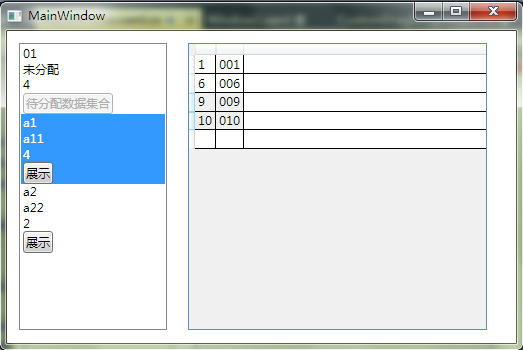
2、XAML
<Window x:Class="WpfApplication2.MainWindow"

        xmlns="http://schemas.microsoft.com/winfx/2006/xaml/presentation"

        xmlns:x="http://schemas.microsoft.com/winfx/2006/xaml"

        Title="MainWindow" Height="350" Width="525" Loaded="Window_Loaded">

    <Grid>

        <ListBox Height="287" HorizontalAlignment="Left" Margin="12,12,0,0" Name="m_ListBox" VerticalAlignment="Top" Width="148" SelectionMode="Single"  AllowDrop="True" Drop="m_ListBox_Drop" DragOver="m_ListBox_DragOver">

            <ListBox.ItemTemplate>

                <DataTemplate>

                    <StackPanel>

                        <TextBlock Text="{Binding Path=Id, Mode=OneWay, UpdateSourceTrigger=PropertyChanged}" />

                        <TextBlock Text="{Binding Path=Name, Mode=OneWay, UpdateSourceTrigger=PropertyChanged}" />

                        <TextBlock Text="{Binding Path=ChildCount, Mode=OneWay, UpdateSourceTrigger=PropertyChanged}" />

                        <Button Content="展示" Tag="{Binding}" Name="m_ListBoxButton" Click="m_ListBoxButton_Click" />

                    </StackPanel>

                </DataTemplate>

            </ListBox.ItemTemplate>

        </ListBox>

        <DataGrid AutoGenerateColumns="False" Height="287" HorizontalAlignment="Left" Margin="181,12,0,0" Name="m_DataGrid" VerticalAlignment="Top" Width="299" AllowDrop="True" SelectionMode="Extended"  PreviewMouseLeftButtonDown="m_DataGrid_PreviewMouseLeftButtonDown">

            <DataGrid.Columns>

                <DataGridTextColumn Binding="{Binding Id}" IsReadOnly="True" />

                <DataGridTextColumn Binding="{Binding Name}" IsReadOnly="True" />

            </DataGrid.Columns>

        </DataGrid>

    </Grid>

</Window>
3、CS
using System;

using System.Collections.Generic;

using System.Linq;

using System.Text;

using System.Windows;

using System.Windows.Controls;

using System.Windows.Data;

using System.Windows.Documents;

using System.Windows.Input;

using System.Windows.Media;

using System.Windows.Media.Imaging;

using System.Windows.Navigation;

using System.Windows.Shapes;

using System.Collections.ObjectModel;

using System.ComponentModel;

namespace WpfApplication2

{

    /// <summary>

    /// MainWindow.xaml 的交互逻辑

    /// </summary>

    public partial class MainWindow : Window

    {

        private ObservableCollection<Person> listBoxList = new ObservableCollection<Person>();

        private Person m_SelectedListBoxPerson;

        private Button m_SelectedListBoxButton;

        public MainWindow()

        {

            InitializeComponent();

        }

        private void Window_Loaded(object sender, RoutedEventArgs e)

        {

            Person person = new Person() { Id = "", Name = "未分配" };

            listBoxList.Add(person);

            listBoxList.Add(new Person() { Id = "a1", Name = "a11" });

            listBoxList.Add(new Person() { Id = "a2", Name = "a22" });

            //初始化数据

            person.Children.Add(new Person() { Id = "", Name = "" });

            person.Children.Add(new Person() { Id = "", Name = "" });

            person.Children.Add(new Person() { Id = "", Name = "" });

            person.Children.Add(new Person() { Id = "", Name = "" });

            person.Children.Add(new Person() { Id = "", Name = "" });

            person.Children.Add(new Person() { Id = "", Name = "" });

            person.Children.Add(new Person() { Id = "", Name = "" });

            person.Children.Add(new Person() { Id = "", Name = "" });

            person.Children.Add(new Person() { Id = "", Name = "" });

            person.Children.Add(new Person() { Id = "", Name = "" });

            //控件加载数据

            this.m_ListBox.ItemsSource = listBoxList;

        }

        private void m_DataGrid_PreviewMouseLeftButtonDown(object sender, MouseButtonEventArgs e)

        {

            Point pos = e.GetPosition(m_DataGrid);

            HitTestResult result = VisualTreeHelper.HitTest(m_DataGrid, pos);

            DataGrid dataGrid = this.FindVisualParent<DataGrid>(result.VisualHit);

            if (dataGrid == null || dataGrid.SelectedItems.Count <= )

            {

                return;

            }

            List<Person> list = new List<Person>();

            for (int i = ; i < dataGrid.SelectedItems.Count; i++)

            {

                if (dataGrid.SelectedItems[i] is Person)

                {

                    list.Add(dataGrid.SelectedItems[i] as Person);

                }

            }

            DragDrop.DoDragDrop(m_DataGrid, list, DragDropEffects.Move);

        }

        private void m_ListBox_Drop(object sender, DragEventArgs e)

        {

            Point pos = e.GetPosition(m_ListBox);

            HitTestResult result = VisualTreeHelper.HitTest(m_ListBox, pos);

            if (result == null)

            {

                return;

            }

            ListBox listBox = this.FindVisualParent<ListBox>(result.VisualHit);

            if (listBox == null || listBox.SelectedItem == null)

            {

                return;

            }

            List<Person> persons = e.Data.GetData(typeof(List<Person>)) as List<Person>;

            if (persons != null)

            {

                foreach (var item in persons)

                {

                    Person person = listBox.SelectedItem as Person;

                    person.Children.Add(item);

                    person.ChangeChildCount();

                    m_SelectedListBoxPerson.Children.Remove(item);

                    m_SelectedListBoxPerson.ChangeChildCount();

                }

            }

        }

        private void m_ListBox_DragOver(object sender, DragEventArgs e)

        {

            Point pos = e.GetPosition(m_ListBox);

            HitTestResult result = VisualTreeHelper.HitTest(m_ListBox, pos);

            if (result == null)

            {

                return;

            }

            ListBoxItem listBoxItem = this.FindVisualParent<ListBoxItem>(result.VisualHit);

            if (listBoxItem == null || listBoxItem.Content == null || !(listBoxItem.Content is Person))

            {

                return;

            }

            m_ListBox.SelectedItem = listBoxItem.Content;

            m_ListBox.Focus();

        }

        private void m_ListBoxButton_Click(object sender, RoutedEventArgs e)

        {

            if (m_SelectedListBoxButton != null)

            {

                m_SelectedListBoxButton.IsEnabled = true;

                m_SelectedListBoxButton.Content = "展示";

            }

            m_SelectedListBoxButton = sender as Button;

            m_SelectedListBoxButton.Content = "待分配数据集合";

            m_SelectedListBoxButton.IsEnabled = false;

            m_ListBox.SelectedItem = m_SelectedListBoxButton.Tag;

            m_ListBox.Focus();

            m_SelectedListBoxPerson = m_ListBox.SelectedItem as Person;

            this.m_DataGrid.ItemsSource = m_SelectedListBoxPerson.Children;

        }

        private T FindVisualParent<T>(DependencyObject obj) where T : class

        {

            while (obj != null)

            {

                if (obj is T)

                    return obj as T;

                obj = VisualTreeHelper.GetParent(obj);

            }

            return null;

        }

    }

    class Person : INotifyPropertyChanged

    {

        public string Id { get; set; }

        public string Name { get; set; }

        public int ChildCount

        {

            get {

                return this.Children.Count;

            }

        }

        public ObservableCollection<Person> Children { get; set; }

        public void ChangeChildCount()

        {

            this.Changed("ChildCount");

        }

        public Person()

        {

            this.Children = new ObservableCollection<Person>();

        }

        #region 属性更改通知

        public event PropertyChangedEventHandler PropertyChanged;

        private void Changed(string PropertyName)

        {

            if (this .PropertyChanged != null)

                this.PropertyChanged(this , new PropertyChangedEventArgs(PropertyName));

        }

        #endregion

    }

}
4、
WPF拖动DataGrid中的数据到ListBox的更多相关文章
- WPF拖动DataGrid滚动条时内容混乱的解决方法
WPF拖动DataGrid滚动条时内容混乱的解决方法 在WPF中,如果DataGrid里使用了模板列,当拖动滚动条时,往往会出现列表内容显示混乱的情况.解决方法就是在Binding的时候给Update ...
- 在WPF的DATAGRID中快速点击出现在ADDNEW或EDITITEM事务过程不允许DEFERREFRESH
原文 在WPF的DATAGRID中快速点击出现在ADDNEW或EDITITEM事务过程不允许DEFERREFRESH 在项目中关于DataGrid的遇到过一些问题,其中是关于迁入CheckBox的双向 ...
- wpf 获取datagrid中模板中控件
//获取name为datagrid中第三列第一行模板的控件 FrameworkElement item = dataGrid.Columns[].GetCellContent(dataGrid.Ite ...
- 在easyui datagrid中formatter数据后使用linkbutton
http://ntzrj513.blog.163.com/blog/static/2794561220139245411997/ formatter:function(value,rowData,ro ...
- [WPF] 在 ViewModel 中让数据验证出错(Validation.HasError)的控件获得焦点
1. 需求 在 MVVM 中 ViewModel 和 View 之间的交互通常都是靠 Icommand 和 INotifyPropertyChanged,不过有时候还会需要从 MVVM 中控制 Vie ...
- 在WPF的DataGrid中对行添加单击事件
在做的一个c#的项目中发现Datagrid没办法直接对鼠标单击进行响应,调用MouseDown事件也需要点击某一行第二次才能响应.所以借助EventSetter来简单的实现了一个. 界面部分的代码 & ...
- wpf mvvm datagrid 中button绑定命令方法
<DataGridTemplateColumn Header="设备状态" IsReadOnly="True" Width="150" ...
- WPF设置DataGrid行内容高度自适应 与 TextBox/TextBlock内容高度自适应
WPF设置DataGrid行内容高度自适应 TextBox/TextBlock内容高度自适应 参考: DataGrid 控件中的调整大小选项: http://msdn.microsoft.com/ ...
- WPF 4 DataGrid 控件(基本功能篇)
原文:WPF 4 DataGrid 控件(基本功能篇) 提到DataGrid 不管是网页还是应用程序开发都会频繁使用.通过它我们可以灵活的在行与列间显示各种数据.本篇将详细介绍WPF 4 中 ...
随机推荐
- android的照片浏览器(一)至返回所有图片文件
今天开始写android的照片浏览器 首先要解决的问题是要得到sdcard下面所有是图片的文件的目录 于是我先写了一个普通的java类 来得到后缀是.jpg,.bmp.png.jpeg的文件 pack ...
- 树莓派学习:源码方式安装opencv
1:下载若干依赖项: 更新软件源:sudo apt-get update/upgrade; 依次安装一下依赖项: sudo apt-get install build-essential su ...
- NoSQL与关系型数据库比较
虽然09年出现了比较激进的文章<关系数据库已死>,但是我们心里都清楚,关系数据库其实还活得好好的,你还不能不用关系数据库.但是也说明了一个事实,关系数据库在处理WEB2.0数据的时候,的确 ...
- lable标签透明
方法1: pictureBox1.Controls.Add(lable1); //或 this.label1.Parent=pictureBox1; lable1.BackColor=Col ...
- C#命名空间“Microsoft.Office”中不存在类型或命名空间名称的终极解决方法
源地址:http://blog.csdn.net/zhu2695/article/details/41852267
- [AIR] 利用SnapShot.exe实现QQ截屏功能
主类(可作文档类): package { import flash.display.Bitmap; import flash.display.Sprite; import flash.events.E ...
- free 查看系统内存
第二部分(-/+ buffers/cache):(-buffers/cache) used内存数:286M (指的第一部分Mem行中的used – buffers – cached)(+buffers ...
- 向sqlserver插入二进制数据(比如图片)
sqlserver插入二进制数据 偶然在sqlteam看到了,真是够绝,这都想得出来,很便捷的一个方式(只适用于SQL SERVER 2005+),代码如下: CREATE TABLE myTable ...
- MS SQL SERVER 数据库日志压缩方法与代码
MS SQL性能是很不错的,但是数据库用了一段时间之后,数据库却变得很大,实际的数据量不大.一般都是数据库日志引起的!数据库日志的增长可以达到好几百M. DUMP TRANSACTION [数据库名] ...
- 通过WebHandler给图片添加水印
图片生成webhandler水印,主要把水印的信息和位置post到webhandler去处理,返回后再div上显示 前台传递水印的信息和位置: /***********提取DIV属性********* ...