
GBDT调参
gbm算法流程图:
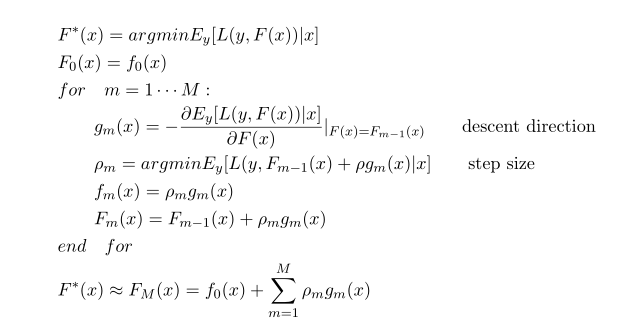
gbdt 参数:参考scikit-learn
The overall parameters can be divided into 3 categories:
- Tree-Specific Parameters: These affect each individual tree in the model.
- Boosting Parameters: These affect the boosting operation in the model.
- Miscellaneous Parameters: Other parameters for overall functioning.
Tree-Specific Parameters:
- min_samples_split
- Defines the minimum number of samples (or observations) which are required in a node to be considered for splitting.
- Used to control over-fitting. Higher values prevent a model from learning relations which might be highly specific to the particular sample selected for a tree.
- Too high values can lead to under-fitting hence, it should be tuned using CV.
- min_samples_leaf
- Defines the minimum samples (or observations) required in a terminal node or leaf.
- Used to control over-fitting similar to min_samples_split.
- Generally lower values should be chosen for imbalanced class problems because the regions in which the minority class will be in majority will be very small.
- min_weight_fraction_leaf
- Similar to min_samples_leaf but defined as a fraction of the total number of observations instead of an integer.
- Only one of #2 and #3 should be defined.
- max_depth
- The maximum depth of a tree.
- Used to control over-fitting as higher depth will allow model to learn relations very specific to a particular sample.
- Should be tuned using CV.
- max_leaf_nodes
- The maximum number of terminal nodes or leaves in a tree.
- Can be defined in place of max_depth. Since binary trees are created, a depth of ‘n’ would produce a maximum of 2^n leaves.
- If this is defined, GBM will ignore max_depth.
- max_features
- The number of features to consider while searching for a best split. These will be randomly selected.
- As a thumb-rule, square root of the total number of features works great but we should check upto 30-40% of the total number of features.
- Higher values can lead to over-fitting but depends on case to case.
Boosting Parameters
- learning_rate
- This determines the impact of each tree on the final outcome (step 2.4). GBM works by starting with an initial estimate which is updated using the output of each tree. The learning parameter controls the magnitude of this change in the estimates.
- Lower values are generally preferred as they make the model robust to the specific characteristics of tree and thus allowing it to generalize well.
- Lower values would require higher number of trees to model all the relations and will be computationally expensive.
- n_estimators
- The number of sequential trees to be modeled (step 2)
- Though GBM is fairly robust at higher number of trees but it can still overfit at a point. Hence, this should be tuned using CV for a particular learning rate.
- subsample
- The fraction of observations to be selected for each tree. Selection is done by random sampling.
- Values slightly less than 1 make the model robust by reducing the variance.
- Typical values ~0.8 generally work fine but can be fine-tuned further.
Miscellaneous Parameters
- loss
- It refers to the loss function to be minimized in each split.
- It can have various values for classification and regression case. Generally the default values work fine. Other values should be chosen only if you understand their impact on the model.
- init
- This affects initialization of the output.
- This can be used if we have made another model whose outcome is to be used as the initial estimates for GBM.
- random_state
- The random number seed so that same random numbers are generated every time.
- This is important for parameter tuning. If we don’t fix the random number, then we’ll have different outcomes for subsequent runs on the same parameters and it becomes difficult to compare models.
- It can potentially result in overfitting to a particular random sample selected. We can try running models for different random samples, which is computationally expensive and generally not used.
- verbose
- The type of output to be printed when the model fits. The different values can be:
- 0: no output generated (default)
- 1: output generated for trees in certain intervals
- >1: output generated for all trees
- The type of output to be printed when the model fits. The different values can be:
- warm_start
- This parameter has an interesting application and can help a lot if used judicially.
- Using this, we can fit additional trees on previous fits of a model. It can save a lot of time and you should explore this option for advanced applications
- presort
- Select whether to presort data for faster splits.
- It makes the selection automatically by default but it can be changed if needed.
#coding=utf-8

"""

http://scikit-learn.org/stable/modules/generated/sklearn.ensemble.GradientBoostingClassifier.html

http://scikit-learn.org/stable/modules/cross_validation.html

http://scikit-learn.org/stable/modules/generated/sklearn.model_selection.StratifiedKFold.html#sklearn.model_selection.StratifiedKFold

http://scikit-learn.org/stable/modules/model_evaluation.html#scoring-parameter

http://scikit-learn.org/stable/modules/generated/sklearn.metrics.accuracy_score.html#sklearn.metrics.accuracy_score

"""

import pandas as pd

import numpy as np

from sklearn.ensemble import GradientBoostingClassifier

from sklearn import cross_validation, metrics

from sklearn.grid_search import GridSearchCV

train = pd.read_csv('train_modified.csv')

target = 'Disbursed'

IDcol = 'ID'

def modelfit(alg, dtrain, predictors, performCV = True, printFeatureImportance = True, cv_folds = 5):

        alg.fit(dtrain[predictors] , dtrain['Disbursed'])

        # Predict class for training set x

        dtrain_predictions = alg.predict(dtrain[predictors])

        # predict class probabilities for training set X

        dtrain_predprob = alg.predict_proba(dtrain[predictors])[:,1]

        #perform cross-validation

        if performCV:

                """

                cross validation, splitting the data, fitting a model and computing the score for cv consecutive times(with different splits each time)

                cv: For integer/None inputs, if the estimator is a classifier and y is either binary or multiclass,StratifiedKFold is used.

                In all other cases, KFold is used.  StratifiedKFold is a variation of KFold that returns stratified folds.The folds are made

                by preserving the percentage of samples for each class.

                K-Folds:split dataset into k consecutive folds (without shuffling by default).Each fold is then used once as a validation

                while the k - 1 remaining folds form the training set.
         returns: Array of scores of the estimator for each run of the cross validation. shape = (cv,)

                """

                cv_score = cross_validation.cross_val_score(alg, dtrain[predictors], dtrain['Disbursed'], cv = cv_folds, scoring = 'roc_auc')

        print "\nModel Report"

        """

        for accuracy_score,if the parameter normalize is true, return the fraction of correctly classified samples.

        If False, return the number of correctly classified samples.The best performance is 1 with normalize == True and

        the number of samples with normalize == False.

        """

        print "Accuracy : %.4g" % metrics.accuracy_score(dtrain['Disbursed'].values, dtrain_predictions)

        """

        roc_auc_score Compute Area Under the Curve (AUC) from prediction scores

        """

        print "AUC Score (Train): %f" % metrics.roc_auc_score(dtrain['Disbursed'], dtrain_predprob)

if performCV:

                print "CV Score : Mean - %.7g | Std - %.7g | Min - %.7g | Max - %.7g" % (np.mean(cv_score), np.std(cv_score), np.min(cv_score), np.max(cv_score))

        #print Feature importance

        if printFeatureImportance:

                #feature_importances_: The feature importances (the higher, the more important the feature).

                feat_imp = pd.Series(alg.feature_importances_, predictors).sort_values(ascending=False)

predictors = [x for x in train.columns if x not in [target, IDcol]]

gbm0 = GradientBoostingClassifier(random_state = 10)

modelfit(gbm0, train,predictors)
General Approach for Parameter Tuning
Though, GBM is robust enough to not overfit with increasing trees, but a high number for pa particular learning rate can lead to overfitting. But as we reduce the learning rate and increase trees, the computation becomes expensive and would take a long time to run on standard personal computers.
- Choose a relatively high learning rate. Generally the default value of 0.1 works but somewhere between 0.05 to 0.2 should work for different problems
- Determine the optimum number of trees for this learning rate. This should range around 40-70. Remember to choose a value on which your system can work fairly fast. This is because it will be used for testing various scenarios and determining the tree parameters.
- Tune tree-specific parameters for decided learning rate and number of trees. Note that we can choose different parameters to define a tree and I’ll take up an example here.
- Lower the learning rate and increase the estimators(增加tree的数目) proportionally to get more robust models.
Fix learning rate and number of estimators for tuning tree-based parameters
- min_samples_split = 500 : This should be ~0.5-1% of total values. Since this is imbalanced class problem, we’ll take a small value from the range.
- min_samples_leaf = 50 : Can be selected based on intuition. This is just used for preventing overfitting and again a small value because of imbalanced classes.
- max_depth = 8 : Should be chosen (5-8) based on the number of observations and predictors. This has 87K rows and 49 columns so lets take 8 here.
- max_features = ‘sqrt’ : Its a general thumb-rule to start with square root.
- subsample = 0.8 : This is a commonly used used start value
Lets take the default learning rate of 0.1 here and check the optimum number of trees for that. For this purpose, we can do a grid search and test out values from 20 to 80 in steps of 10.
predictors = [x for x in train.columns if x not in [target, IDcol]]

#gbm0 = GradientBoostingClassifier(random_state = 10)

param_test1 = {'n_estimators':range(20, 81, 10)}

#GridSearchCV exhaustive search over specified parameter values for an estimator

gridsearch1 = GridSearchCV(estimator = GradientBoostingClassifier(learning_rate = 0.1, min_samples_split = 500, min_samples_leaf = 50, max_depth = 8,

        max_features = 'sqrt', subsample = 0.8, random_state = 10), param_grid = param_test1, scoring = 'roc_auc', n_jobs = 4, iid = False, cv = 5)

gridsearch1.fit(train[predictors], train[target])

print "grid_scores:", gridsearch1.grid_scores_

print "best_params:", gridsearch1.best_params_

print "best_score_:", gridsearch1.best_score_

Tuning tree-specific parameters
- Tune max_depth and num_samples_split
- Tune min_samples_leaf
- Tune max_features
The order of tuning variables should be decided carefully. You should take the variables with a higher impact on outcome first. For instance, max_depth and min_samples_split have a significant impact and we’re tuning those first.
Tuning subsample and making models with lower learning rate
注意: we need to lower the learning rate and increase the number of estimators proportionally.
参考:
https://www.zybuluo.com/yxd/note/611571
https://www.analyticsvidhya.com/blog/2016/02/complete-guide-parameter-tuning-gradient-boosting-gbm-python/
https://www.analyticsvidhya.com/blog/2016/03/complete-guide-parameter-tuning-xgboost-with-codes-python/
GBDT调参的更多相关文章
- scikit-learn 梯度提升树(GBDT)调参小结
在梯度提升树(GBDT)原理小结中,我们对GBDT的原理做了总结,本文我们就从scikit-learn里GBDT的类库使用方法作一个总结,主要会关注调参中的一些要点. 1. scikit-learn ...
- GBDT调参总结
一.GBDT类库弱学习器参数 二.回归 数据集:已知用户的30个特征,预测用户的信用值 from sklearn.ensemble import GradientBoostingRegressor f ...
- scikit-learn 梯度提升树(GBDT)调参笔记
在梯度提升树(GBDT)原理小结中,我们对GBDT的原理做了总结,本文我们就从scikit-learn里GBDT的类库使用方法作一个总结,主要会关注调参中的一些要点. 1. scikit-learn ...
- gbdt调参的小结
关键部分转自http://www.cnblogs.com/pinard/p/6143927.html 第一次知道网格搜索这个方法,不知道在工业中是不是用这种方式 1.首先从步长和迭代次数入手,选择一个 ...
- scikit-learn随机森林调参小结
在Bagging与随机森林算法原理小结中,我们对随机森林(Random Forest, 以下简称RF)的原理做了总结.本文就从实践的角度对RF做一个总结.重点讲述scikit-learn中RF的调参注 ...
- rf调参小结
转自http://www.cnblogs.com/pinard/p/6160412.html 1. scikit-learn随机森林类库概述 在scikit-learn中,RF的分类类是RandomF ...
- sklearn-GBDT 调参
1. scikit-learn GBDT类库概述 在sacikit-learn中,GradientBoostingClassifier为GBDT的分类类, 而GradientBoostingRegre ...
- xgboost/gbdt在调参时为什么树的深度很少就能达到很高的精度?
问题: 用xgboost/gbdt在在调参的时候把树的最大深度调成6就有很高的精度了.但是用DecisionTree/RandomForest的时候需要把树的深度调到15或更高.用RandomFore ...
- LightGBM 调参方法(具体操作)
sklearn实战-乳腺癌细胞数据挖掘(博主亲自录制视频) https://study.163.com/course/introduction.htm?courseId=1005269003& ...
随机推荐
- mysql 慢查询日志 pt-query-digest 工具安装
介绍:pt-query-digest是用于分析mysql慢查询的一个工具,它可以分析binlog.General log.slowlog,也可以通过SHOWPROCESSLIST或者通过tcpdump ...
- BFS:UVa220 ACM/ICPC 1992-Othello(黑白棋)
Othello Othello is a game played by two people on an 8 x 8 board, using disks that are white on one ...
- invalid LOC header (bad signature)
[产生原因] 本地maven仓库相关jar存在问题. [解决方案] 删除本地maven相关jar并重新下载.
- 关于security的简单理解和应用
2018年7月30日1.搜索引擎框架百度google Lucene 单机操作,就是一堆jar包中的api的使用,自己干预,如何创建索引库,删除索引库,更新索引库,高亮,自己调度APISolr 支持we ...
- PowerShell-第2章 管道
2.1 过滤列表项或命令输出项 列出所有正在运行进程名称中包含"search"的进程,对进程名字属性使用-like操作符来比较进程的Name属性 Get-Process | Whe ...
- 解决php7.3 configure: error: off_t undefined
//解决该问题:php7.3 configure: error: off_t undefined; check your library configuration # 添加搜索路径到配置文件echo ...
- SQLite Database Browser 2.0使用方法
在网上找一个SQLITE查看器 这个查看器叫做:www.jb51.net/database/118822.html 这个查看器可以新建SQLITE文件数据库,可以建立表索引,写SQL语句,编辑表数据 ...
- selenium之定位以及切换frame
总有人看不明白,以防万一,先在开头大写加粗说明一下: frameset不用切,frame需层层切! 很多人在用selenium定位页面元素的时候会遇到定位不到的问题,明明元素就在那儿,用firebug ...
- springboot集成redis操作
使用HashOperations操作redis----https://www.cnblogs.com/shiguotao-com/p/10560458.html 使用HashOperations操作r ...
- POJ-2594 Treasure Exploration,floyd+最小路径覆盖!
Treasure Exploration 复见此题,时隔久远,已忘,悲矣! 题意:用最少的机器人沿单向边走完( ...