
基于CentOS 7.2个人网盘的实现
首先使用YUM安装依赖环境:
[root@sishen ~]#yum install python python-setuptools python-imaging python-ldap python-memcached MySQL-python mariadb mariadb-server
启动MySQL并设置其开机启动:
[root@sishen ~]# systemctl start mariadb
[root@sishen ~]# systemctl enable mariadb
MySQL安全初始化
[root@sishen ~]# mysql_secure_installation
NOTE: RUNNING ALL PARTS OF THIS SCRIPT IS RECOMMENDED FOR ALL MariaDB
SERVERS IN PRODUCTION USE! PLEASE READ EACH STEP CAREFULLY!
In order to log into MariaDB to secure it, we'll need the current
password for the root user. If you've just installed MariaDB, and
you haven't set the root password yet, the password will be blank,
so you should just press enter here.
Enter current password for root (enter for none):
OK, successfully used password, moving on...
Setting the root password ensures that nobody can log into the MariaDB
root user without the proper authorisation.
You already have a root password set, so you can safely answer 'n'.
Change the root password? [Y/n] y #注意这里我是第二次初始化了,所以跟初次安装时的提示不一样,如果是初次安装,直接回车即可,这一步除了设置mysql的root密码之外,其他选项可以直接回车,也可以依据个人需要进行设置。
New password:
Re-enter new password:
Password updated successfully!
Reloading privilege tables..
... Success!
By default, a MariaDB installation has an anonymous user, allowing anyone
to log into MariaDB without having to have a user account created for
them. This is intended only for testing, and to make the installation
go a bit smoother. You should remove them before moving into a
production environment.
Remove anonymous users? [Y/n]
... Success!
Normally, root should only be allowed to connect from 'localhost'. This
ensures that someone cannot guess at the root password from the network.
Disallow root login remotely? [Y/n]
... Success!
By default, MariaDB comes with a database named 'test' that anyone can
access. This is also intended only for testing, and should be removed
before moving into a production environment.
Remove test database and access to it? [Y/n]
- Dropping test database...
... Success!
- Removing privileges on test database...
... Success!
Reloading the privilege tables will ensure that all changes made so far
will take effect immediately.
Reload privilege tables now? [Y/n]
... Success!
Cleaning up...
All done! If you've completed all of the above steps, your MariaDB
installation should now be secure.
Thanks for using MariaDB!
下载seafile
[root@sishen ~]# wget https://mc.qcloudimg.com/static/archive/3d8addbe52be88df4f6139ec7e35b453/seafile-server_5.1.4_x86-64.tar.gz
创建安装目录并解压
[root@sishen ~]# mkdir -p /opt/seafile/installed
[root@sishen ~]# mv seafile-server_5.1.4_x86-64.tar.gz /opt/seafile/installed/
[root@sishen installed]# tar -zxf seafile-server_5.1.4_x86-64.tar.gz -C /opt/seafile/
[root@sishen installed]# cd ../seafile-server-5.1.4/
[root@sishen seafile-server-5.1.4]# ls
check_init_admin.py seaf-fuse.sh seahub setup-seafile.sh
reset-admin.sh seaf-gc.sh seahub.sh upgrade
runtime seafile setup-seafile-mysql.py
seaf-fsck.sh seafile.sh setup-seafile-mysql.sh
[root@sishen seafile-server-5.1.4]# ./setup-seafile-mysql.sh
Checking python on this machine ...
Checking python module: setuptools ... Done.
Checking python module: python-imaging ... Done.
Checking python module: python-mysqldb ... Done.
-----------------------------------------------------------------
This script will guide you to setup your seafile server using MySQL.
Make sure you have read seafile server manual at
https://github.com/haiwen/seafile/wiki
Press ENTER to continue
-----------------------------------------------------------------
#这里根据提示直接回车
What is the name of the server? It will be displayed on the client.
3 - 15 letters or digits
[ server name ] seafile #这里输入服务名,有意义即可
What is the ip or domain of the server?
For example: www.mycompany.com, 192.168.1.101
[ This server's ip or domain ] 192.168.75.130 #输入主机的ip地址
Where do you want to put your seafile data?
Please use a volume with enough free space
[ default "/opt/seafile/seafile-data" ] #这里默认无需修改,直接回车
Which port do you want to use for the seafile fileserver?
[ default "8082" ] #这里默认无需修改,直接回车
-------------------------------------------------------
Please choose a way to initialize seafile databases:
-------------------------------------------------------
[1] Create new ccnet/seafile/seahub databases
[2] Use existing ccnet/seafile/seahub databases
[ 1 or 2 ] 1 #这里选择1
What is the host of mysql server?
[ default "localhost" ] #默认无需修改,直接回车
What is the port of mysql server?
[ default "3306" ] #默认无需修改,直接回车
What is the password of the mysql root user?
[ root password ] #这里输入上面mysql安全初始化时设置的root for mysql的密码
verifying password of user root ... done
Enter the name for mysql user of seafile. It would be created if not exists.
[ default "root" ] #这里直接回车
Enter the database name for ccnet-server:
[ default "ccnet-db" ] #这里直接回车
Enter the database name for seafile-server:
[ default "seafile-db" ] #这里直接回车
Enter the database name for seahub:
[ default "seahub-db" ] #这里直接回车
---------------------------------
This is your configuration
---------------------------------
server name: seafile
server ip/domain: 192.168.75.130
seafile data dir: /opt/seafile/seafile-data
fileserver port: 8082
database: create new
ccnet database: ccnet-db
seafile database: seafile-db
seahub database: seahub-db
database user: root
---------------------------------
Press ENTER to continue, or Ctrl-C to abort #这里直接回车
---------------------------------
Generating ccnet configuration ...
done
Successly create configuration dir /opt/seafile/ccnet.
Generating seafile configuration ...
Done.
done
Generating seahub configuration ...
----------------------------------------
Now creating seahub database tables ...
----------------------------------------
creating seafile-server-latest symbolic link ... done
-----------------------------------------------------------------
Your seafile server configuration has been finished successfully.
-----------------------------------------------------------------
run seafile server: ./seafile.sh { start | stop | restart }
run seahub server: ./seahub.sh { start <port> | stop | restart <port> }
-----------------------------------------------------------------
If you are behind a firewall, remember to allow input/output of these tcp ports:
-----------------------------------------------------------------
port of seafile fileserver: 8082
port of seahub: 8000
When problems occur, Refer to
https://github.com/haiwen/seafile/wiki
for information.
启动seafile
[root@sishen seafile-server-5.1.4]# ./seafile.sh start
[11/30/17 02:24:31] ../common/session.c(132): using config file /opt/seafile/conf/ccnet.conf
Starting seafile server, please wait ...
Seafile server started
Done.
[root@sishen seafile-server-5.1.4]# ./seahub.sh start
LC_ALL is not set in ENV, set to en_US.UTF-8
Starting seahub at port 8000 ...
----------------------------------------
It's the first time you start the seafile server. Now let's create the admin account
----------------------------------------
What is the email for the admin account?
[ admin email ] 1255560195@qq.com
What is the password for the admin account?
[ admin password ] #这个密码一会登录的时候要用到,最好记下来。
Enter the password again:
[ admin password again ]
----------------------------------------
Successfully created seafile admin
----------------------------------------
Seahub is started
Done.
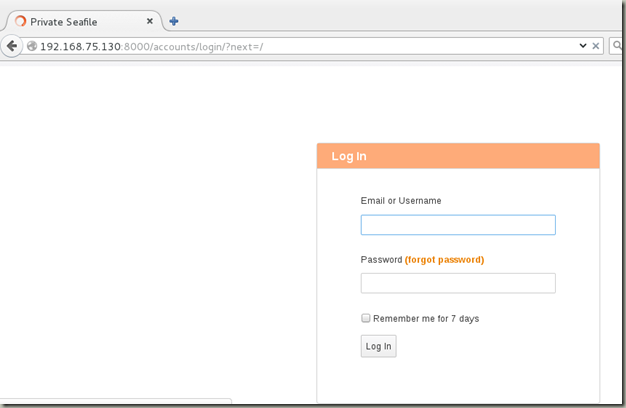
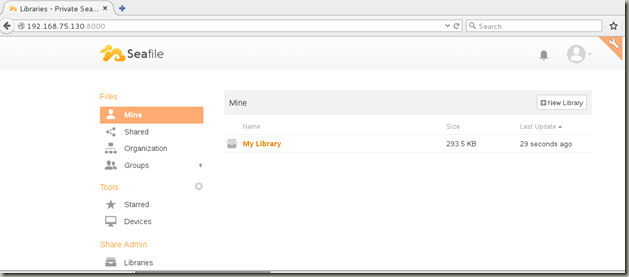
测试登录
基于CentOS 7.2个人网盘的实现的更多相关文章
- 基于CentOS 搭建 Seafile 专属网盘
系统要求:CentOS 7.2 64 位操作系统 安装 Seafile 安装依赖环境 使用 yum 安装 Python 及 MySQL: yum install python python-setup ...
- 基于 CentOS 搭建Seafile个人网盘
一.安装 Seafile 安装依赖环境使用 yum 安装 Python 及 MySQL: yum install python python-setuptools python-imaging pyt ...
- 基于Ubuntu搭建Seafile专属网盘
系统要求: Ubuntu 16.04.1 LTS 64 位操作系统 安装 Seafile 服务器 安装依赖环境 在 Debian/Ubuntu 系统下,可以使用以下命令安装 MySQL: sudo a ...
- CentOS里下载百度网盘 / 360 网盘资源的方法
wget -c --referer=引用地址 -O 文件名 "真实下载地址" 例如,我下载资源原在的页面为http://pan.baidu.com/s/1cfJXZ ,实际下载地址 ...
- Centos搭建Seafile个人网盘
1.安装依赖环境 yum install python python-setuptools python-imaging python-ldap python-memcached MySQL-pyth ...
- vfd-cloud——一个适合练习上手的云存储网盘springboot项目(开发中)
vfd-cloud 一个基于SpringBoot的云存储网盘项目,适合练手学习SpringBoot,用到的技术栈列到了下面.支持用户的注册登陆及修改密码,利用邮箱进行验证.支持 ...
- 『实践』VirtualBox 5.1.18+Centos 6.8+hadoop 2.7.3搭建hadoop完全分布式集群及基于HDFS的网盘实现
『实践』VirtualBox 5.1.18+Centos 6.8+hadoop 2.7.3搭建hadoop完全分布式集群及基于HDFS的网盘实现 1.基本设定和软件版本 主机名 ip 对应角色 mas ...
- [原创] 【2014.12.02更新网盘链接】基于EasySysprep4.1的 Windows 7 x86/x64 『视频』封装
[原创] [2014.12.02更新网盘链接]基于EasySysprep4.1的 Windows 7 x86/x64 『视频』封装 joinlidong 发表于 2014-11-29 14:25:50 ...
- CentOS 7 使用OwnCloud建立私有云储存网盘
使用OwnCloud建立属于自己私有的云存储网盘 OwnCloud概述: OwnCloud 一款文件主机服务软件,就是我们平时使用的云存储,不过这是在自己主机的服务器上建立属于自己的私有云,OwnCl ...
随机推荐
- MRUnit测试
新建一个专门的测试类,代码如下: wordcount的map函数输入string line, 输出<单词 , 1> 右键-> run as junit 出错了,因为输出不是 ...
- SequenceFile
org.apache.hadoop.io包里的SequenceFile类提供了高效的二进制文件格式,它经常用于MapReduce作业的输出.尤其是当作业的输出被当做另一个作业的输入时.Sequence ...
- LOJ#139. 树链剖分
LOJ#139. 树链剖分 题目描述 这是一道模板题. 给定一棵$n$个节点的树,初始时该树的根为 1 号节点,每个节点有一个给定的权值.下面依次进行 m 个操作,操作分为如下五种类型: 换根:将一个 ...
- 关于JAVA中的前期绑定 后期绑定(动态绑定)
前期绑定,在程序执行前根据编译时类型绑定,调用开销较小,如C语言只有前期绑定这种方法调用. 后期绑定,是指在运行时根据对象的类型进行绑定,又叫动态绑定或运行时绑定.实现后期绑定,需要某种机制支持,以便 ...
- BootLoader与Linux内核的参数传递【转】
本文转载自:http://blog.sina.com.cn/s/blog_476d8cf30100rttx.html 在嵌入式系统中,BootLoader 是用来初始化硬件,加载内核,传递参数.因为嵌 ...
- Hihocoder 之 #1097 : 最小生成树一·Prim算法 (用vector二维 模拟邻接表,进行prim()生成树算法, *【模板】)
#1097 : 最小生成树一·Prim算法 时间限制:10000ms 单点时限:1000ms 内存限制:256MB 描述 最近,小Hi很喜欢玩的一款游戏模拟城市开放出了新Mod,在这个Mod中,玩家可 ...
- springboot在eclipse实现热部署
eclipse使用spring-tool-suite插件创建springboot项目,项目创建完成后. 选中项目,右键 Spring Tools --> Add Boot Devtools 点 ...
- javascript 树形菜单
1. [代码][JavaScript]代码 var ME={ini:{i:true,d:{},d1:{},h:0,h1:0,h2:0},html:function(da,f){var s='& ...
- 基于HALCON的模板匹配方法总结 (转)
很早就想总结一下前段时间学习HALCON的心得,但由于其他的事情总是抽不出时间.去年有过一段时间的集中学习,做了许多的练习和实验,并对基于HDevelop的形状匹配算法的参数优化进行了研究,写了一篇& ...
- SPOJ:PATHETIC STRINGS(分配问题&贪心)
Problem statement: A string is said to be “PATHETIC” if all the characters in it are repeated the sa ...