
elasticsearch接口开发(新)
此文在上一篇文章的基础上稍做了些许修改,主要在springboot整合ES后的包路径上,如下是新的目录结构
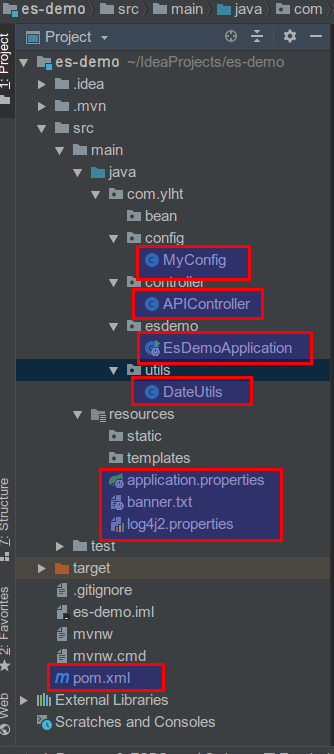
下面贴出代码
MyConfig.java
package com.ylht.config;

import org.elasticsearch.client.transport.TransportClient;

import org.elasticsearch.common.settings.Settings;

import org.elasticsearch.common.transport.InetSocketTransportAddress;

import org.elasticsearch.transport.client.PreBuiltTransportClient;

import org.springframework.context.annotation.Bean;

import org.springframework.context.annotation.Configuration;

import java.net.InetAddress;

import java.net.UnknownHostException;

@Configuration

public class MyConfig {

    @Bean

    public TransportClient client() throws UnknownHostException {

        InetSocketTransportAddress es1 = new InetSocketTransportAddress(

                InetAddress.getByName("192.168.100.101"), 9300

        );

        InetSocketTransportAddress es2 = new InetSocketTransportAddress(

                InetAddress.getByName("192.168.100.102"), 9300

        );

        InetSocketTransportAddress es3 = new InetSocketTransportAddress(

                InetAddress.getByName("192.168.100.103"), 9300

        );

        Settings settings = Settings.builder()

                .put("cluster.name", "aubin-cluster")

                .build();

        TransportClient client = new PreBuiltTransportClient(settings);

        client.addTransportAddresses(es1, es2, es3);

        return client;

    }

}
APICcontroller.java
package com.ylht.controller;

import org.elasticsearch.action.delete.DeleteResponse;

import org.elasticsearch.action.get.GetResponse;

import org.elasticsearch.action.index.IndexResponse;

import org.elasticsearch.action.search.SearchRequestBuilder;

import org.elasticsearch.action.search.SearchResponse;

import org.elasticsearch.action.search.SearchType;

import org.elasticsearch.action.update.UpdateRequest;

import org.elasticsearch.action.update.UpdateResponse;

import org.elasticsearch.client.transport.TransportClient;

import org.elasticsearch.common.xcontent.XContentBuilder;

import org.elasticsearch.common.xcontent.XContentFactory;

import org.elasticsearch.index.query.BoolQueryBuilder;

import org.elasticsearch.index.query.QueryBuilder;

import org.elasticsearch.index.query.QueryBuilders;

import org.elasticsearch.index.query.RangeQueryBuilder;

import org.elasticsearch.search.SearchHit;

import org.springframework.beans.factory.annotation.Autowired;

import org.springframework.format.annotation.DateTimeFormat;

import org.springframework.http.HttpStatus;

import org.springframework.http.ResponseEntity;

import org.springframework.web.bind.annotation.*;

import java.io.IOException;

import java.text.SimpleDateFormat;

import java.util.ArrayList;

import java.util.Date;

import java.util.List;

import java.util.Map;

@RestController

public class APIController {

    @Autowired

    private TransportClient client;

    @GetMapping("/")

    public String index() {

        return "index";

    }

    /**

     * 查询

     *

     * @param id

     * @return

     */

    @GetMapping(value = "/get/book/novel")

    public ResponseEntity get(@RequestParam(name = "id", defaultValue = "") String id) {

        try {

            if (id.isEmpty()) {

                return new ResponseEntity(HttpStatus.NOT_FOUND);

            }

            GetResponse response = this.client.prepareGet("book", "novel", id)

                    .get();

            if (!response.isExists()) {

                return new ResponseEntity(HttpStatus.NOT_FOUND);

            }

            return new ResponseEntity(response.getSource(), HttpStatus.OK);

        } catch (Exception e) {

            e.printStackTrace();

            return new ResponseEntity(HttpStatus.INTERNAL_SERVER_ERROR);

        }

    }

    /**

     * 查询

     *

     * @param id

     * @return

     */

    @GetMapping(value = "/get/book/novel/{id}")

    public ResponseEntity get1(@PathVariable(required = false) String id) {

        try {

            if (id.isEmpty()) {

                return this.get(id);

            }

            GetResponse response = this.client.prepareGet("book", "novel", id)

                    .get();

            if (!response.isExists()) {

                return new ResponseEntity(HttpStatus.NOT_FOUND);

            }

            return new ResponseEntity(response.getSource(), HttpStatus.OK);

        } catch (Exception e) {

            e.printStackTrace();

            return new ResponseEntity(HttpStatus.INTERNAL_SERVER_ERROR);

        }

    }

    /**

     * 添加

     *

     * @param title

     * @param author

     * @param wordCount

     * @param publishDate

     * @return

     */

    @PostMapping(value = "/add/book/novel")

    @ResponseBody

    public ResponseEntity add(@RequestParam(name = "title") String title,

                              @RequestParam(name = "author") String author,

                              @RequestParam(name = "word_count") int wordCount,

                              @RequestParam(name = "publish_date")

                              @DateTimeFormat(pattern = "yyyy-MM-dd HH:mm:ss")

                                      Date publishDate) {

        try {

            XContentBuilder xContentBuilder = XContentFactory.jsonBuilder()

                    .startObject()

                    .field("title", title)

                    .field("author", author)

                    .field("word_count", wordCount)

                    .field("publish_date", new SimpleDateFormat("yyyy-MM-dd").format(publishDate.getTime()))

                    .endObject();

            IndexResponse indexResponse = this.client.prepareIndex("book", "novel")

                    .setSource(xContentBuilder)

                    .get();

            return new ResponseEntity(indexResponse.getId(), HttpStatus.OK);

        } catch (IOException e) {

            e.printStackTrace();

            return new ResponseEntity(HttpStatus.INTERNAL_SERVER_ERROR);

        }

    }

    /**

     * 删除

     *

     * @param id

     * @return

     */

    @DeleteMapping(value = "/delete/book/novel")

    @ResponseBody

    public ResponseEntity delete(@RequestParam(name = "id") String id) {

        DeleteResponse deleteResponse = this.client.prepareDelete("book", "novel", id).get();

        return new ResponseEntity(deleteResponse.getResult().toString(), HttpStatus.OK);

    }

    /**

     * 修改

     *

     * @param id

     * @param title

     * @param author

     * @return

     */

    @PutMapping(value = "/update/book/novel")

    @ResponseBody

    public ResponseEntity update(@RequestParam(name = "id") String id,

                                 @RequestParam(name = "title", required = false) String title,

                                 @RequestParam(name = "author", required = false) String author) {

        UpdateRequest updateRequest = new UpdateRequest("book", "novel", id);

        try {

            XContentBuilder xContentBuilder = XContentFactory.jsonBuilder().startObject();

            if (null != title) {

                xContentBuilder.field("title", title);

            }

            if (null != author) {

                xContentBuilder.field("author", author);

            }

            xContentBuilder.endObject();

            updateRequest.doc(xContentBuilder);

        } catch (IOException e) {

            e.printStackTrace();

            return new ResponseEntity(HttpStatus.INTERNAL_SERVER_ERROR);

        }

        try {

            UpdateResponse updateResponse = this.client.update(updateRequest).get();

            return new ResponseEntity(updateResponse.getResult().toString(), HttpStatus.OK);

        } catch (Exception e) {

            e.printStackTrace();

            return new ResponseEntity(HttpStatus.INTERNAL_SERVER_ERROR);

        }

    }

    /**

     * 复合查询

     *

     * @param title

     * @param author

     * @param gtWordCount

     * @param ltWordCount

     * @return

     */

    @PostMapping(value = "/query/book/bovel")

    @ResponseBody

    public ResponseEntity query(@RequestParam(name = "title", required = false) String title,

                                @RequestParam(name = "author", required = false) String author,

                                @RequestParam(name = "gt_word_count", defaultValue = "0") int gtWordCount,

                                @RequestParam(name = "lt_word_count", required = false) Integer ltWordCount) {

        BoolQueryBuilder boolQueryBuilder = QueryBuilders.boolQuery();

        if (null != title) {

            boolQueryBuilder.must(QueryBuilders.matchQuery("title", title));

        }

        if (null != author) {

            boolQueryBuilder.must(QueryBuilders.matchQuery("author", author));

        }

        RangeQueryBuilder rangeQueryBuilder = QueryBuilders.rangeQuery("word_count").from(gtWordCount);

        if (null != ltWordCount && ltWordCount > 0) {

            rangeQueryBuilder.to(ltWordCount);

        }

        boolQueryBuilder.filter(rangeQueryBuilder);

        SearchRequestBuilder searchRequestBuilder = this.client.prepareSearch("book").setTypes("novel")

                .setSearchType(SearchType.DFS_QUERY_THEN_FETCH)

                .setQuery(boolQueryBuilder)

                .setFrom(0)

                .setSize(10);

        System.out.println(searchRequestBuilder);

        SearchResponse searchResponse = searchRequestBuilder.get();

        List<Map<String, Object>> result = new ArrayList<>();

        for (SearchHit hit : searchResponse.getHits()) {

            result.add(hit.getSource());

        }

        return new ResponseEntity(result, HttpStatus.OK);

    }

}
EsDemoApplication.java
package com.ylht.esdemo;

import org.springframework.boot.SpringApplication;

import org.springframework.boot.autoconfigure.SpringBootApplication;

import org.springframework.boot.autoconfigure.jdbc.DataSourceAutoConfiguration;

import org.springframework.boot.autoconfigure.orm.jpa.HibernateJpaAutoConfiguration;

import org.springframework.context.annotation.ComponentScan;

@SpringBootApplication(exclude = {DataSourceAutoConfiguration.class, HibernateJpaAutoConfiguration.class})

@ComponentScan(basePackages = {"com.ylht"})

public class EsDemoApplication {

    public static void main(String[] args) {

        SpringApplication.run(EsDemoApplication.class, args);

    }

}
DateUtils.java
package com.ylht.utils;

import java.text.ParseException;

import java.text.SimpleDateFormat;

import java.util.Date;

public class DateUtils {

    /*

     * 将时间转换为时间戳

     */

    public static String dateToStamp(String s) throws ParseException {

        String res;

        SimpleDateFormat simpleDateFormat = new SimpleDateFormat("yyyy-MM-dd HH:mm:ss");

        Date date = simpleDateFormat.parse(s);

        long ts = date.getTime();

        res = String.valueOf(ts);

        return res;

    }

    /*

     * 将时间戳转换为时间

     */

    public static String stampToDate(String s){

        String res;

        SimpleDateFormat simpleDateFormat = new SimpleDateFormat("yyyy-MM-dd HH:mm:ss");

        long lt = new Long(s);

        Date date = new Date(lt);

        res = simpleDateFormat.format(date);

        return res;

    }

}
log4j.properties
appender.console.type=Console

appender.console.name=console

appender.console.layout.type=PatternLayout

appender.console.layout.pattern=[%t] %-5p %c %m%n

rootLogger.level=info

rootLogger.appenderRef.console.ref=console
接口都写在APIConfig.java中,启动项目,然后就可以测试了
我使用的是postman测试
测试过程就不说了
elasticsearch接口开发(新)的更多相关文章
- Springboot整合elasticsearch以及接口开发
Springboot整合elasticsearch以及接口开发 搭建elasticsearch集群 搭建过程略(我这里用的是elasticsearch5.5.2版本) 写入测试数据 新建索引book( ...
- python语言(六)mock接口开发、发邮件、写日志、新Excel操作
一.urllib模块 urllib模块是一个标准模块,直接import urllib即可,在python3里面只有urllib模块,在python2里面有urllib模块和urllib2模块. url ...
- 《Python Web 接口开发与测试》---即将出版
为什么要出这样一本书? 首先,今年我有不少工作是跟接口自动化相关的,工作中的接口自动化颇有成效. 我一直是一个没有测试大格局的人,在各种移动测试技术爆发的这一年,我却默默耕耘着自己的一亩三分地儿(We ...
- php支付宝在线支付接口开发教程【转】
php支付宝在线支付接口开发教程 这篇文章主要为大家详细介绍了php支付宝在线支付接口开发教程,具有一定的参考价值,感兴趣的小伙伴们可以参考一下 1.什么是第三方支付 所谓第三方支付,就是一些和各 ...
- 支付宝WAP支付接口开发
支付宝WAP支付接口开发 因项目需要,要增加支付宝手机网站支付功能,找了支付宝的样例代码和接口说明,折腾两天搞定,谨以此文作为这两天摸索的总结.由于公司有自己的支付接口,并不直接使用这个接口,所以晚些 ...
- 关于《Web接口开发与自动化测试--基于Python语言》
关于封面logo 首先,你会被书封上面logo吸引,这么炫酷?双蛇杖?嗯,这是Requests的新logo. 旧的logo是一只乌龟. 新logo是双蛇杖: 看到新logo我首先想到的是 火爆全网页游 ...
- 《Web接口开发与自动化测试 -- 基于Python语言》---现已出版。
终于可以购买了!! 有需要的同学通过下面链接购买. 购买来链接: https://item.jd.com/11806319423.html 为什么要出这样一本书? 首先,今年我有不少工作是跟接口自动化 ...
- Python基础-修改excel、redis、接口开发、组织代码
pymysql模块补充内容 1. 游标.description():显示表的字段属性 (什么是游标:游标用于交互式应用,就好比word里的光标一样,要修改某个地方,要先把光标移动到这里) 用好这个方法 ...
- 微信JS-SDK之图像接口开发详解
由于现在手头的项目中有一个上传证件照认证的功能(手机端),之前的思路是直接点击上传,然后直接将图片上传到服务器去,这篇文章有讲到(http://www.cnblogs.com/it-cen/p/453 ...
随机推荐
- MaterialImageLoading
https://github.com/eltld/MaterialImageLoading
- java设计模式----迭代器模式和组合模式
迭代器模式: 提供一种方法顺序访问一个聚合对象中的各个元素,而又不暴露其内部的表示. 设计原则: 单一责任:一个类应该只有一个引起变化的原因 组合模式: 允许你将对象组合成树形结构来表现“整体/部分” ...
- block-循环引用
在ARC机制下,app的内存管理由操作系统进行管理,不须要程序猿手动的管理内存,方便了开发.虽然,自己主动释放内存非常方便.可是并不是绝对安全,绝对不会产生内存泄露. 大部分导致iOS对象无法按预期释 ...
- SimpleHTTPServer
SimpleHTTPServer python -m SimpleHTTPServer 8989
- Mongoose Embedded Web Server Library
https://github.com/cesanta/mongoose http://ltp.ai/docs/ltpserver.html LTP Server在轻量级服务器程序mongoose基础上 ...
- C++ HOJ 火车进站
[问题描写叙述] 给定一个正整数N代表火车数量.0<N<10,接下来输入火车入站的序列,一共N辆火车,每辆火车以数字1-9编号. 要求以字典序排序输出火车出站的序列号. 输入: 有多组 ...
- hihocoder 1015 KMP(找多个位置的 【*模板】)
#1015 : KMP算法 时间限制:1000ms 单点时限:1000ms 内存限制:256MB 描述 小Hi和小Ho是一对好朋友,出生在信息化社会的他们对编程产生了莫大的兴趣,他们约定好互相帮助,在 ...
- HDU3081 Marriage Match II —— 传递闭包 + 二分图最大匹配 or 传递闭包 + 二分 + 最大流
题目链接:https://vjudge.net/problem/HDU-3081 Marriage Match II Time Limit: 2000/1000 MS (Java/Others) ...
- STL Algorithms 之 unique
C++的文档中说,STL中的unique是类似于这样实现的: template <class ForwardIterator> ForwardIterator unique ( Forwa ...
- bzoj 1894 游戏
题目大意: $n$个装备,每个装备有两个值,可以攻击该值对应的怪兽.每个装备最多用一次 每个怪兽被打一次之后就会死,每个怪兽可以被打当且仅当前面的都死了,求最多打多少个 思路: 很明显的二分图匹配,如 ...