
ChartControl ViewType.Pie3D 用法测试
效果图一、
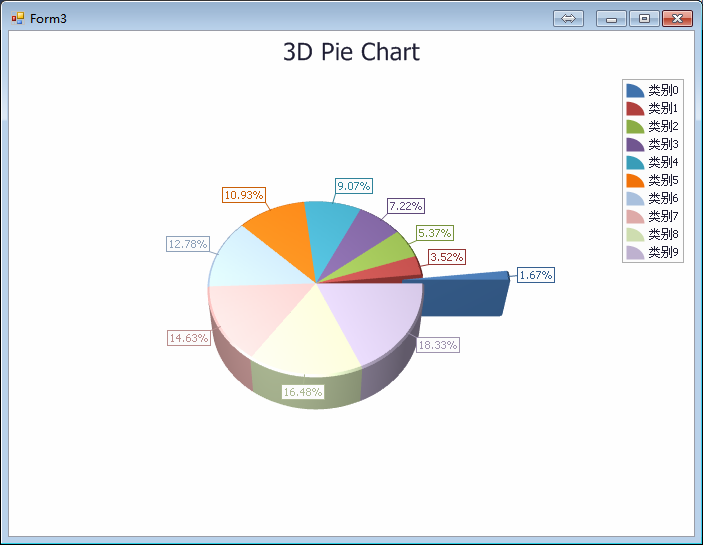
    public partial class Form3 : Form

    {

        public Form3()

        {

            InitializeComponent();

        }

        private void Form3_Load(object sender, EventArgs e)

        {

            // Create an empty chart.

            ChartControl PieChart3D = new ChartControl();

            // Create a pie series.

            Series series1 = new Series("Pie Series 1", ViewType.Pie3D);

            //// Populate the series with points.

            //series1.Points.Add(new SeriesPoint("Russia", 17.0752));

            //series1.Points.Add(new SeriesPoint("Canada", 9.98467));

            //series1.Points.Add(new SeriesPoint("USA", 9.63142));

            //series1.Points.Add(new SeriesPoint("China", 9.59696));

            //series1.Points.Add(new SeriesPoint("Brazil", 8.511965));

            //series1.Points.Add(new SeriesPoint("Australia", 7.68685));

            //series1.Points.Add(new SeriesPoint("India", 3.28759));

            //series1.Points.Add(new SeriesPoint("Others", 81.2));

            DataTable dt = new DataTable();

            dt.Columns.Add("X轴", Type.GetType("System.String"));

            dt.Columns.Add("线①", Type.GetType("System.Int32"));

            dt.Columns.Add("线②", Type.GetType("System.Int32"));

            dt.Columns.Add("线③", Type.GetType("System.Int32"));

            dt.Columns.Add("线④", Type.GetType("System.Int32"));

            for (int i = ; i < ; i++)

            {

                Random rd = new Random();

                DataRow dr = dt.NewRow();

                dr["X轴"] = ("类别" + i.ToString());

                dr["线①"] = rd.Next(i * , (i + ) * ); ;

                dr["线②"] = rd.Next(i * , (i + ) * );

                dr["线③"] = rd.Next(i * , (i + ) * );

                dr["线④"] = rd.Next(i * , (i + ) * );

                dt.Rows.Add(dr);

            }

            series1.DataSource = dt;

            series1.ArgumentDataMember = "X轴"; //设置公共的X轴值(刻度)

            series1.ValueScaleType = ScaleType.Numerical;

            //设置 单个Series2 Y轴的(值)

            series1.ValueDataMembers.AddRange(new string[] { "线①" });

            // Add the series to the chart.

            PieChart3D.Series.Add(series1);

            //series1.LegendPointOptions.PointView = PointView.ArgumentAndValues;//格式:【类别:百分比】

            series1.LegendPointOptions.PointView = PointView.Argument;//格式:【类别】

            //series1.LegendPointOptions.PointView = PointView.Values;//格式:【百分比】

            //series1.LegendPointOptions.PointView = PointView.SeriesName;//显示series1的Name

            //series1.LegendPointOptions.PointView = PointView.Undefined;//显示效果:【百分比】

            // Adjust the value numeric options of the series.

            //series1.Label.TextPattern = "{VP:P0}";

            PieChart3D.Legend.Visible = true; //设置 右边 标注框是否显示

            PieChart3D.Legend.TextVisible = true; //设置标注框是否显示 每项目的数值

            // Adjust the view-type-specific options of the series.

            ((Pie3DSeriesView)series1.View).Depth = ;//设置饼的厚度

            ((Pie3DSeriesView)series1.View).ExplodedPoints.Add(series1.Points[]); //选中一个需要突出的项目

            ((Pie3DSeriesView)series1.View).ExplodedDistancePercentage = ;//将其中一个项目(SeriesPoint)推出来的距离

            // Access the diagram's options.

            ((SimpleDiagram3D)PieChart3D.Diagram).RotationType = RotationType.UseAngles;

            ((SimpleDiagram3D)PieChart3D.Diagram).RotationAngleX = -;//设置平面的倾斜度

            // Add a title to the chart and hide the legend.

            ChartTitle chartTitle1 = new ChartTitle();

            chartTitle1.Text = "3D Pie Chart";//设置标题

            PieChart3D.Titles.Add(chartTitle1);//添加标题

            //PieChart3D.Legend.Visibility = DevExpress.Utils.DefaultBoolean.False;

            // Add the chart to the form.

            PieChart3D.Dock = DockStyle.Fill;

            this.Controls.Add(PieChart3D);

        }

    }
效果图二、
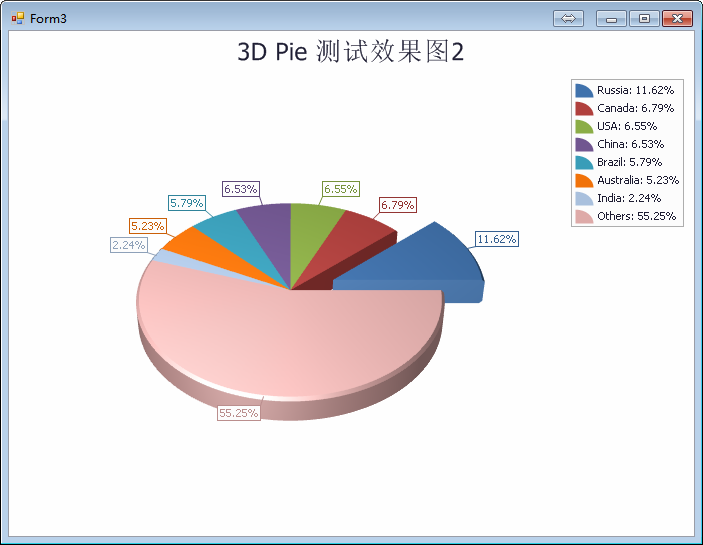
    public partial class Form3 : Form

    {

        public Form3()

        {

            InitializeComponent();

        }

        private void Form3_Load(object sender, EventArgs e)

        {

            // Create an empty chart.

            ChartControl PieChart3D = new ChartControl();

            // Create a pie series.

            Series series1 = new Series("Pie Series 1", ViewType.Pie3D);

            // Populate the series with points.

            series1.Points.Add(new SeriesPoint("Russia", 17.0752));

            series1.Points.Add(new SeriesPoint("Canada", 9.98467));

            series1.Points.Add(new SeriesPoint("USA", 9.63142));

            series1.Points.Add(new SeriesPoint("China", 9.59696));

            series1.Points.Add(new SeriesPoint("Brazil", 8.511965));

            series1.Points.Add(new SeriesPoint("Australia", 7.68685));

            series1.Points.Add(new SeriesPoint("India", 3.28759));

            series1.Points.Add(new SeriesPoint("Others", 81.2));

            //DataTable dt = new DataTable();

            //dt.Columns.Add("X轴", Type.GetType("System.String"));

            //dt.Columns.Add("线①", Type.GetType("System.Int32"));

            //dt.Columns.Add("线②", Type.GetType("System.Int32"));

            //dt.Columns.Add("线③", Type.GetType("System.Int32"));

            //dt.Columns.Add("线④", Type.GetType("System.Int32"));

            //for (int i = 0; i < 10; i++)

            //{

            //    Random rd = new Random();

            //    DataRow dr = dt.NewRow();

            //    dr["X轴"] = ("类别" + i.ToString());

            //    dr["线①"] = rd.Next(i * 10, (i + 1) * 10); ;

            //    dr["线②"] = rd.Next(i * 10, (i + 1) * 10);

            //    dr["线③"] = rd.Next(i * 10, (i + 1) * 10);

            //    dr["线④"] = rd.Next(i * 10, (i + 1) * 10);

            //    dt.Rows.Add(dr);

            //}

            //series1.DataSource = dt;

            //series1.ArgumentDataMember = "X轴"; //设置公共的X轴值(刻度)

            //series1.ValueScaleType = ScaleType.Numerical;

            ////设置 单个Series2 Y轴的(值)

            //series1.ValueDataMembers.AddRange(new string[] { "线①" });

            // Add the series to the chart.

            PieChart3D.Series.Add(series1);

            series1.LegendPointOptions.PointView = PointView.ArgumentAndValues;//格式:【类别:百分比】

            //series1.LegendPointOptions.PointView = PointView.Argument;//格式:【类别】

            //series1.LegendPointOptions.PointView = PointView.Values;//格式:【百分比】

            //series1.LegendPointOptions.PointView = PointView.SeriesName;//显示series1的Name

            //series1.LegendPointOptions.PointView = PointView.Undefined;//显示效果:【百分比】

            // Adjust the value numeric options of the series.

            //series1.Label.TextPattern = "{VP:P0}";

            PieChart3D.Legend.Visible = true; //设置 右边 标注框是否显示

            PieChart3D.Legend.TextVisible = true; //设置标注框是否显示 每项目的数值

            // Adjust the view-type-specific options of the series.

            ((Pie3DSeriesView)series1.View).Depth = ;//设置饼的厚度

            ((Pie3DSeriesView)series1.View).ExplodedPoints.Add(series1.Points[]); //选中一个需要突出的项目

            ((Pie3DSeriesView)series1.View).ExplodedDistancePercentage = ;//将其中一个项目(SeriesPoint)推出来的距离

            // Access the diagram's options.

            ((SimpleDiagram3D)PieChart3D.Diagram).RotationType = RotationType.UseAngles;

            ((SimpleDiagram3D)PieChart3D.Diagram).RotationAngleX = -;//设置平面的倾斜度

            // Add a title to the chart and hide the legend.

            ChartTitle chartTitle1 = new ChartTitle();

            chartTitle1.Text = "3D Pie 测试效果图2";//设置标题

            PieChart3D.Titles.Add(chartTitle1);//添加标题

            //PieChart3D.Legend.Visibility = DevExpress.Utils.DefaultBoolean.False;

            // Add the chart to the form.

            PieChart3D.Dock = DockStyle.Fill;

            this.Controls.Add(PieChart3D);

        }

    }
ChartControl ViewType.Pie3D 用法测试的更多相关文章
- chartControl ViewType.Bar 用法测试
使用方法 一. Datatable : chartControl1.Series.Clear(); DataTable dt = new DataTable(); dt.Columns.Add(&qu ...
- php set_time_limit()用法测试详解
在php中set_time_limit函数是用来限制页面执行时间的,如我想把一个php页面的执行时间定义为5秒就可以set_time_limit(5)了. 一个php脚本通过crontab每5分钟 ...
- DevExpress ChartControl ViewType.Line
源码地址:https://files.cnblogs.com/files/lanyubaicl/ChartControl.Line.7z public partial class Form1 : Fo ...
- DevExpress中ChartControl柱状图(Bar)用法
我的数据 代码如下: 1 2 3 4 5 6 7 8 9 10 11 12 13 14 15 16 17 18 19 20 21 22 23 chartControl1.Series.Clear(); ...
- telnet用法 测试端口号
Telnet是进行远程登录的标准协议和主要方式它为用户提供了在本地计算机上完成远程主机工作的能力.可以用telnet命令来测试端口号是否正常打开还是关闭状态. 工具/原料 电脑 cmd命令 方法/步骤 ...
- python 用法测试
Python 3.5.6 1.js风格的回调测试 def b(): ') def a(fn): if callable(fn): fn() a(b) class Sample: def q(self) ...
- chartControl 饼状图小Demo
Short Description The Pie Chart is represented by the Pie3DSeriesView object, which belongs to P ...
- 关于jQuery.when()用法
1.该方法在jQuery1.5开始被引入. 2.用法测试 a. var url1 = "/resource/ar/hometab/index_tab_games.json", ur ...
- Java 枚举(enum) 详解7种常见的用法
Java 枚举(enum) 详解7种常见的用法 来源 https://blog.csdn.net/qq_27093465/article/details/52180865 JDK1.5引入了新的类型— ...
随机推荐
- Java面试题总结(附答案)
1.什么是B/S架构?C/S架构? B/S(Browser/Server),浏览器/服务器程序: C/S(Client/Server),客户端/服务端,桌面应用程序. 2.网络协议有哪些? HTTP: ...
- nginx配置tp5的pathinfo模式并隐藏后台入口文件
server { listen 2223; server_name manage; access_log /data/wwwlogs/access_manage.log combined; root ...
- Spring 通知和顾问进行增强
使用顾问增加前置增强和后置增强 <bean id="1" class="目标对象"></bean> <bean id=" ...
- HBuilder+eclipse开发:使用ajax异步传值生成首字母索引
使用ajax异步传值生成首字母索引大致有以下几个步骤: 1.服务器端使用servlet提取出数据库里的数据; 2.使用首字母工具类对数据进处理得到首字母; 3.再将首字母和数据一一对应存入json数组 ...
- pycharm中配置启动Django项目
1.先打开mange.py,然后再运行,会提示一堆东西,表示没有配置参数.在pycharm中点击edit configurations 编辑配置参数. 2.点开之后弹出如下对话框,在scrip par ...
- TensorFlow中的变量和常量
1.TensorFlow中的变量和常量介绍 TensorFlow中的变量: import tensorflow as tf state = tf.Variable(0,name='counter') ...
- 使用 WRK 压力测试工具对 ASP.NET Core 的接口进行压力测试
0. 简要介绍 WRK 是一款轻量且易用的 HTTP 压力测试工具,通过该工具我们可以方便地对我们所开发的 WebAPI 项目进行压力测试,并且针对测试的情况返回结果. PS:Wrk 并不能针对测试的 ...
- redis 系列4 数据结构之链表
一. 概述 链表提供了高效的节点重排能力,以及顺序性的节点访问方式,并且可能通过增删节点来灵活地调整链表的长度.作为一种数据结构,在C语言中并没有内置的这种数据结构.所以Redis构建了自己的链表实现 ...
- mysql 开发基础系列5 运算符
1. 算术运算符 2.比较运算符 注意NULL值不能用= 运算符 SELECT * FROM t WHERE c =NULL; -- 需要改成 SELECT * FROM t WHERE c IS N ...
- 在IT行业获得成功 你只需一项技能[转]
能同时使用五种编程语言(包括一种机器语言)?不是. 项目管理能力,再高就是获得PMP认证?也不是. 超强的口才和书面沟通能力,正如工作职位中描述的那样?这不是痛点,但可以学习. 我曾经与最好的IT专业 ...