
Trident中的解析包含的函数操作与投影操作
一:函数操作
1.介绍
Tuple本身是不可变的
Function只是在原有的基础上追加新的tuple
2.说明
如果原来的字段是log,flag
新增之后的tuple可以访问这些字段,log,flag,orderId,orderAmt,memberId
3.先写驱动类
增加了解析
然后再将解析的日志进行打印
 package com.jun.trident;

 import backtype.storm.Config;

 import backtype.storm.LocalCluster;

 import backtype.storm.StormSubmitter;

 import backtype.storm.generated.AlreadyAliveException;

 import backtype.storm.generated.InvalidTopologyException;

 import backtype.storm.tuple.Fields;

 import backtype.storm.tuple.Values;

 import storm.trident.TridentTopology;

 import storm.trident.operation.Function;

 import storm.trident.operation.TridentCollector;

 import storm.trident.operation.TridentOperationContext;

 import storm.trident.testing.FixedBatchSpout;

 import storm.trident.tuple.TridentTuple;

 import java.util.Map;

 public class TridentDemo {

     public static void main(String[] args) throws AlreadyAliveException, InvalidTopologyException {

         TridentTopology tridentTopology=new TridentTopology();

         //模拟数据

         Fields field=new Fields("log","flag");

         FixedBatchSpout spout=new FixedBatchSpout(field,5,

             new Values("168.214.187.214 - - [1481953616092] \"GET /view.php HTTP/1.1\" 200 0 \"http://cn.bing.com/search?q=spark mllib\" \"Mozilla/5.0 (Windows NT 6.1; rv:2.0.1) Gecko/20100101 Firefox/4.0.1\" \"-\"","A"),

             new Values("168.187.202.202 - - [1481953537038] \"GET /IBEIfeng.gif?order_id=1063&orderTime=1481953537038&memberId=4000012340500607&productInfos=10005-2099.48-B-1|10004-1886.62-A-2|10001-961.99-A-1&orderAmt=6834.70 HTTP/1.1\" 200 0 \"-\" \"Mozilla/5.0 (compatible; MSIE 10.0; Windows NT 6.2;Tident/6.0)\" \"-\"","A"),

             new Values("61.30.167.187 - - [1481953539039] \"GET /IBEIfeng.gif?order_id=1064&orderTime=1481953539039&memberId=4000930409959999&productInfos=10007-3329.13-B-1|10009-2607.71-B-1|10002-390.62-A-1|10006-411.00-B-2&orderAmt=7149.46 HTTP/1.1\" 200 0 \"-\" \"Mozilla/5.0 (Linux; Android 4.2.1; Galaxy Nexus Build/JOP40D) AppleWebKit/535.19 (KHTML, like Gecko) Chrome/18.0.1025.166 Mobile Safari/535.19\" \"-\"","A"),

             new Values("30.29.132.190 - - [1481953544042] \"GET /IBEIfeng.gif?order_id=1065&orderTime=1481953544043&memberId=1234568970080798&productInfos=10005-2099.48-B-1|10001-3242.40-C-2|10006-411.00-B-1&orderAmt=8995.28 HTTP/1.1\" 200 0 \"-\" \"Mozilla/5.0 (iPhone; CPU iPhone OS 7_)_3 like Mac OS X) AppleWebKit/537.51.1 (KHTML, like Gecko) Version/7.0 Mobile/11B511 Safari/9537.53\" \"-\"","B"),

             new Values("222.190.187.201 - - [1481953578068] \"GET /IBEIfeng.gif?order_id=1066&orderTime=1481953578068&memberId=3488586887970809&productInfos=10005-2099.48-B-1|10001-2774.16-C-2&orderAmt=7647.80 HTTP/1.1\" 200 0 \"-\" \"Mozilla/5.0 (Windows NT 6.1; rv:2.0.1) Gecko/20100101 Firefox/4.0.1\" \"-\"","B"),

             new Values("72.202.43.53 - - [1481953579069] \"GET /IBEIfeng.gif?order_id=1067&orderTime=1481953579069&memberId=2084859896989877&productInfos=10007-3329.13-B-1|10001-961.99-A-2&orderAmt=5253.10 HTTP/1.1\" 200 0 \"-\" \"Mozilla/5.0 (Linux; Android 4.2.1; Galaxy Nexus Build/JOP40D) AppleWebKit/535.19 (KHTML, like Gecko) Chrome/18.0.1025.166 Mobile Safari/535.19\" \"-\"","B")

         );

         //多次循环

         spout.setCycle(true);

         //提交

         Config config=new Config();

         tridentTopology.newStream("orderAnalyse",spout)

                 //过滤

             .each(new Fields("log"),new ValidLogFilter())

                 //解析

             .each(new Fields("log"), new LogParserFunction(),new Fields("orderId","orderTime","orderAmtStr","memberId"))

                 //不添加log了,日志太长,不方便看控制台的现象

             .each(new Fields("flag","orderId","orderTime","orderAmtStr","memberId"),new PrintFilter());

         if(args==null || args.length<=0){

             LocalCluster localCluster=new LocalCluster();

             localCluster.submitTopology("tridentDemo",config,tridentTopology.build());

         }else {

             config.setNumWorkers(2);

             StormSubmitter.submitTopology(args[0],config,tridentTopology.build());

         }

     }

 }
4.解析方法类
 package com.jun.trident;

 import backtype.storm.tuple.Values;

 import storm.trident.operation.Function;

 import storm.trident.operation.TridentCollector;

 import storm.trident.operation.TridentOperationContext;

 import storm.trident.tuple.TridentTuple;

 import java.util.HashMap;

 import java.util.Map;

 public class LogParserFunction implements Function {

     @Override

     public void execute(TridentTuple tridentTuple, TridentCollector tridentCollector) {

         //function对传进来的tuple子集

         String log=tridentTuple.getStringByField("log");

         //解析

         int splitIndex=log.indexOf("IBEIfeng.gif")+13;

         String orderInfo=log.substring(splitIndex).split(" ")[0];

         String[] kvs=orderInfo.split("\\&");

         Map<String,String> orderInfos=new HashMap<>();

         for(String kv:kvs){

             String[] keyValues=kv.split("=");

             if(keyValues.length==2){

                 orderInfos.put(keyValues[0],keyValues[1]);

             }

         }

         String orderId=getValue(orderInfos,"order_id","");//注意这个在日志中是这个字段

         String orderTime=getValue(orderInfos,"orderTime","");

         String orderAmtStr=getValue(orderInfos,"orderAmt","");

         String memberId=getValue(orderInfos,"memberId","");

         tridentCollector.emit(new Values(orderId,orderTime,orderAmtStr,memberId));

     }

     @Override

     public void prepare(Map map, TridentOperationContext tridentOperationContext) {

     }

     @Override

     public void cleanup() {

     }

     public String getValue(Map<String,String> map,String key,String defaultValue){

         if(map.containsKey(key)){

             return map.get(key);

         }else{

             return defaultValue;

         }

     }

 }
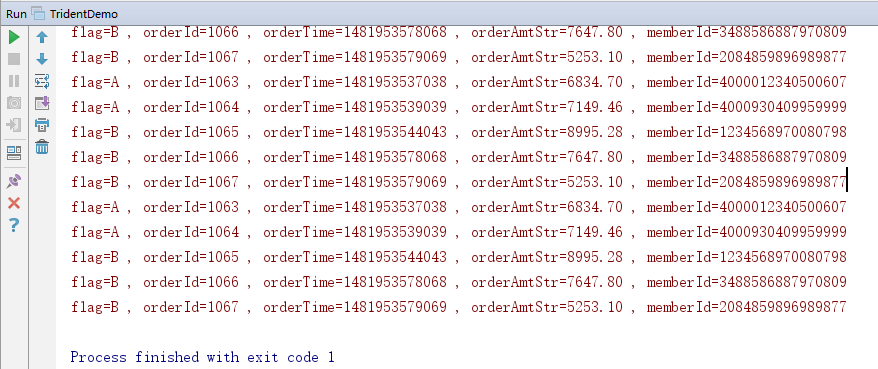
5.效果
二:投影操作
1.说明
可以对tuple进行裁剪操作。
2.驱动类
先投影
然后打印
 package com.jun.trident;

 import backtype.storm.Config;

 import backtype.storm.LocalCluster;

 import backtype.storm.StormSubmitter;

 import backtype.storm.generated.AlreadyAliveException;

 import backtype.storm.generated.InvalidTopologyException;

 import backtype.storm.tuple.Fields;

 import backtype.storm.tuple.Values;

 import storm.trident.TridentTopology;

 import storm.trident.operation.Function;

 import storm.trident.operation.TridentCollector;

 import storm.trident.operation.TridentOperationContext;

 import storm.trident.testing.FixedBatchSpout;

 import storm.trident.tuple.TridentTuple;

 import java.util.Map;

 public class TridentDemo {

     public static void main(String[] args) throws AlreadyAliveException, InvalidTopologyException {

         TridentTopology tridentTopology=new TridentTopology();

         //模拟数据

         Fields field=new Fields("log","flag");

         FixedBatchSpout spout=new FixedBatchSpout(field,5,

             new Values("168.214.187.214 - - [1481953616092] \"GET /view.php HTTP/1.1\" 200 0 \"http://cn.bing.com/search?q=spark mllib\" \"Mozilla/5.0 (Windows NT 6.1; rv:2.0.1) Gecko/20100101 Firefox/4.0.1\" \"-\"","A"),

             new Values("168.187.202.202 - - [1481953537038] \"GET /IBEIfeng.gif?order_id=1063&orderTime=1481953537038&memberId=4000012340500607&productInfos=10005-2099.48-B-1|10004-1886.62-A-2|10001-961.99-A-1&orderAmt=6834.70 HTTP/1.1\" 200 0 \"-\" \"Mozilla/5.0 (compatible; MSIE 10.0; Windows NT 6.2;Tident/6.0)\" \"-\"","A"),

             new Values("61.30.167.187 - - [1481953539039] \"GET /IBEIfeng.gif?order_id=1064&orderTime=1481953539039&memberId=4000930409959999&productInfos=10007-3329.13-B-1|10009-2607.71-B-1|10002-390.62-A-1|10006-411.00-B-2&orderAmt=7149.46 HTTP/1.1\" 200 0 \"-\" \"Mozilla/5.0 (Linux; Android 4.2.1; Galaxy Nexus Build/JOP40D) AppleWebKit/535.19 (KHTML, like Gecko) Chrome/18.0.1025.166 Mobile Safari/535.19\" \"-\"","A"),

             new Values("30.29.132.190 - - [1481953544042] \"GET /IBEIfeng.gif?order_id=1065&orderTime=1481953544043&memberId=1234568970080798&productInfos=10005-2099.48-B-1|10001-3242.40-C-2|10006-411.00-B-1&orderAmt=8995.28 HTTP/1.1\" 200 0 \"-\" \"Mozilla/5.0 (iPhone; CPU iPhone OS 7_)_3 like Mac OS X) AppleWebKit/537.51.1 (KHTML, like Gecko) Version/7.0 Mobile/11B511 Safari/9537.53\" \"-\"","B"),

             new Values("222.190.187.201 - - [1481953578068] \"GET /IBEIfeng.gif?order_id=1066&orderTime=1481953578068&memberId=3488586887970809&productInfos=10005-2099.48-B-1|10001-2774.16-C-2&orderAmt=7647.80 HTTP/1.1\" 200 0 \"-\" \"Mozilla/5.0 (Windows NT 6.1; rv:2.0.1) Gecko/20100101 Firefox/4.0.1\" \"-\"","B"),

             new Values("72.202.43.53 - - [1481953579069] \"GET /IBEIfeng.gif?order_id=1067&orderTime=1481953579069&memberId=2084859896989877&productInfos=10007-3329.13-B-1|10001-961.99-A-2&orderAmt=5253.10 HTTP/1.1\" 200 0 \"-\" \"Mozilla/5.0 (Linux; Android 4.2.1; Galaxy Nexus Build/JOP40D) AppleWebKit/535.19 (KHTML, like Gecko) Chrome/18.0.1025.166 Mobile Safari/535.19\" \"-\"","B")

         );

         //多次循环

         spout.setCycle(true);

         //提交

         Config config=new Config();

         tridentTopology.newStream("orderAnalyse",spout)

                 //过滤

             .each(new Fields("log"),new ValidLogFilter())

                 //解析

             .each(new Fields("log"), new LogParserFunction(),new Fields("orderId","orderTime","orderAmtStr","memberId"))

                 //投影

             .project(new Fields("orderId","orderTime","orderAmtStr","memberId"))

                 .each(new Fields("orderId","orderTime","orderAmtStr","memberId"),new PrintFilter())

         ;

         if(args==null || args.length<=0){

             LocalCluster localCluster=new LocalCluster();

             localCluster.submitTopology("tridentDemo",config,tridentTopology.build());

         }else {

             config.setNumWorkers(2);

             StormSubmitter.submitTopology(args[0],config,tridentTopology.build());

         }

     }

 }
3.效果

三:解析
1.说明
这个部分在解析之后,进入分流阶段。涉及到全局分流与局部分流,现在先使用全局分流,进行打印验证。
2.聚合操作
部分删除,部分增加
3.驱动类
 package com.jun.trident;

 import backtype.storm.Config;

 import backtype.storm.LocalCluster;

 import backtype.storm.StormSubmitter;

 import backtype.storm.generated.AlreadyAliveException;

 import backtype.storm.generated.InvalidTopologyException;

 import backtype.storm.tuple.Fields;

 import backtype.storm.tuple.Values;

 import storm.trident.Stream;

 import storm.trident.TridentState;

 import storm.trident.TridentTopology;

 import storm.trident.operation.Function;

 import storm.trident.operation.TridentCollector;

 import storm.trident.operation.TridentOperationContext;

 import storm.trident.operation.builtin.Count;

 import storm.trident.testing.FixedBatchSpout;

 import storm.trident.testing.MemoryMapState;

 import storm.trident.tuple.TridentTuple;

 import java.util.Map;

 public class TridentDemo {

     public static void main(String[] args) throws AlreadyAliveException, InvalidTopologyException {

         TridentTopology tridentTopology=new TridentTopology();

         //模拟数据

         Fields field=new Fields("log","flag");

         FixedBatchSpout spout=new FixedBatchSpout(field,5,

             new Values("168.214.187.214 - - [1481953616092] \"GET /view.php HTTP/1.1\" 200 0 \"http://cn.bing.com/search?q=spark mllib\" \"Mozilla/5.0 (Windows NT 6.1; rv:2.0.1) Gecko/20100101 Firefox/4.0.1\" \"-\"","A"),

             new Values("168.187.202.202 - - [1481953537038] \"GET /IBEIfeng.gif?order_id=1063&orderTime=1481953537038&memberId=4000012340500607&productInfos=10005-2099.48-B-1|10004-1886.62-A-2|10001-961.99-A-1&orderAmt=6834.70 HTTP/1.1\" 200 0 \"-\" \"Mozilla/5.0 (compatible; MSIE 10.0; Windows NT 6.2;Tident/6.0)\" \"-\"","A"),

             new Values("61.30.167.187 - - [1481953539039] \"GET /IBEIfeng.gif?order_id=1064&orderTime=1481953539039&memberId=4000930409959999&productInfos=10007-3329.13-B-1|10009-2607.71-B-1|10002-390.62-A-1|10006-411.00-B-2&orderAmt=7149.46 HTTP/1.1\" 200 0 \"-\" \"Mozilla/5.0 (Linux; Android 4.2.1; Galaxy Nexus Build/JOP40D) AppleWebKit/535.19 (KHTML, like Gecko) Chrome/18.0.1025.166 Mobile Safari/535.19\" \"-\"","A"),

             new Values("30.29.132.190 - - [1481953544042] \"GET /IBEIfeng.gif?order_id=1065&orderTime=1481953544043&memberId=1234568970080798&productInfos=10005-2099.48-B-1|10001-3242.40-C-2|10006-411.00-B-1&orderAmt=8995.28 HTTP/1.1\" 200 0 \"-\" \"Mozilla/5.0 (iPhone; CPU iPhone OS 7_)_3 like Mac OS X) AppleWebKit/537.51.1 (KHTML, like Gecko) Version/7.0 Mobile/11B511 Safari/9537.53\" \"-\"","B"),

             new Values("222.190.187.201 - - [1481953578068] \"GET /IBEIfeng.gif?order_id=1066&orderTime=1481953578068&memberId=3488586887970809&productInfos=10005-2099.48-B-1|10001-2774.16-C-2&orderAmt=7647.80 HTTP/1.1\" 200 0 \"-\" \"Mozilla/5.0 (Windows NT 6.1; rv:2.0.1) Gecko/20100101 Firefox/4.0.1\" \"-\"","B"),

             new Values("72.202.43.53 - - [1481953579069] \"GET /IBEIfeng.gif?order_id=1067&orderTime=1481953579069&memberId=2084859896989877&productInfos=10007-3329.13-B-1|10001-961.99-A-2&orderAmt=5253.10 HTTP/1.1\" 200 0 \"-\" \"Mozilla/5.0 (Linux; Android 4.2.1; Galaxy Nexus Build/JOP40D) AppleWebKit/535.19 (KHTML, like Gecko) Chrome/18.0.1025.166 Mobile Safari/535.19\" \"-\"","B")

         );

         //多次循环

         spout.setCycle(true);

         //流处理

         Stream stream=tridentTopology.newStream("orderAnalyse",spout)

                 //过滤

             .each(new Fields("log"),new ValidLogFilter())

                 //解析

             .each(new Fields("log"), new LogParserFunction(),new Fields("orderId","orderTime","orderAmtStr","memberId"))

                 //投影

             .project(new Fields("orderId","orderTime","orderAmtStr","memberId"))

                 //时间解析

             .each(new Fields("orderTime"),new DateTransFormerFunction(),new Fields("day","hour","minter"))

          ;

         //分流

         //1.基于minter统计订单数量,分组统计

         TridentState state=stream.groupBy(new Fields("minter"))

                 //全局聚合,使用内存存储状态信息

                 .persistentAggregate(new MemoryMapState.Factory(),new Count(),new Fields("orderNumByMinter"));

         state.newValuesStream().each(new Fields("minter","orderNumByMinter"),new PrintFilter());

         //提交

         Config config=new Config();

         if(args==null || args.length<=0){

             LocalCluster localCluster=new LocalCluster();

             localCluster.submitTopology("tridentDemo",config,tridentTopology.build());

         }else {

             config.setNumWorkers(2);

             StormSubmitter.submitTopology(args[0],config,tridentTopology.build());

         }

     }

 }
4.时间解析方法
 package com.jun.trident;

 import backtype.storm.tuple.Values;

 import org.slf4j.Logger;

 import org.slf4j.LoggerFactory;

 import storm.trident.operation.Function;

 import storm.trident.operation.TridentCollector;

 import storm.trident.operation.TridentOperationContext;

 import storm.trident.tuple.TridentTuple;

 import java.text.DateFormat;

 import java.text.SimpleDateFormat;

 import java.util.Date;

 import java.util.Map;

 public class DateTransFormerFunction implements Function {

     private static final Logger logger = LoggerFactory.getLogger(DateTransFormerFunction.class);

     @Override

     public void execute(TridentTuple tridentTuple, TridentCollector tridentCollector) {

         String orderTime=tridentTuple.getStringByField("orderTime");

         // 处理时间

         try {

             long timestamp = Long.parseLong(orderTime);

             Date date = new Date();

             date.setTime(timestamp);

             DateFormat df = new SimpleDateFormat("yyyyMMddHHmm");

             String dateStr = df.format(date);

             String day = dateStr.substring(0,8);

             String hour = dateStr.substring(0,10);

             String minute = dateStr ;

             //发射

             tridentCollector.emit(new Values(day,hour,minute));

         }catch (Exception e){

             logger.error("日期解析出错"+orderTime);

         }

     }

     @Override

     public void prepare(Map map, TridentOperationContext tridentOperationContext) {

     }

     @Override

     public void cleanup() {

     }

 }
5.效果

Trident中的解析包含的函数操作与投影操作的更多相关文章
- Linq查询操作之投影操作
投影操作,乍一看不知道在说啥.那么什么是投影操作呢?其实就是Select操作,名字起的怪怪的.和Linq查询表达式中的select操作是一样的.它能够选择数据源中的元素,并指定元素的表现形式.投影操作 ...
- (C/C++学习)5.C++中的虚继承-虚函数-多态解析
说明:在C++学习的过程中,虚继承-虚函数经常是初学者容易产生误解的两个概念,它们与C++中多态形成的关系,也是很多初学者经常产生困惑的地方,这篇文章将依次分别对三者进行解析,并讲述其之间的联系与不同 ...
- SqlServer还原数据库时提示:异常终止,不能在此版本的SQL Server中启动,因为它包含分区函数
场景 在SqlServer Management中进行数据库还原时提示: 数据库不能在此版本的SQL Server中启动,因为它包含分区函数. 点击左下角的查看详细信息 实现 电脑上安装的是SQL S ...
- 剑指 Offer 30. 包含min函数的栈 + 双栈实现求解栈中的最小值
剑指 Offer 30. 包含min函数的栈 Offer_30 题目描述: 题解分析: 题目其实考察的是栈的知识,本题的目的是使用两个栈来求解最小值. 第二个栈主要用来维护第一个栈中的最小值,所以它里 ...
- angular中的compile和link函数
angular中的compile和link函数 前言 这篇文章,我们将通过一个实例来了解 Angular 的 directives (指令)是如何处理的.Angular 是如何在 HTML 中找到这些 ...
- PHP中常用的字符串格式化函数总结
注意:在PHP中提供的字符串函数处理的字符串,大部分都不是在原字符串上修改,而是返回一个格式化后的新字符串. 一.取出空格和字符串填补函数 空格也是一个有效的字符,在字符串中也会占据一个位置.用户在表 ...
- 开发过程中 的一些 补充知识点 + 关于mysql中的日期和时间函数?
参考: https://www.jb51.net/article/23966.htm https://yq.aliyun.com/articles/260389 mysql中的 日期格式是: HHHH ...
- Android 中Json解析的几种框架(Gson、Jackson、FastJson、LoganSquare)使用与对比
介绍 移动互联网产品与服务器端通信的数据格式,如果没有特殊的需求的话,一般选择使用JSON格式,Android系统也原生的提供了JSON解析的API,但是它的速度很慢,而且没有提供简介方便的接口来提高 ...
- C++中的继承与虚函数各种概念
虚继承与一般继承 虚继承和一般的继承不同,一般的继承,在目前大多数的C++编译器实现的对象模型中,派生类对象会直接包含基类对象的字段.而虚继承的情况,派生类对象不会直接包含基类对象的字段,而是通过一个 ...
随机推荐
- Android直连SQL Server数据库
1. 下载jtds,一个开放源代码的Java实现的JDBC驱动,地址:http://sourceforge.net/projects/jtds/ 2. 添加jtds到当前Android项目中,本人使用 ...
- 04 if条件判断 流程控制
条件判断 if 语法一: if 条件: # 条件成立时执行的子代码块 代码1 代码2 代码3 示例: sex='female' age=18 is_beautiful=True if sex == ' ...
- Python-socketserver实现并发- 源码分析
基于tcp的套接字,关键就是两个循环, 一个链接循环,一个通信循环 socketserver模块中分两大类: server类(解决链接问题)和request类(解决通信问题) server类: req ...
- HttpListener通讯成功案例
1.创建WindowsService,如下代码 using System;using System.Net;using System.Net.Sockets;using System.ServiceP ...
- vue.js 入门学习
<!DOCTYPE html><html lang="en"><head> <meta charset="UTF-8" ...
- string标准C++中的的用法总结(转)
转自:http://www.cnblogs.com/xFreedom/archive/2011/05/16/2048037.html 相信使用过MFC编程的朋友对CString这个类的印象应该非常深刻 ...
- tail -f -n 0 /var/log/messages
<pre><font color="#CC0000"><b>root@kali</b></font>:<font ...
- java----重载
重载: //同一个类中,方法名相同,参数列表不同[java就是靠不同的参数列表来寻找方法的],返回值可以任意,注意和函数的返回值类型相同.public class Demo { public stat ...
- bzoj3991 lca+dfs序应用+set综合应用
/* 给定一棵树,树上会出现宝物,也会有宝物消失 规定如果要收集树上所有宝物,就要选择一个点开始,到每个宝物点都跑一次,然后再回到那个点 现在给定m次修改,每次修改后树上就有一个宝物消失,或者一个宝物 ...
- Can't connect to X11 window server using 的问题,求解
在JVM中加入-Djava.awt.headless=true对于tomcat ,可以修改catalina.sh,加入:CATALINA_OPTS="$CATALINA_OPTS -Djav ...