
react+typescript报错集锦<持续更新>
typescript报错集锦
- 错误:Import sources within a group must be alphabetized.tslint(ordered-imports)
原因:import名称排序问题,要求按照字母从小到大排序;
解决方案:修改 tslint.json 中 rules 的规则 “ordered-imports” 为 false 即可。
"rules": {

  "ordered-imports": false

}
- vscode打开ts项目,cpu爆满,温度升高
原因:code helper进程占用过高,系统与软件问题
解决方案:修改vs code用户设置
"files.exclude": {

        "**/.git": true,

        "**/.svn": true,

        "**/.hg": true,

        "**/CVS": true,

        "**/.DS_Store": true,

        "**/tmp": true,

        "**/node_modules": true,

        "**/bower_components": true,

        "**/dist": true

    },

    "files.watcherExclude": {

        "**/.git/objects/**": true,

        "**/.git/subtree-cache/**": true,

        "**/node_modules/**": true,

        "**/tmp/**": true,

        "**/bower_components/**": true,

        "**/dist/**": true

    }
- 对象属性赋值报错
原因:在JavaScript中,我们经常会声明一个空对象,然后再给这个属性进行赋值。但是这个操作放在TypeScript中是会发生报错的:
let a = {};

a.b = 1;

// 终端编译报错:TS2339: Property 'b' does not exist on type '{}'.

// 编辑器报错:[ts] 类型“{}”上不存在属性“b”。
解决方案:
这是因为TypeScript不允许增加没有声明的属性。
因此,我们有两个办法来解决这个报错:
在对象中增加属性定义(推荐)。具体方式为:let a = {b: void 0};。这个方法能够从根本上解决当前问题,也能够避免对象被随意赋值的问题。
给a对象增加any属性(应急)。具体方式为:let a: any = {};。这个方法能够让TypeScript类型检查时忽略这个对象,从而编译通过不报错。这个方法适用于大量旧代码改造的情况。
- react-redux react-router4在typescript类型检查下报类型错误
原因:在react项目中,页面需要获取路由信息,且在用了react-redux的情况下,需要将路由与redux做关联
正常写法:
import { connect } from 'react-redux';

import { actionCreators } from './store'

import { withRouter } from 'react-router-dom';

export default withRouter(connect(mapStateToProps, mapDispatchToProps)(App));
react使用了typescript情况下:会报错:
错误提示:类型“ConnectedComponentClass<typeof Login, Pick<LoginProps, "handleNameChange" | "handlePassWordChange" | "handleSubmit">>”的参数不能赋给类型“ComponentType<RouteComponentProps<any, StaticContext, any>>”的参数。 不能将类型“ConnectedComponentClass<typeof Login, Pick<LoginProps, "handleNameChange" | "handlePassWordChange" | "handleSubmit">>”分配给类型“ComponentClass<RouteComponentProps<any, StaticContext, any>, any>”。 属性“propTypes”的类型不兼容。
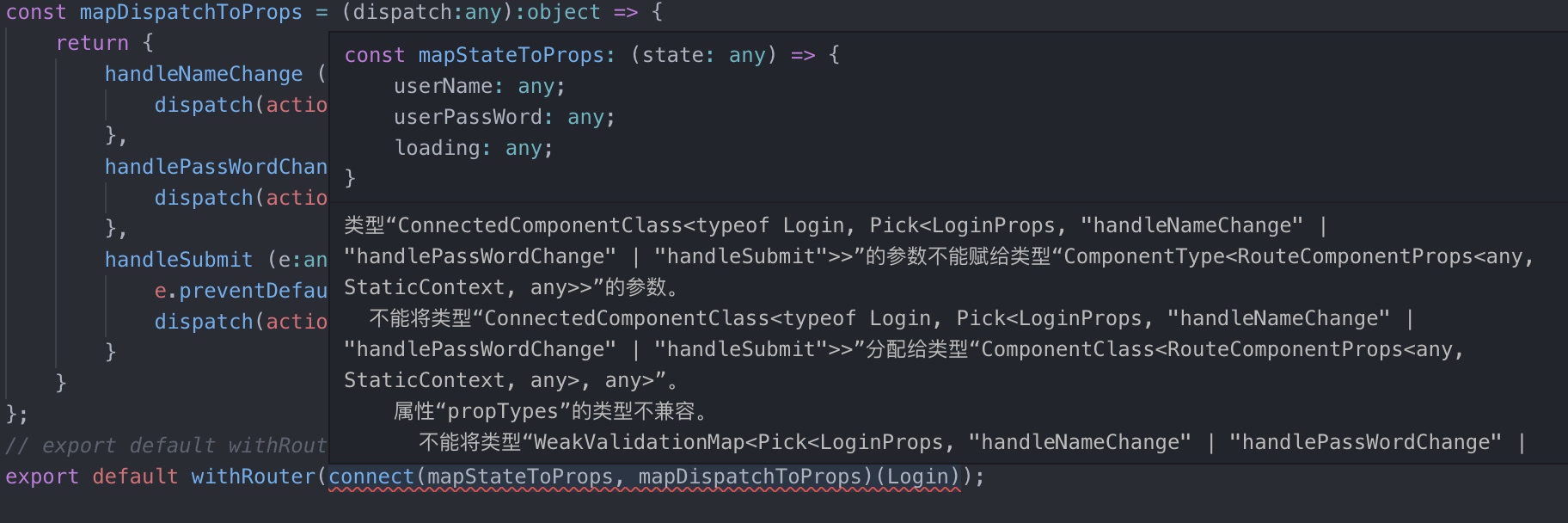
解决方案:router4会给我们提供一个RouteComponentProps接口,在文档中没说明,自己去代码中看,将类型加入到代码中
import { connect } from 'react-redux';

import { withRouter, RouteComponentProps } from 'react-router-dom';

interface Props {

}

class Login extends Component<RouteComponentProps & Props>{}

withRouter(connect(mapStateToProps, mapDispatchToProps)(Login));
react+typescript报错集锦<持续更新>的更多相关文章
- .net 报错汇总——持续更新
1.未能找到 CodeDom 提供程序类型“Microsoft.CodeDom.Providers.DotNetCompilerPla PM> Install-Package Microsoft ...
- Flume的一些报错问题解决(持续更新中)
严谨转载--否则追究法律责任 作者----王加鸿 ----------bug 1---------- ...
- React Native汇错归纳(持续更新中……)
1.2017-10-25: 报错信息:“Cannot find entry file index.android.js in any of roots…..” 解决方法: 1.首先从虚拟机中找问题:看 ...
- Python的ConfigParser模块读取ini配置文件 报错(持续更新总结)
1.ConfigParser.MissingSection什么的错误巴拉巴拉一堆,其实根本上就是没有读到配置文件,然后我去检查了一遍路径,发现没有问题,我是将文件的路径作为一个字符串拼接好传到另一个专 ...
- 【问题与解决】Mac OS通过 npm 安装 React Native 报错(checkPermissions Missing write access to /usr/local/lib/node_modules)
报错情况: 当Mac OS通过 npm 安装 React Native 报错,警告文字为:checkPermissions Missing write access to /usr/local/lib ...
- webStrom中React语法提示,React语法报错处理
1,webStrom中React语法报错 ①, 取消Power Save Mode的勾选 File——Power Save Mode ②,webstorm开发react-native智能提示 随便在一 ...
- react proxy 报错
react项目中,package.json中proxy的配置如下 "proxy": { "/api/rjwl": { "target": & ...
- 使用Visual Studio Code调试React Native报错
报错信息: [Error] Error: Unknown error: not all success patterns were matched. It means that "react ...
- django2.0集成xadmin0.6报错集锦
1.django2.0把from django.core.urlresolvers修改成了django.urls 报错如下: 1 2 3 File "D:\Envs\django-xad ...
随机推荐
- Android “Command” from work summary
总结一下Android中的命令. 一.adb 与 shell ADB的全称为Android Debug Bridge(调试桥).是一个适用命令行工具,用来与模拟器实例或链接的Android设备进行通信 ...
- day11 函数的位置形参,位置实参,可变长位置形参,关键字形参
今天内容 函数的参数详解 形参与实参 形参及形式参数,就是在定义函数是括号中指定的参数(本质就是一个名字) 实参及实际参数,指的是在调用函数是传入的参数)(本质就是一个值) 在调用函数是就会把形参和实 ...
- LeetCode(117):填充同一层的兄弟节点 II
Medium! 题目描述: 给定一个二叉树 struct TreeLinkNode { TreeLinkNode *left; TreeLinkNode *right; TreeLinkNode *n ...
- LeetCode(94):二叉树的中序遍历
Medium! 题目描述: 给定一个二叉树,返回它的中序 遍历. 示例: 输入: [1,null,2,3] 1 \ 2 / 3 输出: [1,3,2] 进阶: 递归算法很简单,你可以通过迭代算法完成吗 ...
- 弹框勾选datatable中的数据,点击保存后添加到另一个表中,同一个页面
需求描述:做编辑的时候,点击添加按钮,弹出数据表table2,勾选弹出框中的数据,点击保存后能够添加到table1中,并且已经被添加到table1中的数据,在弹出框中显示已选,checkbox隐藏:t ...
- poj2411 状态压缩-铺地板题型-轮廓线解法(最优)
解法参考博客https://blog.csdn.net/u013480600/article/details/19569291 一种做法是先打出所有的状态,即满足上下配对的所有可能方案,然后再逐行进行 ...
- Mysql 5.7 密码策略 ERROR 1819 (HY000)
Mysql 5.7 默认对用户密码有密码强度要求,如果指定弱密码,会提示如下: ERROR (HY000): Your password does not satisfy the current po ...
- A.Ocean的礼物线段树
A: Ocean的礼物 Time Limit: 2 s Memory Limit: 128 MB Submit My Status Problem Description 皇家理工存在一段很神 ...
- JCenter下载太慢, jcenter修改 https为http也许能帮助你
今天导入一个工程到studio,一直卡在下载那块. 看到下载地址是:https://jcenter.bintray.com/........https!!!! 到浏览器下载,果然也下载不下来.. 于是 ...
- FORM表单中onclick()、submit()与onsubmit()的问题
最近遇到一次处理form数据的过滤,采用了button的onclick事件来检查,发现return false后表单仍然提交了. 于是仔细研究了下onclick.onsubmit.submit集合函数 ...