
react+typescript报错集锦<持续更新>
typescript报错集锦
- 错误:Import sources within a group must be alphabetized.tslint(ordered-imports)
原因:import名称排序问题,要求按照字母从小到大排序;
解决方案:修改 tslint.json 中 rules 的规则 “ordered-imports” 为 false 即可。
"rules": {

  "ordered-imports": false

}
- vscode打开ts项目,cpu爆满,温度升高
原因:code helper进程占用过高,系统与软件问题
解决方案:修改vs code用户设置
"files.exclude": {

        "**/.git": true,

        "**/.svn": true,

        "**/.hg": true,

        "**/CVS": true,

        "**/.DS_Store": true,

        "**/tmp": true,

        "**/node_modules": true,

        "**/bower_components": true,

        "**/dist": true

    },

    "files.watcherExclude": {

        "**/.git/objects/**": true,

        "**/.git/subtree-cache/**": true,

        "**/node_modules/**": true,

        "**/tmp/**": true,

        "**/bower_components/**": true,

        "**/dist/**": true

    }
- 对象属性赋值报错
原因:在JavaScript中,我们经常会声明一个空对象,然后再给这个属性进行赋值。但是这个操作放在TypeScript中是会发生报错的:
let a = {};

a.b = 1;

// 终端编译报错:TS2339: Property 'b' does not exist on type '{}'.

// 编辑器报错:[ts] 类型“{}”上不存在属性“b”。
解决方案:
这是因为TypeScript不允许增加没有声明的属性。
因此,我们有两个办法来解决这个报错:
在对象中增加属性定义(推荐)。具体方式为:let a = {b: void 0};。这个方法能够从根本上解决当前问题,也能够避免对象被随意赋值的问题。
给a对象增加any属性(应急)。具体方式为:let a: any = {};。这个方法能够让TypeScript类型检查时忽略这个对象,从而编译通过不报错。这个方法适用于大量旧代码改造的情况。
- react-redux react-router4在typescript类型检查下报类型错误
原因:在react项目中,页面需要获取路由信息,且在用了react-redux的情况下,需要将路由与redux做关联
正常写法:
import { connect } from 'react-redux';

import { actionCreators } from './store'

import { withRouter } from 'react-router-dom';

export default withRouter(connect(mapStateToProps, mapDispatchToProps)(App));
react使用了typescript情况下:会报错:
错误提示:类型“ConnectedComponentClass<typeof Login, Pick<LoginProps, "handleNameChange" | "handlePassWordChange" | "handleSubmit">>”的参数不能赋给类型“ComponentType<RouteComponentProps<any, StaticContext, any>>”的参数。 不能将类型“ConnectedComponentClass<typeof Login, Pick<LoginProps, "handleNameChange" | "handlePassWordChange" | "handleSubmit">>”分配给类型“ComponentClass<RouteComponentProps<any, StaticContext, any>, any>”。 属性“propTypes”的类型不兼容。
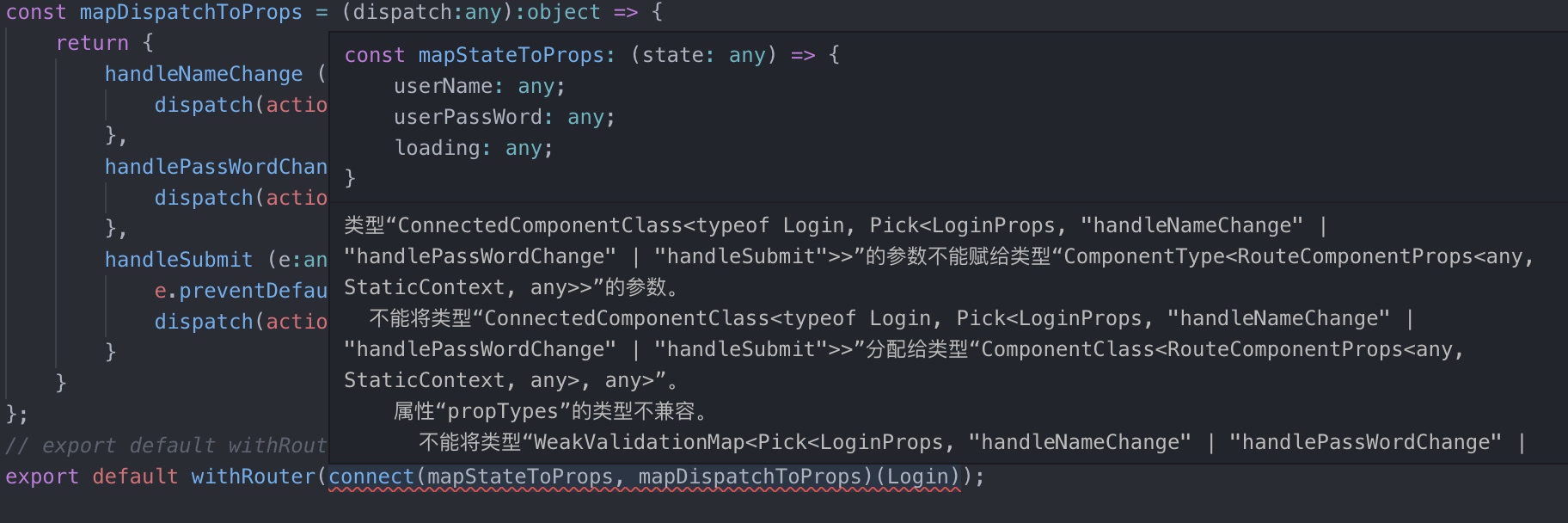
解决方案:router4会给我们提供一个RouteComponentProps接口,在文档中没说明,自己去代码中看,将类型加入到代码中
import { connect } from 'react-redux';

import { withRouter, RouteComponentProps } from 'react-router-dom';

interface Props {

}

class Login extends Component<RouteComponentProps & Props>{}

withRouter(connect(mapStateToProps, mapDispatchToProps)(Login));
react+typescript报错集锦<持续更新>的更多相关文章
- .net 报错汇总——持续更新
1.未能找到 CodeDom 提供程序类型“Microsoft.CodeDom.Providers.DotNetCompilerPla PM> Install-Package Microsoft ...
- Flume的一些报错问题解决(持续更新中)
严谨转载--否则追究法律责任 作者----王加鸿 ----------bug 1---------- ...
- React Native汇错归纳(持续更新中……)
1.2017-10-25: 报错信息:“Cannot find entry file index.android.js in any of roots…..” 解决方法: 1.首先从虚拟机中找问题:看 ...
- Python的ConfigParser模块读取ini配置文件 报错(持续更新总结)
1.ConfigParser.MissingSection什么的错误巴拉巴拉一堆,其实根本上就是没有读到配置文件,然后我去检查了一遍路径,发现没有问题,我是将文件的路径作为一个字符串拼接好传到另一个专 ...
- 【问题与解决】Mac OS通过 npm 安装 React Native 报错(checkPermissions Missing write access to /usr/local/lib/node_modules)
报错情况: 当Mac OS通过 npm 安装 React Native 报错,警告文字为:checkPermissions Missing write access to /usr/local/lib ...
- webStrom中React语法提示,React语法报错处理
1,webStrom中React语法报错 ①, 取消Power Save Mode的勾选 File——Power Save Mode ②,webstorm开发react-native智能提示 随便在一 ...
- react proxy 报错
react项目中,package.json中proxy的配置如下 "proxy": { "/api/rjwl": { "target": & ...
- 使用Visual Studio Code调试React Native报错
报错信息: [Error] Error: Unknown error: not all success patterns were matched. It means that "react ...
- django2.0集成xadmin0.6报错集锦
1.django2.0把from django.core.urlresolvers修改成了django.urls 报错如下: 1 2 3 File "D:\Envs\django-xad ...
随机推荐
- npx简介(转载)
npm v5.2.0引入的一条命令(npx),引入这个命令的目的是为了提升开发者使用包内提供的命令行工具的体验. 举例:使用create-react-app创建一个react项目. 老方法: npm ...
- PDF文件如何标注,怎么使用PDF标注工具
我们在使用文件的时候需要给文件的部分添加标注,能够更加直观的了解文件,但是有很多小伙伴们对于PDF文件怎么添加标注都不知道,也不知道PDF标注工具要怎么使用,那么下面就跟大家分享一下怎么使用PDF标注 ...
- github文档
Video Guides GitHub Help GitHub.com Hello World 10 minute read Intro What is GitHub? Create a Repo ...
- 动手动脑——JAVA语法基础
EnumTest.java public class EnumTest { public static void main(String[] args) { Size s=Size.SMALL; Si ...
- Python+selenium自动化测试中Windows窗口跳转方法
Python+selenium自动化测试中Windows窗口跳转方法 #第一种方法 #获得当前窗口 nowhandle=driver.current_window_handle #打开弹窗 drive ...
- nodejs 如何获取页面get、post传递过来的参数
如果是get传递参数,可以直接使用 request.query.name 如果是post 需要借助body-parser 首先引入bodyParser = require('body-parser') ...
- Ubuntu下安装kate编辑器
Ubuntu下安装kate编辑器 Ubuntu 下安装kate编辑器 #sudo apt-get install kate 安装kconsole #sudo apt-get install kco ...
- python项目实战三个小实例
1. 让用户输入圆的半径,告诉用户圆的面积: import math while True: # 用户输入 r = input("请输入圆的半径:") ...
- 微信小程序--代码构成---WXML 模板
WXML 模板 从事过网页编程的人知道,网页编程采用的是 HTML + CSS + JS 这样的组合,其中 HTML 是用来描述当前这个页面的结构,CSS 用来描述页面的样子,JS 通常是用来处理这个 ...
- 利用SVD-推荐未尝过的菜肴2
推荐未尝过的菜肴-基于SVD的评分估计 实际上数据集要比我们上一篇展示的myMat要稀疏的多. from numpy import linalg as la from numpy import * d ...