
缓存cache介绍
1. 为何要用缓存、缓存的目的是为了什么?(https://my.oschina.net/u/3378039/blog/2986697)
一个程序的瓶颈在于数据库,内存的速度远远大于硬盘的速度,当我们一次又一次请求数据库或远程服务时会导致大量的时间耗费在数据库操作或远程方法调用上,以致于 程序性能恶化,使用数据缓存可以解决此问题。
下面是常用的缓存管理器以及可用注解方式实现缓存机制的集中类型

2.@Cacheable/@CachePut/@CacheEvict/@Caching介绍(https://blog.csdn.net/wjacketcn/article/details/50945887)
具体介绍参见链接。
其中cacheable的源码如下:
 public @interface Cacheable {

     /**

      * 设定要使用的cache的名字,必须提前定义好缓存

      */

     @AliasFor("cacheNames")

     String[] value() default {};

     /**

      * 同value(),决定要使用那个/些缓存

      */

     @AliasFor("value")

     String[] cacheNames() default {};

     /**

      * 使用SpEL表达式来设定缓存的key,如果不设置默认方法上所有参数都会作为key的一部分

      */

     String key() default "";

     /**

      * 用来生成key,与key()不可以共用

      */

     String keyGenerator() default "";

     /**

      * 设定要使用的cacheManager,必须先设置好cacheManager的bean,这是使用该bean的名字

      */

     String cacheManager() default "";

     /**

      * 使用cacheResolver来设定使用的缓存,用法同cacheManager,但是与cacheManager不可以同时使用

      */

     String cacheResolver() default "";

     /**

      * 使用SpEL表达式设定出发缓存的条件,在方法执行前生效

      */

     String condition() default "";

     /**

      * 使用SpEL设置出发缓存的条件,这里是方法执行完生效,所以条件中可以有方法执行后的value

      */

     String unless() default "";

     /**

      * 用于同步的,在缓存失效(过期不存在等各种原因)的时候,如果多个线程同时访问被标注的方法

      * 则只允许一个线程通过去执行方法

      */

     boolean sync() default false;

 }
(下图来源于https://www.cnblogs.com/psy-code/p/9537830.html)

3.使用guava和caffeine缓存(据说spring5开始已经开始用caffeine替换guava)。
以下图列举集中常用的缓存的性能比较柱状图,来源于(https://blog.csdn.net/qq_35981283/article/details/82354081#commentBox)
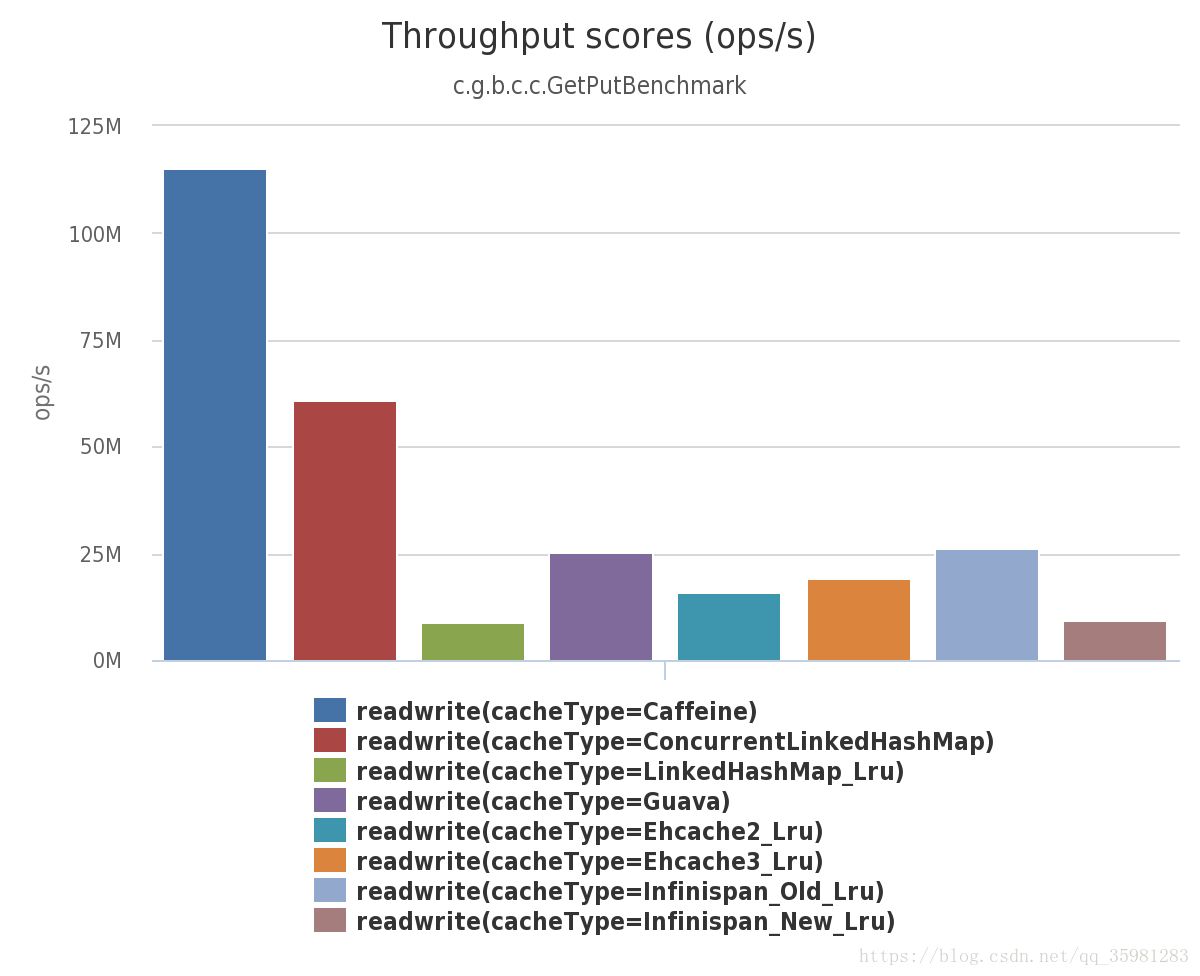
下面主要以guava和caffeine为例,代码如下:
a.使用guava的情景,代码如下(参考网址https://blog.csdn.net/chinabestchina/article/details/78009220):
application-guava.xml
 <?xml version="1.0" encoding="UTF-8"?>

 <beans xmlns="http://www.springframework.org/schema/beans"

        xmlns:xsi="http://www.w3.org/2001/XMLSchema-instance" xmlns:cache="http://www.springframework.org/schema/cache"

        xsi:schemaLocation="http://www.springframework.org/schema/beans http://www.springframework.org/schema/beans/spring-beans.xsd http://www.springframework.org/schema/cache http://www.springframework.org/schema/cache/spring-cache.xsd">

       <cache:annotation-driven/>

     <bean id="cacheManager" class="org.springframework.cache.guava.GuavaCacheManager">

         <property name="cacheSpecification" value="concurrencyLevel=4,expireAfterAccess=100s,expireAfterWrite=100s" />

         <property name="cacheNames">

             <list>

                 <value>guavaCache</value>

             </list>

         </property>

     </bean>

 </beans>
 package com.alice.bean;

 public class Student {

     public Integer id;

     public String name;

     public Integer getId() {

         return id;

     }

     public void setId(Integer id) {

         this.id = id;

     }

     public String getName() {

         return name;

     }

     public void setName(String name) {

         this.name = name;

     }

 }
 package com.alice.guava;

 import com.alice.bean.Student;

 public interface StudentService {

     public Student getStudent(Integer id);

     public Student updateStudent(Student stu);

     public void deleteStudent(Integer id);

     public void deleteAllStudent();

     public void myDelete(Integer id);

 }
 package com.alice.guava;

 import com.alice.bean.Student;

 import org.springframework.aop.framework.AopContext;

 import org.springframework.cache.annotation.CacheEvict;

 import org.springframework.cache.annotation.CachePut;

 import org.springframework.cache.annotation.Cacheable;

 import org.springframework.stereotype.Service;

 @Service("studentGuavaCache")

 public class StudentGuavaCacheImpl implements StudentService {

     @Cacheable(value = "guavaCache",key="'id_'+#id",condition = "#id<3")

     public Student getStudent(Integer id) {

         Student stu = new Student();

         stu.setId(id);

         stu.setName("apple");

         return stu;

     }

     @CachePut(value = "guavaCache",key="'id_'+#stu.getId()")

     public Student updateStudent(Student stu){

         System.out.println("update stu");

         return stu;

     }

     @CacheEvict(value = "guavaCache",key="'id_'+#id")

     public void deleteStudent(Integer id){

         System.out.println("delete student "+id);

     }

     public void myDelete(Integer id){

         try {

             StudentService ss = (StudentService) AopContext.currentProxy();

             ss.deleteStudent(id);

             return ;

         }catch (Exception e){

             e.printStackTrace();

         }

         this.deleteStudent(id);

     }

     @CacheEvict(value = "guavaCache",allEntries = true)

     public void deleteAllStudent(){

         System.out.println("delete all student ");

     }

 }
 package com.alice.guava;

 import com.alice.bean.Student;

 import org.springframework.context.support.ClassPathXmlApplicationContext;

 import org.springframework.util.Assert;

 public class SpringGuavaCacheMain {

     public static void main(String[] args) {

         ClassPathXmlApplicationContext ac = new ClassPathXmlApplicationContext("classpath:application-cache.xml","classpath:application-spring.xml","classpath:application-mybatis.xml");

         StudentService studentService = (StudentService) ac.getBean("studentGuavaCache");

         Integer id =1;

         Student stu = studentService.getStudent(id);  //新建缓存

         stu = studentService.getStudent(id);   //从缓存中取

         studentService.myDelete(id);

         stu = studentService.getStudent(id);   //从缓存中取

         stu.setName("banana");  //重新设置值

         Student stu1 = studentService.getStudent(id);

         stu.setName("banana");

         studentService.updateStudent(stu); //更新缓存

         stu = studentService.getStudent(id); //从缓存中取出新值

         stu = new Student();  //新实例

         stu.setId(0);

         studentService.updateStudent(stu);  //用新建的实例进行更新,会新建缓存

         stu = studentService.getStudent(0);  //从缓存中取

         studentService.deleteStudent(id);  // 删除缓存

         stu = studentService.getStudent(id);  //再次新建缓存

         id=2;

         stu = studentService.getStudent(id); //新建缓存

         studentService.deleteAllStudent(); //删除所有缓存

         id=1;

         stu = studentService.getStudent(id); //因所有缓存被前一步清除,会新建缓存

         id=5;

         stu = studentService.getStudent(id); //不会新建缓存 因为设置了缓存条件必须小于3

         stu = studentService.getStudent(id); //因没有缓存,不会从缓存中取

         Assert.notNull(stu,"deprecated");

     }

 }
2.使用caffeine
这里扩展了下原本的caffeineManager
 package com.alice.caffeine;

 import com.github.benmanes.caffeine.cache.Caffeine;

 import org.springframework.cache.caffeine.CaffeineCacheManager;

 import java.util.concurrent.TimeUnit;

 public class CaffeineCacheExtManager extends CaffeineCacheManager {

     public CaffeineCacheExtManager(){

         super();

     }

     /**

      * Construct a CaffeineCacheExtManager managing caches with expireAfterWrite feature

      *

      * @param duration

      * @param timeUnit

      */

     public CaffeineCacheExtManager(long duration, String timeUnit) {

         this.setCaffeine(Caffeine.newBuilder().expireAfterWrite(duration, TimeUnit.valueOf(timeUnit.toUpperCase())));

     }

 }
application-caffeine.xml
 <?xml version="1.0" encoding="UTF-8"?>

 <beans xmlns="http://www.springframework.org/schema/beans"

        xmlns:xsi="http://www.w3.org/2001/XMLSchema-instance"

        xmlns:cache="http://www.springframework.org/schema/cache"

        xsi:schemaLocation="http://www.springframework.org/schema/beans http://www.springframework.org/schema/beans/spring-beans.xsd http://www.springframework.org/schema/cache http://www.springframework.org/schema/cache/spring-cache.xsd">

        <cache:annotation-driven/>

        <bean id="cacheManager" class="org.springframework.cache.caffeine.CaffeineCacheManager"/>

        <bean id="tenSecondCacheManager" class="com.alice.caffeine.CaffeineCacheExtManager">

               <constructor-arg name="duration" value="10"/>

               <constructor-arg name="timeUnit" value="SECONDS"/>

        </bean>

 </beans>
 package com.alice.caffeine;

 import com.alice.bean.Student;

 public interface StudentService {

     public Student getStudent(Integer id);

 }
 package com.alice.caffeine;

 import com.alice.bean.Student;

 import org.springframework.aop.framework.AopContext;

 import org.springframework.cache.annotation.CacheEvict;

 import org.springframework.cache.annotation.CachePut;

 import org.springframework.cache.annotation.Cacheable;

 import org.springframework.stereotype.Service;

 @Service("CaffeineCache")

 public class StudentCaffeineCacheImpl implements StudentService {

     @Cacheable(cacheManager = CacheMgmtName.TEN_SECOND_CACHE_MANAGER,cacheNames =CacheNames.QUERY_STUINFO_CACHE, key="'id_'+#id",condition = "#id<3")

     public Student getStudent(Integer id) {

         Student stu = new Student();

         stu.setId(id);

         stu.setName("apple");

         return stu;

     }

 }
 package com.alice.caffeine;

 import com.alice.bean.Student;

 import com.alice.caffeine.StudentService;

 import org.springframework.context.support.ClassPathXmlApplicationContext;

 public class test  {

     public static void main(String[] args){

         ClassPathXmlApplicationContext ac = new ClassPathXmlApplicationContext("classpath:application-cache.xml","classpath:application-spring.xml","classpath:application-mybatis.xml","classpath:application-caffeine.xml");

         StudentService studentService = (StudentService) ac.getBean("CaffeineCache");

         int id =1;

         Student stu = studentService.getStudent(id);

         stu = studentService.getStudent(id);

     }

 }
缓存cache介绍的更多相关文章
- C# - 缓存OutputCache(二)缓存详细介绍
本文是通过网上&个人总结的 1.缓存介绍 缓存是为了提高访问速度,而做的技术. 缓存主要有以下几类:1)客户端缓存Client Caching 2)代理缓存Proxy Caching 3)方向 ...
- .Net环境下的缓存技术介绍 (转)
.Net环境下的缓存技术介绍 (转) 摘要:介绍缓存的基本概念和常用的缓存技术,给出了各种技术的实现机制的简单介绍和适用范围说明,以及设计缓存方案应该考虑的问题(共17页) 1 概念 ...
- [.net 面向对象程序设计进阶] (15) 缓存(Cache)(二) 利用缓存提升程序性能
[.net 面向对象程序设计进阶] (15) 缓存(Cache)(二) 利用缓存提升程序性能 本节导读: 上节说了缓存是以空间来换取时间的技术,介绍了客户端缓存和两种常用服务器缓布,本节主要介绍一种. ...
- [.net 面向对象程序设计进阶] (14) 缓存(Cache) (一) 认识缓存技术
[.net 面向对象程序设计进阶] (14) 缓存(Cache)(一) 认识缓存技术 本节导读: 缓存(Cache)是一种用空间换时间的技术,在.NET程序设计中合理利用,可以极大的提高程序的运行效率 ...
- 缓存Cache
转载自 博客futan 这篇文章将全面介绍有关 缓存 ( 互动百科 | 维基百科 )cache以及利用PHP写缓存caching的技术. 什么是缓存Cache? 为什么人们要使用它? 缓存 Cach ...
- .Net环境下的缓存技术介绍
.Net环境下的缓存技术介绍 摘要: 介绍缓存的基本概念和常用的缓存技术,给出了各种技术的实现机制的简单介绍和适用范围说明,以及设计缓存方案应该考虑的问题(共17页) 1 概念 1.1 ...
- Spring Cache 介绍
Spring Cache 缓存是实际工作中非常常用的一种提高性能的方法, 我们会在许多场景下来使用缓存. 本文通过一个简单的例子进行展开,通过对比我们原来的自定义缓存和 spring 的基于注释的 c ...
- ASP.NET缓存 Cache
缓存介绍 如果每次进入页面的时候都查询数据库生成页面内容的话,如果访问量非常大,则网站性能会非常差,而如果只有第一次访问的时候才查询数据库生成页面内容,以后都直接输出内容,则能提高系统性能,这样无论多 ...
- ASP.NET状缓存Cache的应用-提高数据库读取速度
原文:ASP.NET状缓存Cache的应用-提高数据库读取速度 一. Cache概述 既然缓存中的数据其实是来自数据库的,那么缓存中的数据如何和数据库进行同步呢?一般来说,缓存中应该存放改 ...
随机推荐
- Allegro16.6 PCB 导入DXF 外框后曲线不闭合
Allegro16.6 PCB 导入DXF 外框后曲线不闭合,边框不封闭导致的z-copy无法用的问题.解决办法: 菜单栏依次选择 shape--compose shape,options选择好ou ...
- Gradle史上最详细解析
转自:https://www.cnblogs.com/wxishang1991/p/5532006.html 郑重申明本文转自邓凡平老师的 http://www.infoq.com/cn/articl ...
- MySql CURD操作(数据的增删改查)
1.增 格式 insert into 表名字 (列名) values(...); 两种方式 1.直接insert into 表名字 values(...); 全部插入 2.insert into ...
- python xlrd xlwt
1.什么是xlrd模块? 2.为什么使用xlrd模块? 3.怎样使用xlrd模块? 1.什么是xlrd模块? ♦python操作excel主要用到xlrd和xlwt这两个库,即xlrd是读excel, ...
- junit,面向切面开发(动态代理),工厂设计模式,数据库连接池
1.junit junit又叫单元测试,好处是能进行批量测试,而且如果方法出现了问题能立刻定位出出现问题的方法,还有一个好处是感官效果很好,如果方法都通过了则显示绿条,否则显示红条 TestCase. ...
- pymysql -转自https://www.cnblogs.com/chenhaiming/p/9883349.html#undefined
PyMysql的几个重要方法 connect函数:连接数据库,根据连接的数据库类型不同,该函数的参数也不相同.connect函数返回Connection对象. cursor方法:获取操作数据库的Cur ...
- Spring Security 理解小记
JWT 框架图如下, 来自博客https://blog.csdn.net/shehun1/article/details/45394405 个人觉得还不错.. 在开发中Spring boot 启用 加 ...
- MM-移动类型
链接:SAP移动类型 移动类型 备注 业务类型 SAP中事务代码 备注 101 采购订单收货.生产订单收货 收货 migo CO11N顶层处理移动类型\跨工厂收货 102 采购订单收货冲销 收货 ...
- activiti官网实例项目activiti-explorer之扩展多选框回显功能
相关参考链接:https://blog.csdn.net/murongxuesheng/article/details/76147380 回显:确认选中属性ng-model,循环属性ng-repeat ...
- js 字符串截取函数substr,substring,slice之间的差异
js 字符串的截取,主要有三个函数,一般使用三个函数:substr,substring,slice. 而这三个函数是不完全一样的,平时很难记住,在这里做下笔记,下次遇到的时候,直接从这里参考,调用合适 ...