
使用Vuex心得
之前一直都是看别人写的vuex感觉还挺好理解的,今天自己根据需求写了下vuex,一下子不知道怎么写了,
想要用好vuex还是先要知道原理:
参考好博客写的非常到位:https://www.cnblogs.com/DM428/p/7293867.html
基本组成:
注意到这个store对象包含三个子对象:
state、mutations、actions
其中state用于存储数据,类似vue实例的data属性。
mutations用于递交更改,对state对象中的属性数据进行更改。
actions用于进行递交异步更改,通过调用mutations实现对数据的更改。
actions与mutations的区别:
其中actions区别于mutations的地方在于mutations只能进行同步更改,而actions中的更改可以是异步执行。所以基本上所有用户执行的直接数据更改都是触发mutations属性
函数执行,而需要与后端进行数据交互的数据更改通常是通过actions属性函数去执行。
定义actions与mutations属性函数的注意事项:
其中定义mutations属性函数时必须传递的第一个参数是state,因为要对state进行更改,第二个参数代表传入的新参数。mutations属性函数只接受两个参数,如果要同时更改多个属性值,可以通过对象传入。
在actions属性函数中可以通过context.commit()方法触发mutations属性函数。定义actions属性函数时,必须传递的第一个参数是context,用于触发mutations函数。
触发actions与mutations属性函数的方法:
在子组件中通过this.$store.commit()方法触发mutations属性函数。在注册store的Vue实例中(第三步中将会讲到)可以通过store.commit()触发。
commit函数第一个参数是mutations的属性函数名,第二个参数是传入的新值。
actions属性函数中可以进行异步操作,比如通过ajax或者Vue.Resource()进行数据获取,获取数据后再通过context.commit()触发更改。
触发actions属性函数使用this.$store.dispatch()或者store.dispatch() (在注册store的Vue实例中)函数。dispatch函数传递的一个参数是actions属性函数名称。如果希望在
Vue实例创建完成还未挂载时就从后端获取数据,则可以在created钩子函数中调用actions属性函数。
在组件中访问数据中心state的注意事项:
在Vue实例中可以通过this.$store.state对象获取state中的数据。如果希望在state中的数据发生更改之后,组件会自动更新,则应该使用组件的computed属性定义数据,而
不是通过data属性定义。如果使用data定义组件数据,则state中的数据发生更改之后组件不会发生变化。
练习:vuex+父子组件间通信
项目目录:
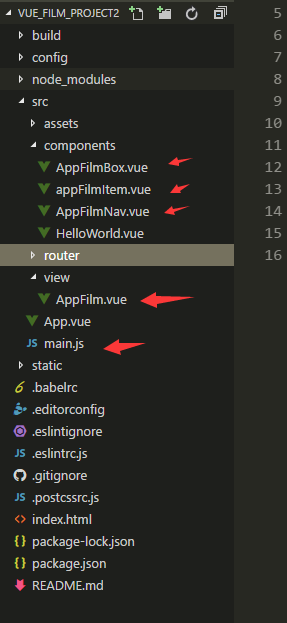
页面组件:AppFilm.vue
<template>

  <div class="app-film">

    <AppFilmNav></AppFilmNav>

    <AppFilmBox></AppFilmBox>

  </div>

</template>

<script>

import AppFilmNav from '@/components/AppFilmNav'

import AppFilmBox from '@/components/AppFilmBox'

export default {

  name: 'app-film',

  components:{AppFilmNav,AppFilmBox},

  data () {

    return {

    }

  },

  computed:{

 }

}

</script>

<!-- Add "scoped" attribute to limit CSS to this component only -->

<style scoped>

.app-film{

  height: 0.5rem;

}

</style>
AppFilmBox:
<template>

  <div class="app-film-box">

    <AppFilmItem  :film="film" v-for="(film,index) in films" :key="index"></AppFilmItem>   /// :film 绑定数据传递给子组件

    <!--{{ infor }}-->

   </div>

</template>

<script>

import axios from 'axios'

import AppFilmItem from './AppFilmItem'

export default {

  // props:['infor'],

  name: 'app-film-box',

  components:{AppFilmItem},

  data () {

    return {

      // films:[]

    }

  },
  // 必须通过computed属性使用state数据!否则state属性中的数据发生更改时不会反映在组件上!

  computed: {

    films(){

      return this.$store.state.film

    }

  },

  methods: {

    getfilms(){

      let that = this;

      this.$store.dispatch('Toggle',this.$store.state.posturl);

    }

  },

  created(){

    this.getfilms()

  }

}

</script>

<!-- Add "scoped" attribute to limit CSS to this component only -->

<style>

.app-film-box{

  padding:0 15px;

}

</style>
appFilmItem.vue
<template>

  <div class="app-film-item">

    <img  :src="film.poster" alt="">

    <div class="info">

        <h5>{{film.name}}</h5>

        <p class="for">{{film.intro}}</p>

        <p class="for1">{{film.cinemaCount}}家影院上映<i>{{film.watchCount}}人购票</i></p>

    </div>

    <div class="other">

        <div class="range">8.5</div>

        <i class="fa fa-angle-right"></i>

    </div>

  </div>

</template>

<script>

export default {

  name:'app-film-item',

  props:['film'], // 从父组件那里接受数据 film

}

</script>

<!-- Add "scoped" attribute to limit CSS to this component only -->

<style lang="scss">

body{

  background-color:#f9f9f9;

}

.app-film-item{

  // padding-left: 20px;

  // margin-top: -0.3rem;

  display: flex;

  align-items: center;

  padding-bottom: 28px;

  border-bottom: 1px solid #ccc;

  padding-top: 25px;

  img{

    width:0.6rem;

  }

  .info{

    padding-left: 15px;

    display: inline-block;

    width: 75%;

    h5{

      font-size: 16px;

      line-height: 32px;

      color: #000;

      overflow: hidden;

      text-overflow: ellipsis;

      white-space: nowrap;

    }

    .for{

      height: 24px;

      line-height: 24px;

      color: #8e8e8e;

      font-size: 14px;

      overflow: hidden;

      text-overflow: ellipsis;

      width: 100%;

      display: inline-block;

    }

    .for1{

      line-height: 24px;

      color: #8e8e8e;

      font-size: 12px;

      i{

        margin-left: 15px;

      }

    }

  }

}

.other{

  display: flex;

  justify-content: space-between;

  margin-right: 0.2rem;

  margin-bottom:0.5rem;

  .range{

    font-size: 16px;

    line-height: 32px;

    color: #fc7103;

  }

  i{

    padding-left: 5px;

    line-height: 29px;

    color: #c6c6c6;

  }

}

</style>
AppFilmNav.vue
<template>

  <div class="app-film-nav">

    <div  class="now_playing" @touchend.stop.prevent="toggle(0)" :class="{active:active==0}">

        正在热映

    </div>

    <div  class="coming_soon" @touchend.stop.prevent="toggle(1)" :class="{active:active==1}">

        即将上映

    </div>

  </div>

</template>

<script>

export default {

  name:'app-film-nav',

  data () {

    return {

      active:0

    }

  },

  methods: {

    toggle (i) {

      this.active = i;

      this.$store.state.posturl = this.$store.state.urls[i].url;

      this.$store.dispatch('Toggle',this.$store.state.posturl);

    }

  }

}

</script>

<!-- Add "scoped" attribute to limit CSS to this component only -->

<style lang="scss" scoped>

.app-film-nav{

  height: 47px;

  margin: 0.5rem 15px 5px 15px;

  border-bottom: solid #fe6e00 1px;

  // padding-left: 15px;

  // padding-right:15px;

  .now_playing{

    float: left;

    width: 50%;

    height: 100%;

    text-align: center;

    font-size: 16px;

    line-height: 46px;

    // color: #6a6a6a;

    cursor: pointer;

  }

  .coming_soon{

    float: left;

    width: 50%;

    height: 100%;

    text-align: center;

    font-size: 16px;

    line-height: 46px;

    color: #6a6a6a;

    cursor: pointer;

  }

  .active{

    color: #fe6e00;

    border-bottom: solid;

  }

}

</style>
vuex写在main.js里
// The Vue build version to load with the `import` command

// (runtime-only or standalone) has been set in webpack.base.conf with an alias.

import Vue from 'vue'

import App from './App'

import router from './router'

import Vuex from 'vuex'

import axios from 'axios'

Vue.use(Vuex)

Vue.config.productionTip = false

const store = new Vuex.Store({

  state:{

    urls:[

      {title:'正在热映',url:'/static/mock/now-playing.json'},

      {title:'即将上映',url:'/static/mock/coming-soon.json'}

    ],

    posturl:'/static/mock/now-playing.json',

    film:''

  },

  mutations:{

    SET_FILM: (state, film) => {

      state.film = film

    }

  },

  actions: {

    Toggle: ({commit},url) => {

      return new Promise((resolve, reject) => {

        axios.get(url).then((res) => {

          const data = res.data.data

          commit('SET_FILM', data)

          resolve()

        }).catch((err) => {

          reject(err)

        })

      })

    }

  }

})

/* eslint-disable no-new */

new Vue({

  el: '#app',

  store, // 根组件通过store选项将store实例注入所有地子组件

  created (){

    store.dispatch('Toggle',store.state.posturl);

  },

  router,

  components: { App },

  template: '<App/>'

})

// 上面的代码能够让子组件通过this.$store访问到store实例。
页面效果:
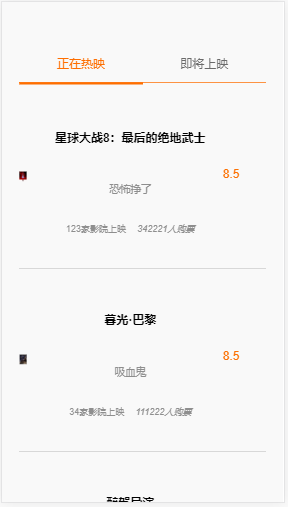
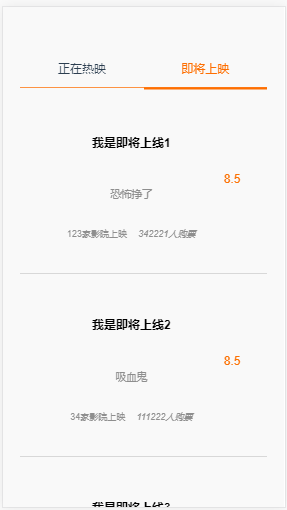
这里用Vuex来切换get请求的地址
使用Vuex心得的更多相关文章
- vue-cli中配置vuex流程和注意事项
本文目录 vue-cli下新建站 配置路由更改HelloWorld.vue组件到新建Home.vue组件 安装vuex 测试是否安装成功vuex一:vue-cli下新建站 a)新建文件夹vuexStu ...
- Vuex 实际使用中的一点心得 —— 一刷新就没了
问题 在开发中,有一些全局数据,比如用户数据,系统数据等.这些数据很多组件中都会使用,我们当然可以每次使用的时候都去请求,但是出于程序员的"洁癖"."抠"等等优 ...
- vuex的使用心得
今天的工作内容-----vuex的使用心得: 都知道,对于小型的项目来说不必使用vuex,但是对于需要把共享的变量全部存储在一个对象里面,然后把这个对象放在顶层组件中以供其他组件使用.其实vuex就是 ...
- vuex使用心得分享(填坑)
今天我们简单说一下vuex的使用,vuex是什么呢,相当于react的redux,如果项目使用数据过多的话,直接管理是非常不方便的,那么采用vuex,那些繁琐的问题就迎刃而解了,首先我们先看看官方对v ...
- Vuex学习心得
最近公司项目中使用Vuex做状态管理,就全面温习了一遍文档,然后在项目使用中遇到一些常见问题就一一总结下. 一.由来 我们知道Vue中数据是自顶向下单向流动的,但是以下两种情况单向数据流实现起来十分繁 ...
- 探索 vuex 2.0 以及使用 vuejs 2.0 + vuex 2.0 构建记事本应用
前言 首先说明这并不是一个教程贴,而记事本应用是网上早有的案例,对于学习 vuex 非常有帮助.我的目的是探索 vuex 2.0 ,然后使用 vue 2.0 + vuex 2.0 重写这个应用,其中最 ...
- vue学习心得
前言 使用vue框架有一段时间了,这里总结一下心得,主要为新人提供学习vue一些经验方法和项目中一些解决思路. 文中谨代表个人观点,如有错误,欢迎指正. 环境搭建 假设你已经通读vue官方文档(文档都 ...
- Vuex 2.0 深入简出
最近面试充斥了流行框架Vue的各种问题,其中Vuex的使用就相当有吸引力.下面我就将自己深入简出的心得记录如下: 1.在vue-init webpack project (创建vue项目) 2.src ...
- vuex到底是个啥
vuex总结 Vuex 是一个专为 Vue.js 应用程序开发的状态管理模式.它采用集中式存储管理应用的所有组件的状态,并以相应的规则保证状态以一种可预测的方式发生变化.Vuex 也集成到 Vue 的 ...
随机推荐
- ASP.NET MVC 学习笔记-7.自定义配置信息(后续)
自定义配置信息的高级应用 通过上篇博文对简单的自定义配置信息的学习,使得更加灵活的控制系统配置信息.实际项目中,这种配置的灵活度往往无法满足项目的灵活度和扩展性. 比如,一个配置信息有三部分组成,而每 ...
- 关于Maven项目build时出现No compiler is provided in this environment的处理
版权声明:本文为博主原创文章,未经博主允许不得转载. http://blog.csdn.net/lslk9898/article/details/73836745 近日有同事遇到在编译Maven项目时 ...
- Spring Boot从入门到精通之:一、Spring Boot简介及快速入门
Spring Boot Spring Boot 简介 Spring Boot是由Pivotal团队提供的全新框架,其设计目的是用来简化新Spring应用的初始搭建以及开发过程.该框架使用了特定的方式来 ...
- constructor C++ example
The constructor for this class could be defined, as usual, as: Rectangle::Rectangle (int x, int y) ...
- Laravel 系列入门教程(五)【最适合中国人的 Laravel 教程】
本文是本系列教程的完结篇,我们将一起给 Article 加入评论功能,让游客在前台页面可以查看.提交.回复评论,并完成后台评论管理功能,可以删除.编辑评论.Article 和评论将使用 Laravel ...
- Session过期,跳出iframe框架页显示会话过期页面
web开发中经常会有这种情况,在一个主页面中包含侧边导航菜单和iframe,点击菜单项,对应页面会在iframe中显示,整个页面不会刷新.但是如果设置了会话Session,在会话过期后再操作会自动re ...
- Django之django模型层一单表操作
一 ORM简介 MVC或者MVC框架中包括一个重要的部分,就是ORM,它实现了数据模型与数据库的解耦,即数据模型的设计不需要依赖于特定的数据库,通过简单的配置就可以轻松更换数据库,这极大的减轻了开发人 ...
- css中的颜色
我常用的是win10里面的自带的3D画图工具里面的颜色表 CSS 设置颜色的几种方式: 1.颜色名 2.rgb值 3十六进制表示 4. HSL color values CSS3 adds numer ...
- docker研究-1
Docker是一个开源的引擎,可以轻松的为任何应用创建一个轻量级的.可移植的.自给自足的容器.开发者在笔记本上编译测试通过的容器可以批量地在生产环境中部署,包括VMs(虚拟机).bare metal. ...
- 实现加载Tomcat服务器中的图片,并且有进度条提示进度
首先布局页面, <?xml version="1.0" encoding="utf-8"?> <LinearLayout xmlns:andr ...