
神经网络可视化《Grad-CAM:Visual Explanations from Deep Networks via Gradient-based Localization》
神经网络已经在很多场景下表现出了很好的识别能力,但是缺乏解释性一直所为人诟病。《Grad-CAM:Visual Explanations from Deep Networks via Gradient-based Localization》这篇论文基于梯度为其可解释性做了一些工作,它可以显著描述哪块图片区域对识别起了至关重要的作用,以热度图的方式可视化神经网络的注意力。本博客主要是基于pytorch的简单工程复现。原文见这里,本代码基于这里。
  1 import torch

  2 import torchvision

  3 from torchvision import models

  4 from torchvision import transforms

  5 from PIL import Image

  6 import pylab as plt

  7 import numpy as np

  8 import cv2

  9

 10

 11 class Extractor():

 12     """

 13     pytorch在设计时,中间层的梯度完成回传后就释放了

 14     这里用hook工具在保存中间参数的梯度

 15     """

 16     def __init__(self, model, target_layer):

 17         self.model = model

 18         self.target_layer = target_layer

 19         self.gradient = None

 20

 21     def save_gradient(self, grad):

 22         self.gradient=grad

 23

 24     def __call__(self, x):

 25         outputs = []

 26         self.gradients = []

 27         for name,module in self.model.features._modules.items():

 28             x = module(x)

 29             if name == self.target_layer:

 30                 x.register_hook(self.save_gradient)

 31                 target_activation=x

 32         x=x.view(1,-1)

 33         for name,module in self.model.classifier._modules.items():

 34             x = module(x)

 35         # 维度为(1,c, h, w) , (1,class_num)

 36         return target_activation, x

 37

 38

 39 def preprocess_image(path):

 40     means=[0.485, 0.456, 0.406]

 41     stds=[0.229, 0.224, 0.225]

 42     m_transform=transforms.Compose([transforms.ToTensor(),transforms.Normalize(means,stds)])

 43     img=Image.open(path)

 44     return m_transform(img).reshape(1,3,224,224)

 45

 46

 47 class GradCam():

 48     def __init__(self, model, target_layer_name, use_cuda):

 49         self.model = model

 50         self.model.eval()

 51         self.cuda = use_cuda

 52         if self.cuda:

 53             self.model = model.cuda()

 54

 55         self.extractor = Extractor(self.model, target_layer_name)

 56

 57

 58     def __call__(self, input, index = None):

 59         if self.cuda:

 60             target_activation, output = self.extractor(input.cuda())

 61         else:

 62             target_activation, output = self.extractor(input)

 63

 64         # index是想要查看的类别,未指定时选择网络做出的预测类

 65         if index == None:

 66             index = np.argmax(output.cpu().data.numpy())

 67

 68         # batch维为1(我们默认输入的是单张图)

 69         one_hot = np.zeros((1, output.size()[-1]), dtype = np.float32)

 70         one_hot[0][index] = 1.0

 71         one_hot = torch.tensor(one_hot)

 72         if self.cuda:

 73             one_hot = torch.sum(one_hot.cuda() * output)

 74         else:

 75             one_hot = torch.sum(one_hot * output)

 76

 77         self.model.zero_grad()

 78         one_hot.backward(retain_graph=True)

 79

 80         grads_val = self.extractor.gradient.cpu().data.numpy()

 81          # 维度为(c, h, w)

 82         target = target_activation.cpu().data.numpy()[0]

 83         # 维度为(c,)

 84         weights = np.mean(grads_val, axis = (2, 3))[0, :]

 85         # cam要与target一样大

 86         cam = np.zeros(target.shape[1 : ], dtype = np.float32)

 87         for i, w in enumerate(weights):

 88             cam += w * target[i, :, :]

 89

 90         # 每个位置选择c个通道上最大的最为输出

 91         cam = np.maximum(cam, 0)

 92         cam = cv2.resize(cam, (224, 224))

 93         cam = cam - np.min(cam)

 94         cam = cam / np.max(cam)

 95         return cam

 96

 97

 98 def show_cam_on_image(img, mask):

 99     heatmap = cv2.applyColorMap(np.uint8(255*mask), cv2.COLORMAP_JET)

100     heatmap = np.float32(heatmap) / 255

101     cam = heatmap + np.float32(img)

102     cam = cam / np.max(cam)

103     cv2.imwrite("cam2.jpg", np.uint8(255 * cam))

104

105

106 #target_layer 越靠近分类层效果越好

107 grad_cam = GradCam(model = models.vgg19(pretrained=True), target_layer_name = "35", use_cuda=True)

108 input = preprocess_image("both.png")

109 mask = grad_cam(input, None)

110 img = cv2.imread("both.png", 1)

111 #热度图是直接resize加到输入图上的

112 img = np.float32(cv2.resize(img, (224, 224))) / 255

113 show_cam_on_image(img, mask)
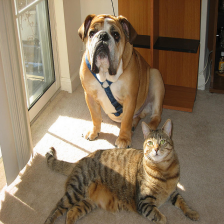
原图:
可视化图:

神经网络可视化《Grad-CAM:Visual Explanations from Deep Networks via Gradient-based Localization》的更多相关文章
- Grad-CAM:Visual Explanations from Deep Networks via Gradient-based Localization
目录 Grad-CAM:Visual Explanations from Deep Networks via Gradient-based Localization 1.Abstract 2.Intr ...
- 【论文简读】 Deep web data extraction based on visual
<Deep web data extraction based on visual information processing>作者 J Liu 上海海事大学 2017 AIHC会议登载 ...
- 深度卷积神经网络用于图像缩放Image Scaling using Deep Convolutional Neural Networks
This past summer I interned at Flipboard in Palo Alto, California. I worked on machine learning base ...
- 论文笔记:SiamRPN++: Evolution of Siamese Visual Tracking with Very Deep Networks
SiamRPN++: Evolution of Siamese Visual Tracking with Very Deep Networks 2019-04-02 12:44:36 Paper:ht ...
- 论文笔记之:Action-Decision Networks for Visual Tracking with Deep Reinforcement Learning
论文笔记之:Action-Decision Networks for Visual Tracking with Deep Reinforcement Learning 2017-06-06 21: ...
- Distill详述「可微图像参数化」:神经网络可视化和风格迁移利器!
近日,期刊平台 Distill 发布了谷歌研究人员的一篇文章,介绍一个适用于神经网络可视化和风格迁移的强大工具:可微图像参数化.这篇文章从多个方面介绍了该工具. 图像分类神经网络拥有卓越的图像生成能力 ...
- WPF中的可视化对象(Visual)
原文:WPF中的可视化对象(Visual) 这是MSDN对Visual的解释:Visual class:Provides rendering support in WPF, which include ...
- TensorSpace:超酷炫3D神经网络可视化框架
TensorSpace:超酷炫3D神经网络可视化框架 TensorSpace - 一款 3D 模型可视化框架,支持多种模型,帮助你可视化层间输出,更直观地展示模型的输入输出,帮助理解模型结构和输出方法 ...
- Deep Learning 8_深度学习UFLDL教程:Stacked Autocoders and Implement deep networks for digit classification_Exercise(斯坦福大学深度学习教程)
前言 1.理论知识:UFLDL教程.Deep learning:十六(deep networks) 2.实验环境:win7, matlab2015b,16G内存,2T硬盘 3.实验内容:Exercis ...
随机推荐
- kubeadm 搭建 K8s
kubeadm 搭建 K8s 本篇主要记录一下 使用 kubeadm 搭建 k8s 详细过程 ,环境使用 VirtualBox 构建的3台虚拟机 1.环境准备 操作系统:Centos7 (CentOS ...
- MySQL 数据库备份脚本
MySQL 数据库备份脚本 #!/bin/bash # 数据库连接信息 DB_HOST="127.0.0.1" DB_PORT="3306" DB_USER=& ...
- 5个容易忽视的PostgreSQL查询性能瓶颈
PostgreSQL 查询计划器充满了惊喜,因此编写高性能查询的常识性方法有时会产生误导.在这篇博文中,我将描述借助 EXPLAIN ANALYZE 和 Postgres 元数据分析优化看似显而易见的 ...
- 超越iTerm! 号称下一代终端神器,功能贼强大!
程序员的一生,用的最多的两个工具,一个是代码编辑器(Code Editor),另外一个就是命令行终端工具(Terminal).这两个工具对于提高开发效率至关重要. 代码编辑器在过去的 40 年里不断进 ...
- 杭电2091空心三角形Java(AC)
题目:http://acm.hdu.edu.cn/showproblem.php?pid=2091 把三角形写入二维数组里,然后输出出来 注意事项: 1.三角形后面没有空格(每一层的后面) 2.三角形 ...
- Redis6通信协议升级至RESP3,一口气看完13种新数据类型
原创:微信公众号 码农参上,欢迎分享,转载请保留出处. 在前面的文章 Redis:我是如何与客户端进行通信的 中,我们介绍过RESP V2版本协议的规范,RESP的全程是Redis Serializa ...
- 分享一款高逼格的Linux磁盘信息查看工具
关注「开源Linux」,选择"设为星标" 回复「学习」,有我为您特别筛选的学习资料~ 可以使用df命令来显示在Linux.macOS和类Unix系统中挂载的文件系统上有多少可用磁盘 ...
- KMP算法学习以及小结(好马不吃回头草系列)
首先请允许我对KMP算法的三位创始人Knuth,Morris,Pratt致敬,这三位优秀的算法科学家发明的这种匹配模式可以大大避免重复遍历的情况,从而使得字符串的匹配的速度更快,效率更高. 首先引入对 ...
- JS 异步与 Promise
JS 异步与 Promise 本文写于 2020 年 6 月 8 日 1. 同步与异步与回调函数 Promise 现在是前端面试必考题呀,但是先不急着看 Promise,我们首先来看看什么是异步. - ...
- 【算法】选择排序(Selection Sort)(二)
选择排序(Selection Sort) 选择排序(Selection-sort)是一种简单直观的排序算法.它的工作原理:首先在未排序序列中找到最小(大)元素,存放到排序序列的起始位置,然后,再从剩余 ...