
Golang爬虫:使用正则表达式解析HTML
之前所写的爬虫都是基于Python,而用Go语言实现的爬虫具有更高的性能。
第一个爬虫
使用http库,发起http请求
package main

import (

	"fmt"

	"io/ioutil"

	"net/http"

)

func fetch(url string) string {

	client := &http.Client{} // 创建http客户端对象

	// 创建一个请求,使用get方法

	req, _ := http.NewRequest("GET", url, nil)

	// 设置请求头内容

	req.Header.Set("User-Agent", "Mozilla/5.0 (X11; Linux x86_64)")

	resp, err := client.Do(req) // 发起请求

	if err != nil {

		fmt.Println(err)

		return ""

	}

	defer resp.Body.Close()

	body, err := ioutil.ReadAll(resp.Body)

	if err != nil {

		fmt.Println(err)

		return ""

	}

	return string(body)

}

func main() {

	url := "https://www.cnblogs.com/N3ptune"

	res := fetch(url)

	fmt.Println(res)

}
运行这段代码,可以看到终端打印除了网页代码,这是服务端回应的内容
对上述几个函数作一个特别说明
http.NewRequest
$ go doc http.NewRequest

package http // import "net/http"

func NewRequest(method, url string, body io.Reader) (*Request, error)

    NewRequest wraps NewRequestWithContext using context.Background.
该函数是构建请求的第一步
req.Header即Request Header,所谓请求头。req.Header.Set是设置请求头,可以用来应对一些反爬虫机制,如上是设置了User-Agent。
User-Agent 即用户代理,简称“UA”,它是一个特殊字符串头。网站服务器通过识别 “UA”来确定用户所使用的操作系统版本、CPU 类型、浏览器版本等信息。
http.Do
用于发送HTTP请求,同时会返回响应内容
$ go doc http.Do

package http // import "net/http"

func (c *Client) Do(req *Request) (*Response, error)

    Do sends an HTTP request and returns an HTTP response, following policy

    (such as redirects, cookies, auth) as configured on the client.
Body是响应的正文,不用时要关闭
ioutil.ReadAll
上述代码中用于读取响应中的正文内容,返回一个字节切片
$ go doc io.ReadAll

package io // import "io"

func ReadAll(r Reader) ([]byte, error)

    ReadAll reads from r until an error or EOF and returns the data it read. A

    successful call returns err == nil, not err == EOF. Because ReadAll is

    defined to read from src until EOF, it does not treat an EOF from Read as an

    error to be reported.
因为是字节类型的切片,所以要转成string
如下是main函数
func main() {

	url := "https://www.cnblogs.com/N3ptune"

	res := fetch(url)

	fmt.Println(res)

}
解析页面
这里先使用正则表达式 目标URL:GORM 指南
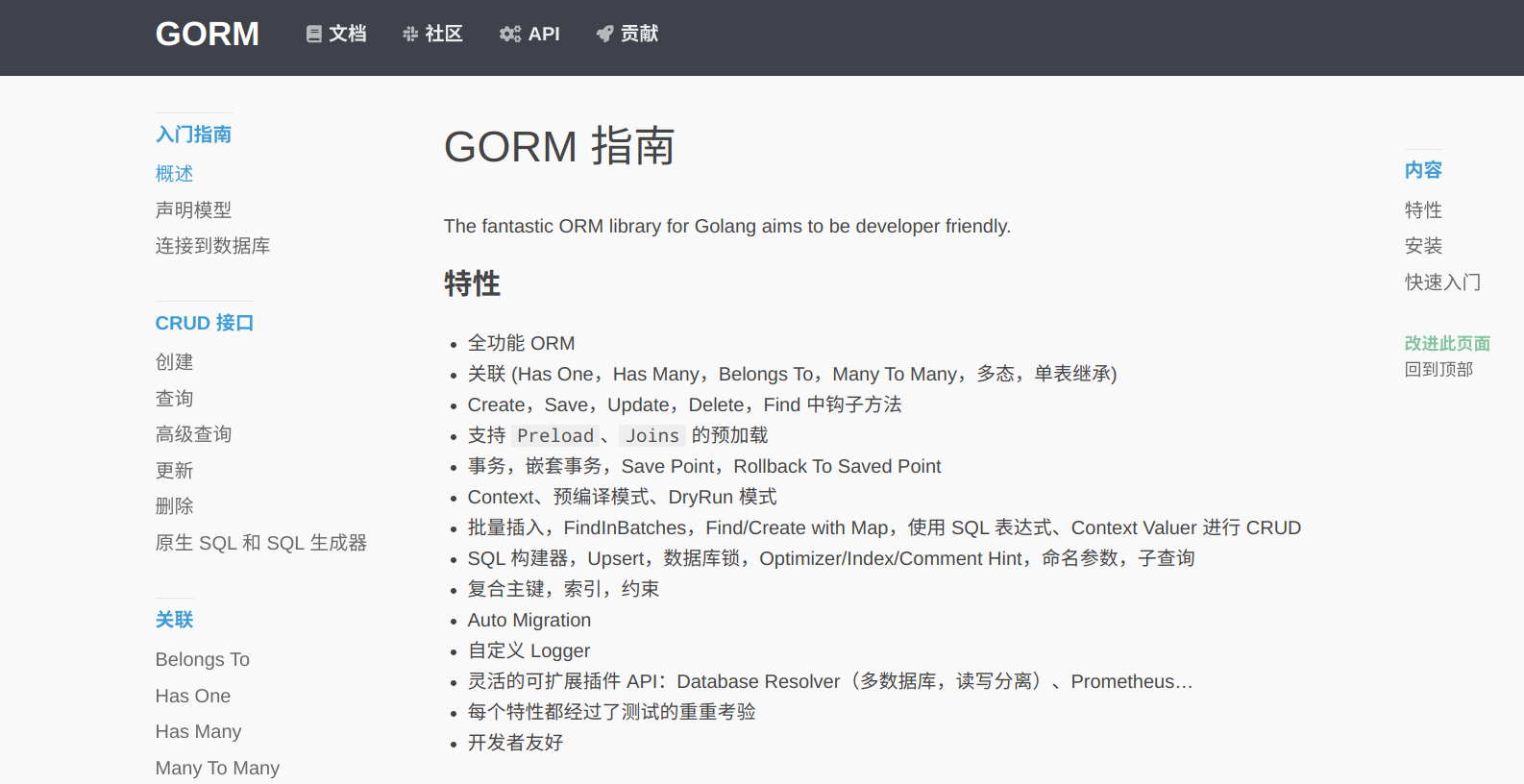
目标是爬取到左侧每个条目的链接
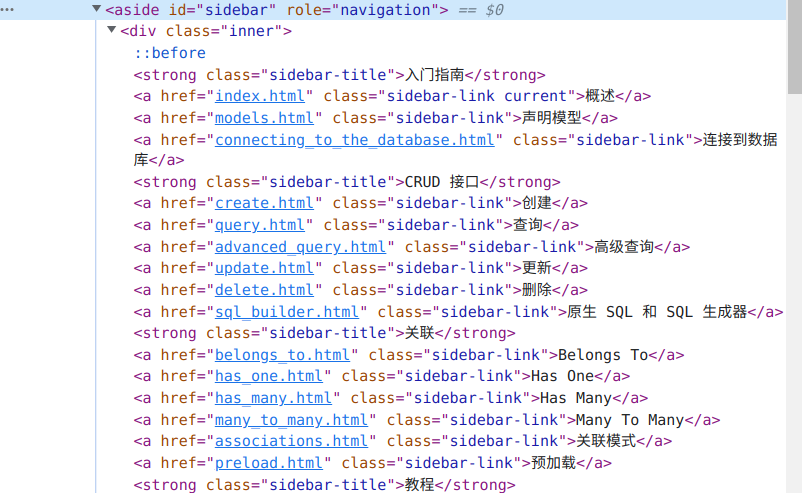
查看网页源码就可以找到链接,显然这些链接都是用固定格式的,可以轻易使用正则表达式匹配。
func parse(html string) {

	// 替换换行

	html = strings.Replace(html, "\n", "", -1)

	// 边栏内容块 正则

	reSidebar := regexp.MustCompile(`<aside id="sidebar" role="navigation">(.*?)</aside>`)

	sidebar := reSidebar.FindString(html)

    // 链接 正则

	reLink := regexp.MustCompile(`href="(.*?)"`)

	// 找到所有链接

	links := reLink.FindAllString(sidebar, -1)

	baseURL := "https://gorm.io/zh_CN/docs/"

	// 遍历链接

	for _, v := range links {

		s := v[6 : len(v)-1]

		url := baseURL + s

		fmt.Printf("URL: %v\n", url)

	}

}
上面这个函数用于解析HTML文档,构造正则表达式进行匹配。
应用正则表达式要使用regexp模块
MustCompile
$ go doc regexp.MustCompile

package regexp // import "regexp"

func MustCompile(str string) *Regexp

    MustCompile is like Compile but panics if the expression cannot be parsed.

    It simplifies safe initialization of global variables holding compiled

    regular expressions.
该函数的作用是解析正则表达式,因此它的参数是一个正则表达式字符串
FindString
$ go doc regexp.FindString

package regexp // import "regexp"

func (re *Regexp) FindString(s string) string

    FindString returns a string holding the text of the leftmost match in s of

    the regular expression. If there is no match, the return value is an empty

    string, but it will also be empty if the regular expression successfully

    matches an empty string. Use FindStringIndex or FindStringSubmatch if it is

    necessary to distinguish these cases.
使用FindString函数可以按照正则规则匹配字符串,只返回一个字符串,该字符串包含最左边的匹配文本。
FindAllString 则返回多个字符串
$ go doc regexp.FindAllString

package regexp // import "regexp"

func (re *Regexp) FindAllString(s string, n int) []string

    FindAllString is the 'All' version of FindString; it returns a slice of all

    successive matches of the expression, as defined by the 'All' description in

    the package comment. A return value of nil indicates no match.
首先使用正则表达式匹配边栏的内容块,找到内容块所在的标签,然后将其作为匹配规则,传入FindString函数。然后再构造另一个正则表达式,传入FindAllString函数来匹配链接,返回字符串切片。
对其进行遍历,即可得到链接
main函数
func main() {

	url := "https://gorm.io/zh_CN/docs/index.html"

	res := fetch(url)

	parse(res)

}
运行结果
URL: https://gorm.io/zh_CN/docs/index.html

URL: https://gorm.io/zh_CN/docs/models.html

URL: https://gorm.io/zh_CN/docs/connecting_to_the_database.html

URL: https://gorm.io/zh_CN/docs/create.html

URL: https://gorm.io/zh_CN/docs/query.html

URL: https://gorm.io/zh_CN/docs/advanced_query.html

URL: https://gorm.io/zh_CN/docs/update.html

URL: https://gorm.io/zh_CN/docs/delete.html

URL: https://gorm.io/zh_CN/docs/sql_builder.html

URL: https://gorm.io/zh_CN/docs/belongs_to.html

URL: https://gorm.io/zh_CN/docs/has_one.html

URL: https://gorm.io/zh_CN/docs/has_many.html

URL: https://gorm.io/zh_CN/docs/many_to_many.html

URL: https://gorm.io/zh_CN/docs/associations.html

URL: https://gorm.io/zh_CN/docs/preload.html

URL: https://gorm.io/zh_CN/docs/context.html

URL: https://gorm.io/zh_CN/docs/error_handling.html

URL: https://gorm.io/zh_CN/docs/method_chaining.html

URL: https://gorm.io/zh_CN/docs/session.html

URL: https://gorm.io/zh_CN/docs/hooks.html

URL: https://gorm.io/zh_CN/docs/transactions.html

URL: https://gorm.io/zh_CN/docs/migration.html

URL: https://gorm.io/zh_CN/docs/logger.html

URL: https://gorm.io/zh_CN/docs/generic_interface.html

URL: https://gorm.io/zh_CN/docs/performance.html

URL: https://gorm.io/zh_CN/docs/data_types.html

URL: https://gorm.io/zh_CN/docs/scopes.html

URL: https://gorm.io/zh_CN/docs/conventions.html

URL: https://gorm.io/zh_CN/docs/settings.html

URL: https://gorm.io/zh_CN/docs/dbresolver.html

URL: https://gorm.io/zh_CN/docs/sharding.html

URL: https://gorm.io/zh_CN/docs/serializer.html

URL: https://gorm.io/zh_CN/docs/prometheus.html

URL: https://gorm.io/zh_CN/docs/hints.html

URL: https://gorm.io/zh_CN/docs/indexes.html

URL: https://gorm.io/zh_CN/docs/constraints.html

URL: https://gorm.io/zh_CN/docs/composite_primary_key.html

URL: https://gorm.io/zh_CN/docs/security.html

URL: https://gorm.io/zh_CN/docs/gorm_config.html

URL: https://gorm.io/zh_CN/docs/write_plugins.html

URL: https://gorm.io/zh_CN/docs/write_driver.html

URL: https://gorm.io/zh_CN/docs/changelog.html

URL: https://gorm.io/zh_CN/docs//community.html

URL: https://gorm.io/zh_CN/docs//contribute.html

URL: https://gorm.io/zh_CN/docs//contribute.html#Translate-this-site
进一步解析
下面对每个URL对应的页面再进行解析,获取到每个页面的标题
func getTitle(body string) {

	// 替换换行

	body = strings.Replace(body, "\n", "", -1)

	// 页面内容

	reContent := regexp.MustCompile(`<div class="article">(.*?)</div>`)

	// 找到页面内容

	content := reContent.FindString(body)

	// 标题

	reTitle := regexp.MustCompile(`<h1 class="article-title" itemprop="name">(.*?)</h1>`)

	// 找到页面内容

	title := reTitle.FindString(content)

	if len(title) < 47 {

		return

	}

	title = title[42 : len(title)-5]

	fmt.Printf("title: %v\n", title)

}
访问目标URL,得到HTML文本,使用正则表达式,只要构造出标签的匹配规则即可。
用一个专门的goroutine去做这件事
运行结果
title: GORM 指南

title: 模型定义

title: 连接到数据库

title: 创建

title: 查询

title: 高级查询

title: 更新

title: 删除

title: SQL 构建器

title: Belongs To

title: Has One

title: Has Many

title: Many To Many

title: 实体关联

title: 预加载

title: Context

title: 处理错误

title: 链式方法

title: 会话

title: Hook

title: 事务

title: 迁移

title: Logger

title: 常规数据库接口 sql.DB

title: 性能

title: 自定义数据类型

title: Scopes

title: 约定

title: 设置

title: DBResolver

title: Sharding

title: Serializer

title: Prometheus

title: Hints

title: 数据库索引

title: 约束
目前的完整代码
package main

import (

	"fmt"

	"io/ioutil"

	"net/http"

	"regexp"

	"strings"

)

func fetch(url string) string {

	client := &http.Client{} // 创建http客户端

	// 创建一个请求

	req, _ := http.NewRequest("GET", url, nil)

	// 设置请求头内容

	req.Header.Set("User-Agent", "Mozilla/5.0 (X11; Linux x86_64)")

	resp, err := client.Do(req)

	if err != nil {

		fmt.Println(err)

		return ""

	}

	defer resp.Body.Close()

	body, err := ioutil.ReadAll(resp.Body)

	if err != nil {

		fmt.Println(err)

		return ""

	}

	return string(body)

}

func parse(html string) {

	// 替换空格

	html = strings.Replace(html, "\n", "", -1)

	// 边栏内容块正侧

	reSidebar := regexp.MustCompile(`<aside id="sidebar" role="navigation">(.*?)</aside>`)

	// 找到所有链接

	sidebar := reSidebar.FindString(html)

	// 链接正则

	reLink := regexp.MustCompile(`href="(.*?)"`)

	// 找到所有链接

	links := reLink.FindAllString(sidebar, -1)

	baseURL := "https://gorm.io/zh_CN/docs/"

	// 遍历链接

	for _, v := range links {

		s := v[6 : len(v)-1]

		url := baseURL + s

		body := fetch(url)

		go getTitle(body)

	}

}

func getTitle(body string) {

	// 替换掉空格

	body = strings.Replace(body, "\n", "", -1)

	// 页面内容

	reContent := regexp.MustCompile(`<div class="article">(.*?)</div>`)

	// 找到页面内容

	content := reContent.FindString(body)

	// 标题

	reTitle := regexp.MustCompile(`<h1 class="article-title" itemprop="name">(.*?)</h1>`)

	// 找到页面内容

	title := reTitle.FindString(content)

	if len(title) < 47 {

		return

	}

	title = title[42 : len(title)-5]

	fmt.Printf("title: %v\n", title)

}

func main() {

	url := "https://gorm.io/zh_CN/docs/index.html"

	res := fetch(url)

	parse(res)

}
后续还会考虑将数据保存到本地
Golang爬虫:使用正则表达式解析HTML的更多相关文章
- Python爬虫 | re正则表达式解析html页面
正则表达式(Regular Expression)是一种文本模式,包括普通字符(例如,a 到 z 之间的字母)和特殊字符(称为"元字符"). 正则表达式通常被用来匹配.检索.替换和 ...
- 基础知识 - Golang 中的正则表达式
------------------------------------------------------------ Golang中的正则表达式 ------------------------- ...
- python 3.x 爬虫基础---正则表达式
python 3.x 爬虫基础 python 3.x 爬虫基础---http headers详解 python 3.x 爬虫基础---Urllib详解 python 3.x 爬虫基础---Requer ...
- Golang - 爬虫案例实践
目录 Golang - 爬虫案例实践 1. 爬虫步骤 2. 正则表达式 3. 并发爬取美图 Golang - 爬虫案例实践 1. 爬虫步骤 明确目标(确定在哪个网址搜索) 爬(爬下数据) 取(去掉没用 ...
- python爬虫---爬虫的数据解析的流程和解析数据的几种方式
python爬虫---爬虫的数据解析的流程和解析数据的几种方式 一丶爬虫数据解析 概念:将一整张页面中的局部数据进行提取/解析 作用:用来实现聚焦爬虫的吧 实现方式: 正则 (针对字符串) bs4 x ...
- java对身份证验证及正则表达式解析
原文地址:http://www.cnblogs.com/zhongshengzhen/ java对身份证验证及正则表达式解析 package service; import java.text.Par ...
- 用正则表达式解析XML
import java.util.regex.*; import java.util.*; /** * * <p>Title: Document</p> * * <p&g ...
- Golang爬虫示例包系列教程(一):pedaily.com投资界爬虫
Golang爬虫示例包 文件结构 自己用Golang原生包封装了一个爬虫库,源码见go get -u -v github.com/hunterhug/go_tool/spider ---- data ...
- golang reflect包使用解析
golang reflect包使用解析 参考 Go反射编码 2个重要的类型 Type Value 其中Type是interface类型,Value是struct类型,意识到这一点很重要 Type和Va ...
- 笔记-爬虫-js代码解析
笔记-爬虫-js代码解析 1. js代码解析 1.1. 前言 在爬取网站时经常会有js生成关键信息,而且js代码是混淆过的. 以瓜子二手车为例,直接请求https://www.guaz ...
随机推荐
- 导入maven包时,非常慢的解决方案
在导入maven包时,很多时候导的很慢,导致找不到包,需要将maven包下载地址替换为aliyun的地址,以下为解决方案 找到使用的maven地址,在文件内添加以下节点然后重启ide即可 <mi ...
- 狂神学习笔记domo6
1.新特性,1000000000可以写成10_0000_0000便于阅读 2.强制类型转换 先强制类型转换再赋值才能正确的结果 public class domo06 { public static ...
- 8、HTTP Cookie管理器
如果有需要加的cookie 就选择添加 如果没有特殊的 就默认就好了 第一次访问是没有cookie的 会话 session Cookie 是明文的 Session id 是保存在cookie里 ...
- ctype.h系列的字符函数
C有一系列专门处理字符的函数,ctype.h头文件包含了这些函数的原型.这些函数接受一个字符作为参数,如果该字符属于某特殊的类别,就返回一个非零值(真):否则返回0(假).这个头文件在判断特定字符类型 ...
- 通过yum命令只下载rpm包不安装
方法一:yumdownloader# 如果只想通过 yum 下载软件的软件包,但是不需要进行安装的话,可以使用 yumdownloader 命令: yumdownloader 命令在软件包 yum-u ...
- autossh 使用
Table of Contents 1. centos7下配置为服务 2. 命令式使用 2.1. 映射远程主机防火墙之后的端口到本机 2.2. 映射本机端口到远程主机 centos7下配置为服务 编辑 ...
- UGUI六大基础组件——Graphic Raycaster
一.组件作用 图形摄像投射器是用于检测UI输入事件的射线发射器.通过射线检测玩家和用户的交互,判断是否点击到了UI元素. 注意:不是通过碰撞器来检测的,而是通过图形来检测的. 二.参数解释 ***** ...
- 使用yarn启用项目,报错无法加载文件 C:\Users\Administrator\AppData\Roaming\npm\yarn.ps1,因为在此系 统上禁止运行脚本。有关详细信息,请参阅 https:/go.microsoft.com/fwlink/?LinkID=135170 中的 about_Execution_Policies。
这是由于新版win10 安装的时候会出现: 解决 搜索powershell,右键以管理员身份运行 2.打开之后,执行命令set-ExecutionPolicy RemoteSigned更改 Power ...
- AIR32F103(十) 在无系统环境和FreeRTOS环境集成LVGL
目录 AIR32F103(一) 合宙AIR32F103CBT6开发板上手报告 AIR32F103(二) Linux环境和LibOpenCM3项目模板 AIR32F103(三) Linux环境基于标准外 ...
- Bootstarp5笔记
我这次来更新Bootstarp5的相关知识啦! 一.安装教程 1.在官网下载相应版本 官网地址:getbootstrap.com 我下载的是Bootstarp5版本 2.点击下载之后,会得到一个压缩文 ...