
KingbaseES R6 集群在线删除standby节点
案例环境:
操作系统:
[root@node1 ~]# cat /etc/centos-release
CentOS Linux release 7.2.1511 (Core)
数据库:
test=# select version();
version
------------------------------------------------------------------------------
KingbaseES V008R006C003B0010 on x86_64-pc-linux-gnu, compiled by gcc (GCC) 4.1.2 20080704 (Red Hat 4.1.2-46), 64-bit
(1 row)
集群架构:
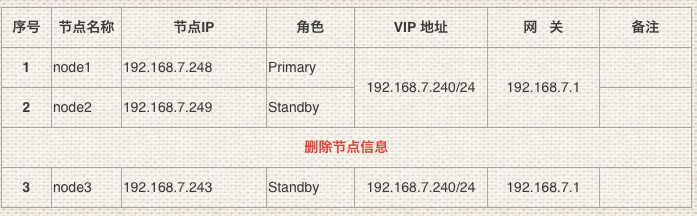
一、查看当前集群节点状态信息
1、集群节点信息
[kingbase@node3 bin]$ ./repmgr cluster show
 ID | Name    | Role    | Status    | Upstream | Location | Priority | Timeline | Connection string
----+---------+---------+-----------+----------+----------+----------+----
 1  | node248 | primary | * running |          | default  | 100      | 5        | host=192.168.7.248 user=esrep dbname=esrep port=54321 connect_timeout=10 keepalives=1 keepalives_idle=10 keepalives_interval=1 keepalives_count=3
 2  | node249 | standby |   running | node248  | default  | 100      | 5        | host=192.168.7.249 user=esrep dbname=esrep port=54321 connect_timeout=10 keepalives=1 keepalives_idle=10 keepalives_interval=1 keepalives_count=3
 3  | node243 | standby |   running | node248  | default  | 100      | 5        | host=192.168.7.243 user=esrep dbname=esrep port=54321 connect_timeout=10 keepalives=1 keepalives_idle=10 keepalives_interval=1 keepalives_count=3
2、主备流复制信息
test=# select * from sys_stat_replication;
 pid  | usesysid | usename | application_name |  client_addr  | client_hostname | client_port |         backend_start         | backend_xmin |   state   |  sent_lsn  | write_lsn  | flush_lsn  | replay_lsn | write_lag | flush_lag | replay_lag | sync_priority | sync_state |          reply_time
------+----------+---------+------------------+---------------+-----------
 3403 |    16384 | esrep   | node249          | 192.168.7.249 |                 |       14247 | 2021-03-01 12:03:37.651419+08 |              | streaming | 1/F9005BA0 | 1/F9005BA0 | 1/F9005BA0 | 1/F9005BA0 |           |           |            |             1 | quorum     | 2021-03-01 12:31:56.432910+08
 3419 |    16384 | esrep   | node243          | 192.168.7.243 |                 |       34939 | 2021-03-01 12:03:43.876552+08 |              | streaming | 1/F9005BA0 | 1/F9005BA0 | 1/F9005BA0 | 1/F9005BA0 |           |           |            |             1 | quorum     | 2021-03-01 12:30:42.663663+08
(2 rows)
3、复制槽信息
test=# select * from sys_replication_slots;
   slot_name   | plugin | slot_type | datoid | database | temporary | active | active_pid | xmin | catalog_xmin | restart_lsn | confirmed_flush_lsn
---------------+--------+-----------+--------+----------+-----------+--------+------------+------+--------------+-------------+---------------------
 repmgr_slot_2 |        | physical  |        |          | f         | t      |       3403 |      |              | 1/F9005BA0  |
 repmgr_slot_3 |        | physical  |        |          | f         | t      |       3419 |      |              | 1/F9005BA0  |
(2 rows)
二、将standby节点unregister
1、unregister standby node
在要删除的Standby 节点执行:
[kingbase@node3 bin]$ ./repmgr standby unregister;
INFO: connecting to local standby
INFO: connecting to primary database
NOTICE: unregistering node 3
INFO: try to drop slot "repmgr_slot_3" of node 3 on primary node
WARNING: replication slot "repmgr_slot_3" is still active on node 3
INFO: standby unregistration complete
2、查看集群节点信息
[kingbase@node3 bin]$ ./repmgr cluster show
 ID | Name    | Role    | Status    | Upstream | Location | Priority | Timeline | Connection string
----+---------+---------+-----------+----------+----------+----------+----
 1  | node248 | primary | * running |          | default  | 100      | 5        | host=192.168.7.248 user=esrep dbname=esrep port=54321 connect_timeout=10 keepalives=1 keepalives_idle=10 keepalives_interval=1 keepalives_count=3
 2  | node249 | standby |   running | node248  | default  | 100      | 5        | host=192.168.7.249 user=esrep dbname=esrep port=54321 connect_timeout=10 keepalives=1 keepalives_idle=10 keepalives_interval=1 keepalives_count=3
=== 从以上获知,集群节点信息已经没有unregister的节点信息===
三、停止本地集群服务删除复制槽
1、停止本地集群服务
[kingbase@node3 bin]$ ./sys_monitor.sh stoplocal
Service process "node_export" was killed at process 4928
Service process "postgres_ex" was killed at process 4929
2021-03-01 12:33:52 begin to stop repmgrd on "[localhost]".
2021-03-01 12:33:54 repmgrd on "[localhost]" stop success.
2021-03-01 12:33:54 begin to stop DB on "[localhost]".
waiting for server to shut down.... done
server stopped
2021-03-01 12:33:55 DB on "[localhost]" stop success.
2、关闭cron计划任务:
[kingbase@node2 bin]$ cat /etc/cron.d/KINGBASECRON

#*/1 * * * * kingbase . /etc/profile;/home/kingbase/cluster/R6HA/KHA/kingbase/bin/kbha -A daemon -f /home/kingbase/cluster/R6HA/KHA/kingbase/bin/../etc/repmgr.conf >> /home/kingbase/cluster/R6HA/KHA/kingbase/bin/../kbha.log 2>&1

#*/1 * * * * kingbase  /home/kingbase/cluster/kha/db/bin/network_rewind.sh

3、停止hamgr进程:
[kingbase@node2 bin]$ ps -ef |grep repmgr

kingbase  7536     1  0 12:20 ?        00:01:12 /home/kingbase/cluster/R6HA/KHA/kingbase/bin/repmgrd -d -v -f /home/kingbase/cluster/R6HA/KHA/kingbase/bin/../etc/repmgr.conf

kingbase  7955     1  0 12:21 ?        00:00:01 /home/kingbase/cluster/R6HA/KHA/kingbase/bin/kbha -A daemon -f /home/kingbase/cluster/R6HA/KHA/kingbase/bin/../etc/repmgr.conf

[kingbase@node2 bin]$ kill -2 7536 7955
4、停止export进程:
[kingbase@node2 bin]$ ps -ef |grep kingbase

kingbase  8190     1  0 12:21 ?        00:00:00 /home/kingbase/cluster/R6HA/KHA/kingbase/bin/../share/node_exporter

kingbase  8191     1  0 12:21 ?        00:00:00 /home/kingbase/cluster/R6HA/KHA/kingbase/bin/../share/postgres_exporter

......

[kingbase@node2 bin]$ kill -9 8190 8191
5、查看复制槽信息
test=# select * from sys_replication_slots;

   slot_name   | plugin | slot_type | datoid | database | temporary | active | active_pid | xmin | catalog_xmin | restart_lsn | confirmed_flush_lsn

---------------+--------+-----------+--------+----------+-----------+--------+------------+------+--------------+-------------+---------------------

 repmgr_slot_2 |        | physical  |        |          | f         | t      |       3403 |      |              | 1/F9007590  |

 repmgr_slot_3 |        | physical  |        |          | f         | f      |            |      |              | 1/F9007590  |

(2 rows)
6、删除复制槽
test=# select sys_drop_replication_slot('repmgr_slot_3');

 sys_drop_replication_slot

---------------------------

(1 row)
test=# select * from sys_replication_slots;

   slot_name   | plugin | slot_type | datoid | database | temporary | active | active_pid | xmin | catalog_xmin | restart_lsn | confirmed_flush_lsn

---------------+--------+-----------+--------+----------+-----------+--------+------------+------+--------------+-------------+---------------------

 repmgr_slot_2 |        | physical  |        |          | f         | t      |       3403 |      |              | 1/F9007590  |

(1 row)
7、查看流复制信息
test=# select * from sys_stat_replication;

 pid  | usesysid | usename | application_name |  client_addr  | client_hostname | client_port |         backend_start         | backend_xmin |   state   |  sent_lsn  | write_lsn  | flush_lsn  | replay_lsn | write_lag | flush_lag | replay_lag | sync_priority | sync_state |          reply_time

------+----------+---------+------------------+---------------+-----------------+-------------+-------------------------------+--------------+------

 3403 |    16384 | esrep   | node249          | 192.168.7.249 |                 |       14247 | 2021-03-01 12:03:37.651419+08 |              | streaming | 1/F9007590 | 1/F9007590 | 1/F9007590 | 1/F9007590 |           |           |            |             1 | quorum     | 2021-03-01 12:35:38.819940+08

(1 row)
四、重新启动集群服务测试
[kingbase@node1 bin]$ ./sys_monitor.sh restart

2021-03-01 12:37:43 Ready to stop all DB ...

Service process "node_export" was killed at process 4546

Service process "postgres_ex" was killed at process 4547

Service process "node_export" was killed at process 4242

Service process "postgres_ex" was killed at process 4243

2021-03-01 12:37:49 begin to stop repmgrd on "[192.168.7.248]".

2021-03-01 12:37:50 repmgrd on "[192.168.7.248]" stop success.

2021-03-01 12:37:50 begin to stop repmgrd on "[192.168.7.249]".

2021-03-01 12:37:51 repmgrd on "[192.168.7.249]" stop success.

2021-03-01 12:37:51 begin to stop DB on "[192.168.7.249]".

waiting for server to shut down.... done

server stopped

2021-03-01 12:37:52 DB on "[192.168.7.249]" stop success.

2021-03-01 12:37:52 begin to stop DB on "[192.168.7.248]".

waiting for server to shut down..... done

server stopped

2021-03-01 12:37:53 DB on "[192.168.7.248]" stop success.

2021-03-01 12:37:53 Done.

2021-03-01 12:37:53 Ready to start all DB ...

2021-03-01 12:37:53 begin to start DB on "[192.168.7.248]".

waiting for server to start.... done

server started

2021-03-01 12:37:55 execute to start DB on "[192.168.7.248]" success, connect to check it.

2021-03-01 12:37:56 DB on "[192.168.7.248]" start success.

2021-03-01 12:37:56 Try to ping trusted_servers on host 192.168.7.248 ...

2021-03-01 12:37:59 Try to ping trusted_servers on host 192.168.7.249 ...

2021-03-01 12:38:01 begin to start DB on "[192.168.7.249]".

waiting for server to start.... done

server started

2021-03-01 12:38:03 execute to start DB on "[192.168.7.249]" success, connect to check it.

2021-03-01 12:38:04 DB on "[192.168.7.249]" start success.

 ID | Name    | Role    | Status    | Upstream | Location | Priority | Timeline | Connection string

----+---------+---------+-----------+----------+----------+----------+----------+---------------------------------------------------------------------------------------------------------------------------------------------------

 1  | node248 | primary | * running |          | default  | 100      | 5        | host=192.168.7.248 user=esrep dbname=esrep port=54321 connect_timeout=10 keepalives=1 keepalives_idle=10 keepalives_interval=1 keepalives_count=3

 2  | node249 | standby |   running | node248  | default  | 100      | 5        | host=192.168.7.249 user=esrep dbname=esrep port=54321 connect_timeout=10 keepalives=1 keepalives_idle=10 keepalives_interval=1 keepalives_count=3

2021-03-01 12:38:04 The primary DB is started.

2021-03-01 12:38:08 Success to load virtual ip [192.168.7.240/24] on primary host [192.168.7.248].

2021-03-01 12:38:08 Try to ping vip on host 192.168.7.248 ...

2021-03-01 12:38:11 Try to ping vip on host 192.168.7.249 ...

2021-03-01 12:38:13 begin to start repmgrd on "[192.168.7.248]".

[2021-03-01 12:38:14] [NOTICE] using provided configuration file "/home/kingbase/cluster/R6HA/KHA/kingbase/bin/../etc/repmgr.conf"

[2021-03-01 12:38:14] [NOTICE] redirecting logging output to "/home/kingbase/cluster/R6HA/KHA/kingbase/hamgr.log"

2021-03-01 12:38:14 repmgrd on "[192.168.7.248]" start success.

2021-03-01 12:38:14 begin to start repmgrd on "[192.168.7.249]".

[2021-03-01 12:38:45] [NOTICE] using provided configuration file "/home/kingbase/cluster/R6HA/KHA/kingbase/bin/../etc/repmgr.conf"

[2021-03-01 12:38:45] [NOTICE] redirecting logging output to "/home/kingbase/cluster/R6HA/KHA/kingbase/hamgr.log"

2021-03-01 12:38:15 repmgrd on "[192.168.7.249]" start success.

 ID | Name    | Role    | Status    | Upstream | repmgrd | PID   | Paused? | Upstream last seen

----+---------+---------+-----------+----------+---------+-------+---------+--------------------

 1  | node248 | primary | * running |          | running | 14373 | no      | n/a

 2  | node249 | standby |   running | node248  | running | 12219 | no      | n/a

2021-03-01 12:38:23 Done.
=== 重新启动集群服务,启动后集群节点状态正常,standby节点删除成功===
KingbaseES R6 集群在线删除standby节点的更多相关文章
- KingbaseES R3集群在线删除数据节点案例
案例说明: kingbaseES R3集群一主多从的架构,一般有两个节点是集群的管理节点,所有的节点都可以为数据节点:对于非管理节点的数据节点可以在线删除:但是对于管理节点,无法在线删除,如果删除管理 ...
- KingbaseES R6 集群repmgr.conf参数'recovery'测试案例(一)
KingbaseES R6集群repmgr.conf参数'recovery'测试案例(一) 案例说明: 在KingbaseES R6集群中,主库节点出现宕机(如重启或关机),会产生主备切换,但是当主库 ...
- KingbaseES R6 集群 recovery 参数对切换的影响
案例说明:在KingbaseES R6集群中,主库节点出现宕机(如重启或关机),会产生主备切换,但是当主库节点系统恢复正常后,如何对原主库节点进行处理,保证集群数据的一致性和安全,可以通过对repmg ...
- KingbaseES R6 集群通过备库clone在线添加新节点
案例说明: KingbaseES R6集群可以通过图形化方式在线添加新节点,但是在添加新节点clone环节时,是从主库copy数据到新的节点,这样在生产环境,如果数据量大,将会对主库的网络I/O造成压 ...
- KingbaseES R6 集群修改data目录
案例说明: 本案例是在部署完成KingbaseES R6集群后,由于业务的需求,集群需要修改data(数据存储)目录的测试.本案例分两种修改方式,第一种是离线修改data目录,即关闭整个集群后,修改数 ...
- KingbaseES R6 集群创建流复制只读副本库案例
一.环境概述 [kingbase@node2 bin]$ ./ksql -U system test ksql (V8.0) Type "help" for help. test= ...
- KingbaseES R6 集群修改物理IP和VIP案例
在用户的实际环境里,可能有时需要修改主机的IP,这就涉及到集群的配置修改.以下以例子的方式,介绍下KingbaseES R6集群如何修改IP. 一.案例测试环境 操作系统: [KINGBASE@nod ...
- KingbaseES R6 集群sys_monitor.sh change_password一键修改集群用户密码
案例说明: kingbaseES R6集群用户密码修改,需要修改两处: 1)修改数据库用户密码(alter user): 2)修改.encpwd文件中用户密码: 可以通过sys_monitor.sh ...
- KingbaseES R6 集群启动‘incorrect command permissions for the virtual ip’故障案例
案例说明: KingbaseES R6集群启动时,出现"incorrect command permissions for the virtual ip"故障,本案例介绍了如何分析 ...
随机推荐
- 关于个人全栈项目【臻美IT】博客类出现的问题以及解决方法
每做一个项目,要记得写下心得哦,别偷懒啊!先上网址:https://www.maomin.club/ 这个项目属于博客类的,因为百度审核的问题就大体做了下,就当来练练手,里面文章链接的是CSDN的博客 ...
- UiPath循环活动Do While的介绍和使用
一.Do While的介绍 先执行循环体, 再判断条件是否满足, 如果满足, 则再次执行循环体, 直到判断条件不满足, 则跳出循环 二.Do While在UiPath中的使用 1. 打开设计器,在设计 ...
- labelimg使用指南
labelimg使用指南 From RSMX - https://www.cnblogs.com/rsmx/ 目录 labelimg使用指南 1. 确保已经安装了 Python 环境 2. 使用pip ...
- 【JS】两数之和
给定一个整数数组 nums 和一个整数目标值 target,请你在该数组中找出 和为目标值 target 的那 两个 整数,并返回它们的数组下标. 你可以假设每种输入只会对应一个答案.但是,数组中同一 ...
- 全新升级的AOP框架Dora.Interception[汇总,共6篇]
多年之前利用IL Emit写了一个名为Dora.Interception(github地址,觉得不错不妨给一颗星)的AOP框架.前几天利用Roslyn的Source Generator对自己为公司写的 ...
- 如何借助Chrome Tool Dev 帮助前端开发
11111111111111111111111111111111111111111111111111
- Vue中关于this指向的问题
由Vue管理的函数 例如: computed 计算属性 watch 监视属性 filters (Vue3中已弃用且不再支持) 过滤器 .... 上述属性里配置的函数不要采用箭头函数写法,因为箭头函数没 ...
- EfficientFormer:轻量化ViT Backbone
论文:<EfficientFormer: Vision Transformers at MobileNet Speed > Vision Transformers (ViT) 在计算机视觉 ...
- 7.5 The Morning after Halloween
本题主要是存储的问题,在存储上笔者原先的代码占用了大量的内存空间 这边笔者采用暴力的思想直接硬开所有情况的16^6的数组来存储该问题,当然这在时间上是十分浪费的,因为初始化实在太慢了,剩下的就是状态转 ...
- 2022-7-23 pan小堂 Object与Final
Object类 1.Object方法 public final native Class<?> getClass() 返回object运行时类 public native int hash ...