
doc或docx(word)或image类型文件批量转PDF脚本
doc或docx(word)或image类型文件批量转PDF脚本
1.实际生产环境中遇到文件展示只能适配PDF版本的文件,奈何一万个文件有七千个都是word或者image类型的,由此搞个脚本批量转换下上传至OSS,为前端提供数据支撑。
2.环境准备,这里使用的是aspose-words-18.6-jdk16-crack.jar工具包,资源包就不提供了,网上百度一下即可。
3.javaMaven项目,jdk1.8.maven3.6
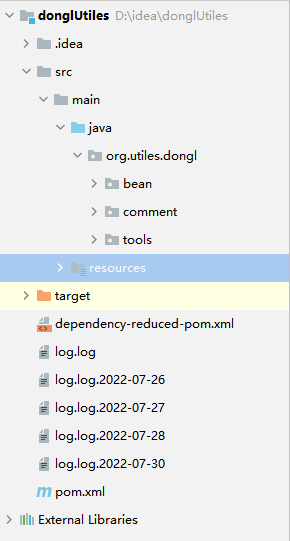
4.使用aspose-words-18.6-jdk16-crack.jar工具包会产生水印,需要配置resources下去除水印配置:


<?xml version="1.0" encoding="UTF-8" ?>

<License>

    <Data>

        <Products>

            <Product>Aspose.Total for Java</Product>

            <Product>Aspose.Words for Java</Product>

        </Products>

        <EditionType>Enterprise</EditionType>

        <SubscriptionExpiry>20991231</SubscriptionExpiry>

        <LicenseExpiry>20991231</LicenseExpiry>

        <SerialNumber>8bfe198c-7f0c-4ef8-8ff0-acc3237bf0d7</SerialNumber>

    </Data>

    <Signature>sNLLKGMUdF0r8O1kKilWAGdgfs2BvJb/2Xp8p5iuDVfZXmhppo+d0Ran1P9TKdjV4ABwAgKXxJ3jcQTqE/2IRfqwnPf8itN8aFZlV3TJPYeD3yWE7IT55Gz6EijUpC7aKeoohTb4w2fpox58wWoF3SNp6sK6jDfiAUGEHYJ9pjU=</Signature>

</License>
license.xml
5.工具类编写:
package org.utiles.dongl.tools;

import com.aspose.words.License;

import com.aspose.words.SaveFormat;

import com.itextpdf.text.*;

import com.itextpdf.text.pdf.PdfWriter;

import org.apache.log4j.Logger;

import org.utiles.dongl.comment.WordTranPDF;

import java.io.File;

import java.io.FileOutputStream;

import java.io.IOException;

import java.io.InputStream;

import java.util.*;

import java.util.List;

/**

 * @ClassName: FileTranPDFTool

 * @Description TODO

 * @Author: 东霖

 * @Date: 2022/7/23 10:50

 * @Version 1.0

 **/

public class FileTranPDFTool {

    private static Logger logger = Logger.getLogger(FileTranPDFTool.class);

    public static boolean getLicense() {

        boolean result = false;

        try {

            InputStream is = WordTranPDF.class.getClassLoader().getResourceAsStream("\\license.xml"); // license.xml应放在..\WebRoot\WEB-INF\classes路径下

            License aposeLic = new License();

            aposeLic.setLicense(is);

            result = true;

        } catch (Exception e) {

            e.printStackTrace();

        }

        return result;

    }

    /**

     * ImageToPDF

     * 支持类型:jpg/tif/..

     *

     * @param source

     * @param target

     */

    public static void ImageToPDF(String source, String target) {

        Document document = new Document();

        //设置文档页边距

        document.setMargins(0, 0, 0, 0);

        FileOutputStream fos = null;

        try {

            fos = new FileOutputStream(target);

            PdfWriter.getInstance(document, fos);

            //打开文档

            document.open();

            //获取图片的宽高

            Image image = Image.getInstance(source);

            float imageHeight = image.getScaledHeight();

            float imageWidth = image.getScaledWidth();

            //设置页面宽高与图片一致

            Rectangle rectangle = new Rectangle(imageWidth, imageHeight);

            document.setPageSize(rectangle);

            //图片居中

            image.setAlignment(Image.ALIGN_CENTER);

            //新建一页添加图片

            document.newPage();

            document.add(image);

        } catch (Exception ioe) {

            System.out.println(ioe.getMessage());

        } finally {

            //关闭文档

            document.close();

            try {

                fos.flush();

                fos.close();

            } catch (IOException e) {

                e.printStackTrace();

            }

        }

    }

    /**

     * word 文档类型转pdf

     *

     * @param inPath

     * @param outPath

     * @return

     */

    public static boolean doc2pdf(String inPath, String outPath) {

        if (!getLicense()) { // 验证License 若不验证则转化出的pdf文档会有水印产生

            return false;

        }

        FileOutputStream os = null;

        try {

            File file = new File(outPath); // 新建一个空白pdf文档

            os = new FileOutputStream(file);

            com.aspose.words.Document doc = new com.aspose.words.Document(inPath); // Address是将要被转化的word文档

//            doc.save(os, SaveFormat.PDF);// 全面支持DOC, DOCX, OOXML, RTF HTML, OpenDocument, PDF,

            doc.save(os, SaveFormat.DOCX);// 全面支持DOC, DOCX, OOXML, RTF HTML, OpenDocument, PDF,

            // EPUB, XPS, SWF 相互转换

        } catch (Exception e) {

            e.printStackTrace();

            return false;

        } finally {

            if (os != null) {

                try {

                    os.flush();

                    os.close();

                } catch (IOException e) {

                    e.printStackTrace();

                }

            }

        }

        return true;

    }

    /**

     * 遍历指定目录取文件名称

     *

     * @param foldPath 文件目录绝对路径

     * @return

     */

    public static List<String> listFileName(String foldPath) {

        List<String> listFiles = new ArrayList<>();

        //创建文件对象

        File f = new File(foldPath);

        //列出文件名称存入数组

        File[] files = f.listFiles();

        for (int i = 0; i < Objects.requireNonNull(files).length; i++) {

            listFiles.add(files[i].getName());

        }

        return listFiles;

    }

    /**

     * 删除指定文件

     * @param filePath

     * @return

     */

    public static boolean deleteByFilePath(String filePath) {

        File file = new File(filePath);

        return file.delete();

    }

    /**

     * 遍历指定目录取文件名称并接入路径

     *

     * @param oldPath 遍历文件目录绝对路径,也是要删除的文件目录

     * @return

     */

    public static Map<String, String> listFileNameAndPath(String oldPath) {

        Map<String, String> listFiles = new HashMap();

        //创建文件对象

        File f = new File(oldPath);

        //列出文件名称存入数组

        File[] files = f.listFiles();

        for (int i = 0; i < Objects.requireNonNull(files).length; i++) {

            listFiles.put(files[i].getPath(), files[i].getName());

        }

        return listFiles;

    }

    /**

     * 获取指定文件目录文件大小为0Size的

     * @param foldPath

     * @return

     */

    public static Integer getFileSize(String foldPath,String newFoldPath) {

        int j=1;

        //创建文件对象

        File file = new File(foldPath);

        File[] files = file.listFiles();

        for (int i = 0; i < files.length; i++) {

            if (files[i].length()==0){

                Boolean aBoolean = WriteToFileExample.moveFileToTarget("D:\\OSS\\ghwb\\ghksj_1_copy\\《金东区卫生健康事业发展“十四五”规划》.pdf", newFoldPath+files[i].getName(),null);

                if (aBoolean==true){

                    j++;

                    logger.info("移动:"+files[i].getPath()+"到"+newFoldPath);

                }

                System.out.println(files[i].getPath());

            }

        }

        return j;

    }

    /**

     * 文件对比删除重复文件

     * @param oldFileNames

     * @param newPath 对比文件目录

     * @return

     */

    public static Integer deleteByFileName(Map<String, String> oldFileNames, String newPath) {

        int j = 0;

        List<String> newListNames = listFileName(newPath);

        for (Map.Entry<String, String> entry : oldFileNames.entrySet()) {

            for (int i = 0; i < newListNames.size(); i++) {

                String value = entry.getValue();

                String s = newListNames.get(i);

                if (value.substring(0,value.lastIndexOf(".")).equals(s.substring(0,s.lastIndexOf(".")))) {

                    boolean b = deleteByFilePath(entry.getKey());

                    if (b==true){

                        logger.info("成功删除指定文件:"+entry.getKey()+",共计:"+j+"个");

                        j++;

                    }else{

                        logger.error("指定文件不存在:"+entry.getKey());

                    }

                }

            }

        }

        return j;

    }

    public static void main(String[] args) {

        //文件对比删除

        Map<String, String> map = listFileNameAndPath("D:\\OSS\\ghwb\\word");

        int b = deleteByFileName(map, "D:\\OSS\\ghwb\\ghksj - 副本");

        //word转pdf

        doc2pdf("D:\\OSS\\ghwb\\13c5ad939a0b2001.doc",

                "D:\\OSS\\ghwb\\doc2docx\\13c5ad939a0b2001.docx");

        //移动文件size为0的数据到指定文件夹

//        getFileSize("D:\\OSS\\ghwb\\ghksj_3_copy","D:\\OSS\\ghwb\\test");

    }

}
WordORImageTranPDF
6.逻辑代码:
package org.utiles.dongl.comment;

import org.apache.log4j.Logger;

import org.utiles.dongl.tools.FileTranPDFTool;

import org.utiles.dongl.tools.WriteToFileExample;

import java.io.*;

import java.util.HashMap;

import java.util.Map;

import static org.utiles.dongl.tools.FileTranPDFTool.doc2pdf;

/**

 * @ClassName: WordTranPDF

 * @Description TODO

 * @Author: 东霖

 * @Date: 2022/7/22 8:55

 * @Version 1.0

 **/

public class WordTranPDF {

    private static Logger logger = Logger.getLogger(WordTranPDF.class);

    /**

     * 获取指定文件路径下所有文件对象

     *

     * @param inFilePath

     * @return

     */

    public static Map<String, String> getFilePathName(String inFilePath,String replacePathOld

            ,String replacePathNew,String wjjl,String pdfToPath) {

        Map<String, String> fileList = new HashMap();

        //创建文件对象

        File f = new File(inFilePath);

        //列出文件名称存入数组

        File[] files = f.listFiles();

        for (int i = 0; i < files.length; i++) {

            if (files[i].getName().endsWith("docx") || files[i].getName().endsWith("doc")

                    || files[i].getName().endsWith("wps") || files[i].getName().endsWith("rtf"))

            {

//                String str=files[i].getPath().substring(0,files[i].getPath().lastIndexOf(".")+1)+"pdf";

                String str=files[i].getPath().substring(0,files[i].getPath().lastIndexOf(".")+1)+"docx";

                fileList.put(files[i].getPath()+"&"+"word",str.replace(replacePathOld,replacePathNew));

//                logger.info("当前文件路径为:"+files[i].getPath());

            } else if (files[i].getName().endsWith(".png") || files[i].getName().endsWith(".jpg") || files[i].getName().endsWith(".gif")

                    || files[i].getName().endsWith(".jpeg") || files[i].getName().endsWith(".tif"))

            {

                String str=files[i].getPath().substring(0,files[i].getPath().lastIndexOf(".")+1)+"pdf";

                fileList.put(files[i].getPath()+"&"+"image", str.replace(replacePathOld,replacePathNew));

//                logger.info("当前文件路径为:"+files[i].getPath());

            }else if(files[i].getName().endsWith(".pdf")) {

                WriteToFileExample.moveFileToTarget(files[i].getPath(),pdfToPath+files[i].getName(),"");

                logger.info("移动:"+files[i].getPath()+"到"+pdfToPath);

            }else{

                WriteToFileExample.writeFileSQL("当前文件无法转换:"+files[i].getPath(),wjjl);

            }

        }

        return fileList;

    }

    public static void start(Map<String, String> hashMap) throws InterruptedException {

        long old = System.currentTimeMillis();

        int j = 0;

        for (Map.Entry<String, String> entry : hashMap.entrySet()) {

//            doc2pdf(entry.getKey(),entry.getValue());

            String[] split = entry.getKey().split("&");

            if(split[1].equals("word")){

                System.out.println(entry.getValue());

                doc2pdf(split[0],entry.getValue());

                Thread.sleep(Long.parseLong("15"));

            }else if (split[1].equals("image")){

                FileTranPDFTool.ImageToPDF(split[0],entry.getValue());

                Thread.sleep(Long.parseLong("15"));

            }else {

//                break;

            }

            j++;

            logger.info("转换第:"+j+"个!"+"文件名称为:"+entry.getKey());

        }

        long now = System.currentTimeMillis();

        logger.info("pdf转换成功,共耗时:" + ((now - old) / 1000.0) + "秒");

        logger.info("共转换:" + j + "个文件!");

    }

    public static void main(String[] args) throws InterruptedException {

        /**

         * inFilePath: 需要转换的文件夹路径

         * replacePathOld: 抓换后的文件要写入新文件,直接替换文件的上级目录关键字即可

         * replacePathNew: 新的文件父路径

         * wjjl: 不能转换的文件记录位置及记录名称

         * pdfToPath:当文件中已有pdf不用抓换的需配置文件留存方向。会从原文件目录移动至新文件目录

         */

        Map<String, String> filePathName = getFilePathName("D:\\OSS\\ghwb\\doc11",

                "doc11","doc2docx",

                "D:\\OSS\\ghwb\\"+System.currentTimeMillis()+".txt"

        ,"D:\\OSS\\yjbg\\gjxxzx\\ghksj_copy\\");

        start(filePathName);

    }

}
7.上述就是word或者image类型的批量脚本,可以在工具类中单元测试之后在使用批量逻辑代码。
doc或docx(word)或image类型文件批量转PDF脚本的更多相关文章
- 将doc文件批量转为pdf文件
需要将不少doc文件转为pdf,WPS带有这种功能,但是鼠标点击次数太多以后整个人都变得很烦躁 用了一下午去搜这方面的工具软件,找到若干.有一些免费,有一些试用的,但总归就找到一个真正能用,虽说生成的 ...
- C# 将Word,Execl,PPT,Project, 文件转成PDF, 不依赖Office!!
git 地址 https://gitee.com/bandung/Execl_WordTOPDF.git 包括了各种破解的dll Word转PDF 挨个引用 Word转PDF public void ...
- 文件批量scp分发脚本
#!/bin/bash SERVERS="172.17.xx.y 172.17.pp.mm" PASSWORD=机器登录密码 auto_ssh_copy_file() { expe ...
- 个人永久性免费-Excel催化剂功能第88波-批量提取pdf文件信息(图片、表格、文本等)
日常办公场合中,除了常规的Excel.Word.PPT等文档外,还有一个不可忽略的文件格式是pdf格式,而对于想从pdf文件中获取信息时,常规方法将变得非常痛苦和麻烦.此篇给大家送一pdf文件提取信息 ...
- 基于java 合并.doc和docx格式的Word文件
注:摘录自 https://www.cnblogs.com/shenzhouyh/articles/7243805.html 之前用过jacob 合并.doc,但是是有jacob有弊端: 服务器必须是 ...
- C#仪器数据文件解析-Word文件(doc、docx)
不少仪器数据报告输出为Word格式文件,同Excel文件,Word文件doc和docx的存储格式是不同的,相应的解析Word文件的方式也类似,主要有以下方式: 1.通过MS Word应用程序的DCOM ...
- Python:读取 .doc、.docx 两种 Word 文件简述及“Word 未能引发事件”错误
概述 Python 中可以读取 word 文件的库有 python-docx 和 pywin32. 下表比较了各自的优缺点. 优点 缺点 python-docx 跨平台 只能处理 .docx 格式 ...
- python对不同类型文件(doc,txt,pdf)的字符查找
python对不同类型文件的字符查找 TXT文件: def txt_handler(self, f_name, find_str): """ 处理txt文件 :param ...
- 手把手教你用 Spring Boot搭建一个在线文件预览系统!支持ppt、doc等多种类型文件预览
昨晚搭建环境都花了好一会时间,主要在浪费在了安装 openoffice 这个依赖环境上(Mac 需要手动安装). 然后,又一步一步功能演示,记录,调试项目,并且简单研究了一下核心代码之后才把这篇文章写 ...
随机推荐
- 一些GIT操作的技巧
一.git stash 我们有时会遇到这样的情况,正在分支a上开发一半,然后分支b上发现Bug,需要马上处理.这时候分支a上的修改怎么办呢,git add 是不行的,有的git客户端版本会提示还有ad ...
- Windows环境下启动Redis报错:Could not create server TCP listening socket 127.0.0.1:6379: bind: 操作成功完成。(已解决)
问题描述: 今天在windows环境下启动Redis时启动失败报错: 解决方案: ①运行命令:redis-cli.exe ②退出Redis ③运行命令:redis-server.exe redis.w ...
- Zookeeper安装学习(二)
学习内容:Zookeeper集群安装(Zookeeper版本:Zookeeper3.5.7:注:master,s1,s2都需要部署) 解压安装: (1)在主机 master 解压 Zookeeper ...
- TENSEAL: A LIBRARY FOR ENCRYPTED TENSOR OP- ERATIONS USING HOMOMORPHIC ENCRYPTION 解读
本文记录阅读该paper的笔记,这篇论文是TenSeal库的原理介绍. 摘要 机器学习算法已经取得了显著的效果,并被广泛应用于各个领域.这些算法通常依赖于敏感和私有数据,如医疗和财务记录.因此,进一步 ...
- 在windows下使用s3cmd和s3browser来管理amazon s3的笔记
S3是Amazon S3的简称,s3cmd是一款命令行工具用来管理s3,同时还有一款图形化的管理工具:s3 browser. 因为绝大多数用户都是在linux下管理s3,而我们的打包机是在window ...
- 【freertos】011-信号量、互斥量及优先级继承机制源码分析
目录 前言 11.1 任务同步 11.2 信号量概念 11.3 二值信号量 11.3.1 二值信号量概念 11.3.2 优先级翻转 11.3.3 二值信号量运作机制 11.4 计数信号量 11.4.1 ...
- python自动将新生成的报告作为附件发送并进行封装
发送报告作为自动化部署来讲是一个重要的环节,废话不多说直接上代码吧,如果想更细致的了解内容查阅本博主上篇基本发送文章 特别叮嘱一下:SMTP协议默认端口25,qq邮箱SMTP服务器端口是465 别出丑 ...
- CabloyJS v4.0.0支持工作流引擎及更多 🎉
截至2020年12月21日冬至,花了近5年时间作出最小可用NodeJS开源全栈框架,这就是CabloyJS V4.0.0 5年,90个模块,30万行代码,5400次提交(Commits),开启Node ...
- 二:动手实操SpringBoot-使用Spring Initializr创建项目
使用 Spring Initializr 初始化 Spring Boot 项目 Spring Initializr 从本质上说就是一个Web应用程序,它能为你构建Spring Boot项目结构. 虽然 ...
- UiPathExcel写入操作
一.Excel 写操作 1.写一个单元格 (1)控件介绍 Write Cell: 使用Write Cell控件,在指定单元格写入内容 常用属性介绍: Destination: Cell: 要写 ...