
UI自动化之【报错记录-selenium】
1.找不到元素
写脚本的过程中时不时就会报这种错,一般路径定位不到直接复制xpath基本就能找到了,也有时候是因为有iframe或是句柄不对
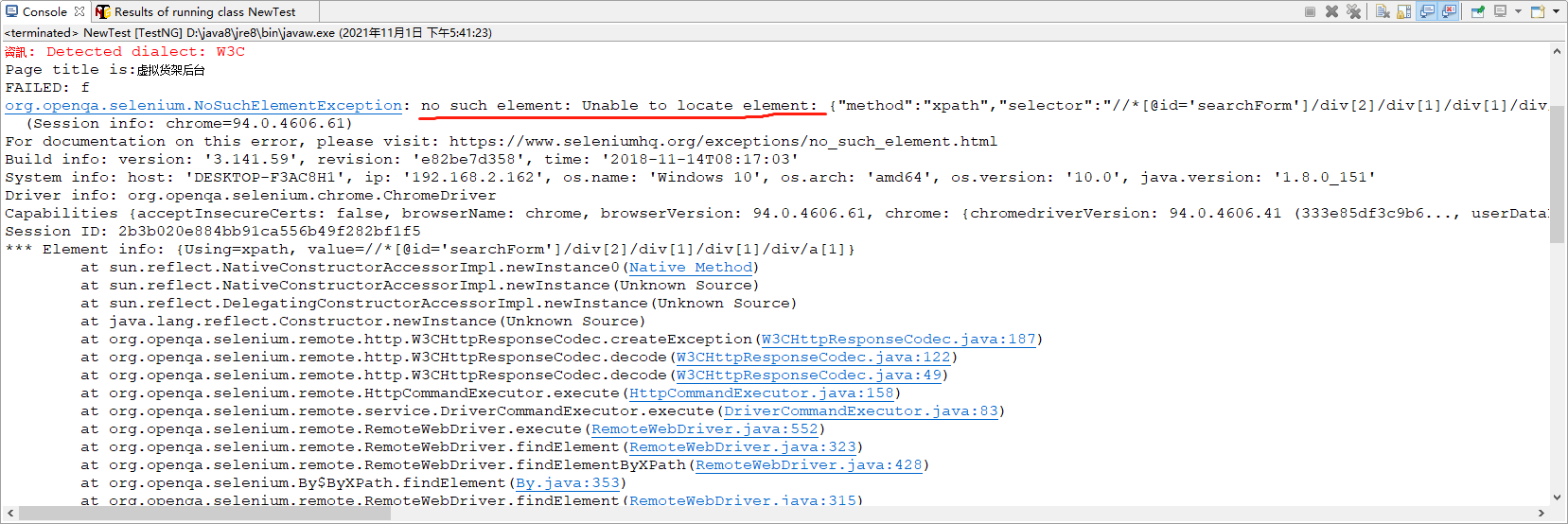
原因:
①没有加等待时间,脚本运行到那步时,页面还没加载完,所以就找不到元素了,加上Thread.sleep(2000)就好了
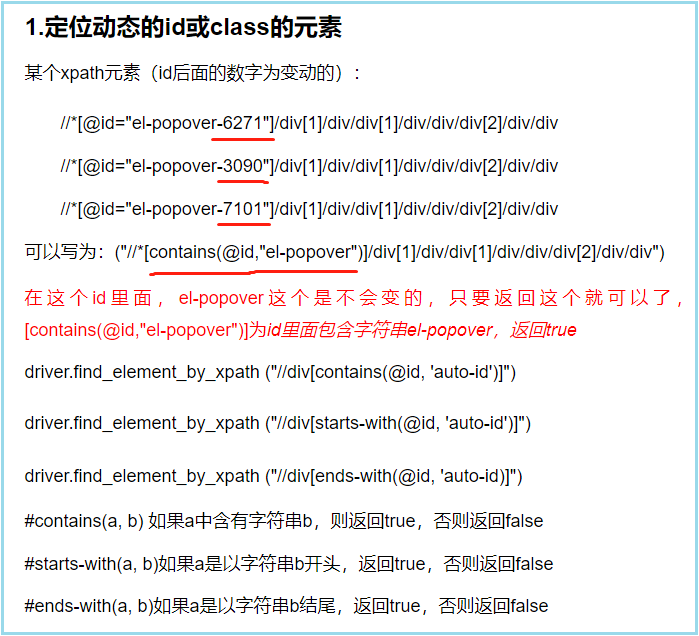
②页面元素xpath路径中含有动态数字:
例如这种://*[@id="el-collapse-content-8913"]/div/div/div[1]/div/div/div/div/div/input,在这个地址中,每次刷新页面8913都会变,所以直接定位显然是徒劳的
得改成这种://*[contains(@id,'el-collapse-content')]/div/div/div[1]/div/div/div/div/div/input
具体可参考这位大佬的博客:https://www.cnblogs.com/dingxinwen/p/14192929.html
2.元素被遮挡导致找不到
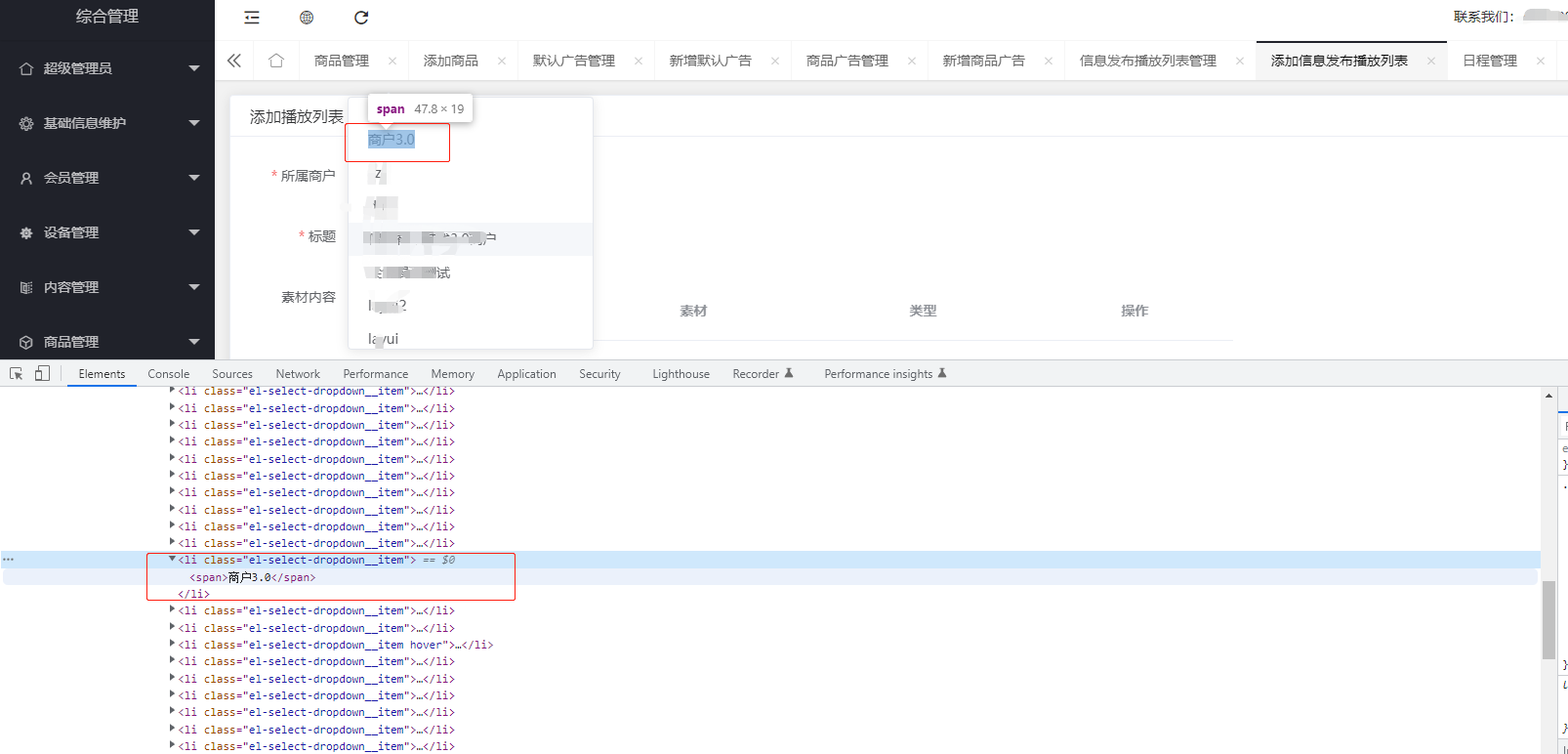
就是在定位下面这个下拉框的元素集合时,一直报错说找不到元素
一顿百度后,说是下拉框下的元素集合和下拉框不在一个地方……于是我定位了一下还真不在一个地方,之前从没注意过还有这种问题
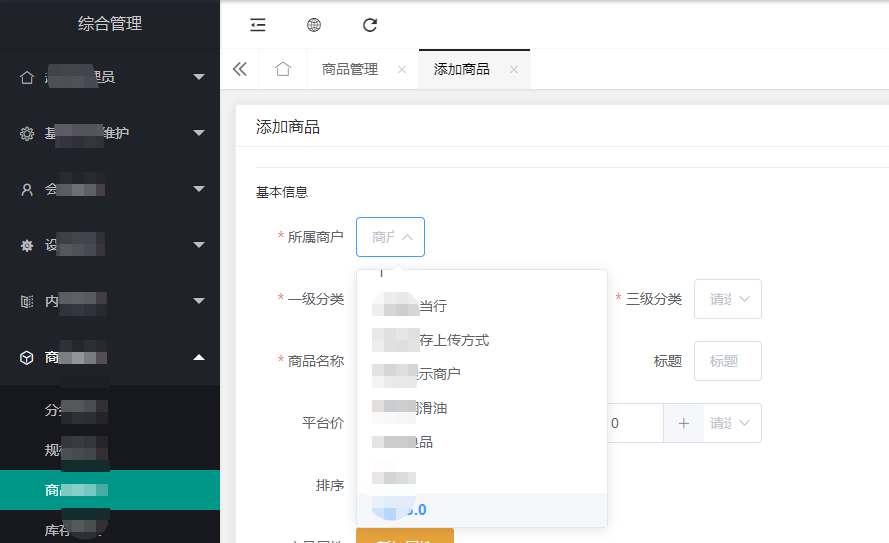
定位下拉框如下:
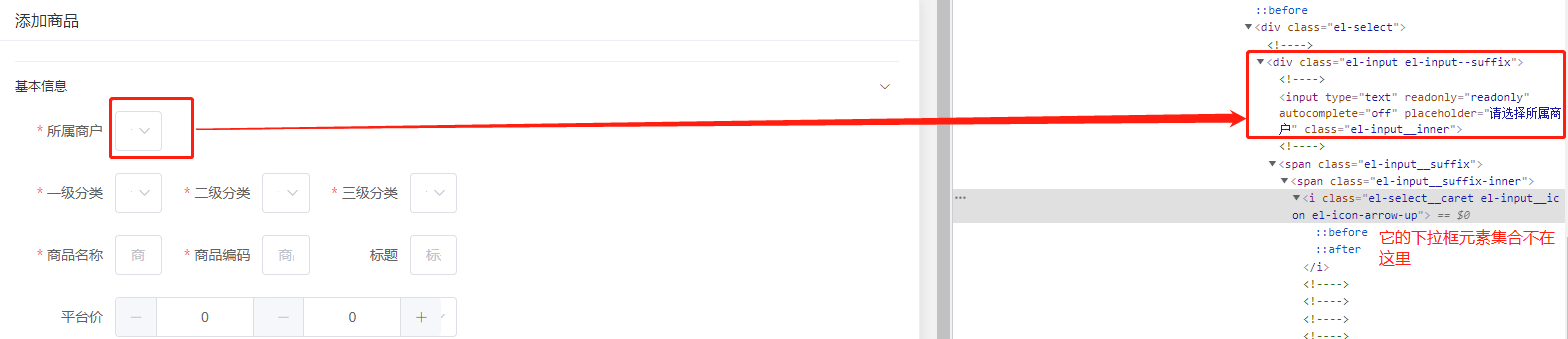
再定位下拉框元素集合如下:

下面这个下拉框是常见的,元素集合和下拉框在一起
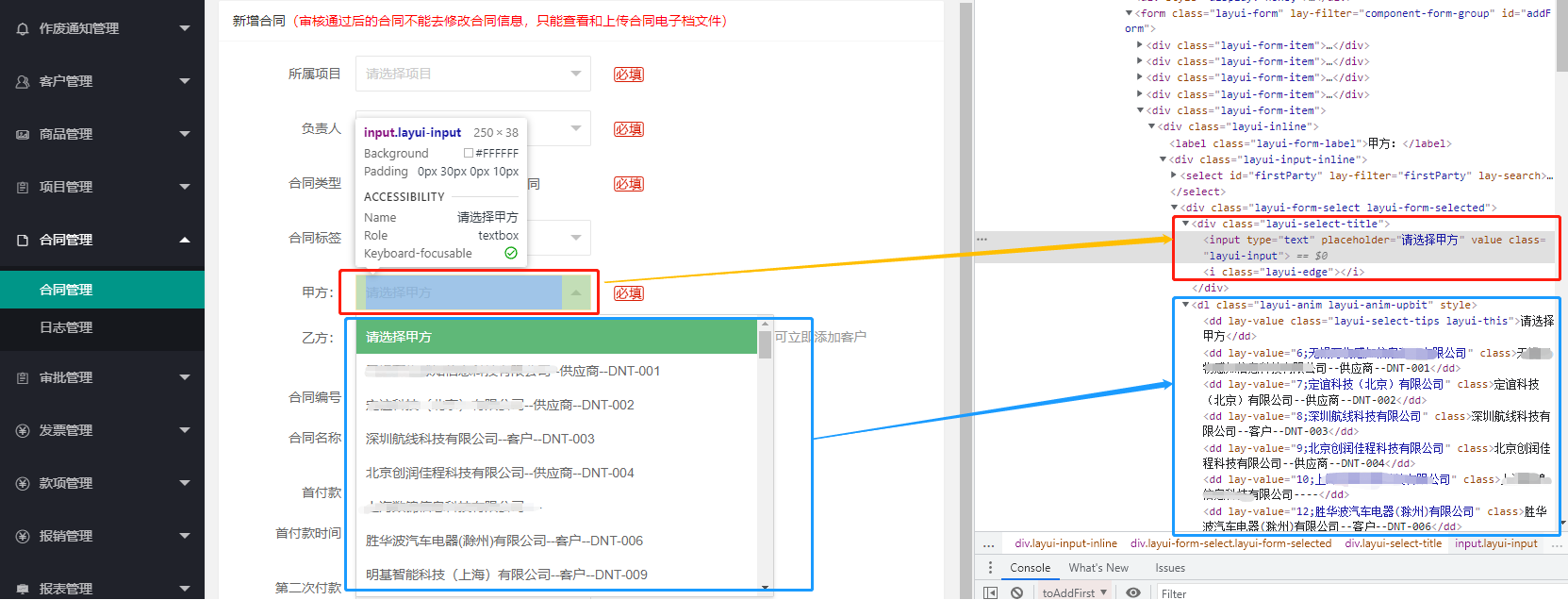
然后就重新定位了元素集合,结果运行还是报错,报错信息如下:
org.openqa.selenium.ElementClickInterceptedException: element click intercepted: Element <li class="el-select-dropdown__item">...</li> is not clickable at point (262, 379). Other element would receive the click: <div class="el-form-item__content" style="margin-left: 100px;">...</div>

  (Session info: chrome=94.0.4606.61)

Build info: version: '3.141.59', revision: 'e82be7d358', time: '2018-11-14T08:17:03'

System info: host: 'DESKTOP-F3AC8H1', ip: '192.168.2.162', os.name: 'Windows 10', os.arch: 'amd64', os.version: '10.0', java.version: '1.8.0_151'

Driver info: org.openqa.selenium.chrome.ChromeDriver

Capabilities {acceptInsecureCerts: false, browserName: chrome, browserVersion: 94.0.4606.61, chrome: {chromedriverVersion: 94.0.4606.41 (333e85df3c9b6..., userDataDir: C:\Users\caiman\AppData\Loc...}, goog:chromeOptions: {debuggerAddress: localhost:63208}, javascriptEnabled: true, networkConnectionEnabled: false, pageLoadStrategy: normal, platform: WINDOWS, platformName: WINDOWS, proxy: Proxy(), setWindowRect: true, strictFileInteractability: false, timeouts: {implicit: 0, pageLoad: 300000, script: 30000}, unhandledPromptBehavior: dismiss and notify, webauthn:extension:credBlob: true, webauthn:extension:largeBlob: true, webauthn:virtualAuthenticators: true}

Session ID: 02d316c1613deed0338da698e5931b6e

    at sun.reflect.NativeConstructorAccessorImpl.newInstance0(Native Method)

    at sun.reflect.NativeConstructorAccessorImpl.newInstance(Unknown Source)

    at sun.reflect.DelegatingConstructorAccessorImpl.newInstance(Unknown Source)

    at java.lang.reflect.Constructor.newInstance(Unknown Source)

    at org.openqa.selenium.remote.http.W3CHttpResponseCodec.createException(W3CHttpResponseCodec.java:187)

    at org.openqa.selenium.remote.http.W3CHttpResponseCodec.decode(W3CHttpResponseCodec.java:122)

    at org.openqa.selenium.remote.http.W3CHttpResponseCodec.decode(W3CHttpResponseCodec.java:49)

    at org.openqa.selenium.remote.HttpCommandExecutor.execute(HttpCommandExecutor.java:158)

    at org.openqa.selenium.remote.service.DriverCommandExecutor.execute(DriverCommandExecutor.java:83)

    at org.openqa.selenium.remote.RemoteWebDriver.execute(RemoteWebDriver.java:552)

    at org.openqa.selenium.remote.RemoteWebElement.execute(RemoteWebElement.java:285)

    at org.openqa.selenium.remote.RemoteWebElement.click(RemoteWebElement.java:84)

    at com.dnt.auto.NewTest.f(NewTest.java:74)
这个问题百度各位大佬说是当前要点击的元素被其它元素覆盖了,所以要把焦点移动到这个元素后才能点击,给了如下两种解决方法:
方法一:

element = driver.find_element_by_css('div[class*="loadingWhiteBox"]')


driver.execute_script("arguments[0].click();", element)

方法二:

element = driver.find_element_by_css('div[class*="loadingWhiteBox"]')


webdriver.ActionChains(driver).move_to_element(element ).click(element ).perform()
我选了第一种方法,用java改了一下:
//      点击“商户”下拉框

      driver.findElement(By.xpath("//*[contains(@id,'el-collapse-content')]/div/div/div[1]/div/div/div/div/div/input")).click();

//      点击商户下拉框时,由于webdriver只能操作页面可见的元素,所有需要下垃滚动条定位元素

      JavascriptExecutor js1 = (JavascriptExecutor)driver;

//      循环下拉,向下拉95000

      js1.executeScript("scrollTo(0,95000)");

      WebElement select = driver.findElement(By.xpath("/html/body/div[2]/div[1]/div[1]/ul/li[27]"));

//      需要执行下面这个js后才能找到元素

      JavascriptExecutor js2 = (JavascriptExecutor)driver;

      js2.executeScript("arguments[0].click();",select);
这样就能定位到了。(先定位元素,再执行js)
PS:关于“ JavascriptExecutor”的介绍可参考这位大佬的博客:https://www.cnblogs.com/lnn123/p/10209641.html
3.当页面上两个按钮元素地址一样时(2021-11-9)
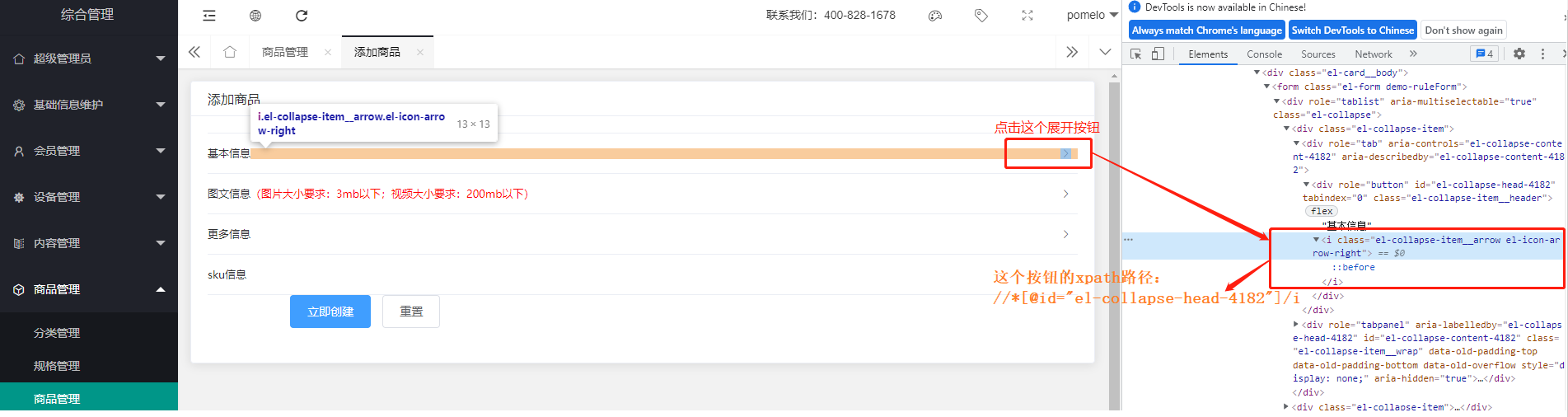
(这次碰到的问题是页面上有很多折叠按钮,操作过程中需要展开或收起各个版块,但是定位发现每个按钮的xpath路径是一样的)
eg:下图是第一个按钮的xpath路径:
下图是第二个按钮的xpath路径:
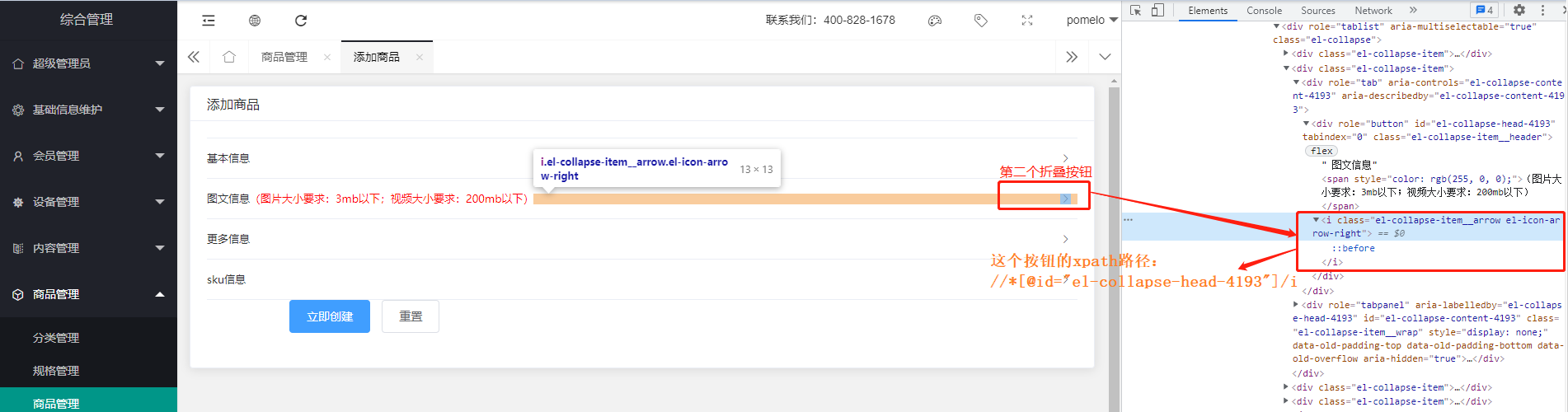
这两个路径一样的话就只能定位到一个按钮,肯定不行啦
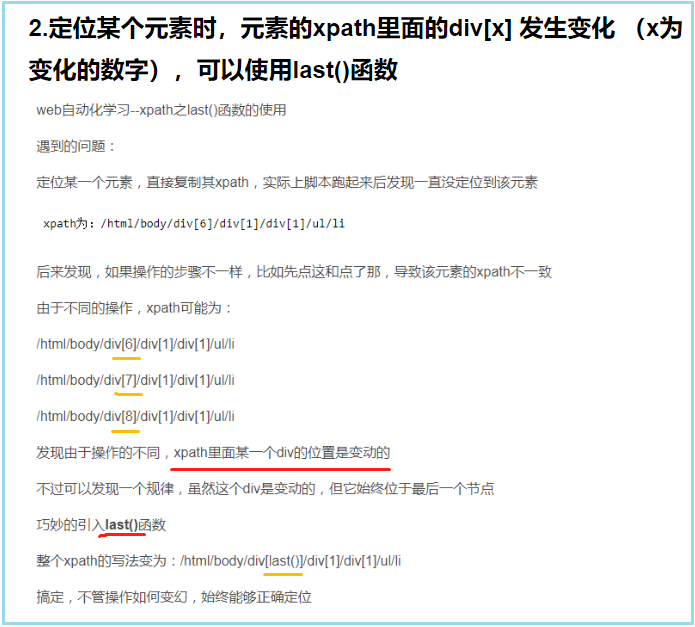
百度说当两个按钮路径一样时,使用last()函数,使用方法:(参考教程:https://www.yiibai.com/selenium/webdriver-locating-strategies-by-xpath-using-last.html)
findElement(By.xpath("(//input[@type='text'])[last()]"))
如果页面只有两个相同地址的元素,那么第二个元素像上面这样处理就够了,代表定位最后一个元素。但是我这个页面上有四个相同地址的元素,所以就需要有选择的定位其中某个元素了,方法如下:
findElement(By.xpath("(//input[@type='text'])[last()-1]")) 注释:last()后面的-1代表定位倒数第二个,以此类推,倒数第三个就是[last()-2]
4.上传图片,点击图片上传框时报错如下:(2021-11-12)
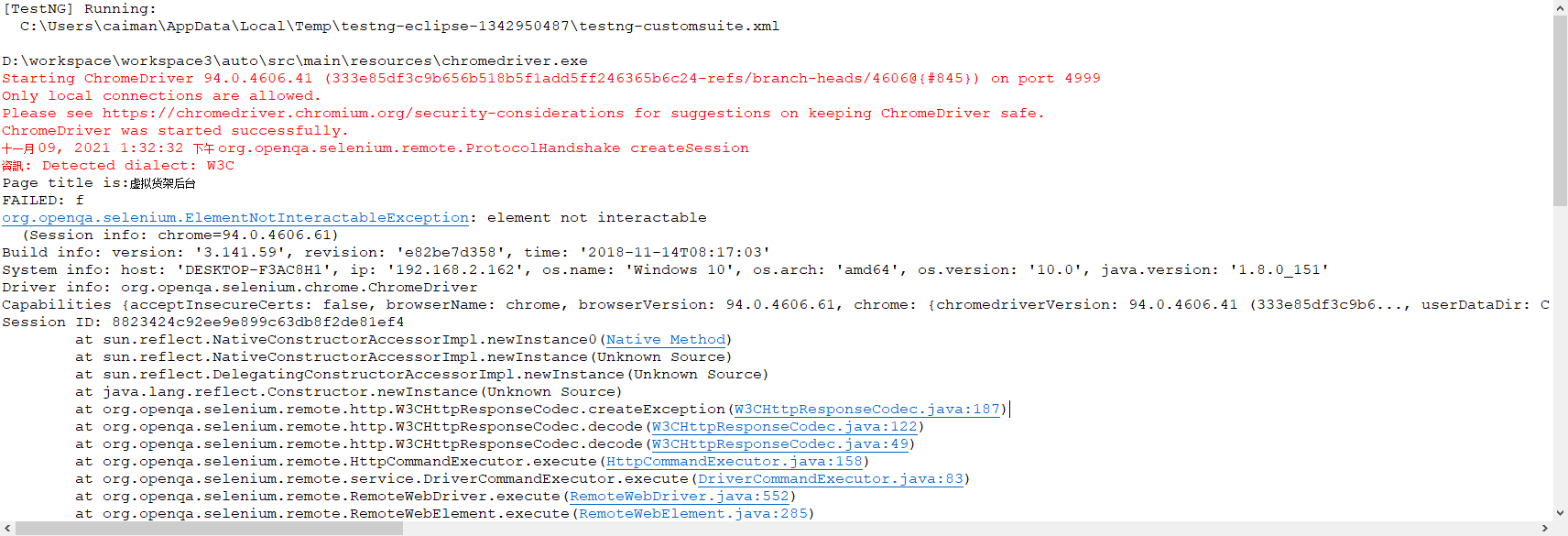
报错的意思是“元素不可以交互”
终于找到解决方法了是元素被遮挡导致的
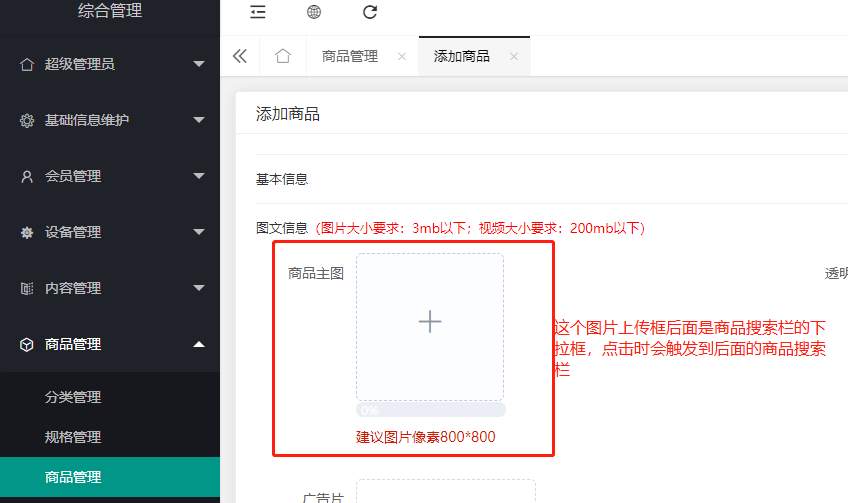
代码如下:
WebElement spuMain = driver.findElement(By.xpath("//*[contains(@id,'el-collapse-content')]/div/div[1]/div[1]/div/div/div[1]/div[1]/div/i"));

((JavascriptExecutor) driver).executeScript("arguments[0].click()",spuMain);
5.页面文本定位不到(2021-12-1)
这个问题已经困扰了一天了
本来想做个断言校验一下查询出来的文本是否匹配的,结果文本死活定位不到
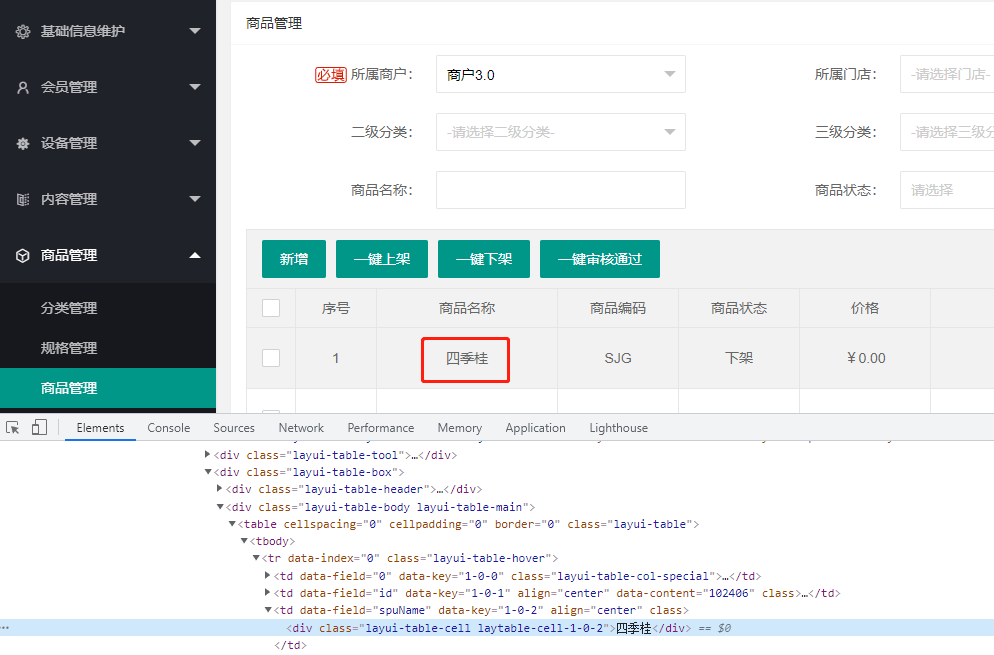
现在只是感觉可能和它在表格里有关系,但是层层定位路径也没问题,不知道到底是被什么影响了
2021-12-2
终于找到解决办法了
参考了这篇问答:http://cn.voidcc.com/question/p-vfkkyukq-tb.html
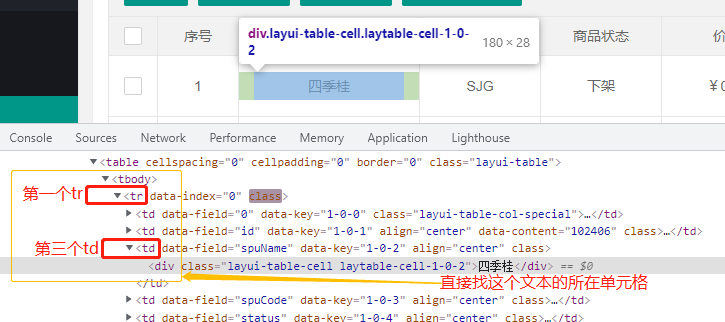
我之前是用的xpath路径://*[@id='searchForm']/div[2]/div[2]/div[2]/table/tbody/tr[1]/td[3]/div,放在console里验证是能找到的,可是selenium就是定位不到它
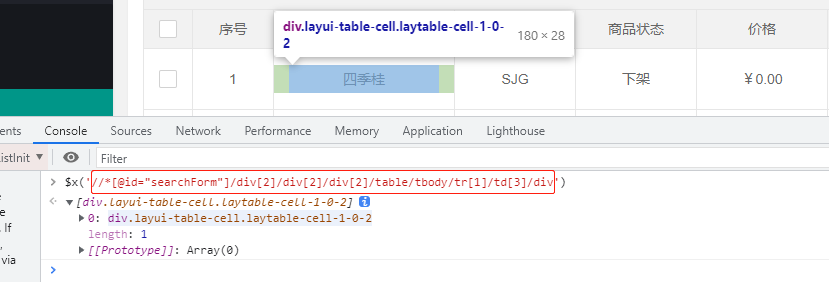
正确操作:直接定位表格里的单元格://tr[1]/td[3]

6.图片上传框和页面下拉框点击时冲突(2021-12-6)
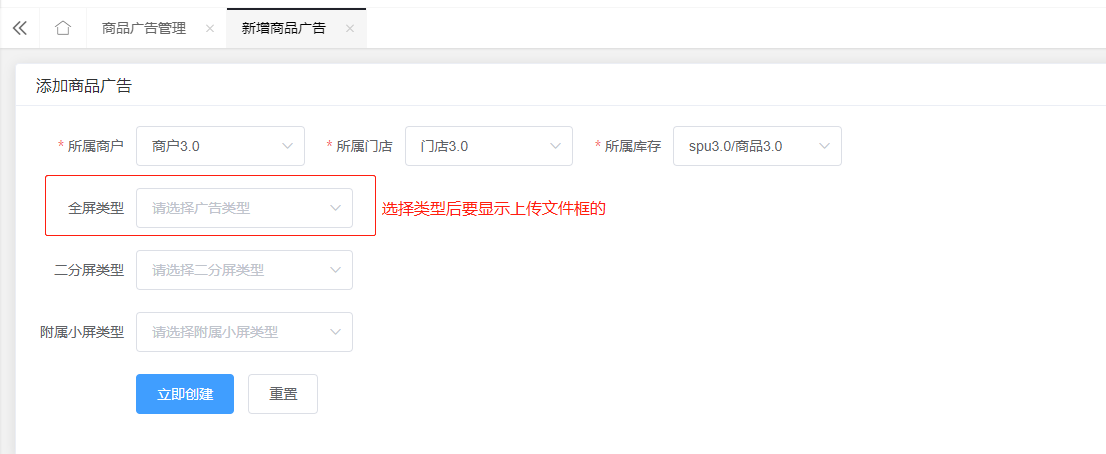
目前的问题:
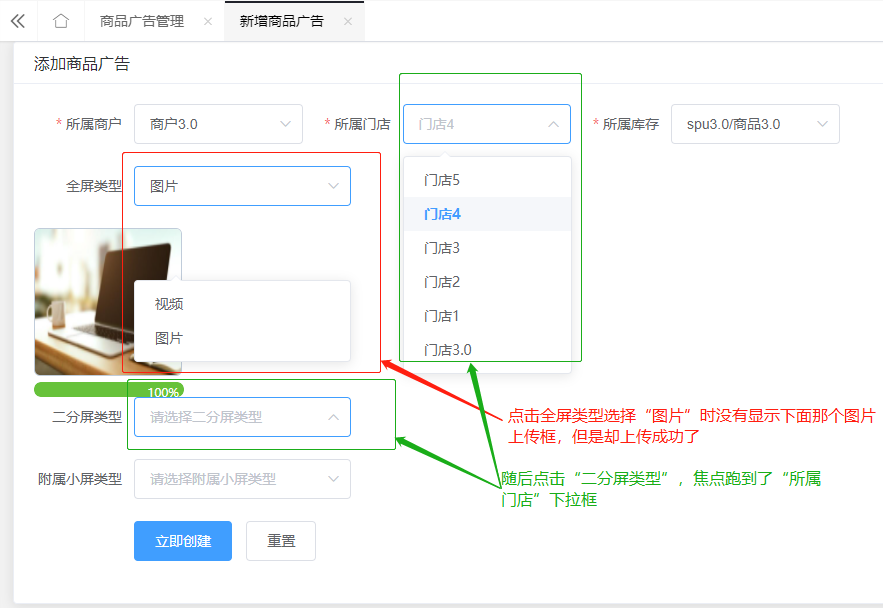
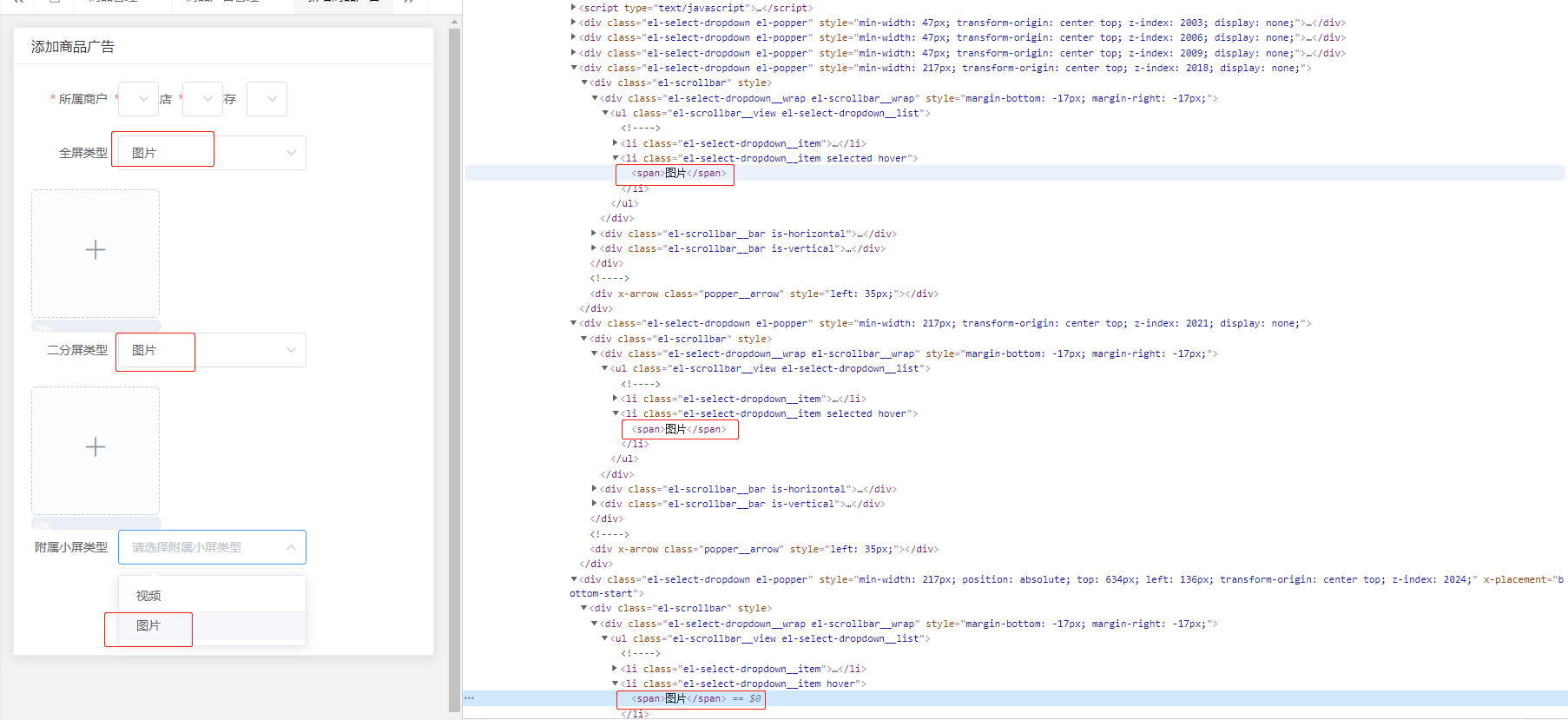
12-7发现还是因为定位的图片路径和其它路径重复冲突了,要通过last()函数区分一下
代码如下:
WebElement image = driver.findElement(By.xpath("(/html/body/div[6]/div[1]/div[1]/ul/li[2]/span)[last()]"));

JavascriptExecutor js5 = (JavascriptExecutor) driver;

js5.executeScript("arguments[0].click();", image);      //因为下拉框被后面的元素遮挡了,所以要用js处理一下
7.进入iframe后,要操作iframe外部的元素需要退出
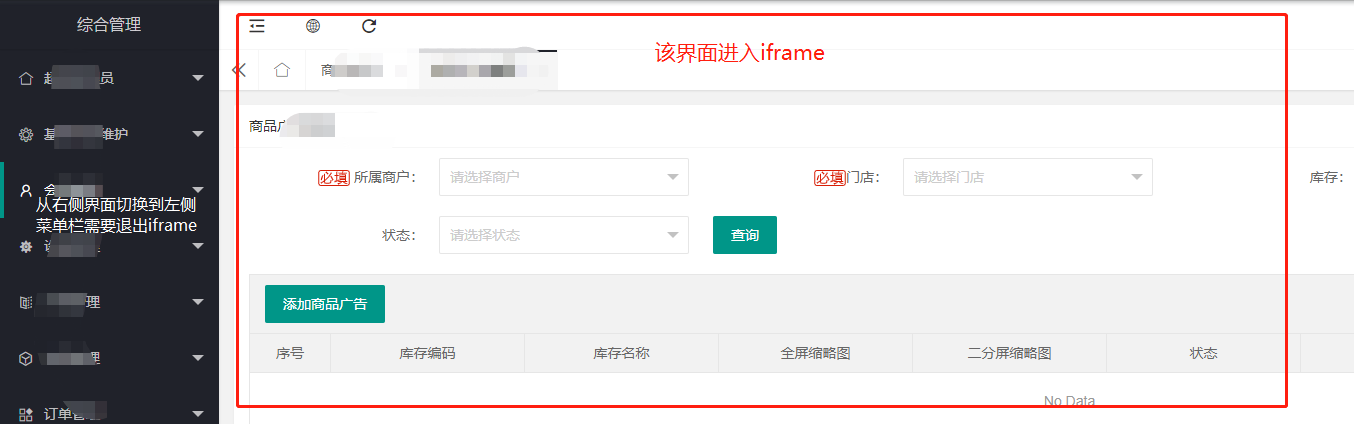
代码如下:
driver.switchTo().defaultContent(); //退出iframe
WebElement iframe = driver.findElement(By.xpath("//*[@id='LAY_app_body']/div[2]/iframe"));

driver.switchTo().frame(iframe);      //进入iframe
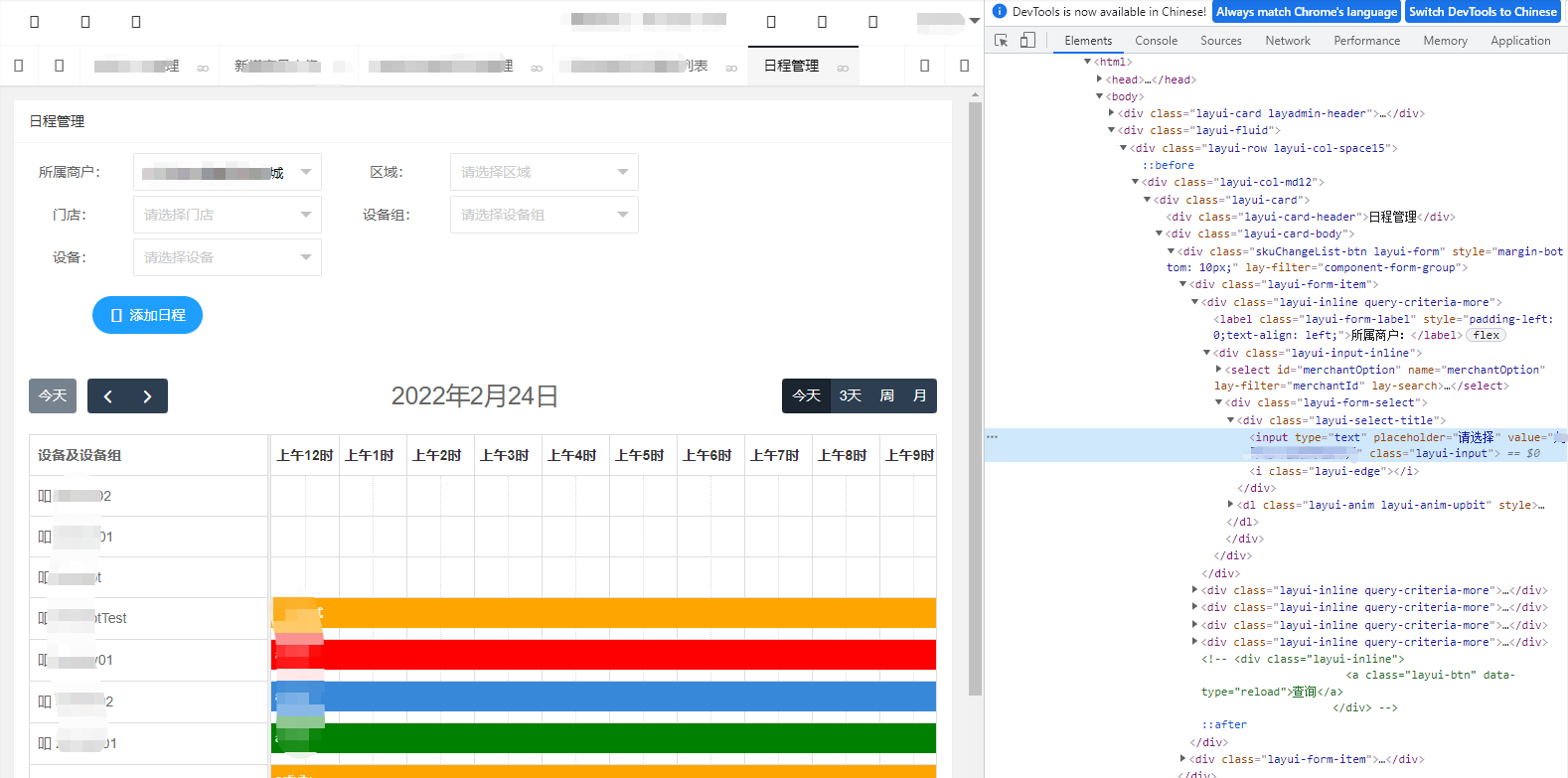
8.又遇到了问题,绊住好几天了都找不到解决办法(2022-2-24)
一个用例单独执行的时候能成功执行,但是放到测试套件里和其它用例一起执行就报错找不到元素
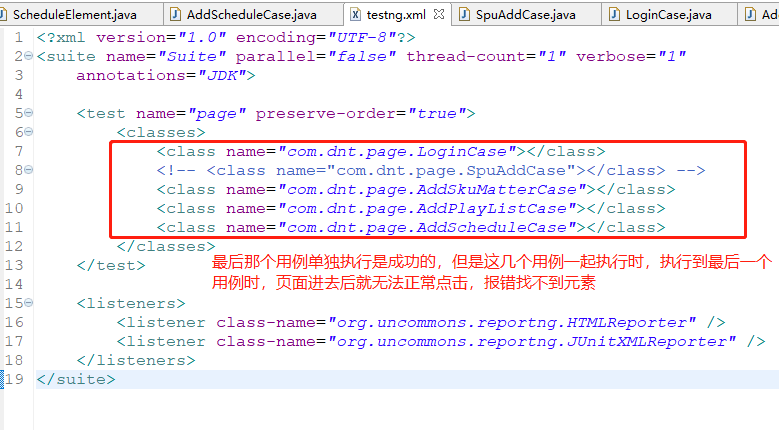
2022-5-9上面这个问题总算找到原因了
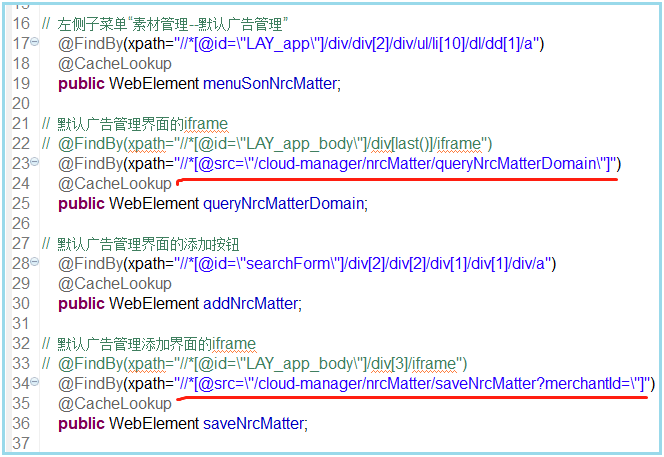
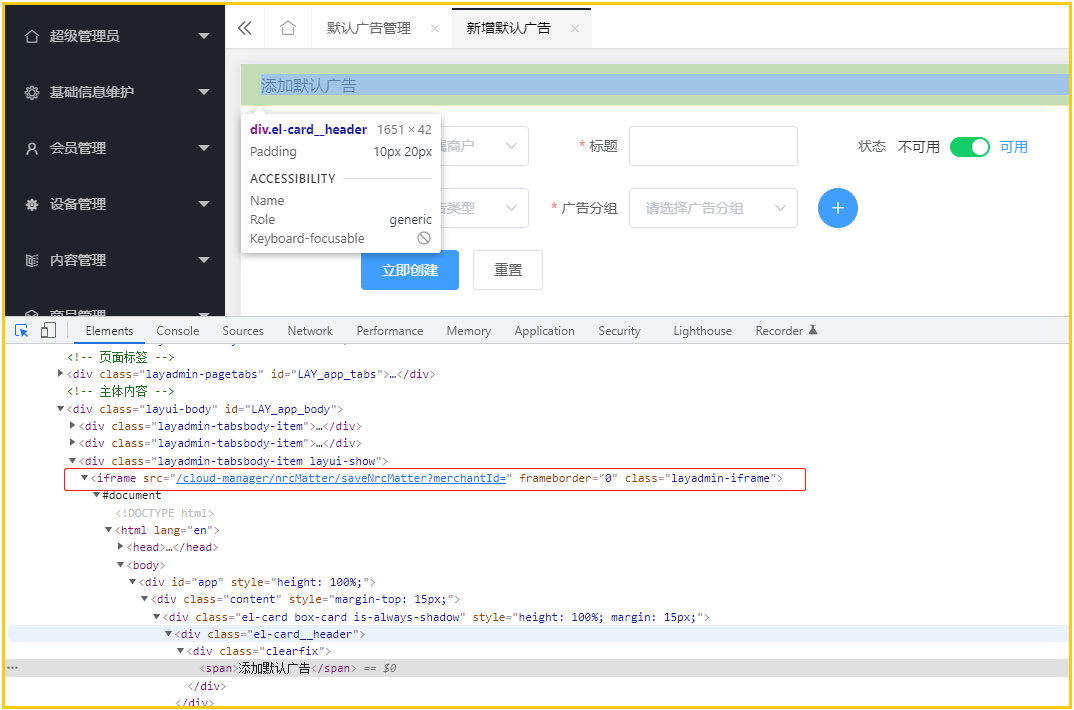
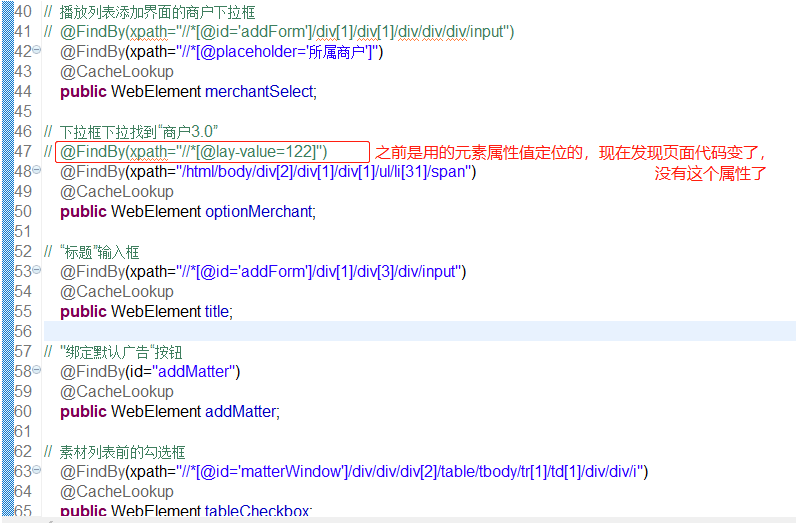
是因为iframe路径中,div括号中的数字一直在变化,导致一直定位不到这个iframe,所以也就定位不到该页面上的元素
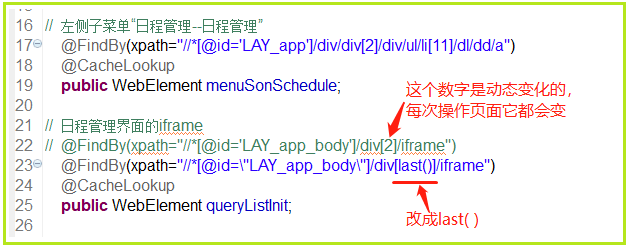
6-15以上这种方法的缺陷:当一个用例中包含多个iframe时,若都用这种改法,那所有iframe的路径都变成一样的了,这样就无法定位了
所以可改用下面这种通过元素中的某个属性来定位,这样就能区分开来了
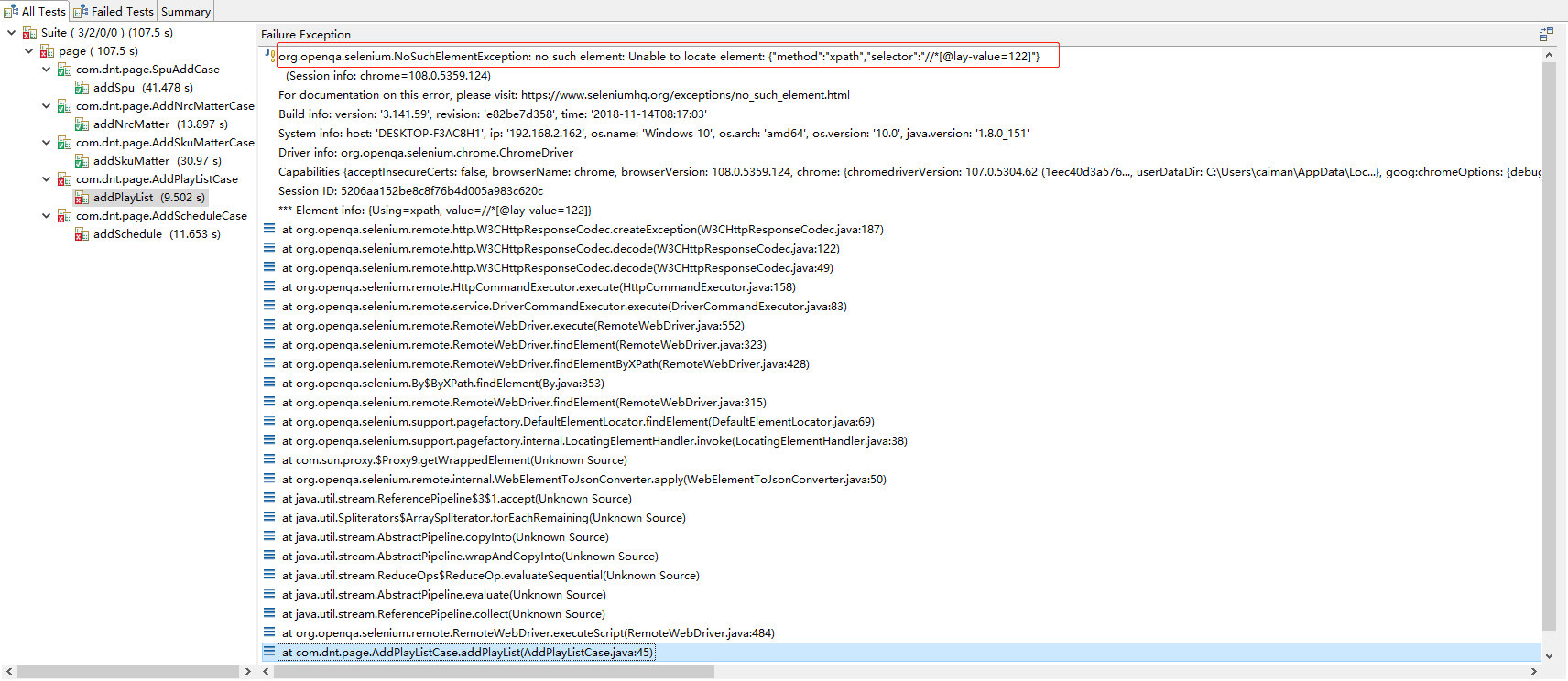
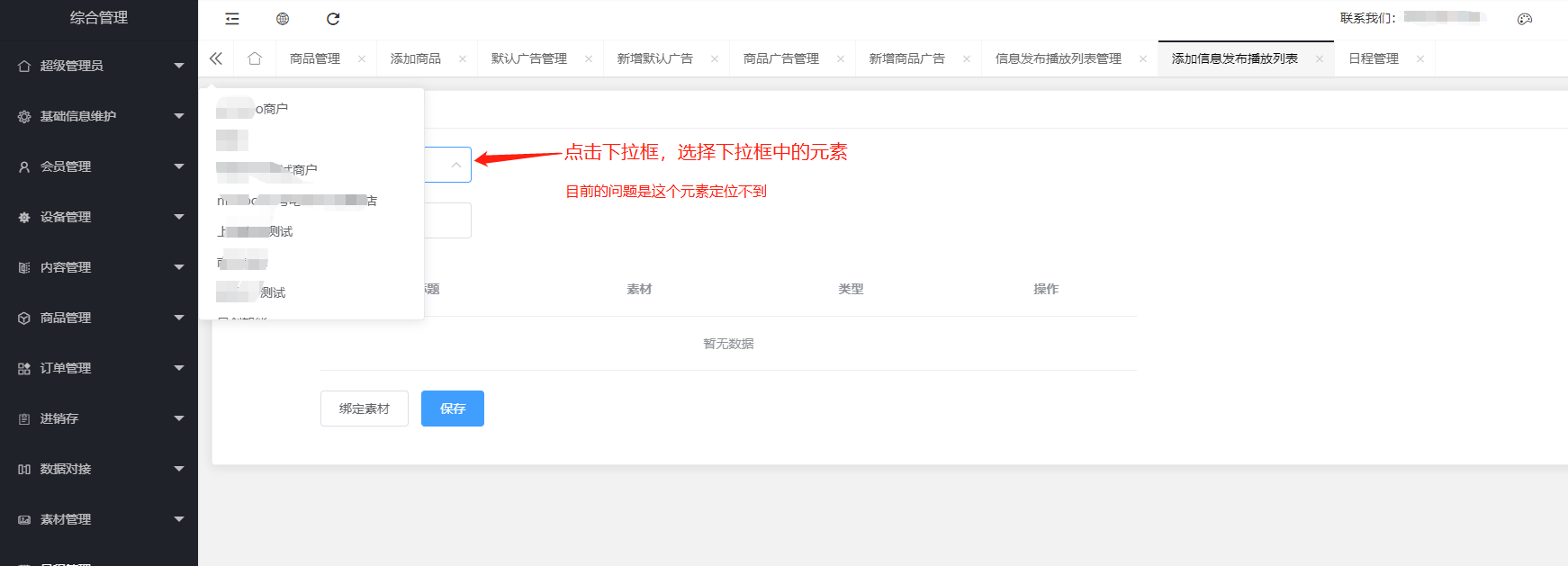
9.又遇到找不到元素的问题(2022-12-16)
UI自动化之【报错记录-selenium】的更多相关文章
- 【Python + Selenium】初次用IE浏览器之报错:selenium.common.exceptions.WebDriverException: Message: Unexpected error launching Internet Explorer. Protected Mode settings are not the same for all zones.
初次用IE浏览器运行自动化程序时,报错:selenium.common.exceptions.WebDriverException: Message: Unexpected error launchi ...
- 报错记录(xml抬头报错)
报错记录(xml抬头报错) Referenced file contains errors (http://www.springframework.org/schema/beans/spring-be ...
- IDEA 报错记录
IDEA 报错记录 Process finished with exit code 0 这种主要是配了默认的 Tomcat ,然后又配置了外部的 Tomcat.解决办法,注释掉默认的: <dep ...
- Spring Boot 报错记录
Spring Boot 报错记录 由于新建的项目没有配置数据库连接启动报错,可以通过取消自动数据源自动配置来解决 解决方案1: @SpringBootApplication(exclude = Dat ...
- selenium+python自动化93-Chrome报错:Python is likely shutting down
遇到问题 报错信息:sys.meta_path is None, Python is likely shutting down 1.我的环境: python 3.6 selenium 2.53.6 c ...
- 报错记录:getOutputStream() has already been called for this response
仅作记录:参考文章:http://www.blogjava.net/vickzhu/archive/2008/11/03/238337.html 报错信息: java.lang.IllegalStat ...
- 【Selenium】【BugList7】执行driver.find_element_by_id("kw").send_keys("Selenium"),报错:selenium.common.exceptions.InvalidArgumentException: Message: Expected [object Undefined] undefined to be a string
[版本] selenium:3.11.0 firefox:59.0.3 (64 位) python:3.6.5 [代码] #coding=utf-8 from selenium import webd ...
- Jmeter 接口自动化执行报错 无法找到类或者类的方法
写好的自动化测试脚本在PC以及mac book 都执行正确,但是放到linux集成环境时就一直报错,报错类似如下 [jmeter] // Debug: eval: nameSpace = NameSp ...
- 小程序使用npm模块(引入第三方UI),报错的多种解决办法。
前言引入第三方模块时,我遇到了很多坑. 首先是微信.第三方模块的文档描述不清楚.其次.搜索到的博客,大部分是抄的文档 / 相互转载抄袭.作用有限. 于是,我自己做了各种条件下的测试.解决各种情况的引入 ...
- g++ 6.4编译opencv-2.4.10报错记录
fetch公司的项目进行编译,此项目依赖opencv库.由于本人一直比较偏爱fedora,但也因此给我带来了许多"乐趣"(麻烦).fedora一直走得比较前沿,g++ 6.3了 ...
随机推荐
- usb 2.0 high speed resetting signaling.
- js之new的原理和源码
new的原理即作用: function Student(name,age){ this.name=name; this.age=age; } var stu=new Student("小明& ...
- [Oracle19C 数据库管理] 管理回滚表空间(UNDO Tablespace)
当对数据进行修改时,Oracle数据库会将旧的数据存储到UNDO表空间(回滚表空间).回滚表空间让用户可以rollback到修改前的数据,提供了读一致性,并支持闪回查询过去的数据.Undo也用来在Tr ...
- solt废弃,报错解决方法
1.饿了么组件库给出得文字提示框 写到项目里之后报错 提示 solt已经废弃 <el-tooltip placement="top"> <div slot=&qu ...
- 日志 LOG / Debug
有很多时候我们想要查看日志文件,发现服务器已经被重启了,然后原来的日志就被打包存起来了,这个时候生成的gz日志文件我们就没有办法直接去查看了. 所以这个时候我们就需要zcat+日志名.gz来查看,还可 ...
- https原理(二)服务端公钥有没有被CA私钥加密
https://www.dianjilingqu.com/387084.html 在https原理中,一大争议就是服务端是否用CA私钥加密服务器公钥 是-自签名证书浏览器没有CA公钥,无法解密公钥,而 ...
- goland使用go mod模式
使用go mod之后,想要在goland中有代码提示,有两种方式,一种是使用gopath下的goimport工具,另一种是使用gomod自身的管理工具 我是用的是非gopath的方式,每次新建项目后总 ...
- iOS证书签名
苹果官方有一对密钥,即私钥和公钥,私钥在苹果后台,公钥在iOS系统中(如iPhone手机在出厂后,其中就保存有苹果官方的公钥):在Mac系统打包app时也会生成一对密钥(私钥.公钥),并保存在钥匙串中 ...
- Visual Studio 2010安装
学校要计算机二级证书,为了准备c语言的二级考试,要装Visual Studio 2010(Visual Studio 2022生成的文件过不了检测) 1-下载安装包 在这个网站上下载安装包 MSDN, ...
- Ubuntu PostgreSQL数据库忘记密码
1. find / -name pg_hba.conf2. sudo vi /etc/postgresql/13/main/pg_hba.conf 3. 拉到最下面,把postgres所在行的md5改 ...