
6、发送验证码功能(Redis)
一、业务需求:
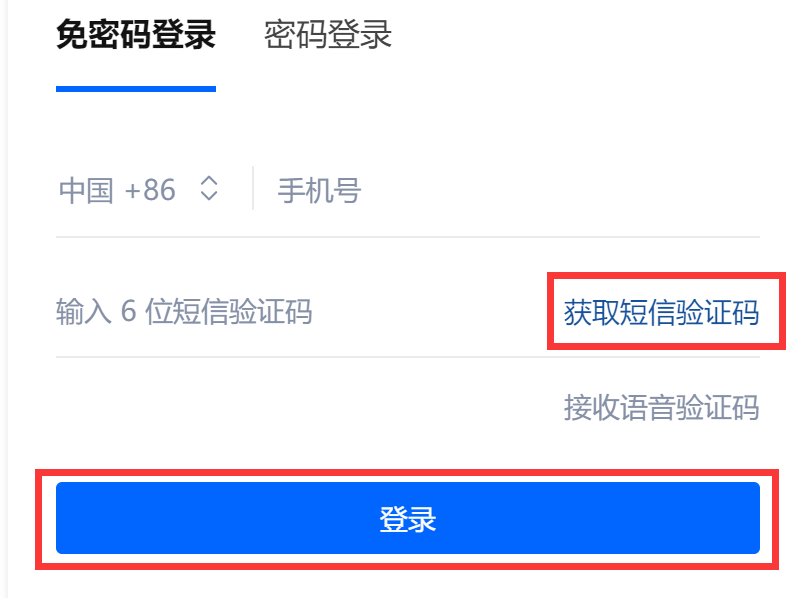
1、后端随机生成短信验证码,并在服务器端保存一定时间(redis);
2、将短信验证码发给用户;
3、用户输入短信验证码提交后,在后端与之前生成的短信验证码作比较,如果相同说明验证成功,否则验证失败。
二、操作流程:
建工程——》改POM——》写YML——》业务类
1、添加依赖:
        <!-- redis -->

        <dependency>

            <groupId>org.springframework.boot</groupId>

            <artifactId>spring-boot-starter-data-redis</artifactId>

        </dependency>

        <!-- 短信包-->

        <dependency>

            <groupId>com.aliyun</groupId>

            <artifactId>aliyun-java-sdk-core</artifactId>

            <version>4.0.6</version>

        </dependency>

        <dependency>

            <groupId>com.aliyun</groupId>

            <artifactId>aliyun-java-sdk-dysmsapi</artifactId>

            <version>1.1.0</version>

        </dependency>

        <!-- E-mail -->

        <dependency>

            <groupId>javax.mail</groupId>

            <artifactId>mail</artifactId>

            <version>1.4.7</version>

        </dependency>

    </dependencies>
2、写YML:
server:

  port: 8081

spring:

  application:

    name: demo

  datasource:

    type: com.alibaba.druid.pool.DruidDataSource    #当前数据源操作类型

    driver-class-name: org.gjt.mm.mysql.Driver    #mysql驱动包

    url: jdbc:mysql://localhost:3306/demo?useUnicode=true&characterEncoding=utf-8&useSSL=false

    username: root

    password: 123456

    druid:

      test-while-idle: false  #关闭空闲检测

  redis:

    host: 127.0.0.1   # Redis服务器地址

    port: 6379    # Redis服务器连接端口

    password:   # Redis服务器连接密码

    jedis:

      pool:

        max-active: 8   # 连接池最大连接数(使用负值表示没有限制)

        max-wait: -1ms    # 连接池最大阻塞等待时间(使用负值表示没有限制)

        max-idle: 500   # 连接池中的最大空闲连接

        min-idle: 0   # 连接池中的最小空闲连接

    lettuce:

      shutdown-timeout: 0ms

mybatis:

  mapperLocations: classpath:mapper/*.xml
三、通用工具类:
1、Redis通用工具类:
@Component

public final class RedisUtil {

    @Autowired

    private RedisTemplate<String, Object> redisTemplate;

    // =============================common============================

    /**

     * 指定缓存失效时间

     * @param key  键

     * @param time 时间(秒)

     */

    public boolean expire(String key, long time) {

        try {

            if (time > 0) {

                redisTemplate.expire(key, time, TimeUnit.SECONDS);

            }

            return true;

        } catch (Exception e) {

            e.printStackTrace();

            return false;

        }

    }

    /**

     * 根据key 获取过期时间

     * @param key 键 不能为null

     * @return 时间(秒) 返回0代表为永久有效

     */

    public long getExpire(String key) {

        return redisTemplate.getExpire(key, TimeUnit.SECONDS);

    }

    /**

     * 判断key是否存在

     * @param key 键

     * @return true 存在 false不存在

     */

    public boolean hasKey(String key) {

        try {

            return redisTemplate.hasKey(key);

        } catch (Exception e) {

            e.printStackTrace();

            return false;

        }

    }

    /**

     * 删除缓存

     * @param key 传入一个值

     */

    @SuppressWarnings("unchecked")

    public void del(String key) {

        redisTemplate.delete(key);

    }

    /**

     * 删除缓存

     * @param keys 传入多个值

     */

    @SuppressWarnings("unchecked")

    public void del(Collection<String> keys) {

        redisTemplate.delete(keys);

    }

    // ============================String=============================

    /**

     * 普通缓存获取

     * @param key 键

     * @return 值

     */

    public Object get(String key) {

        return key == null ? null : redisTemplate.opsForValue().get(key);

    }

    /**

     * 普通缓存放入

     * @param key   键

     * @param value 值

     * @return true成功 false失败

     */

    public boolean set(String key, Object value) {

        try {

            redisTemplate.opsForValue().set(key, value);

            return true;

        } catch (Exception e) {

            e.printStackTrace();

            return false;

        }

    }

    /**

     * 普通缓存放入并设置时间

     * @param key   键

     * @param value 值

     * @param time  时间(秒) time要大于0 如果time小于等于0 将设置无限期

     * @return true成功 false 失败

     */

    public boolean set(String key, Object value, long time) {

        try {

            if (time > 0) {

                redisTemplate.opsForValue().set(key, value, time, TimeUnit.SECONDS);

            } else {

                set(key, value);

            }

            return true;

        } catch (Exception e) {

            e.printStackTrace();

            return false;

        }

    }

    /**

     * 递增

     * @param key   键

     * @param delta 要增加几(大于0)

     */

    public long incr(String key, long delta) {

        if (delta < 0) {

            throw new RuntimeException("递增因子必须大于0");

        }

        return redisTemplate.opsForValue().increment(key, delta);

    }

    /**

     * 递减

     * @param key   键

     * @param delta 要减少几(小于0)

     */

    public long decr(String key, long delta) {

        if (delta < 0) {

            throw new RuntimeException("递减因子必须大于0");

        }

        return redisTemplate.opsForValue().increment(key, -delta);

    }

    // ================================Map=================================

    /**

     * HashGet

     * @param key  键 不能为null

     * @param item 项 不能为null

     */

    public Object hget(String key, String item) {

        return redisTemplate.opsForHash().get(key, item);

    }

    /**

     * 获取hashKey对应的所有键值

     * @param key 键

     * @return 对应的多个键值

     */

    public Map<Object, Object> hmget(String key) {

        return redisTemplate.opsForHash().entries(key);

    }

    /**

     * HashSet

     * @param key 键

     * @param map 对应多个键值

     */

    public boolean hmset(String key, Map<String, Object> map) {

        try {

            redisTemplate.opsForHash().putAll(key, map);

            return true;

        } catch (Exception e) {

            e.printStackTrace();

            return false;

        }

    }

    /**

     * HashSet 并设置时间

     * @param key  键

     * @param map  对应多个键值

     * @param time 时间(秒)

     * @return true成功 false失败

     */

    public boolean hmset(String key, Map<String, Object> map, long time) {

        try {

            redisTemplate.opsForHash().putAll(key, map);

            if (time > 0) {

                expire(key, time);

            }

            return true;

        } catch (Exception e) {

            e.printStackTrace();

            return false;

        }

    }

    /**

     * 向一张hash表中放入数据,如果不存在将创建

     *

     * @param key   键

     * @param item  项

     * @param value 值

     * @return true 成功 false失败

     */

    public boolean hset(String key, String item, Object value) {

        try {

            redisTemplate.opsForHash().put(key, item, value);

            return true;

        } catch (Exception e) {

            e.printStackTrace();

            return false;

        }

    }

    /**

     * 向一张hash表中放入数据,如果不存在将创建

     *

     * @param key   键

     * @param item  项

     * @param value 值

     * @param time  时间(秒) 注意:如果已存在的hash表有时间,这里将会替换原有的时间

     * @return true 成功 false失败

     */

    public boolean hset(String key, String item, Object value, long time) {

        try {

            redisTemplate.opsForHash().put(key, item, value);

            if (time > 0) {

                expire(key, time);

            }

            return true;

        } catch (Exception e) {

            e.printStackTrace();

            return false;

        }

    }

    /**

     * 删除hash表中的值

     *

     * @param key  键 不能为null

     * @param item 项 可以使多个 不能为null

     */

    public void hdel(String key, Object... item) {

        redisTemplate.opsForHash().delete(key, item);

    }

    /**

     * 判断hash表中是否有该项的值

     *

     * @param key  键 不能为null

     * @param item 项 不能为null

     * @return true 存在 false不存在

     */

    public boolean hHasKey(String key, String item) {

        return redisTemplate.opsForHash().hasKey(key, item);

    }

    /**

     * hash递增 如果不存在,就会创建一个 并把新增后的值返回

     *

     * @param key  键

     * @param item 项

     * @param by   要增加几(大于0)

     */

    public double hincr(String key, String item, double by) {

        return redisTemplate.opsForHash().increment(key, item, by);

    }

    /**

     * hash递减

     *

     * @param key  键

     * @param item 项

     * @param by   要减少记(小于0)

     */

    public double hdecr(String key, String item, double by) {

        return redisTemplate.opsForHash().increment(key, item, -by);

    }

    // ============================set=============================

    /**

     * 根据key获取Set中的所有值

     * @param key 键

     */

    public Set<Object> sGet(String key) {

        try {

            return redisTemplate.opsForSet().members(key);

        } catch (Exception e) {

            e.printStackTrace();

            return null;

        }

    }

    /**

     * 根据value从一个set中查询,是否存在

     *

     * @param key   键

     * @param value 值

     * @return true 存在 false不存在

     */

    public boolean sHasKey(String key, Object value) {

        try {

            return redisTemplate.opsForSet().isMember(key, value);

        } catch (Exception e) {

            e.printStackTrace();

            return false;

        }

    }

    /**

     * 将数据放入set缓存

     *

     * @param key    键

     * @param values 值 可以是多个

     * @return 成功个数

     */

    public long sSet(String key, Object... values) {

        try {

            return redisTemplate.opsForSet().add(key, values);

        } catch (Exception e) {

            e.printStackTrace();

            return 0;

        }

    }

    /**

     * 将set数据放入缓存

     *

     * @param key    键

     * @param time   时间(秒)

     * @param values 值 可以是多个

     * @return 成功个数

     */

    public long sSetAndTime(String key, long time, Object... values) {

        try {

            Long count = redisTemplate.opsForSet().add(key, values);

            if (time > 0)

                expire(key, time);

            return count;

        } catch (Exception e) {

            e.printStackTrace();

            return 0;

        }

    }

    /**

     * 获取set缓存的长度

     *

     * @param key 键

     */

    public long sGetSetSize(String key) {

        try {

            return redisTemplate.opsForSet().size(key);

        } catch (Exception e) {

            e.printStackTrace();

            return 0;

        }

    }

    /**

     * 移除值为value的

     *

     * @param key    键

     * @param values 值 可以是多个

     * @return 移除的个数

     */

    public long setRemove(String key, Object... values) {

        try {

            Long count = redisTemplate.opsForSet().remove(key, values);

            return count;

        } catch (Exception e) {

            e.printStackTrace();

            return 0;

        }

    }

    // ===============================list=================================

    /**

     * 获取list缓存的内容

     *

     * @param key   键

     * @param start 开始

     * @param end   结束 0 到 -1代表所有值

     */

    public List<Object> lGet(String key, long start, long end) {

        try {

            return redisTemplate.opsForList().range(key, start, end);

        } catch (Exception e) {

            e.printStackTrace();

            return null;

        }

    }

    /**

     * 获取list缓存的长度

     *

     * @param key 键

     */

    public long lGetListSize(String key) {

        try {

            return redisTemplate.opsForList().size(key);

        } catch (Exception e) {

            e.printStackTrace();

            return 0;

        }

    }

    /**

     * 通过索引 获取list中的值

     *

     * @param key   键

     * @param index 索引 index>=0时, 0 表头,1 第二个元素,依次类推;index<0时,-1,表尾,-2倒数第二个元素,依次类推

     */

    public Object lGetIndex(String key, long index) {

        try {

            return redisTemplate.opsForList().index(key, index);

        } catch (Exception e) {

            e.printStackTrace();

            return null;

        }

    }

    /**

     * 将list放入缓存

     *

     * @param key   键

     * @param value 值

     */

    public boolean lSet(String key, Object value) {

        try {

            redisTemplate.opsForList().rightPush(key, value);

            return true;

        } catch (Exception e) {

            e.printStackTrace();

            return false;

        }

    }

    /**

     * 将list放入缓存

     * @param key   键

     * @param value 值

     * @param time  时间(秒)

     */

    public boolean lSet(String key, Object value, long time) {

        try {

            redisTemplate.opsForList().rightPush(key, value);

            if (time > 0)

                expire(key, time);

            return true;

        } catch (Exception e) {

            e.printStackTrace();

            return false;

        }

    }

    /**

     * 将list放入缓存

     *

     * @param key   键

     * @param value 值

     * @return

     */

    public boolean lSet(String key, List<Object> value) {

        try {

            redisTemplate.opsForList().rightPushAll(key, value);

            return true;

        } catch (Exception e) {

            e.printStackTrace();

            return false;

        }

    }

    /**

     * 将list放入缓存

     *

     * @param key   键

     * @param value 值

     * @param time  时间(秒)

     * @return

     */

    public boolean lSet(String key, List<Object> value, long time) {

        try {

            redisTemplate.opsForList().rightPushAll(key, value);

            if (time > 0)

                expire(key, time);

            return true;

        } catch (Exception e) {

            e.printStackTrace();

            return false;

        }

    }

    /**

     * 根据索引修改list中的某条数据

     *

     * @param key   键

     * @param index 索引

     * @param value 值

     * @return

     */

    public boolean lUpdateIndex(String key, long index, Object value) {

        try {

            redisTemplate.opsForList().set(key, index, value);

            return true;

        } catch (Exception e) {

            e.printStackTrace();

            return false;

        }

    }

    /**

     * 移除N个值为value

     *

     * @param key   键

     * @param count 移除多少个

     * @param value 值

     * @return 移除的个数

     */

    public long lRemove(String key, long count, Object value) {

        try {

            Long remove = redisTemplate.opsForList().remove(key, count, value);

            return remove;

        } catch (Exception e) {

            e.printStackTrace();

            return 0;

        }

    }

}
2、随机数工具类:
public class RandomUtil {

    //随机生成六位数验证码

    public static String getCode() {

        Random random = new Random();

        String result = "";

        for (int i = 0; i < 6; i++) {

            result += random.nextInt(10);

        }

        return result;

    }

}
3、发送信息工具类:
public class SentMessageUtil {

    /**

     * 发送短信信息

     * */

    //产品名称:云通信短信API产品,开发者无需替换

    static final String product = "Dysmsapi";

    //产品域名,开发者无需替换

    static final String domain = "dysmsapi.aliyuncs.com";

    // TODO 此处需要替换成开发者自己的AK(在阿里云访问控制台寻找)

    static final String accessKeyId = "自己的AccessKeyId";

    static final String accessKeySecret = "自己的accesskeySecret";

    public static boolean sendMessage(String id, String code) {

        //可自助调整超时时间

        System.setProperty("sun.net.client.defaultConnectTimeout", "10000");

        System.setProperty("sun.net.client.defaultReadTimeout", "10000");

        //初始化acsClient,暂不支持region化

        IClientProfile profile = DefaultProfile.getProfile("cn-hangzhou", accessKeyId, accessKeySecret);

        try {

            DefaultProfile.addEndpoint("cn-hangzhou", "cn-hangzhou", product, domain);

            IAcsClient acsClient = new DefaultAcsClient(profile);

            //组装请求对象-具体描述见控制台-文档部分内容

            SendSmsRequest request = new SendSmsRequest();

            //必填:待发送手机号

            request.setPhoneNumbers(id);

            //必填:短信签名-可在短信控制台中找到

            request.setSignName("替换成自己的短信签名");

            //必填:短信模板-可在短信控制台中找到

            request.setTemplateCode("替换成自己的短信模板编号");

            //可选:模板中的变量替换JSON串,如模板内容为"亲爱的${name},您的验证码为${code}"时,此处的值为

            request.setTemplateParam(code);

            SendSmsResponse sendSmsResponse = acsClient.getAcsResponse(request);

            if( sendSmsResponse.getCode().equals("OK")) {

                return true;

            }else {

                return false;

            }

        } catch (ClientException e) {

            e.printStackTrace();

        }

        return false;

    }

    /**

     * 发送邮件信息

     * */

    public static boolean sendMail(String id, String code) {

        Properties properties = new Properties();

        // 连接协议

        properties.put("mail.transport.protocol", "smtp");

        // 主机名

        properties.put("mail.smtp.host", "smtp.qq.com");

        // 端口号

        properties.put("mail.smtp.port", 465);

        properties.put("mail.smtp.auth", "true");

        // 设置是否使用ssl安全连接 ---一般都使用

        properties.put("mail.smtp.ssl.enable", "true");

        // 设置是否显示debug信息 true 会在控制台显示相关信息

        properties.put("mail.debug", "true");

        // 得到回话对象

        Session session = Session.getInstance(properties);

        // 获取邮件对象

        Message message = new MimeMessage(session);

        try {

            // 设置发件人邮箱地址

            message.setFrom(new InternetAddress("发件人xxx@qq.com"));

            // 设置收件人邮箱地址:单个/多个

            //message.setRecipients(Message.RecipientType.TO, new InternetAddress[]{new InternetAddress("xxx@qq.com"),new InternetAddress("xxx@qq.com"),new InternetAddress("xxx@qq.com")});

            message.setRecipient(Message.RecipientType.TO, new InternetAddress(id));

            // 设置邮件标题

            message.setSubject("验证信息测试");

            // 设置邮件内容

            message.setText("验证码为:" + code + ",验证码有效期5分钟,请及时验证");

            // 得到邮差对象

            Transport transport = session.getTransport();

            // 连接自己的邮箱账户

            // 密码为QQ邮箱开通的stmp服务后得到的客户端授权码

            transport.connect("发件人xxx@qq.com", "rbg");

            // 发送邮件

            transport.sendMessage(message, message.getAllRecipients());

            transport.close();

            return true;

        } catch (MessagingException e) {

            e.printStackTrace();

        }

        return false;

    }

}
4、Redis配置类:
@EnableCaching

@Configuration

public class RedisConfig extends CachingConfigurerSupport {

    /**

     * RedisTemplate内部的序列化配置器默认采用JDK序列化器

     * 使用默认序列化配置器查看数据时会导致数据乱码,需重新定义RedisTemplate序列化方案

     * 修改存储对象的序列化问题

     */

    @Bean

    @SuppressWarnings("all")

    public RedisTemplate<String, Object> redisTemplate(RedisConnectionFactory factory) {

        RedisTemplate<String, Object> template = new RedisTemplate<String, Object>();

        template.setConnectionFactory(factory);

        Jackson2JsonRedisSerializer jackson2JsonRedisSerializer = new Jackson2JsonRedisSerializer(Object.class);

        ObjectMapper om = new ObjectMapper();

        om.setVisibility(PropertyAccessor.ALL, JsonAutoDetect.Visibility.ANY);

        om.enableDefaultTyping(ObjectMapper.DefaultTyping.NON_FINAL);

        jackson2JsonRedisSerializer.setObjectMapper(om);

        StringRedisSerializer stringRedisSerializer = new StringRedisSerializer();

        // key采用String的序列化方式

        template.setKeySerializer(stringRedisSerializer);

        // hash的key也采用String的序列化方式

        template.setHashKeySerializer(stringRedisSerializer);

        // value序列化方式采用jackson

        template.setValueSerializer(jackson2JsonRedisSerializer);

        // hash的value序列化方式采用jackson

        template.setHashValueSerializer(jackson2JsonRedisSerializer);

        template.afterPropertiesSet();

        return template;

    }

    /**

     * CacheManager:

     * 管理多种缓存,包含内存, appfabric, redis, couchbase, windows azure cache, memorycache等

     * 提供了额外的功能,如缓存同步、并发更新、事件、性能计数器等

     */

    @Bean

    public CacheManager cacheManager(RedisConnectionFactory factory) {

        RedisSerializer<String> redisSerializer = new StringRedisSerializer();

        Jackson2JsonRedisSerializer jackson2JsonRedisSerializer = new Jackson2JsonRedisSerializer(Object.class);

        //解决查询缓存转换异常的问题

        ObjectMapper om = new ObjectMapper();

        om.setVisibility(PropertyAccessor.ALL, JsonAutoDetect.Visibility.ANY);

        om.enableDefaultTyping(ObjectMapper.DefaultTyping.NON_FINAL);

        jackson2JsonRedisSerializer.setObjectMapper(om);

        // 配置序列化(解决乱码的问题),过期时间600秒

        RedisCacheConfiguration config = RedisCacheConfiguration.defaultCacheConfig()

                .entryTtl(Duration.ofSeconds(600))

                .serializeKeysWith(RedisSerializationContext.SerializationPair.fromSerializer(redisSerializer))

                .serializeValuesWith(RedisSerializationContext.SerializationPair.fromSerializer(jackson2JsonRedisSerializer))

                .disableCachingNullValues();

        RedisCacheManager cacheManager = RedisCacheManager.builder(factory)

                .cacheDefaults(config)

                .build();

        return cacheManager;

    }

}
四、发送验证码功能:
1、请求体:
@Data

public class MessageResourceVO {

    private String id;

    private String code;

    private Boolean way;

}
2、控制类:
    /**

     * 功能一:发送验证码

     *

     * http://localhost:8081/v1/sent-code

     * */

    @PostMapping("/sent-code")

    public Response<?> sentCode(

            @RequestBody MessageResourceVO messageResourceVO) {

        return Response.success(sendService.sentCode(messageResourceVO));

    }
3、业务类:
    @Autowired

    private RedisUtil redisUtil;

    @Override

    public Object sentCode(MessageResourceVO messageResourceVO) {

        //设置redis的key:USER:+号码

        String userId = "USER:" + messageResourceVO.getId();

        //设置redis的value:随机生成的六位数验证码

        String code = RandomUtil.getCode();

        //设置验证码的失效时间:5min-->300s

        redisUtil.set(userId,code,300);

        //判断key是否存在

        if (redisUtil.hasKey(userId)) {

            boolean isSuccess = false;

            if (messageResourceVO.getWay()) {

                //发送短信验证码

                isSuccess = SentMessageUtil.sendMessage(messageResourceVO.getId(), code);

            } else {

                //发送邮件验证码

                isSuccess = SentMessageUtil.sendMail(messageResourceVO.getId(), code);

            }

            if (isSuccess) {

                return "success";

            } else {

                return "fail";

            }

        } else {

            return "redis连接失败";

        }

    }
五、验证信息功能:
1、请求体:
@Data

public class MessageResourceVO {

    private String id;

    private String code;

    private Boolean way;

}
2、控制类:
    /**

     * 功能二:验证信息

     *

     * http://localhost:8081/v1/verify-code

     * */

    @PostMapping("/verify-code")

    public Response<?> verifyCode(

            @RequestBody MessageResourceVO messageResourceVO) {

        return Response.success(sendService.verifyCode(messageResourceVO));

    }
3、业务类:
    @Autowired

    private RedisUtil redisUtil;

    @Override

    public Object verifyCode(MessageResourceVO messageResourceVO) {

        //设置redis的key:USER:+号码

        String userId = "USER:" + messageResourceVO.getId();

        //获取Redis缓存值

        String realCode = redisUtil.get(userId).toString();

        if(realCode != null && realCode.equals(messageResourceVO.getCode())){

            return "success";

        }else {

            return "fail";

        }

    }
六、参考:
1、发送邮件参考
搜索
复制
6、发送验证码功能(Redis)的更多相关文章
- JAVA 实现 QQ 邮箱发送验证码功能(不局限于框架)
JAVA 实现 QQ 邮箱发送验证码功能(不局限于框架) 本来想实现 QQ 登录,有域名一直没用过,还得备案,好麻烦,只能过几天再更新啦. 先把实现的发送邮箱验证码更能更新了. 老规矩,更多内容在注释 ...
- html计时发送验证码功能的实现
function countdown() { var time=60; setTime=setInterval(function(){ if(time<=0){ clearInterval(se ...
- 微信小程序发送验证码功能,验证码倒计时
data{ timer:'', countDownNum:'发送验证码', } // 点击验证码倒计时获取验证码 Gain:function(e){ let that = this let count ...
- 使用redis进行手机验证码的验证、每天只能发送三次验证码 (redis安装在虚拟机linux系统中)
文章目录 1.代码 2.测试结果 2.1.第一次发送 2.2.填写正确的验证码 2.3.填写错误的验证码 连续发送多次验证码 环境准备:虚拟机Linux系统,redis安装在虚拟机中. 前提条件:虚拟 ...
- Springboot +redis+⾕歌开源Kaptcha实现图片验证码功能
Springboot +redis+⾕歌开源Kaptcha实现图片验证码功能 背景 注册-登录-修改密码⼀般需要发送验证码,但是容易被 攻击恶意调⽤ 什么是短信-邮箱轰炸机 手机短信轰炸机是批.循环给 ...
- [.NET开发] C#实现发送手机验证码功能
之前不怎么了解这个,一直以为做起来很复杂. 直到前两天公司要求要做这个功能. 做了之后才发现 这不过就是一个POST请求就能实现的东西.现在给大家分享一下,有不足之处还请多多指教. 废话不多说 直接上 ...
- Java调用WebService接口实现发送手机短信验证码功能,java 手机验证码,WebService接口调用
近来由于项目需要,需要用到手机短信验证码的功能,其中最主要的是用到了第三方提供的短信平台接口WebService客户端接口,下面我把我在项目中用到的记录一下,以便给大家提供个思路,由于本人的文采有限, ...
- jQuery实现倒计时重新发送短信验证码功能示例
<!doctype html> <html> <head> <meta charset="utf-8"> <title> ...
- 这是一个简单的前台短信验证码功能 ajax实现异步处理 (发送和校验)
<script type="text/javascript"> var InterValObj; //timer变量,控制时间 var count = 60; //间隔 ...
随机推荐
- 修改-Python函数-2
一.导入 $$f ( x , y ) = 2 x + 3 y$$ 上面括号里面的就是数学公式里的自变量,自变量就相当于函数里的参数. 二.为什么要有参数 如果一个大楼里有两种尺寸不一的窗户,显然在没有 ...
- mysql安装教程-window操作系统
1.下载安装包(官网下载) 直达链接:https://dev.mysql.com/downloads/mysql/ 下载后放到指定目录下解压即可(给电脑新手忠告:注意不要放在C盘,养成好习惯,放C盘多 ...
- .NET 6学习笔记(4)——如何在.NET 6的Desktop App中使用Windows Runtime API
Windows Runtime API是当初某软为了区别Win32 API,力挺UWP而创建的另一套Windows 10专用的API集合.后来因为一些原因,UWP没火.为了不埋没很有价值的Window ...
- Android 13 新特性及适配指南
Android 13(API 33)于 2022年8月15日 正式发布(发布时间较往年早了一些),正式版Release源代码也于当日被推送到AOSP Android开源项目. 截止到笔者撰写这篇文章时 ...
- 【Serverless】云函数微信小程序
简介 什么是AppGallery Connect云函数 云函数是一项Serverless计算服务,提供FaaS(Function as a Service)能力,可以帮助开发者大幅简化应用开发与运维相 ...
- 题解 CF803A Maximal Binary Matrix
Luogu codeforces 前言 模拟赛原题.. 好好一道送分被我硬打成爆蛋.. \(\sf{Solution}\) 看了一波数据范围,感觉能 dfs 骗分. 骗成正解了. 大概就是将这个 \( ...
- awk变量
awk变量 awk参数 参数 解释 -F 指定分割字段符 -v 定义或修改一个awk内部的变量 -f 从脚本文件中读取awk命令 对于awk而言,变量分为 内置变量 自定义变量 内置变量 解释 FS ...
- 【lwip】07-链路层收发以太网数据帧源码分析
目录 前言 7.1 链路层概述 7.2 MAC地址的基本概念 7.3 以太网帧结构 7.4 以太网帧结构 7.5 以太网帧报文数据结构 7.6 发送以太网数据帧 7.7 接收以太网数据帧 7.8 虚拟 ...
- CH58X服务修改
在对ble系列应用时,很多时候拿手机充当主机.在使用ble 调试助手时常会用到write.read.notify等功能.有时可能会根据自己的需求对这些服务进行修改.下图是官方例程体现出的service ...
- 有依赖的背包问题(Acwing 10)
1 # include<iostream> 2 # include<cstring> 3 # include<algorithm> 4 using namespac ...