
pytest 失败重跑截图
1.环境准备
/*@param:
作者:流浪的python
Date:2019/01/19
env:python 3.7(由于3.0-3.5以下部分pytest可能有部分兼容问题安装建议2.7-2.9,3.5-最新)
pip install pytest专属 pytest框架包
pip install pytest-html pytest自己专属报告包
pip install pytest-rerunfailures 失败重跑包也是pytest专属
并发的也可以安下,利用多cpu运行调高用例执行速度
python -m pip install xdist
2.用例配置conftest.py编写,这个文件名必须是这个,官网指定的,pytest运行前会自己寻找这个文件,如果有会按里面配置跑没有就默认按用例设置跑,conftest.py仅对同目录,同目录下文件生效,超出按自己的conftest.py配置,每个包可以有自己的conftest.py
目录结构:https://docs.pytest.org/en/latest/pythonpath.html#test-modules-conftest-py-files-inside-packages
参考以上链接官网解释
这里我给出我的结构供参考:
project/

   |- __init__.py

   |- conftest.py

   |- bar/

      |- __init__.py

      |- tests/

         |- __init__.py

         |- test_foo.py
conftest.py
# coding=utf-8

from selenium import webdriver

import pytest

import os

driver = None

@pytest.mark.hookwrapper

def pytest_runtest_makereport(item):

    """

    Extends the PyTest Plugin to take and embed screenshot in html report, whenever test fails.

    :param item:

    """

    pytest_html = item.config.pluginmanager.getplugin('html')

    outcome = yield

    report = outcome.get_result()

    extra = getattr(report, 'extra', [])

    if report.when == 'call' or report.when == "setup":

        xfail = hasattr(report, 'wasxfail')

        if (report.skipped and xfail) or (report.failed and not xfail):

            dirpng=r'./report/png/'

            if os.path.exists(dirpng) and os.path.isdir(dirpng):

                pass

            else:

                os.mkdir(dirpng)

            file_name = dirpng + report.nodeid.replace("::", "_")+".png"

            file_name1=r'./png/'+ report.nodeid.replace("::", "_")+".png"

            _capture_screenshot(file_name)

            if file_name:

                html = '<div><img src="%s" alt="screenshot" style="width:304px;height:228px;" ' \

                       'onclick="window.open(this.src)" align="right"/></div>' % file_name1

                extra.append(pytest_html.extras.html(html))

        report.extra = extra

def _capture_screenshot(name):

    driver.get_screenshot_as_file(name)

@pytest.fixture(scope='session', autouse=True)

def browser():

    global driver

    if driver is None:

        driver = webdriver.Chrome()

    return driver
3例脚本编写
# coding=utf-8

import pytest

class TestFailScreenShoot(object):

    def test_run001(self):

        assert  1==2

    def test_run002(self):

        assert 1==1

    def test_screenshot_on_test_failure(self,browser):

        browser.get("https://www.baidu.com")

        assert False

# if __name__ == "__main__":

#     pytest.main('-s','-q')
4.cmd 到用例所在目录,Tests目录retry次数2,失败重跑延迟间隔2秒
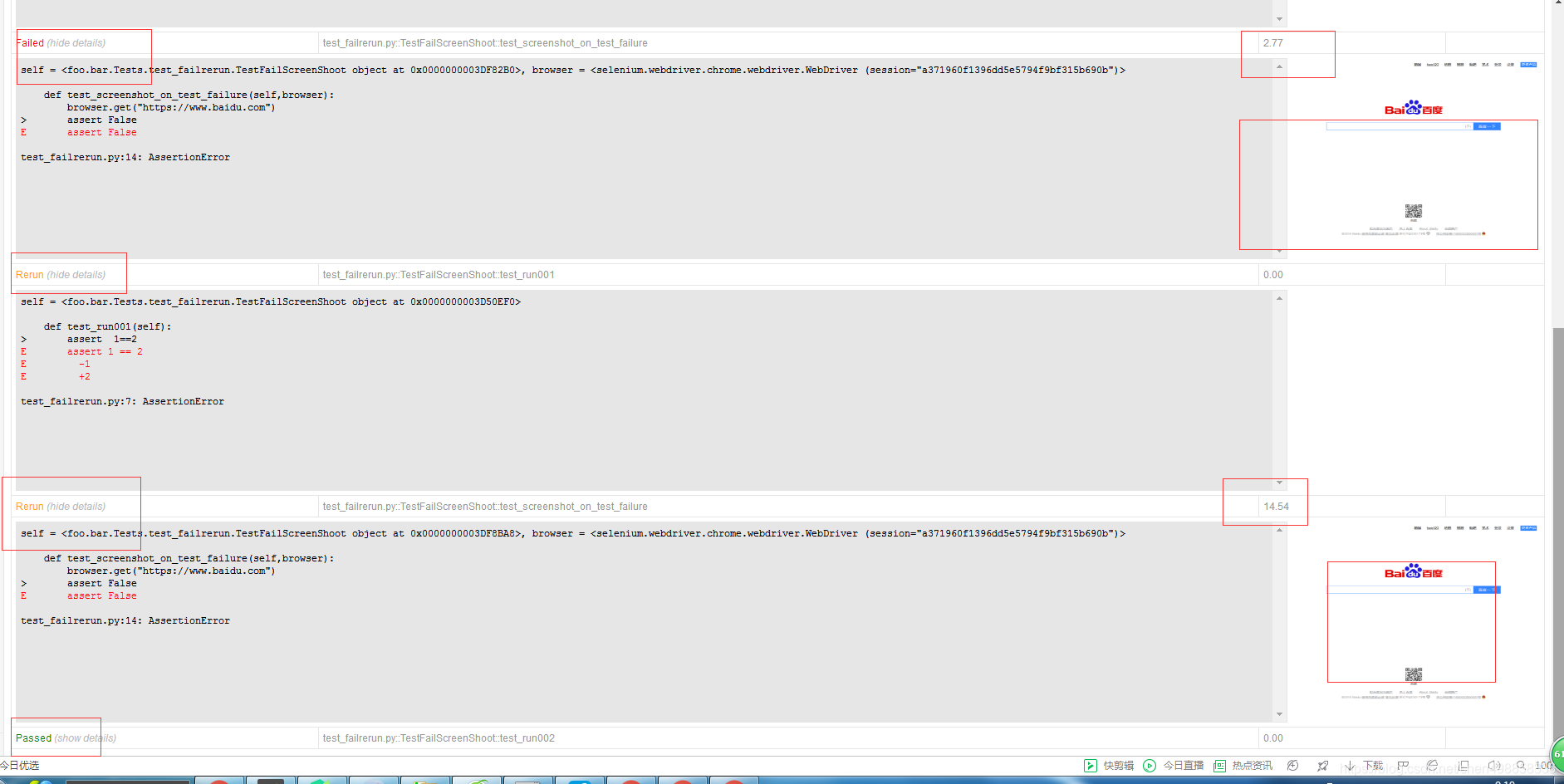
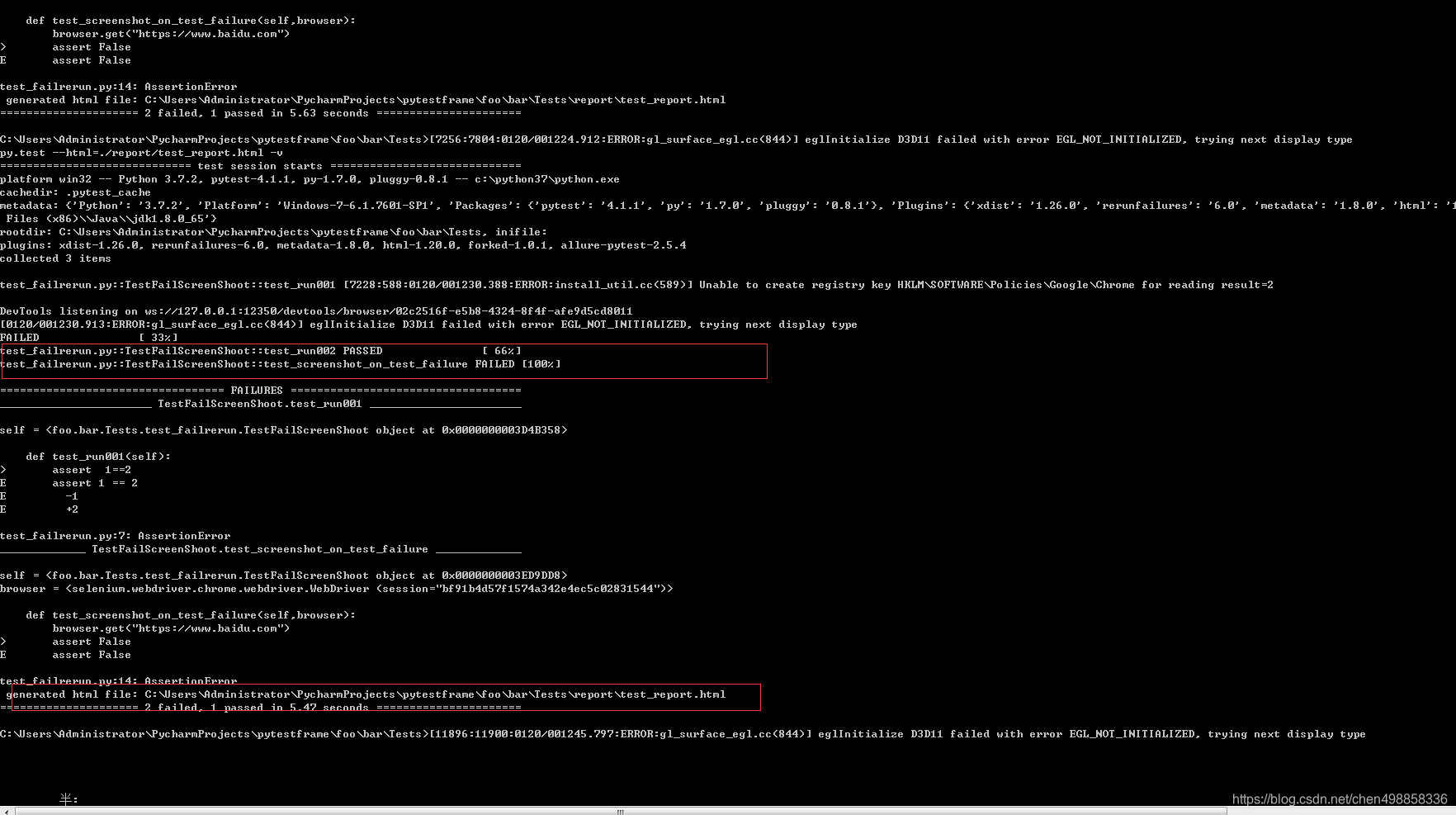
输入: py.test --html=./report/test_report.html -v --reruns 2 --reruns-delay 2 看到cmd提示如下:
generated html file: C:\Users\Administrator\PycharmProjects\pytestframe\foo\bar\Tests\report\test_report.html
根据提示浏览器地址栏输入file:///C:/Users/Administrator/PycharmProjects/pytestframe/foo/bar/Tests/report/test_report.html
pytest 失败重跑截图的更多相关文章
- pytest失败重跑
一.说明 平常在做功能测试的时候,经常会遇到某个模块不稳定,偶然会出现一些bug,对于这种问题我们会针对此用例反复执行多次,最终复现出问题来.自动化运行用例时候,也会出现偶然的bug,可以针对单个用例 ...
- pytest文档8-html报告报错截图+失败重跑
前言 做web自动化的小伙伴应该都希望在html报告中展示失败后的截图,提升报告的档次,pytest-html也可以生成带截图的报告. conftest.py 1.失败截图可以写到conftest.p ...
- testng优化:失败重跑,extentReport+appium用例失败截图,测试报告发邮件
生成的单html方便jenkins集成发邮件,= = 构建失败发邮件 参考:https://blog.csdn.net/galen2016/article/details/77975965 步骤: 1 ...
- python3 unittest框架失败重跑加截图支持python2,python3
github源码地址下载:https://github.com/GoverSky/HTMLTestRunner_cn.git 解压文件后取出/HTMLTestRunner_cn.py文件丢进C:\Py ...
- testng增加失败重跑机制
注: 以下内容引自 http://www.yeetrack.com/?p=1015 testng增加失败重跑机制 Posted on 2014 年 10 月 31 日 使用Testng框架搭建自动测试 ...
- 【转载】扩展Robot Framework,实现失败用例自动再执行(失败重跑)
使用自动化脚本进行测试,经常受环境影响等各方面导致本能成功的脚本失败,下面介绍了RFS框架下,失败重跑的方法: 通过改写RobotFramework源代码增加--retry选项,实现test级别的失败 ...
- RF实现多次失败重跑结果合并的基础方法和优化方法
实现思路:通过分次执行失败案例重跑,然后通过结果文件合并命令实现多次失败重跑结果文件的合并,并输出合并后的log和report文件: 说明:具体失败案例重跑命令和结果文件合并命令请参考本博客其他相关章 ...
- testng失败重跑
重跑失败场景 1.要添加两个文件 背景:因为这里只是想单独展示失败的重跑的案例,所以先暂时把app这块的运行注释掉,只跑一个简单的demo,就一个简单类,类中就3个测试方法,失败重跑的原理是,运行方法 ...
- TestNg失败重跑—解决使用 dataProvider 参数化用例次数冲突问题
问题背景 在使用 testng 执行 UI 自动化用例时,由于 UI自动化的不稳定性,我们在测试的时候,往往会加上失败重跑机制.在不使用 @DataProvider 提供用例参数化时,是不会有什么问题 ...
随机推荐
- socketsever模块
TCP协议下 服务端可以同时接收多个客户端信息 import socketserver class MySocket(socketserver.BaseRequestHandler): def han ...
- 基于jQuery的软键盘
基于jQuery的软键盘 前些天写了一个基于基于jQuery的数字键盘,今天给大家带来一个基于jQuery的全字母键盘插件(支持全字母大小写切换,数字输入,退格清除,关闭功能,可调整大小和键盘位置 ...
- JavaSE (二)
this关键字 当一个对象创建后,Java虚拟机(JVM)就会给这个对象分配一个引用自身的指针,这个指针的名字就是 this. 用法:对当前对象的默认引用 调用自己的的构造方法. 用在构造方法内部,区 ...
- js面向对象设计之function类
本文仅探讨如何合理的使用 function 在 javascript中实现一个面向对象设计的类.总所周知,javascript 并不能实现一个真正意义上的类,比如 protect 比如 函数重载.下面 ...
- 如何发挥ERP系统中的财务监控职能?
ERP系统的管理理念与特点 ERP,是整合了企业管理理念.业务流程.基础数据.人力物力.计算机硬件和软件于一体的企业资源管理系统.ERP系统运用信息技术将企业的资金流.物资流.信息流进行有效的集成,使 ...
- Flutter完整开发实战详解
Flutter完整开发实战详解(一.Dart语言和Flutter基础) Flutter完整开发实战详解(二. 快速开发实战篇) Flutter完整开发实战详解(三. 打包与填坑篇)
- DNS隧道实战&&cobaltstrike利用dns隧道
前言 使用 dns 隧道进行 tcp 通信. 正文 首先配置域名 配置一个 A 记录指向我们的 vps, 然后配置几个 ns 记录,指向刚刚设置的 A 记录 然后在服务端安装 wget https:/ ...
- ShortcutBadger添加桌面角标(Badge)
1.简介:角标原本是苹果的ios中的东西,android原生并不支持角标,因为google的意思是让大家用notification(提示栏)即可,不过无妨,厉害的android第三方厂商可以通过在自定 ...
- 读书笔记week1——涂涵越
这次读书笔记主要是就<程序员修炼之道>这本书的前半部分做一些总结以及发表一些自己的看法. 本书前面的一部分主要是一些程序员应该在工作中时刻注意的事情,一些关键的信息如下: 1.处理问题的态 ...
- AWS CSAA -- 02 AWS - 10000 Feet Overview
004 The History Of AWS So Far 005 AWS - 10000 Foot Overview 006 AWS - 10000 Foot Overview 007 AWS - ...