
在Spring中注入Java集合
集合注入重要是对数组、List、Set、map的注入,具体注入方法请参照一下代码(重点是applicationContext.xml中对这几个集合注入的方式):
1.在工程中新建一个Department类,该类包含在com.LHB.collection包当中

 1 package com.LHB.collection;

 2 import java.util.List;

 3 import java.util.Map;

 4 import java.util.Properties;

 5 import java.util.Set;

 6 public class Department {

 7     private String name;

 8     private String[] empName;

 9     private List<Employee> empList;    //List集合

10     private Set<Employee> empSets;     //Set集合

11     private Map<String,Employee> empMap; //map集合

12     private Properties pp;    //Properties的使用

13

14     public Properties getPp() {

15         return pp;

16     }

17     public void setPp(Properties pp) {

18         this.pp = pp;

19     }

20     public Map<String, Employee> getEmpMap() {

21         return empMap;

22     }

23     public void setEmpMap(Map<String, Employee> empMap) {

24         this.empMap = empMap;

25     }

26     public Set<Employee> getEmpSets() {

27         return empSets;

28     }

29     public void setEmpSets(Set<Employee> empSets) {

30         this.empSets = empSets;

31     }

32     public List<Employee> getEmpList() {

33         return empList;

34     }

35     public void setEmpList(List<Employee> empList) {

36         this.empList = empList;

37     }

38     public String getName() {

39         return name;

40     }

41     public void setName(String name) {

42         this.name = name;

43     }

44     public String[] getEmpName() {

45         return empName;

46     }

47     public void setEmpName(String[] empName) {

48         this.empName = empName;

49     }

50 }
2.继续在包中创建Employee类
 1 package com.LHB.collection;

 2 public class Employee {

 3     private String name;

 4     private int id;

 5     public int getId() {

 6         return id;

 7     }

 8     public void setId(int id) {

 9         this.id = id;

10     }

11     public String getName() {

12         return name;

13     }

14     public void setName(String name) {

15         this.name = name;

16     }

17

18 }
3.创建applicationContext.xml配置文件,配置重点在数组,List,Set,Map,propertes装载值的环节
 1 <?xml version="1.0" encoding="UTF-8"?>

 2 <beans xmlns="http://www.springframework.org/schema/beans"

 3        xmlns:xsi="http://www.w3.org/2001/XMLSchema-instance"

 4        xmlns:context="http://www.springframework.org/schema/context"

 5        xsi:schemaLocation="http://www.springframework.org/schema/beans

 6                 http://www.springframework.org/schema/beans/spring-beans.xsd

 7                 http://www.springframework.org/schema/context

 8                 http://www.springframework.org/schema/context/spring-context.xsd">

 9

10    <bean id="department" class="com.LHB.collection.Department">

11        <property name="name" value="财务部门" />

12        <!-- 给数组注入值 -->

13        <property name="empName">

14            <list>

15                <value>小米</value>

16                <value>小明</value>

17                <value>小四</value>

18            </list>

19        </property>

20

21        <!-- 给list注入值 可以有相同的多个对象  -->

22        <property name="empList">

23            <list>

24                <ref bean="emp1" />

25                <ref bean="emp2"/>

26            </list>

27        </property>

28        <!-- 给set注入值 不能有相同的对象 -->

29        <property name="empSets">

30            <set>

31                <ref bean="emp1" />

32                <ref bean="emp2"/>

33            </set>

34        </property>

35

36        <!-- 给map注入值 只要map中的key值不一样就可以装配value -->

37        <property name="empMap">

38            <map>

39                <entry key="1" value-ref="emp1" />

40                <entry key="2" value-ref="emp2" />

41            </map>

42        </property>

43

44        <!-- 给属性集合配置 -->

45        <property name="pp">

46            <props>

47                <prop key="pp1">hello</prop>

48                <prop key="pp2">world</prop>

49            </props>

50        </property>

51    </bean>

52    <bean id="emp1" class="com.LHB.collection.Employee">

53        <property name="name">

54            <value>北京</value>

55        </property>

56    </bean>

57     <bean id="emp2" class="com.LHB.collection.Employee">

58        <property name="name">

59            <value>天津</value>

60        </property>

61    </bean>

62

63 </beans>
4.继续在该包中新建App1.java测试类
 1 package com.LHB.collection;

 2 import java.util.Enumeration;

 3 import java.util.Iterator;

 4 import java.util.Map;

 5 import java.util.Map.Entry;

 6 import java.util.Properties;

 7

 8 import org.springframework.context.ApplicationContext;

 9 import org.springframework.context.support.ClassPathXmlApplicationContext;

10 public class App1 {

11

12     public static void main(String[] args) {

13         // TODO Auto-generated method stub

14

15         //通过类路径应用上下文获取配置文件applicationContext.xml

16         ApplicationContext ac = new ClassPathXmlApplicationContext("com/LHB/collection/applicationContext.xml");

17         //通过getBean()获取到applicationContext.xml文件中Bean对象

18         Department dm = (Department) ac.getBean("department");

19         System.out.println(dm.getName());

20         //取出数组中的值

21         for(String emName : dm.getEmpName()){

22             System.out.println(emName);

23         }

24

25         System.out.println("*********通过List集合取出数据******");

26         for(Employee e : dm.getEmpList()){

27             System.out.println("name = "+ e.getName());

28         }

29

30         System.out.println("*********通过Set集合取出数据******");

31         for(Employee e : dm.getEmpSets()){

32             System.out.println("name = "+ e.getName());

33         }

34

35         System.out.println("*********通过Map集合取出数据(迭代器)******");

36         //迭代器

37         Map<String,Employee> empMap = dm.getEmpMap();

38         Iterator it = empMap.keySet().iterator();

39         while(it.hasNext()){

40             String key = (String) it.next();

41             Employee emp = empMap.get(key);

42             System.out.println("key = " + key + " " + emp.getName());

43         }

44         System.out.println("*********通过Map集合取出数据(Emtry简洁法)******");

45         //简洁方法

46         for(Entry<String,Employee> entry : dm.getEmpMap().entrySet()){

47

48             System.out.println(entry.getKey()+ " " + entry.getValue().getName());

49         }

50

51         System.out.println("*********通过Propertis取出数据(通过Entry对象取)******");

52         Properties pp = dm.getPp();

53         for(Entry<Object,Object> entry : pp.entrySet()){

54             System.out.println(entry.getKey().toString() + ", "+ entry.getValue().toString());

55         }

56         System.out.println("*********通过Propertis取出数据(通过Enumeration对象取)******");

57         Enumeration en = pp.keys();

58         while(en.hasMoreElements()){

59             String key = (String) en.nextElement();

60             System.out.println(key + " " + pp.getProperty(key));

61         }

62     }

63 }
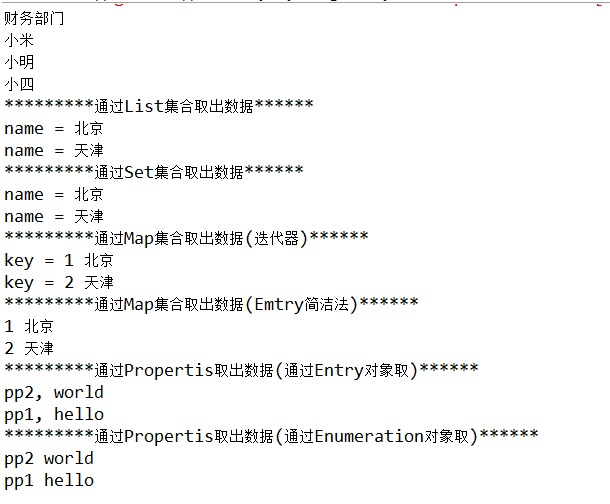
运行结果如下:
在Spring中注入Java集合的更多相关文章
- Spring实战(十二) Spring中注入AspectJ切面
1.Spring AOP与AspectJ Spring AOP与AspectJ相比,是一个功能比较弱的AOP解决方案. AspectJ提供了许多它不能支持的类型切点,如在创建对象时应用通知,构造器切点 ...
- Spring中基于java的配置
Spring中为了减少XML配置,可以声明一个配置类类对bean进行配置,主要用到两个注解@Configuration和@bean 例子: 首先,XML中进行少量的配置来启动java配置: <? ...
- Spring中注入List,Set,Map,Properties的xml文件配置方法
下面的例子展示了如何注入 List – <list/> Set – <set/> Map – <map/> Properties – <props/> ...
- 【Spring】28、Spring中基于Java的配置@Configuration和@Bean用法.代替xml配置文件
Spring中为了减少xml中配置,可以生命一个配置类(例如SpringConfig)来对bean进行配置. 一.首先,需要xml中进行少量的配置来启动Java配置: <?xml version ...
- Spring中注入对象为NULL
Java工程报错, java.lang.reflect.InvocationTargetException,网上搜索过后,发现是注入错误,通过调试发现,具体报错位置是某个dao层对象为null,进而引 ...
- Spring中基于Java的配置@Configuration和@Bean用法
spring中为了减少xml中配置,可以声明一个配置类(例如SpringConfig)来对bean进行配置. 一.首先,需要xml中进行少量的配置来启动Java配置: <?xml version ...
- Spring中基于Java的配置@Configuration和@Bean用法 (转)
spring中为了减少xml中配置,可以生命一个配置类(例如SpringConfig)来对bean进行配置. 一.首先,需要xml中进行少量的配置来启动Java配置: <?xml version ...
- Spring中注入bean学习的总结
1.在类上直接加注解@Component,那么这个类就直接注入到Spring容器中了 ,像@Contrloller,@Service这些本质上都是@Component, 2.@Configurati ...
- Spring中使用要点集合
1.InitializingBean和init-method方法 Spring的InitializingBean为bean提供了定义初始化方法的方式.InitializingBean是一个接口,它仅仅 ...
随机推荐
- Win7没有防火墙:0x80070422
在"MSDN我告诉你"下载的官方原版Window7 64位,安装后防火墙是这样的: 点击"使用推荐设置",报错:0x80070422,估计是因为使用PE中的工具 ...
- redis sentinel(哨兵机制)部署(Windows下实现)
另外参考:http://www.cnblogs.com/LiZhiW/p/4851631.html 一.准备条件 1.操作系统:win7 2.redis版本:redis-2.8.19 二.下载Redi ...
- uni-app - 如何打包
H5,spa应用,必须在服务器环境下运行 多看官方文档,打包涉及到支付.以及各平台兼容性,通过 官方API链接如下: https://uniapp.dcloud.io/platform H5打包 An ...
- redis 安装 命令
安装: http://redis.io/download 在线操作命令:http://try.redis.io/ 命令查询:https://redis.readthedocs.org/en/lates ...
- 算法笔记_126:算法集训之编程大题集二(Java)
目录 1 连续数的公倍数 2 漏掉的账目明细 3 罗马数字转十进制 4 逻辑推断 5 平面4点最小距离 6 取球博弈 7 人民币金额大写 8 人员排日程 9 三角螺旋阵 10 手机尾号评分 1 ...
- 所有标准API
序号 系统版本 模块 应用场景 类型 API/接口 参数规格 样例代码 备注 登记者 登记时间 关键字 1 12.1.3 AP 付款核销 API ap_pay_invoice_pkg.ap_pay_i ...
- Eclipse调试cas server 3.5.2.1
由于在配置CAS+LDAP总是报错,决定Eclipse调试cas server,跟踪问题出在哪里? ================================================== ...
- [Animations] 快速上手 iOS10 属性动画
概述 今天要说的UIViewPropertyAnimator, 是iOS10新的API 详细 代码下载:http://www.demodashi.com/demo/10639.html 基础动画, 核 ...
- aop 注解 开启spring自带的事务
一些基本知识 可以 http://jinnianshilongnian.iteye.com/blog/1415606 serviceImpl.java package cn.us.service.im ...
- HDUOJ------2398Savings Account
Savings Account Time Limit: 2000/1000 MS (Java/Others) Memory Limit: 32768/32768 K (Java/Others)T ...