
转载 springboot 配置读取
前言:了解过spring-Boot这个技术的,应该知道Spring-Boot的核心配置文件application.properties,当然也可以通过注解自定义配置文件**.properties的信息。
一.读取核心配置文件信息application.properties的内容
核心配置文件是指在resources根目录下的application.properties或application.yml配置文件,读取这两个配置文件的方法有两种,都比较简单。
(1)核心配置文件application.properties内容如下:
- test.msg=Hello World SpringBoot
(1)方式一:使用@Value方式(常用)
- package Solin.controller;
- import org.springframework.beans.factory.annotation.Value;
- import org.springframework.web.bind.annotation.RequestMapping;
- import org.springframework.web.bind.annotation.RestController;
- @RestController
- public class WebController {
- @Value("${test.msg}")
- private String msg;
- @RequestMapping("/index1")
- public String index1(){
- return "方式一:"+msg;
- }
- }
注意:在@Value的${}中包含的是核心配置文件中的键名。在Controller类上加@RestController表示将此类中的所有视图都以JSON方式显示,类似于在视图方法上加@ResponseBody。
访问:http://localhost:8088/index1时得到:"方式一:Hello World SpringBoot"
(2)方式二:使用Environment方式
- package Solin.controller;
- import org.springframework.beans.factory.annotation.Autowired;
- import org.springframework.beans.factory.annotation.Value;
- import org.springframework.core.env.Environment;
- import org.springframework.web.bind.annotation.RequestMapping;
- import org.springframework.web.bind.annotation.RestController;
- @RestController
- public class WebController {
- @Autowired
- private Environment env;
- @RequestMapping("/index2")
- public String index2(){
- return "方式二:"+env.getProperty("test.msg");
- }
- }
注意:这种方式是依赖注入Evnironment来完成,在创建的成员变量private Environment env上加上@Autowired注解即可完成依赖注入,然后使用env.getProperty("键名")即可读取出对应的值。
访问:http://localhost:8088/index2时得到:"方式二:Hello World SpringBoot"
(2)核心配置文件application-dev.yml内容如下:
- # --**银行配置文件路径 start
czb:
configPath: /usr/local/czbConfig/config.properties
# --浙商银行相关配置文件路径 end
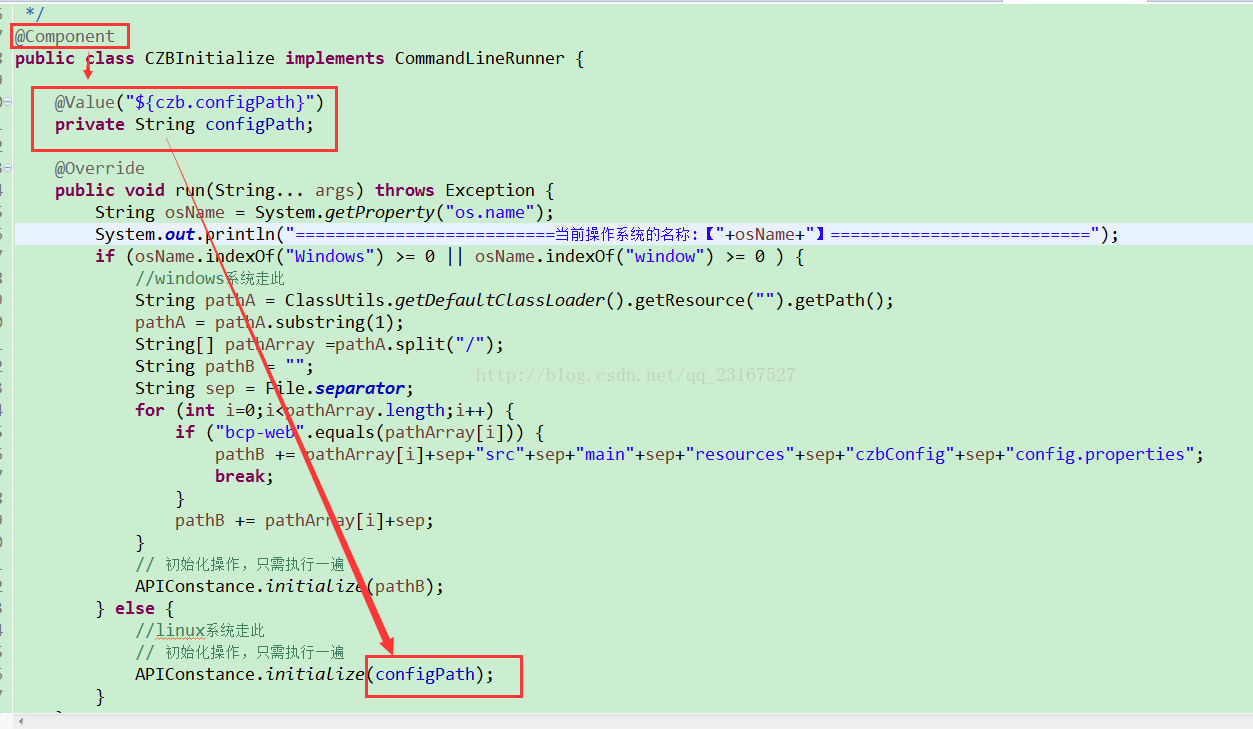
application*.yml核心配置文件,也是用上面两种方式读取其内容。例如:如下图使用方式一来读取:
二.读取自定义配置文件信息,例如:author.properties
为了不破坏核心文件的原生态,但又需要有自定义的配置信息存在,一般情况下会选择自定义配置文件来放这些自定义信息,这里在resources目录下创建配置文件authorA.properties
resources/author/authorA.properties内容如下:
- auth.name=Solin
- auth.age=22
创建管理配置的实体类:
- package Solin.controller;
- import org.springframework.boot.context.properties.ConfigurationProperties;
- import org.springframework.context.annotation.Configuration;
- import org.springframework.stereotype.Component;
- //加上注释@Component,可以直接其他地方使用@Autowired来创建其实例对象
- @Component
- //springboot1.5之前的版本这么用,1.5版本之后取消了locations属性,替代方案看最下面。
- @ConfigurationProperties(prefix = "auth",locations = "classpath:/author/authorA.properties")
- //在启动类上增加@EnableConfigurationProperties注解,激活自定义的配置类(重要)
- public class MyWebConfig{
- private String name;
- private int age;
- public String getName() {
- return name;
- }
- public void setName(String name) {
- this.name = name;
- }
- public int getAge() {
- return age;
- }
- public void setAge(int age) {
- this.age = age;
- }
- }
注意:
在@ConfigurationProperties注释中有两个属性:
locations:指定配置文件的所在位置
prefix:指定配置文件中键名称的前缀(我这里配置文件中所有键名都是以auth.开头)
使用@Component是让该类能够在其他地方被依赖使用,即使用@Autowired注释来创建实例。
创建测试Controller
- package Solin.controller;
- import org.springframework.beans.factory.annotation.Autowired;
- import org.springframework.stereotype.Controller;
- import org.springframework.web.bind.annotation.RequestMapping;
- import org.springframework.web.bind.annotation.ResponseBody;
- @Controller
- public class ConfigController {
- @Autowired
- private MyWebConfig conf;
- @RequestMapping("/test")
- public @ResponseBody String test() {
- return "Name:"+conf.getName()+"---"+"Age:"+conf.getAge();
- }
- }
注意:由于在Conf类上加了注释@Component,所以可以直接在这里使用@Autowired来创建其实例对象。
访问:http://localhost:8088/test时得到:"Name:Solin---Age:22"
备注:spring boot1.5以上版本@ConfigurationProperties取消locations注解后的替代方案,只是下面注解变了,别的都一样。
创建管理配置的实体类:
- package Solin.controller;
- import org.springframework.boot.context.properties.ConfigurationProperties;
- import org.springframework.context.annotation.Configuration;
- import org.springframework.stereotype.Component;
- @Component
- @ConfigurationProperties(prefix ="auth")
- @PropertySource("classpath:/author/authorA.properties")//
@PropertySource来指定自定义的资源目录 - //在启动类上取消掉@EnableConfigurationProperties注解,springboot1.5版本之后不需要@EnableConfigurationProperties注解了。
- public class MyWebConfig{
- private String name;
- private int age;
- public String getName() {
- return name;
- }
- public void setName(String name) {
- this.name = name;
- }
- public int getAge() {
- return age;
- }
- public void setAge(int age) {
- this.age = age;
- }
- }
- test.msg=Hello World SpringBoot
转载 springboot 配置读取的更多相关文章
- Java后端精选技术:SpringBoot配置读取
在早前的博客中曾经写过 Spring 程序通过 Bean 映射实现配置信息的读取. 在SpringBoot 框架中读取配置的方式变得非常多样,这导致读者在搜寻资料时反而容易迷糊. 到底,SpringB ...
- springboot用@Autowired和@PostConstruct注解把config配置读取到bean变成静态方法
springboot用@Autowired和@PostConstruct注解把config配置读取到bean变成静态方法 @SpringBootApplication public class Sen ...
- SpringBoot配置属性转载地址
SpringBoot配置属性系列 SpringBoot配置属性之MVC SpringBoot配置属性之Server SpringBoot配置属性之DataSource SpringBoot配置属性之N ...
- SpringBoot基础系列-SpringBoot配置
原创作品,可以转载,但是请标注出处地址:https://www.cnblogs.com/V1haoge/p/9990680.html SpringBoot基础系列-SpringBoot配置 概述 属性 ...
- springboot配置详解
springboot配置详解 Author:SimpleWu properteis文件属性参考大全 springboot默认加载配置 SpringBoot使用两种全局的配置文件,全局配置文件可以对一些 ...
- springboot配置server相关配置&整合模板引擎Freemarker、thymeleaf&thymeleaf基本用法&thymeleaf 获取项目路径 contextPath 与取session中信息
1.Springboot配置server相关配置(包括默认tomcat的相关配置) 下面的配置也都是模板,需要的时候在application.properties配置即可 ############## ...
- SpringBoot配置(1) 配置文件application&yml
SpringBoot配置(1) 配置文件application&yml 一.配置文件 1.1 配置文件 SpringBoot使用一个全局的配置文件,配置文件名是固定的. application ...
- SpringBoot配置属性之Migration
SpringBoot配置属性系列 SpringBoot配置属性之MVC SpringBoot配置属性之Server SpringBoot配置属性之DataSource SpringBoot配置属性之N ...
- spring boot 学习(十)SpringBoot配置发送Email
SpringBoot配置发送Email 引入依赖 在 pom.xml 文件中引入邮件配置: <dependency> <groupId>org.springframework. ...
随机推荐
- Solr学习总结(六)solr的函数查询Function Queries
摘要: 函数查询允许你使用一个或多个数字字段的真实值生成一个相关性分数,函数查询在standard,DisMax,eDisMax下都能使用. 查询函数可以是常量,字段或者其他函数的组合.使用函数可以影 ...
- Mysql主从同步在线实施步骤【适合大数据库从库配置】
Mysql主从同步在线实施步骤[适合大数据库从库配置] MySQL的主从搭建大家有很多种方式,传统的mysqldump方式是很多人的选择之一,但比较适合在新实例中实施,对于较大的数据库则存在停机等不可 ...
- Python - Django - App 的概念
App 方便我们在一个大的项目中,管理实现不同的业务功能 创建 App: 命令行: python manage.py startapp app名 使用 Pycharm 创建: 文件 -> 新建项 ...
- mysql 数据字典
Information_schema数据库是MySQL自带的,它提供了访问数据库元数据的方式. desc tb_name ,describe tb_name,show columns from tb_ ...
- 57. 激活office时出下以下问题的解决方案
我们拿出一段来分析一下(我所知道的不多)SKU ID:1b686580-9fb1-4b88-bfba-eae7c0da31adLICENSE NAME: Office 15, OfficeProP ...
- Star打印机数据解密
通过串口调试工具 抓取到的16进制文本; 如下 然后打开我们的文档,查看命令数据内容. 详情请密我QQ:1161588342 说明加好友原因
- 前端开发-3-HTML-body标签
body标签 h.p.a.ul.ol.div.img. 想要在网页上展示出来的内容一定要放在body标签中. 把我们之前海燕那一段HTML代码贴过来,保存到一个HTML格式的文件中. <!DOC ...
- centos6.8 安装python2.7 or python3.6
from:https://danieleriksson.net/2017/02/08/how-to-install-latest-python-on-centos/ 准备 # Start by mak ...
- list接口如何使用
1集合类,在java语言中的java.util包提供了一些集合类,这些集合类又被称作容器. 2区别集合类和数组.(1)数组的长度是固定的,集合的长度是可变的.(2)数组是用来存放基本数据类型的,集合是 ...
- SpringMVC的实现过程
Spring Web MVC 处理Http请求的大致过程: 一旦Http请求到来,DispatcherSevlet将负责将请求分发.DispatcherServlet可以认为是Spring提供的前端控 ...