
vue2.0学习小列子
参考地址:https://segmentfault.com/a/1190000006165434
例1:
<template>

<div id="app">

  <div class="main" v-cloak @click="hideTooltip">

    <div class="tooltip" v-if="show_tooltip" @click.stop>

      <input type="text" v-model="text_content">

    </div>

    <p @click.stop="toggleTooltip">{{text_content}}</p>

  </div>

</div>

</template>

<script>

/*import tab1 from './components/tabs/tab1.vue'

import tab2 from './components/tabs/tab2.vue'*/

export default {

  name: 'app',

  data(){

    return {

      show_tooltip:false,

      text_content:'Edit me'

    }

  },

  methods: {

    hideTooltip(){

      this.show_tooltip=false;

    },

    toggleTooltip(){

      this.show_tooltip=!this.show_tooltip;

    }

  }

}

</script>

<style>

*{

  padding:;

  margin:;

  box-sizing:border-box;

}

[v-cloak]{

  display: none;

}

#app {

  font-family: 'Avenir', Helvetica, Arial, sans-serif;

  -webkit-font-smoothing: antialiased;

  -moz-osx-font-smoothing: grayscale;

  /* text-align: center;

  color: #2c3e50;

  margin-top: 60px; */

  width:%;

}

.main{

  height:300px;

  position:relative;

  padding-top: 150px;

}

.tooltip{

  position:absolute;

  left:%;

  top:80px;

  width:290px;

  padding:10px;

  margin-left:-150px;

  border-radius: 3px;

  background-color: #5c9bb7;

}

.tooltip:after{

  content:'';

  position:absolute;

  left:%;

  width:;

  height:;

  bottom:-6px;

  border-left:6px solid transparent;

  border-right:6px solid transparent;

  border-top:6px solid #5190ac;

}

.tooltip input{

  border: none;

  width: %;

  line-height: 34px;

  border-radius: 3px;

  box-shadow:  2px 6px #bbb inset;

  text-align: center;

  font-size: 16px;

  font-family: inherit;

  color: #8d9395;

  font-weight: bold;

  outline: none;

}

p{

  font-size:22px;

  font-weight:bold;

  color:#6d8088;

  height: 30px;

  cursor:pointer;

  text-align: center;

}

p:before{

  content:'✎';

  display:inline-block;

  margin-right:5px;

  font-weight:normal;

  vertical-align: text-bottom;

}

</style>
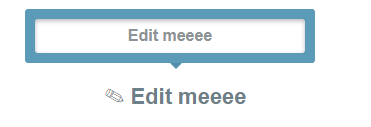
例2
<template>

<div id="app">

  <div id="main">

    <nav>

      <a v-for="(item,index) in items" :class="{active:item.active}" @click="makeActive(item,index)">{{item.name}}</a>

    </nav>

    <p>You chose<b>{{active}}</b></p>

  </div>

</div>

</template>

<script>

/*import tab1 from './components/tabs/tab1.vue'

import tab2 from './components/tabs/tab2.vue'*/

export default {

  name: 'app',

  data(){

    return {

      active:'HTML',

      items:[

        {name:'HTML',active:true},

        {name:'CSS',active:false},

        {name:'Javascript',active:false},

        {name:'Vue.js',active:false}

      ]

    }

  },

  methods: {

    makeActive(item,index){

      this.active=item.name;

      for(var i=;i<this.items.length;i++){

        this.items[i].active=false

      }

      this.items[index].active=true

    }

  }

}

</script>

<style>

*{

  padding:;

  margin:;

  box-sizing:border-box;

}

[v-cloak]{

  display: none;

}

#app {

  font-family: 'Avenir', Helvetica, Arial, sans-serif;

  -webkit-font-smoothing: antialiased;

  -moz-osx-font-smoothing: grayscale;

  /* text-align: center;

  color: #2c3e50;

  margin-top: 60px; */

  width:%;

}

#main{

  width:432px;

  margin: auto;

  text-align: center;

}

nav{

  display: inline-block;

  margin:60px auto 45px;

  background-color:#5597b4;

  box-shadow: 1px 1px #ccc;

  border-radius:2px;

}

nav a{

  display: inline-block;

  padding:18px 30px;

  color:#fff !important;

  font-weight: bold;

  font-size:16px;

  text-decoration: none;

  line-height:;

  background-color: transparent;

  transition: background-color .25s;

  cursor:pointer;

}

b{

    display:inline-block;

  padding:5px 10px;

  background-color:#c4d7e0;

  border-radius:2px;

  font-size:18px;

}

.active{

  background:#ccc;

}

</style>

例3:
 <template>

     <div class="nav">

         <ul>

             <router-link tag="li" to="/home" active-class="active">

                 <a href="javascript:;">首页</a>

             </router-link>

             <router-link to="/follow" tag="li" active-class="active">

             <a href="javascript:;">关注</a>

         </router-link>

         <router-link to="/column" tag="li" active-class="active">

             <a href="javascript:;">栏目</a>

         </router-link>

         </ul>

     </div>

 </template>

 <script>

 export default{

 }

 </script>

 <style scoped>

 .nav{

     width:100%;

     position:fixed;

     top:0;

     left:0;

     z-index:2;

     background:#fff;

 }

 .nav ul{

     width:4.38rem;

     height:0.6rem;

     margin:0 auto;

 }

 .nav li{

     width:1.46rem;

     height:0.6rem;

     line-height:0.6rem;

     float:left;

     text-align: center;

     box-sizing:border-box;

 }

 .nav li a{

     display:block;

     width:1.46rem;

     height:0.6rem;

     font-size:0.3rem;

     color:#9e9a95;

     text-decoration: none;

 }

 .nav li.active a{height:0.6rem; border-bottom:0.1rem solid #5477b2; color:#5477b2;}

 </style>

vue2.0学习小列子的更多相关文章
- vue2.0学习笔记之路由(二)路由嵌套+动画
<!DOCTYPE html> <html lang="en"> <head> <meta charset="UTF-8&quo ...
- vue2.0学习笔记之路由(二)路由嵌套
<!DOCTYPE html> <html lang="en"> <head> <meta charset="UTF-8&quo ...
- VUE2.0学习总结
摘要: 年后公司项目开始上vue2.0,自己对学习进行了总结,希望对大家有帮助! VUE2.0学习 vue介绍 vue是什么? https://vuefe.cn/guide vue也是一个数据驱动框架 ...
- Vue2.0学习--Vue数据通信详解
一.前言 组件是 vue.js最强大的功能之一,而组件实例的作用域是相互独立的,这就意味着不同组件之间的数据无法相互引用.组件间如何传递数据就显得至关重要.本文尽可能罗列出一些常见的数据传递方式,如p ...
- vue2.0学习教程
十分钟上手-搭建vue开发环境(新手教程)https://www.jianshu.com/p/0c6678671635 如何在本地运行查看github上的开源项目https://www.jianshu ...
- Vue2.0学习笔记一 :各种表达式
#,过滤器 #,在Vue2.x中,过滤器只能在mustache绑定中使用,为了在指令帮定中实现同样的行为,你应该使用计算属性: #,过滤器可以串联 {{ message | filterA | ...
- vue2.0学习(二)
1.关于模板渲染,当需要渲染多个元素时可以 <ul> <template v-for="item in items"> <li>{{ item. ...
- vue2.0 学习 ,开始学习
先看官网的介绍上面的教程 https://cn.vuejs.org/v2/guide/ 尝试 Vue.js 最简单的方法是使用 JSFiddle Hello World 例子.你可以在浏览器新标签 ...
- vue2.0 项目小总结
最近做了一个vue的PC端的项目,不大,真正用到vue的东西也不是太多,逻辑处理用到了不少原生js东西. 1.图片渲染 后台返回base64格式数据,一开始绑定src,提示pic字段未定义,懵逼了好久 ...
随机推荐
- Linux火焰图-ubuntu
关注火焰图非常长的时间了!~~一直未能自己做个火焰图出来.今天小试一把. ubuntu18.04 ssh登陆之后执行命令 安装软件 apt-get install -y linux-cloud-too ...
- [Python] Hermite 插值
# -*- coding: utf-8 -*- #Program 0.5 Hermite Interpolation import matplotlib.pyplot as plt import nu ...
- UML 中关系图的解说
最近在教软件工程项目实践,就又仔细了解了下UML中各种关系的意义,虽然有点简单,但是有些概念还是经常被混淆的,写在这里是为了加深印象. 关系列表: 继承关系(Generalization): 实现关系 ...
- Axure8.1.0.3372 注册码
Axure8.1.0.3372 注册码 转载:http://blog.csdn.net/cslucifer/article/details/79355007 Koshy wTADPqxn3KChzJx ...
- TCP/IP协议和IP
理解 使用网络能够把多方链接在一起,然后可以进行数据传递 所谓的网络编程就是,让在不同的电脑上的软件能够进行数据传递,即进程之间的通信 tcp/ip简介 1. 什么是协议 有的说英语,有的说中文,有的 ...
- 框架之Tornado(简单介绍)
引言 回想Django的部署方式 以Django为代表的python web应用部署时采用wsgi协议与服务器对接(被服务器托管),而这类服务器通常都是基于多线程的,也就是说每一个网络请求服务器都会有 ...
- mysql级联删除
一个building对应多个rooms,building删除----级联删除相关的rooms 第一步, 创建buildings表,如下创建语句: USE testdb; CREATE TABLE bu ...
- .NET Framework 官方下载地址
.net framwork 官方下载地址 3.5 https://www.microsoft.com/zh-cn/download/details.aspx?id=25150 .NET Framewo ...
- c++builder Delphi 直接使用剪贴板 Clipboard
c++builder Delphi 直接使用剪贴板 Clipboard 剪贴板 delphi use Vcl.Clipbrd procedure TForm27.FormCreate(Sender: ...
- Spring Boot学习--项目启动时执行特定方法
Springboot给我们提供了两种"开机启动"某些方法的方式:ApplicationRunner和CommandLineRunner. 这两种方法提供的目的是为了满足,在项目启动 ...